Chrome Extension
I've generated thousands of AI video clips, and the single biggest problem I kept running into was character drift, the same "person" showing up with a different jawline, different hair, or a completely different outfit three scenes later.
The fix isn't a better model. It's a character reference sheet, and the right prompt to generate one. In this guide, I'm sharing the four production-ready character sheet prompts I use, plus how to set them up whether you're using your own photo or building a fictional character from scratch.
Key Takeaways
Why Your AI Videos Keep Losing the Same Character
Character drift is the industry term for what happens when AI can't hold a consistent visual identity across multiple generated clips. You generate scene one with a tall blonde man in a red jacket. By scene four, he's shorter, wearing a blue jacket, and has a different face shape entirely.
This happens because most AI video tools process each generation independently. They don't "remember" the character from the last clip unless you give them something concrete to reference. Testing across 1,800 character-driven Kling AI generations showed that prompts with 2–3 specific character details produce consistent results only 78% of the time. A proper character reference sheet pushes that number far higher.
What a Character Reference Sheet Actually Does
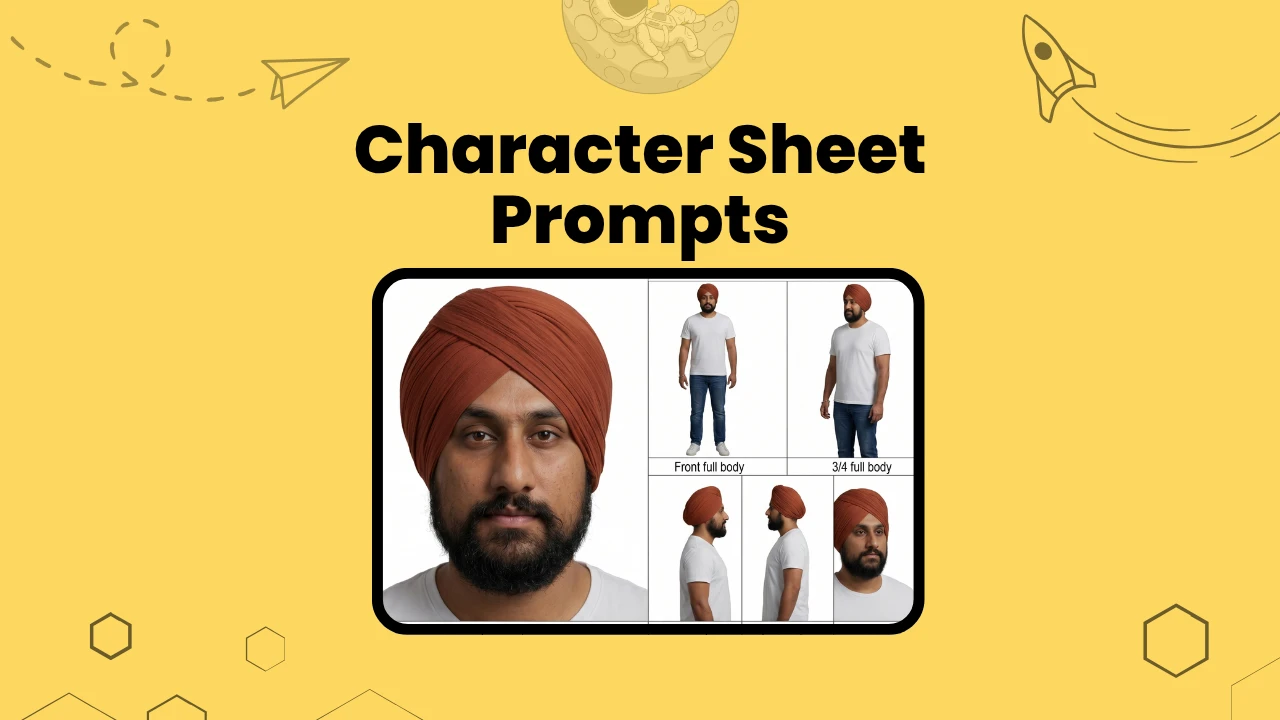
A character sheet is a single image that shows your character from multiple angles, poses, and expressions, all in one frame. Think of it as a film studio's costume and continuity board. Every panel shows the same person, same outfit, same proportions. When I feed this image to an AI video tool, it has a complete visual map of the character. That map becomes the anchor for every subsequent scene.
The sheet typically includes a large close-up portrait on the left (the identity anchor), and a grid of smaller panels on the right showing full-body views, walking and sitting poses, side profiles, back view, and a set of facial expressions. This format mirrors what production teams use in traditional animation and film, and it works just as well for AI-generated video.
Two Ways to Start: Your Photo or a Fictional Character
Before you copy any of the prompts below, you need to decide where your character is coming from. I use both methods depending on the project.
Option 1: Use Your Own Photo (or a Client's Photo)
This is the fastest path to a character sheet with a real, recognizable face. I use this method when:
Workaround: How to Use a Photo as Input:
Attach your photo directly to the prompt when using ChatGPT (GPT Image 2), or any image generator that accepts image uploads. Use a clean, well-lit photo: face forward, neutral expression, no heavy filters, no busy backgrounds. A simple headshot or half-body photo works best.
Paste the character sheet prompt below directly after your photo. The AI will extract your facial features, skin tone, hairstyle, and clothing from the image and use them as the source of truth for every panel in the sheet.
For tools that don't accept image uploads (some versions of Midjourney, older Stable Diffusion setups), skip to Option 2 and describe yourself in text instead. You can also use your photo to generate a base reference with ChatGPT (GPT Image 2) first, then feed that output into your video tool.
Option 2: Define a Fictional Character
This method gives me complete creative control. I use it when:
Workaround: How to Define a Character in Text:
Replace the photo attachment with a written character description at the start of the prompt. Be specific. The AI responds to precision. A weak description produces an inconsistent character; a strong one produces a locked-in identity.
Strong fictional character description example:
A 35-year-old South Asian woman with straight black hair cut just below her chin. She has sharp cheekbones, dark brown eyes, and light brown skin. She wears a structured navy blazer over a white turtleneck, slim dark grey trousers, and white leather sneakers. No jewelry except small gold stud earrings. Slim build, medium height.
That level of detail, face shape, eye color, skin tone, exact clothing items, accessories, which gives the AI enough to stay consistent across 15+ panels.
Fictional Creator Examples, Copy and Adapt These
Here are three ready-to-use fictional creator character descriptions I've written for different content niches. Drop any of these directly into the prompt instead of a photo.
Tech Creator / YouTube Educator:
A 28-year-old East Asian man with short, slightly tousled black hair and light skin. He has a relaxed, approachable face with dark brown eyes and a clean-shaven jaw. He wears a fitted grey crewneck sweatshirt over a white t-shirt, dark slim-fit jeans, and white low-top sneakers. No accessories except a simple black watch on his left wrist. Medium build, slightly above average height. Posture is casual but alert, the kind of person who explains things clearly and calmly.
Lifestyle / Wellness Creator:
A 30-year-old Black woman with natural 4C coils worn in a high puff, deep brown skin, and full cheeks with a warm, open expression. She wears a sage green oversized linen shirt tucked loosely into high-waisted cream wide-leg trousers, with tan leather sandals. Small gold hoop earrings, no other jewelry. Athletic but relaxed build, medium height. She carries energy that feels grounded and optimistic.
Finance / Business Creator:
A 42-year-old white man with short salt-and-pepper hair, combed back, and a well-maintained short beard going grey at the chin. Blue-grey eyes, medium skin, slight weathering around the eyes. He wears a crisp light blue Oxford shirt with the top button open, no tie, dark charcoal flat-front trousers, and polished dark brown leather Oxford shoes. No jewelry. Lean, upright build, tall. His expression reads confident but not cold, with direct eye contact, slight natural squint.
Each description locks in enough detail for the AI to stay consistent across all 15 panels. The personality cue at the end ("approachable," "grounded and optimistic," "confident but not cold") also helps the AI nail the expression shots more accurately. Swap out the details to match whatever creator persona you need.
Cinematic Creature and Fantasy Character Examples
These are for short films, animated series, brand mascots, and any project where the character isn't human. The same rules apply — the more specific the description, the more stable the output. I use these for storytelling projects and creative campaigns where a memorable non-human character needs to appear consistently across multiple scenes.
The Cockroach Executive (Anthropomorphic):
A photorealistic anthropomorphic cockroach standing upright at full human height. He has a dark brown iridescent exoskeleton with subtle amber highlights on the wing casings. His face is expressive — large multifaceted amber eyes, small twitching antennae, and a jaw line that communicates authority. He wears a perfectly tailored charcoal three-piece suit with a crisp white dress shirt, a dark burgundy silk tie, and a polished gold pocket watch chain. Black leather Oxford shoes on his lower legs. He carries himself with the posture of a senior executive — straight back, chin slightly lifted, hands clasped behind him. The overall impression is powerful, slightly intimidating, and quietly absurd.
The Street Superhero (Grounded, Non-Cartoon):
A photorealistic superhero standing in a relaxed ready stance. He is a broad-shouldered Black man in his early 30s with a shaved head and a square jaw. His suit is matte dark navy with deep charcoal geometric plating across the chest and shoulders, subtle texture like carbon fiber weave. No cape. A fitted cowl covers the top of his head and brow, leaving the lower face exposed. Glowing amber lines run along the forearm panels and the sides of the boots. The suit fits like armor but moves like athletic gear. His expression is calm and focused, not fierce.
The Sentient Robot Chef:
A photorealistic humanoid robot with a warm, rounded design aesthetic — not industrial, more like a friendly appliance that grew legs. The body is off-white with soft chrome joints, standing about 5 feet tall with a slight stocky build. The face plate has two large circular LED eyes that glow warm amber, a simple horizontal mouth display that shifts expression. The robot wears a classic white chef's toque hat sitting slightly crooked on its dome head, a double-breasted white chef's jacket with brass buttons, and a flour-dusted black apron. One hand has five articulated fingers; the other is a whisk permanently attached. The posture is enthusiastic and forward-leaning.
The Ancient Forest Spirit:
A photorealistic forest spirit standing at roughly human height. Its body is composed of dark twisted bark, moss, and dense fern growth woven into a vaguely humanoid form — two legs, two arms, a distinct head shape. The face is carved-looking, with deep-set hollow eyes that glow pale green from within, a wide mouth that could be a crack in the bark, and small mushrooms growing along the brow ridge. Trailing vines hang from the shoulders like a cloak. The hands have long finger-like branches tipped with small glowing spores. The posture is ancient and still — like something that has not moved in centuries but is fully aware of everything around it. Photorealistic natural textures throughout, no cartoon elements.
Cinematic creature characters work well with the Detailed or Cinematic prompt version, since those force the AI to maintain exact physical proportions across all 15 panels. Always include the negative prompt to stop the AI from softening or cartoonizing the design between panels.
The Character Sheet Prompts: Copy and Use These
Below are the four prompts I use. Each one generates a different level of detail and layout complexity. Start with the Compact version if you're new to this workflow. Use the Cinematic version when you need the most production-ready output.
How to use these: Attach your photo (Option 1) or paste your character description (Option 2) at the top of the prompt before sending it to your AI image generator.
Prompt 1: Improved Character Sheet Prompt
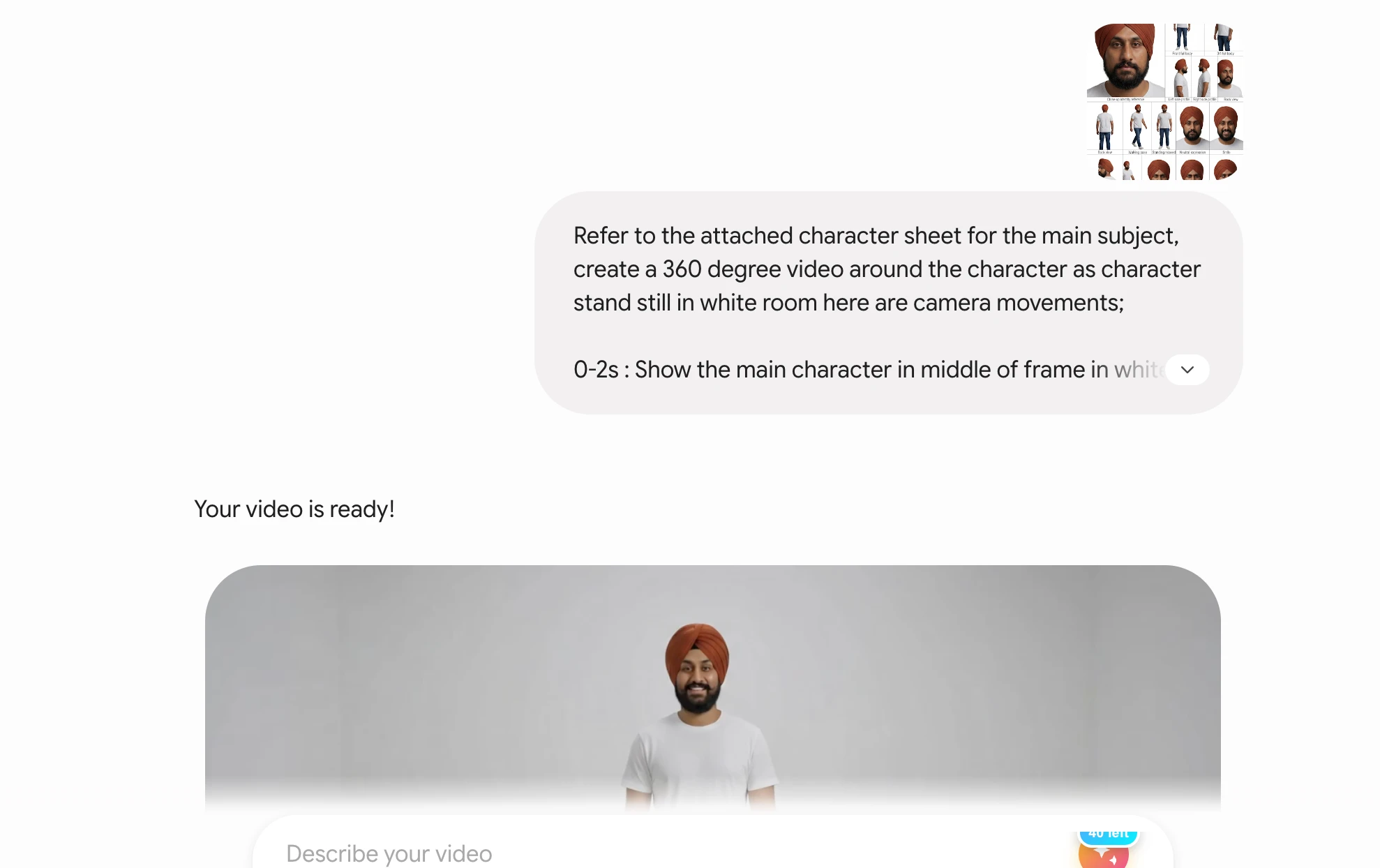
Create a professional photorealistic character reference sheet based on the attached image or the user-defined character description.
The goal is to make the character easy to reuse consistently in AI video generation.
Use a clean white studio background with subtle light-gray grid lines across the full canvas, like a production reference board. Keep lighting consistent in every panel: soft studio lighting, slightly elevated angle, natural shadows, realistic skin texture, sharp details.
Layout:
On the left side, place a large vertical close-up panel showing the character's face and upper body. This should be the biggest reference image, clearly showing facial features, hairstyle, skin tone, clothing texture, accessories, and identity details.
On the right side, arrange smaller panels in a neat grid showing:
Front view, full body 3/4 view, full body Side profile, full body Back view, full body Walking pose Sitting pose Over-the-shoulder angle Looking down angle Looking up angle Neutral reaction Happy reaction Angry reaction Surprised reaction Sad reaction Thinking reaction
Add small clean labels under each panel, such as "Front View," "Side Profile," "Happy," "Surprised," etc.
Keep the character exactly the same in every panel, including face structure, body type, hair, clothing, colors, accessories, proportions, and overall identity. Do not invent new details. Do not change the outfit. Do not change age, ethnicity, hairstyle, facial hair, body shape, or accessories.
The sheet should look like a polished film/animation character reference board used for production. High realism, consistent proportions, sharp facial likeness, clean composition, no clutter, no extra characters, no props unless already present in the reference.
Aspect ratio: 3:4.
Best for: Quick production-ready sheets that cover body poses and emotional range in one pass. I use this as my default starting prompt.
Prompt 2: More Detailed Version
Create a polished photorealistic character consistency reference sheet from the attached image or character description.
Design it like a professional AI video production sheet, with a clean white background and thin light-gray grid lines separating each section. The layout should be organized, symmetrical, and easy for AI video tools to understand.
Main layout:
Left column: A large close-up portrait panel occupying around 35 to 40 percent of the canvas width. Show the character from head to mid-torso. This panel should preserve the exact facial identity, expression, hairstyle, outfit, skin tone, texture, accessories, and defining features.
Right side: A structured grid of smaller reference panels showing the same character in multiple consistent angles and emotions.
Include these views:

1. Front full body
2. 3/4 full body
3. Side profile full body
4. Back full body
5. Front medium shot
6. 3/4 medium shot
7. Walking pose
8. Sitting pose
9. Looking over shoulder
10. Neutral expression
11. Happy expression
12. Angry expression
13. Surprised expression
14. Sad expression
15. Confused/thinking expression
Add small black labels beneath every panel. Use clean minimal typography. Do not make the labels too large.
Important consistency rules:
The character must remain identical across all panels. Preserve the same face, same age, same body proportions, same clothing, same hairstyle, same colors, same accessories, same skin tone, and same visual identity. Only pose, camera angle, and facial expression may change.
Use soft studio lighting throughout the sheet. Avoid dramatic shadows, stylized lighting, cinematic color grading, fantasy elements, or extra background details. Keep everything neutral and production-ready.
Style: photorealistic, high-resolution, sharp, realistic skin and fabric details, clean white background, professional reference board.
Aspect ratio: 3:4.
Best for: Projects where I need 15 labeled reference panels and want the AI to follow a numbered layout structure. The numbered list format helps tools like GPT-4o and DALL-E 3 comply more precisely with panel count.
Prompt 3: Compact Version
Create a photorealistic character reference sheet from the attached image or user-defined character. Use a clean white background with subtle gray grid lines. Make the left side a large close-up portrait showing face and upper body. On the right side, create a neat grid of smaller panels showing front full body, 3/4 full body, side profile, back view, walking pose, sitting pose, over-the-shoulder view, and expression shots: neutral, happy, angry, surprised, sad, thinking.
Label each panel in small clean text beneath it. Keep the character exactly identical across all panels, same face, body, outfit, hairstyle, skin tone, accessories, colors, and proportions. Only change pose, angle, and expression. Soft studio lighting, sharp realistic details, no extra props, no clutter, no background scenery. Designed as a production-ready AI video consistency sheet.
Aspect ratio 3:4.
Best for: Fast iteration. I use this when I want to generate multiple versions quickly and pick the best one before moving to a detailed version. Shorter prompts also work better with some models that struggle under heavy instruction loads.
Prompt 4: Cinematic AI Video Generator Version
Create a production-ready character sheet for AI video generation based on the attached image or written character description.
The sheet must help maintain character consistency across multiple scenes. Use photorealistic rendering, clean white background, thin gray grid lines, and soft studio lighting.
Composition:
Large left panel: close-up face and upper body, most important identity reference. Right grid: multiple smaller panels showing full-body views, camera angles, and emotional reactions.
Required panels:
Close-up identity reference Front full body 3/4 full body Left side profile Right side profile Back view Walking pose Standing relaxed Sitting pose Looking over shoulder Neutral expression Smile Shock Anger Sadness Thinking/confused
All panels must show the same exact character. Do not change outfit, face shape, hair, skin color, age, body type, accessories, or proportions. The only variation should be camera angle, body pose, and facial expression.
Make it look like a professional character turnaround sheet used for film, animation, and AI video production. Clean labels under each panel. No stylized cartoon look. No background environment. No added objects. No identity drift.
Aspect ratio: 3:4.
Best for: Film and cinematic video projects. This version explicitly calls for left-side and right-side profiles separately, giving AI video tools the widest possible angle coverage. I use this for short films and brand campaigns where production quality is non-negotiable.
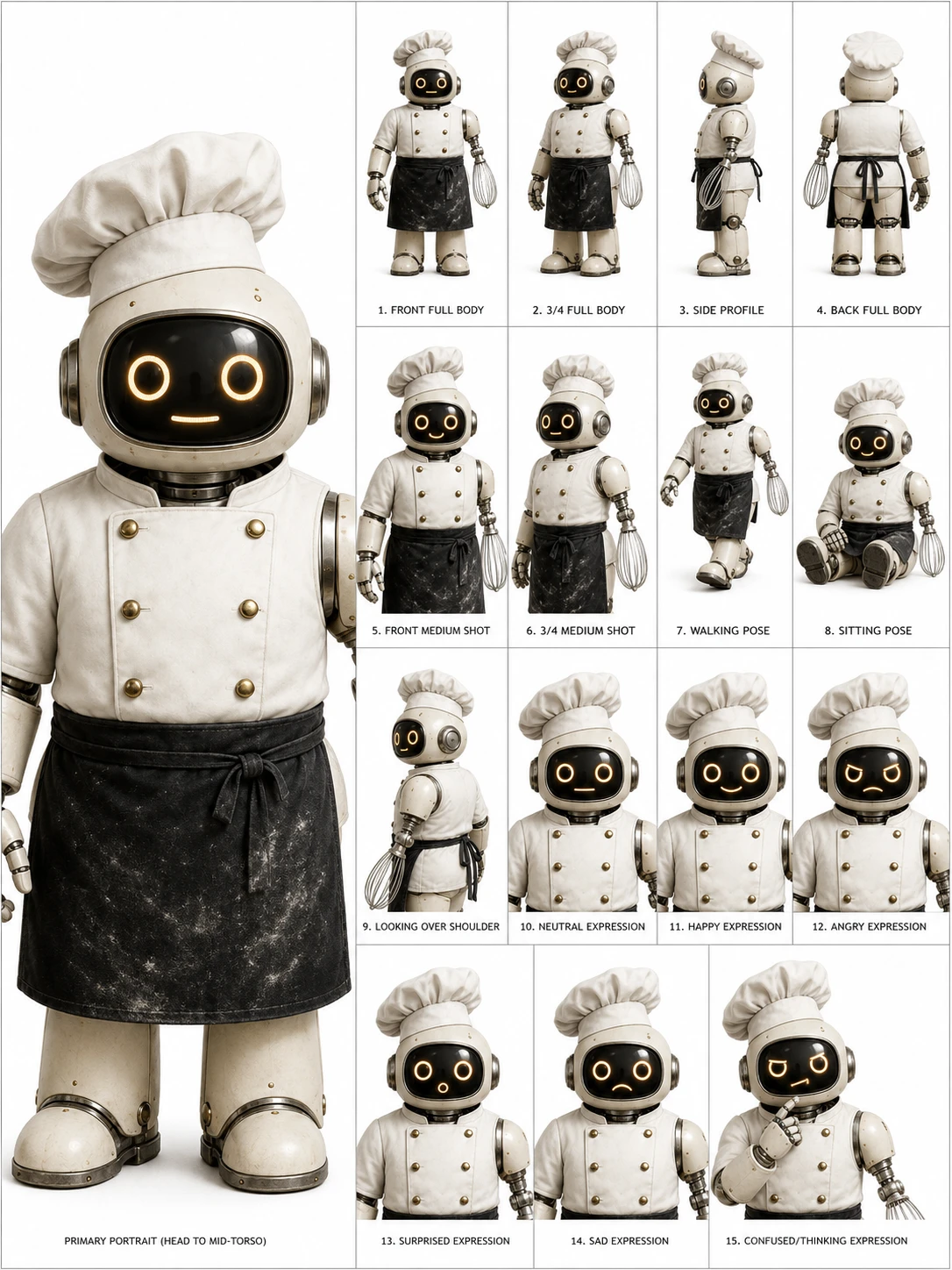
And here's the video for above;
The Negative Prompt: Always Use This
Use this negative prompt alongside any of the four prompts above. Copy and paste it into the "Negative Prompt" field in your image generator, or append it to the main prompt if your tool uses a single input field.
Do not change the character's face, clothing, hairstyle, body type, skin tone, age, gender, accessories, or identity. No extra characters, no random props, no different outfits, no fantasy elements, no exaggerated expressions, no distorted hands, no mismatched faces, no inconsistent lighting, no duplicate faces with different identities, no blurry panels, no low-resolution details, no messy layout, no dramatic background, no cinematic shadows, no text errors, no misspelled labels.
This negative prompt tells the AI what to avoid. Without it, models frequently add objects not present in the reference, shift lighting between panels, or subtly change the character's face, especially in later panels. I never skip this step.
How to Feed Your Character Sheet Into AI Video Tools
Generating the sheet is step one. Here's how I use it across the main AI video platforms.
Kling AI: Subject Library Method
Kling 3.0's Character ID system is currently the most reliable method for maintaining character consistency across scenes. It maintains recognizable identity in over 90% of generated clips when given a well-structured reference.
Upload your character sheet to Kling AI's Subject Library. Tag it with your character's name. From that point, every prompt you write references the stored subject. The AI pulls the visual identity from your sheet rather than interpreting it fresh each time.
Runway Gen-4 and Google Omni: Reference Upload
Both platforms support reference image uploads. Omni calls this feature "Ingredients." I upload my character sheet as the primary reference, then write prompts that focus on action and environment rather than re-describing the character.
For example, instead of re-describing the character in every prompt, I write: "Character walks into a coffee shop, looks around, sits down at a window table. Morning light. Handheld camera feel." The character sheet handles the appearance. The prompt handles the scene.
ChatGPT GPT Image 2 and Nano Banana 2: Multi-Turn Conversation Method
GPT Image 2 is OpenAI's current image generation model and it handles character sheets better than any previous version. It accepts image uploads, maintains strong prompt adherence, and lets me request corrections in follow-up messages without re-uploading the photo. I upload my reference and the prompt in one message, review the output, then refine in the next turn.
Nano Banana 2 from Artlist is another strong option, particularly for creators already working inside the Artlist ecosystem. It produces sharp, photorealistic output and integrates directly with Artlist's video generation workflow. For generating the character sheet itself, GPT Image 2 or Nano Banana 2 are my first choices. For actual video generation, I export the best panel and feed it into Kling or Runway.
Frame-to-Frame Chaining for Long Videos
For long-form AI video productions, I use frame-to-frame chaining. After generating each clip, I save the final frame as a still image. That still becomes the reference image for the next prompt. This creates a visual thread that runs through the entire video. The character looks like the same person from shot to shot because each generation literally starts from where the last one ended.
Artlist's production team used this exact method with Veo 3 and Nano Banana 2 to produce multi-scene sequences where the lead character held a consistent look through complex lighting and camera angle changes.
Frequently Asked Questions (FAQs)
What AI tool works best for generating a character sheet?
GPT Image 2 (via ChatGPT) handles character sheets well because it accepts image uploads, follows prompts precisely, and maintains context across multi-turn conversations. It's my first choice for generating character sheets. Nano Banana 2 from Artlist is a strong alternative if you're already in the Artlist workflow. Midjourney produces high-quality images but requires workarounds like the --cref flag for consistency.
Can I use my own photo for an AI character sheet?
Yes. Attach a clear, well-lit photo of yourself to the prompt when using ChatGPT or any image generator that accepts reference images. Use a simple headshot with a plain background for the cleanest result. The AI will use your facial features, skin tone, and visible clothing as the character's visual identity.
Do I need a character sheet for every AI video project?
I use one for any project with more than two scenes featuring the same character. For single-clip social posts or one-off experiments, it's optional. For brand videos, short films, YouTube series, or anything with a recurring protagonist, a character sheet is necessary if you want visual consistency.
How do I keep the character consistent across different AI video platforms?
Generate your character sheet once in GPT Image 2 or Nano Banana 2, then export the highest-quality version. Upload that image as a reference to every AI video tool you use, Kling AI's Subject Library, Runway's reference input, Veo 3's Ingredients feature. Consistent input produces consistent output across platforms.
What goes wrong if I skip the negative prompt?
Without the negative prompt, the AI frequently drifts, adding objects not in the original reference, changing the outfit between panels, softening or sharpening the facial features, or generating extra characters in the background. The negative prompt explicitly blocks these behaviors. I treat it as a required part of any character sheet generation.
Can a fictional character sheet work as well as one based on a real photo?
Yes, if the text description is specific enough. Include face shape, eye color, skin tone, hair style, hair color, exact clothing items (not just "a jacket" but "a structured navy blazer"), accessories, build, and height. The more specific the description, the more stable the AI's interpretation across panels. Vague descriptions produce inconsistent panels.
Final Thoughts
Character consistency is what separates a professional AI video production from a collection of loosely related clips. I use character sheets on every serious project I work on, and the four prompts in this guide are the ones I keep coming back to. Start with the Compact version to generate your first sheet, review the panels for identity accuracy, then move to the Detailed or Cinematic version once you know what adjustments to make. Feed the finished sheet into Kling AI, Veo 3, or Runway as your reference image, and always attach the negative prompt. Your character will stay your character, scene after scene.