Chrome Extension
I have tested a lot of AI image models this year, and most of them still fall apart the moment you ask for dense text, a specific layout, or a small edit without wrecking the rest of the image.
Seedream 5.0 Pro is the first one I have used that treats an image like a design file instead of a single flat picture.
ByteDance launched it on July 8, 2026, and after digging through the official documentation, the API pricing pages, and dozens of hands-on tests from other builders, I put together the guide I wish existed on day one.
This is everything I found: what Seedream 5.0 Pro actually is, its full technical specs, every way to access the API, real pricing across providers, a prompting guide built from ByteDance's own examples, and a use case list long enough to cover almost any creative job you throw at it.
Also check out our free Seedream 5 Prompt Generator here.
Key Takeaways
What Is Seedream 5.0 Pro?
Seedream 5.0 Pro is a multimodal image generation and editing model built by ByteDance's Seed research team, the same group behind Doubao, Seedance, and the broader Seed model family. ByteDance calls it a model that goes "beyond generation" to actually understand design, and after testing the examples on its official launch page, I understand why they phrased it that way.
The model sits above Seedream 5.0 and Seedream 5.0 Lite in ByteDance's lineup. Where Lite focuses on reasoning speed and real-time web search grounding, Pro focuses on spatial control: knowing exactly where an object sits in an image and letting you edit that exact region without touching anything else.
ByteDance groups Pro's upgrades into four core capabilities, and I am going to walk through all four because they explain almost every use case later in this guide.
1. Complex Information Visualization
Pro can take raw data, concepts, and dense text and turn them into a professional layout in one pass. I am talking infographics with timelines, bar charts, pie charts, and photographs all sharing one frame while staying legible.
2. Interactive Precision Editing

This is the feature that sold me. Pro understands spatial position (grounding) and regional semantics well enough that you can point, lasso, or box-select a single object, describe the change, and the rest of the image stays untouched.
3. Realistic Imagery and Portrait Textures
Skin texture, fabric weave, glass reflection, and lighting physics all get a real upgrade here. ByteDance's own examples show god rays through blinds, motion-blurred bicycle spokes, and layered reflections on glass architecture that look shot, not generated.
4. Native Multilingual Input and Generation
Pro accepts prompts in Chinese, English, French, German, Russian, Japanese, Korean, Spanish, Arabic, Thai, and several more languages, and it adjusts cultural details (architecture, clothing, facial features) to match the language, not just the words.
Seedream 5.0 Pro Full Specs
Here is every technical detail I could confirm from official sources and API documentation.
| Spec | Detail |
|---|---|
| Developer | ByteDance Seed team |
| Release date | July 8, 2026 |
| Model IDs | doubao-seedream-5-0-pro-260628 (Volcano Engine, China) / dola-seedream-5-0-pro-260628 (BytePlus ModelArk, international) |
| Max resolution | Up to 2K (2048x2048), with some providers reporting output stretching toward 3K |
| Aspect ratio range | 1/16 to 16, depending on provider |
| Prompt length | Up to 5,000 characters |
| Batch generation | 1 to 15 images per request via BytePlus (n parameter), up to 6 per request on some third-party APIs |
| Reference images | Supports single or multiple reference images for editing and fusion, up to 5 reference images for character consistency on some integrations |
| Output formats | JPEG or PNG, with transparent-channel PNG output for separated layers |
| Languages supported | 10+ natively, including Chinese, English, French, German, Russian, Japanese, Korean, Spanish, Arabic, and Thai |
| Editing tools | Point selection, lasso selection, box selection, sketch rendering, color/material replacement (Hex code input), layer separation, multi-image fusion |
| Image link expiry | Generated image URLs are valid for 72 hours, so save them promptly |
Sources: ByteDance Seed official launch post, ByteDance Seed project page, fal.ai Seedream 5.0 Pro API page.
Seedream 5.0 Pro vs Seedream 5.0 Lite vs Seedream 4.5
I kept seeing people mix these up, so here is the real breakdown.
| Feature | Seedream 4.5 | Seedream 5.0 Lite | Seedream 5.0 Pro |
|---|---|---|---|
| Focus | Photoreal skin, lighting, and text rendering | Deep reasoning, real-time web search grounding | Spatial editing, layout control, layer separation |
| Max resolution | Standard HD | Up to 4K | Up to 2K (stretching toward 3K) |
| Editing precision | Basic image-to-image | Instruction-based edits | Point, lasso, box, and sketch-based pixel-level edits |
| Best for | General photoreal generation | Fast iteration, current-events accuracy | Infographics, dense text, product mockups, layered design assets |
If your job is a single, quick, photoreal image, Lite or 4.5 might be enough and cheaper. If your job involves editing one specific part of an image, building a poster with a lot of text, or exporting separated design layers, Pro is the one built for it.
Seedream 5.0 Pro vs Nano Banana Pro vs GPT Image 2
I found consistent numbers across multiple independent comparison tests, so I am reporting the range rather than one single figure.
| Benchmark area | Seedream 5.0 Pro | Nano Banana Pro | GPT Image 2 High |
|---|---|---|---|
| E-commerce visuals | Leads by roughly 10% | Behind Seedream | Not directly compared in this test |
| Marketing visuals | Leads by roughly 20% | Behind Seedream | Not directly compared in this test |
| UI and apparel design | Behind Nano Banana | Leads | Not directly compared in this test |
| Photorealism and text accuracy | Strong, not the leader | Leads (94-96% text accuracy at native 4K) | Strong |
| Relative price | Baseline | 11-55% more expensive than Seedream | Up to 4.7x more expensive than Seedream |
| Native language text support | 10+ languages | 4 languages | Fewer than Seedream |
| Reasoning strengths | Logical deduction, spatial relationships, physical laws | Photorealistic rendering, complex multi-element composition | General-purpose strength |
Sources: WaveSpeed's four-way comparison, Apiyi's five-dimension comparison, Atlas Cloud's 2026 API benchmark. None of these are official ByteDance or Google benchmark pages, so treat the exact percentages as directional, not certified.
My personal read: if you do a lot of e-commerce and marketing work, Seedream 5.0 Pro is the better default. If your job leans on UI mockups or apparel flat-lays specifically, keep Nano Banana Pro in your toolkit too.
How to Access the Seedream 5.0 Pro API
There is no single official API endpoint. ByteDance ships Seedream 5.0 Pro through its own platforms, and a handful of third-party inference providers mirror it with their own pricing and interfaces.
| Provider | Access type | Notes |
|---|---|---|
| Volcano Engine | Official, China market | Model ID doubao-seedream-5-0-pro-260628 |
| BytePlus ModelArk | Official, international | Model ID dola-seedream-5-0-pro-260628 |
| fal.ai | Third-party API | Separate text-to-image and edit endpoints, no cold starts |
| Replicate | Third-party API | Simple REST interface, pay-per-run pricing |
| Kie.ai | Third-party API | Markets itself on lower cost per image |
| Runware | Third-party API | Documented parameter reference |
A Basic API Call Example
Here's what a standard text-to-image request looks like against the BytePlus/Volcano Engine endpoint structure:
{
  "model": "doubao-seedream-5-0-pro-260628",
  "prompt": "A 16:9 pet e-commerce homepage UI in warm sunset tones with layered shadows, featuring a top navigation bar, product cards, and a golden capsule-shaped button",
  "n": 1,
  "size": "2048x2048",
  "response_format": "url"
}
The workflow is a two-step process on most official endpoints: you submit the job and receive a task_id, then poll the status endpoint until the image finishes rendering. If you skip the polling step, you will not get the final file. Also remember that the n field must be an integer between 1 and 15, not a string, or the API returns a validation error.
An Image Editing Request Example
For edits, you pass a reference image alongside your instruction:
{
  "model": "doubao-seedream-5-0-pro-260628",
  "prompt": "Using the material from Image 1 and the color swatch from Image 2, modify the sofa in Image 3",
  "image": [
    "https://your-cdn.com/material-reference.png",
    "https://your-cdn.com/color-swatch.png",
    "https://your-cdn.com/sofa-base-image.png"
  ],
  "n": 1
}
One thing I learned the hard way from other developers' write-ups: generated image URLs expire after 72 hours on the official endpoints, so build a download step into your pipeline immediately instead of storing the URL long-term.
Seedream 5.0 Pro Pricing
Pricing genuinely varies by provider, and none of the numbers below are locked in as final since a few providers still mark theirs as tentative.
| Provider | Price structure |
|---|---|
| EmpirioLabs | $0.075 per image up to 2.36MP output, $0.150 per image above 2.36MP, plus $0.005 per extra input image after the first |
| fal.ai | $0.0675 per image up to 1536x1536px, $0.135 per image between 1536x1536px and 2048x2048px (marked tentative/TBD) |
| Replicate / WaveSpeed | Starts around $0.045 per run, scaling with output size and parameters |
| ByteDance native (Yuan pricing) | First input image free, ¥0.02 per additional input image, ¥0.30 per output image (at or below 2.36MP output) |
Sources: EmpirioLabs Seedream 5.0 Pro pricing page, fal.ai model page, WaveSpeed pricing page.
Rough rule of thumb from my own math: a 500-image batch job for product photography lands somewhere between $22 and $75 depending on which provider you pick and how large your outputs are. Always check the live pricing page before running a large batch, since these rates shift as providers adjust margins.
The Complete Seedream 5.0 Pro Prompting Guide
I pulled this from ByteDance's own documented examples plus patterns that showed up consistently across independent prompting guides. Here is what actually moves the needle.
The Core Principle: Describe the Scene, Not Just the Subject
A weak prompt says "a beautiful sunset." A strong prompt says what is in the frame, how it is arranged, and how the light behaves. Aim for a focused brief of roughly 30 to 80 words for a single image, and go longer only when you are building a dense infographic or poster.
Name the Light
Lighting language does more for realism than any style keyword. Instead of "cinematic lighting," try:
Soft window light falling from the left, casting long shadows across
the table, with a warm 3200K color temperature and gentle falloff
toward the background.
State the Reading Order for Text-Heavy Designs
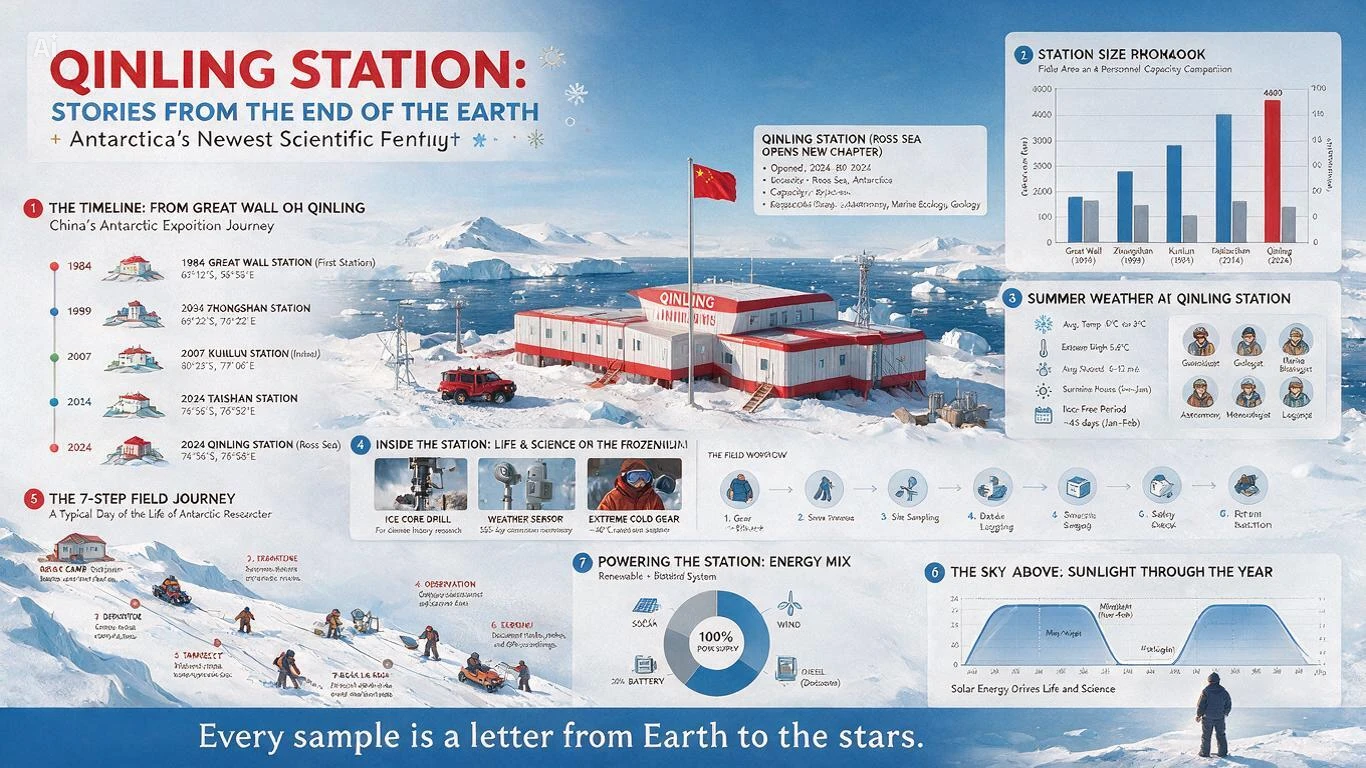
For infographics and posters, tell the model what to place first, second, and third. ByteDance's own team used this exact approach for a real infographic build:
A visual infographic chronicling scientific research at Antarctica's
Qinling Station. Place the main Qinling Station building at the center.
Surround it with a timeline of research station development, a bar
chart comparing the sizes of five research stations, a pie chart of
the station's energy sources, and a line chart of monthly sunshine.
Supplement this with realistic photos of research equipment, a summer
weather panel, a seven-step fieldwork flowchart, and on-site sampling
photography to showcase China's Antarctic research in a comprehensive way.
Put Exact On-Image Text in Quotes
If you want specific words rendered on the image, quote them exactly. Unquoted text descriptions tend to render garbled or paraphrased.
Use Targeted Edits Instead of Full Re-Rolls

This is the single biggest workflow shift Pro enables. Instead of regenerating an entire image for one small change, lock onto the exact element and edit only that region.
[Attach Image]
Locate the sofa in this image. Using the material from Image 1 and the
color swatch from Image 2, replace the sofa's fabric and color while
keeping the rest of the room, lighting, and shadows exactly the same.
Reference Hex Codes for Precise Color Control

Pro accepts exact color codes, which removes the guesswork from brand-accurate work.
[Attach Image]
Change the pumpkins in this image to an alternating pattern of dark
green (#3E4A2E) and turmeric yellow (#DB973E). Give the background
typography an embroidered texture. Keep the ambient light of the
summer afternoon scene unchanged.
Use Sketch Rendering for Fast Layout Iteration

You can draw rough color blocks or shapes and let Pro interpret them as a layout guide.
[Attach Image]
Using this rough sketch as the layout guide, render a finished poster
for a school spring outing. Recreate felt and stitching textures for
the header, and place the departure time and packing list text
precisely into the marked areas.
Separate an Image Into Editable Layers

This prompt style is what turns a flat image into a design asset you can actually work with.
[Attach Image]
Separate this poster into independent layers: the background, the main
subject, all text elements, and any environmental decoration. Export
each layer with a transparent background and inpaint any areas
previously hidden behind the main subject.
Fuse Multiple Reference Images Into One Scene
For group shots or composite scenes, list your references clearly and describe the final arrangement.
[Attach Image] [Attach Image] [Attach Image] [Attach Image] [Attach Image]
Combine the people from Images 2 to 6 into a group photo referencing
the positioning in Image 1. Give everyone happy expressions, with
trees and a cafe storefront in the background.
Common Mistakes I'd Avoid
107 Real-World Use Cases for Seedream 5.0 Pro, With a Prompt for Every One
I organized these by industry so you can jump straight to your field, and I wrote a ready-to-run example prompt for every single use case. Any prompt that needs a starting photo or reference is marked [Attach Image], exactly how you would flag it in a real editing request.
Marketing and Advertising
1. Campaign hero images for paid social and display ads
A bold hero image for a paid social ad promoting a wireless earbuds launch.
Product floating center-frame with dramatic rim lighting on a deep navy
gradient background. Bold white sans-serif headline text reading "NOW LIVE"
top-left, minimalist premium aesthetic, 1:1 aspect ratio.
2. Seasonal promotional posters with dense discount and date text
A winter holiday sale poster on a deep red and gold background. Headline
"WINTER MEGA SALE" in bold serif at the top, subheading "Up to 60% Off
Storewide", event dates "Dec 20 - Jan 2" in a ribbon banner, snowflake
motifs in the corners, vintage scroll texture, alternating bold and
handwritten fonts by priority.
3. Billboard and out-of-home ad concepts
A minimalist highway billboard concept for a sports car brand. Car in
three-quarter view against a clean gradient sunset sky, short punchy
headline "DRIVE THE FUTURE" in large bold type, logo bottom-right,
extreme legibility at a distance, high contrast.
4. A/B test variant generation for the same ad in different color schemes
[Attach Image]
Generate three color variants of this ad creative: one in warm coral and
cream tones, one in cool navy and silver tones, and one in high-contrast
black and neon green. Keep the layout, product position, and text exactly
the same across all three.
5. Product-in-lifestyle-scene composites for retargeting ads
[Attach Image]
Place this product naturally into a bright, modern kitchen countertop scene
with morning sunlight streaming through a window, a coffee cup and open
notebook nearby, soft shadows grounding the product realistically.
6. Localized ad creative for 10+ language markets from one base design
[Attach Image]
Recreate this ad design in Japanese, keeping the exact layout, color scheme,
and product position. Translate the headline "Limited Time Offer" and
subtext naturally, and adjust typography to fit vertical Japanese reading
conventions where appropriate.
7. Banner ad sets in multiple aspect ratios from a single source image
[Attach Image]
Reformat this creative into a 728x90 leaderboard banner, a 300x250
rectangle banner, and a 160x600 skyscraper banner, keeping the product,
headline, and brand colors consistent while adapting the layout to each
aspect ratio.
8. Influencer-style UGC mockups for brand campaigns
A casual, phone-shot-style photo of a young woman holding a skincare
bottle in a sunlit bathroom, natural candid expression, slightly imperfect
framing, warm authentic color grading, no visible studio lighting,
UGC aesthetic.
9. Email marketing header images with embedded promotional text
A wide email header banner, soft pastel gradient background, product
flat-lay centered, headline text "New Arrivals Just Dropped" in clean
modern sans-serif, small CTA button graphic reading "Shop Now" bottom-right.
10. Direct mail and print ad layouts with structured copy blocks
A print postcard ad layout, cream paper texture background, headline
"You're Invited" top-center, three structured copy blocks below for event
details, date, and RSVP instructions, elegant thin-line borders,
minimalist typography hierarchy.
E-Commerce and Product Photography
11. Studio-style product hero shots from a single reference photo
[Attach Image]
Turn this product photo into a clean studio hero shot on a seamless
light-gray backdrop, soft diffused three-point lighting, subtle drop
shadow beneath the product, centered composition, e-commerce catalog style.
12. Lifestyle scene composites showing products in real-world context
[Attach Image]
Place this backpack into a lifestyle scene: a hiker's shoulder on a
mountain trail at golden hour, natural motion blur in the background,
realistic fabric texture and lighting matching the outdoor scene.
13. Annotated selling-point graphics for product detail pages
[Attach Image]
Add annotated callout labels around this product pointing to key features:
"Waterproof Zipper", "18-Hour Battery Life", and "Breathable Mesh Lining".
Use thin leader lines and a clean sans-serif label style matching a modern
product page.
14. Packaging mockups and label swaps without rebuilding the scene
[Attach Image]
Replace only the label on this bottle with a new design in forest green
and gold, keeping the bottle shape, lighting, reflections, and background
scene exactly the same.
15. Color and material variant generation for the same product listing
[Attach Image]
Generate this chair in three additional colorways: matte black, terracotta,
and sage green, keeping the exact shape, studio lighting, and camera angle
identical across all versions.
16. Seasonal promotional banners for storefronts
A spring storefront banner for an online plant shop, pastel green and
cream palette, potted plants arranged asymmetrically, headline "Spring
Refresh Sale" in a soft rounded font, 20% off badge in the corner.
17. Multi-angle product shots generated from one reference image
[Attach Image]
Generate this sneaker from three additional angles: a 45-degree side view,
a top-down view, and a rear heel view, keeping the exact colorway,
materials, and studio lighting consistent across all angles.
18. Bundle and kit visualization for cross-sell listings
A flat-lay product bundle shot showing a camera, tripod, memory card, and
carrying case arranged in a clean grid on a light wood surface, soft
overhead lighting, minimal shadows, e-commerce bundle listing style.
19. Size comparison and scale reference graphics
[Attach Image]
Add a size-comparison graphic next to this product showing it against a
standard smartphone and a human hand for scale, clean white background,
subtle dimension lines with measurements labeled in inches and centimeters.
20. Catalog-wide background and lighting standardization
[Attach Image]
Replace the background of this product photo with a seamless light-gray
studio backdrop matching our catalog standard, and adjust the lighting to
soft even three-point studio lighting with a subtle floor shadow.
Social Media and Content Creation
21. Consistent brand mascot generation across a full content calendar
[Attach Image]
Generate this brand mascot character in five new poses and expressions:
waving hello, giving a thumbs up, sitting and reading, celebrating with
confetti, and sleeping, keeping the exact color palette, proportions, and
style consistent across all five.
22. Serialized comic panels with the same character across scenes
[Attach Image]
Continue this comic story with the same character in a new three-panel
sequence: panel one shows her entering a coffee shop, panel two shows her
ordering, panel three shows a surprised reaction, keeping her exact face,
outfit, and art style consistent.
23. Carousel post graphics with matching color and typography systems
Design a 5-slide Instagram carousel template on a warm cream and terracotta
palette, consistent header typography across all slides, slide 1 as a bold
title card, slides 2-4 as numbered tip cards, slide 5 as a CTA card.
24. Thumbnail generation for video platforms
A high-contrast YouTube thumbnail showing a shocked facial expression,
bold yellow arrow pointing at a product, large bold red text reading
"I WAS WRONG", vibrant saturated colors, clean composition for small
thumbnail sizes.
25. Meme-style templates with custom text overlays
A reaction-meme style image of a surprised cat looking at a laptop screen,
bold white Impact-style font at the top reading "WHEN THE API FINALLY
WORKS", classic meme layout and framing.
26. Story and Reels cover art in vertical formats
A 9:16 vertical Instagram Story cover, soft gradient sunset background,
bold centered title text "5 Prompt Tips You Need", minimalist icon accents,
generous negative space at the top for the profile sticker.
27. Profile and banner image sets for brand consistency
A cohesive social media profile set: a circular profile picture featuring
a minimalist logo mark on a solid brand-color background, and a matching
wide banner image using the same color palette and a subtle brand pattern.
28. Quote card graphics for text-heavy social posts
A minimalist quote card, soft beige background, centered serif text
reading "Great design is invisible until you notice everything it got
right", small quotation marks as a design accent, generous padding.
29. Before-and-after style comparison graphics
[Attach Image] [Attach Image]
Combine these two images into a single before-and-after comparison
graphic with a vertical divider line down the middle, "BEFORE" and
"AFTER" labels in clean bold text on each side.
30. Event promotion graphics with date and location text baked in
An event promotion graphic for a rooftop music night, moody purple and
blue gradient sky background, silhouette of a DJ booth, headline
"Rooftop Sessions" in bold display font, date "July 18" and venue name
in a clean subtext line below.
Graphic Design and Branding
31. Logo concept exploration and refinement
Design three logo concepts for a coffee roastery called "Ember & Oak": one
minimalist wordmark, one geometric icon mark with a coffee bean motif, and
one combination mark, all in a warm brown and cream palette.
32. Brand style guide mockups showing color and typography in context
A brand style guide page layout showing a primary logo, color swatches with
hex codes, two typography samples, and a small pattern tile, clean grid
layout on a white background, professional design-system presentation style.
33. Business card and stationery visualization
A realistic mockup of a business card resting on a wood desk, embossed
logo, matte black cardstock with gold foil text, soft natural side lighting,
shallow depth of field.
34. Icon set generation in a consistent visual language
A set of eight minimalist line icons for a finance app: wallet, chart
trending up, credit card, piggy bank, transfer arrows, calculator, lock,
and bell, consistent stroke weight and rounded corners throughout.
35. Presentation slide backgrounds and title graphics
A minimalist presentation title slide background, soft geometric shapes in
a muted blue and orange palette, large clean space reserved at the center
for a title, subtle grid texture in the corner.
36. Brand pattern and texture design for packaging or merchandise
A seamless repeating pattern of small geometric leaves and dots in a
two-color palette of sage green and cream, suitable for tiling across
packaging or fabric.
37. Letterhead and document template mockups
A corporate letterhead template mockup, logo top-left, thin accent line
below the header, clean sans-serif body text placeholder, minimalist
footer with contact details, printed on a realistic paper texture.
38. Signage and environmental branding concepts
An exterior storefront sign concept for a bakery, warm wood and brass
lettering reading "Maple & Rye", mounted on a brick facade, soft evening
light, string lights in the background.
39. Merchandise mockups (apparel, mugs, tote bags) with logo placement
[Attach Image]
Place this logo onto a realistic mockup of a cream-colored tote bag and a
black ceramic mug, natural studio lighting, correct fabric and ceramic
material rendering.
40. Rebrand comparison visuals for stakeholder presentations
[Attach Image] [Attach Image]
Create a side-by-side comparison graphic showing the old logo on the left
and the new logo on the right, labeled "Before" and "After" beneath each,
on a clean white presentation background.
Education and Infographics
41. Data-dense infographics combining charts, timelines, and photography
A visual infographic explaining renewable energy sources, centered wind
turbine illustration, surrounded by a bar chart comparing solar, wind, and
hydro output, a pie chart of global energy mix, and three labeled fact
callouts, clean modern educational layout.
42. Science communication graphics (biology, astronomy, geography)
A biology infographic titled "The Water Cycle", grid layout showing
evaporation, condensation, precipitation, and collection stages with clear
arrows connecting each step, labeled diagrams, soft blue and green palette.
43. Step-by-step process diagrams and flowcharts
A five-step flowchart illustrating "How to Brew Pour-Over Coffee",
numbered circular icons connected by arrows, each step with a short label
and simple line illustration, clean minimalist style.
44. Educational picture-book pages for younger readers
A children's picture book illustration of a friendly fox exploring a
colorful autumn forest, soft watercolor style, warm inviting palette,
generous white space at the bottom for story text.
45. Historical timeline visualizations
A horizontal historical timeline graphic covering major space exploration
milestones from 1957 to 2026, labeled markers with dates and short
descriptions, small illustrative icons at each point, muted navy palette.
46. Language-learning flashcard sets with native-script text
A set of six flashcards for learning Spanish kitchen vocabulary, each card
showing a simple illustration of the object with the Spanish word in bold
below and the English translation in smaller text, consistent card design.
47. Textbook diagram illustrations
A labeled cross-section diagram of a plant cell for a biology textbook,
clean line-art style, each organelle labeled with a leader line and name,
white background, printable clarity.
48. Classroom poster generation for STEM topics
A classroom poster titled "The Periodic Table of Elements Made Simple",
color-coded element categories, large legible labels, a small key
explaining the color system, bright and engaging for a middle-school
classroom.
49. Quiz and worksheet answer-key visualization
[Attach Image]
Complete all the multiple-choice questions above and write out the
corresponding calculation steps in the blank space below each question.
50. Presentation-ready slide graphics for lectures and training decks
A lecture slide graphic explaining the software development lifecycle, six
labeled stages arranged in a circular flow diagram, clean icons for each
stage, professional blue and gray color scheme.
Architecture and Real Estate
51. Exterior architectural renders with accurate material and lighting physics
A wide realistic render of a modern coastal cliff villa, dark metal frames,
floor-to-ceiling glass, stone base, wood terrace, golden sunset lighting
with layered reflections off the sea surface, photorealistic architectural
photography style.
52. Interior design mockups for living rooms, kitchens, and offices
A modern minimalist living room interior with floor-to-ceiling windows,
afternoon sunlight casting soft shadows across a light oak floor, a low
gray sofa, and a single sculptural floor lamp, realistic material
rendering and accurate perspective.
53. Before-and-after renovation visualization
[Attach Image]
Renovate this kitchen to a modern minimalist style: replace the cabinets
with matte white flat-panel doors, swap the countertop for white quartz,
and update the lighting to recessed ceiling fixtures, keeping the room
layout and window position exactly the same.
54. Real estate listing hero images from floor plans or rough sketches
[Attach Image]
Using this rough floor plan sketch as the layout guide, render a
photorealistic top-down 3D visualization of the apartment, furnished in a
warm modern style, soft natural lighting through each window.
55. Landscape and outdoor space concept renders
A backyard landscape concept render featuring a stone patio, a small fire
pit, string lights overhead, and native drought-resistant plants along the
border, warm dusk lighting.
56. Lighting mood studies for the same space (day, dusk, night)
[Attach Image]
Generate this same living room in three lighting conditions: bright
midday sunlight, warm golden-hour light, and a cozy evening scene with
lamps on and the window dark, keeping the furniture and layout identical.
57. Material and finish comparison boards (wood, stone, metal, glass)
[Attach Image]
Create a material comparison board for this kitchen counter showing three
finish options side by side: white quartz, dark walnut wood, and honed
gray marble, each on identical lighting and camera angle.
58. Urban planning and concept-city visualization
An aerial concept render of a mixed-use urban district, tree-lined
pedestrian streets, low-rise buildings with green rooftops, a central
plaza with a fountain, soft overcast daylight, realistic urban planning
visualization style.
59. Virtual staging for empty property listings
[Attach Image]
Virtually stage this empty living room with a neutral gray sofa, a wood
coffee table, a jute area rug, and a floor lamp, matching the room's
existing lighting and perspective exactly.
60. Commercial space mockups (retail storefronts, offices, restaurants)
An interior render of a modern minimalist coffee shop, exposed brick wall,
hanging pendant lights, light wood counter with a brass espresso machine,
warm inviting morning light through a large front window.
Fashion and Apparel
61. Flat-lay style extraction and reapplication to new products
[Attach Image]
Extract the flat-lay photography style from this reference image and apply
it to a new product: a pair of leather boots with a matching belt and
sunglasses arranged in the same composition and lighting style.
62. Virtual try-on composites combining a garment with a model reference
[Attach Image] [Attach Image]
Apply the jacket from Image 1 onto the model in Image 2, matching the
body pose, lighting direction, and fabric drape realistically while
keeping the model's face and background unchanged.
63. Editorial fashion photography concepts
A vibrant editorial fashion photo of a model in contemporary streetwear
fused with bold graphic prints, dramatic studio lighting, saturated color
palette, striking confident pose, high-fashion magazine aesthetic.
64. Textile pattern and print design
A seamless textile pattern featuring abstract tropical leaves in coral,
teal, and cream, suitable for tiling across a fabric swatch, bold
mid-century modern style.
65. Accessory and prop styling for product shoots
A styled product shot of a leather handbag with coordinating accessories:
sunglasses, a scarf, and a keychain arranged naturally beside it on a
marble surface, soft natural window light.
66. Seasonal lookbook page layouts
A two-page fashion lookbook spread for a fall collection, left page
featuring a full-body model shot in a wool coat, right page showing three
smaller detail shots of texture, buttons, and stitching, minimalist
magazine-style layout.
67. Fabric texture and material studies
A close-up macro study of raw silk fabric texture under soft directional
light, showing natural sheen and weave detail, neutral cream color.
68. Model pose variation from a single reference image
[Attach Image]
Generate this same model in three new poses: walking mid-stride, sitting
casually on a stool, and looking over one shoulder, keeping the outfit,
face, and studio lighting consistent across all three.
69. Runway concept visualization
A runway concept render of a model walking under dramatic overhead spot
lighting, avant-garde silhouette with structured shoulders, dark moody
background, fashion week atmosphere.
70. Custom colorway generation for the same garment design
[Attach Image]
Generate this dress in four additional colorways: burgundy, emerald green,
mustard yellow, and charcoal gray, keeping the exact silhouette, fabric
texture, and studio lighting identical across all versions.
Gaming and Entertainment
71. Character concept art with consistent identity across poses
[Attach Image]
Generate this same character in three new poses: a dynamic combat stance,
a relaxed standing pose, and a close-up portrait, keeping the exact face,
armor design, and color palette consistent across all three.
72. Environment and level concept art
A 3A dark fantasy environment concept, a ruined gothic cathedral overtaken
by glowing purple vines, shafts of moonlight through broken stained-glass
windows, moody atmospheric fog, hardcore realistic game art style.
73. UI and HUD mockups for game interfaces
A hardcore combat UI mockup for a dark fantasy RPG, health and mana bars
in ornate metal frames bottom-left, a minimap top-right, ability icons
bottom-center, cinematic dark red and gold color scheme.
74. Key art and promotional splash screens
A dramatic key art splash screen for a sci-fi shooter game, a lone soldier
silhouetted against a burning cityscape, bold logo placement at the top,
cinematic wide-angle composition, high-contrast lighting.
75. Storyboard frames for cutscenes or trailers
A three-panel storyboard sequence for a game trailer: panel one shows a
wide establishing shot of a mountain fortress, panel two shows a close-up
of the protagonist drawing a sword, panel three shows an action shot of
combat beginning, consistent art style across all panels.
76. Weapon, item, and prop design iteration
[Attach Image]
Generate three material variants of this sword: one with a weathered iron
blade, one with a glowing blue magical enchantment, and one with an ornate
gold and ruby-inlaid design, keeping the exact silhouette consistent.
77. Creature and monster design exploration
A concept design for a dark fantasy creature, a massive sky beast with
leathery purple wings and glowing ember eyes, perched on a jagged cliff,
dramatic backlighting, realistic scale and texture detail.
78. Box art and store listing graphics
A game box art cover featuring the main character in a heroic pose against
a dramatic sunset battlefield, bold title logo at the top, age rating
badge bottom-left, cinematic composition suitable for a store thumbnail.
79. Fan-facing promotional graphics for community engagement
A community celebration graphic for a game's one-year anniversary,
confetti and fireworks effects, the main character celebrating center-frame,
bold text reading "1 YEAR OF ADVENTURE", vibrant festive color palette.
80. Concept art for AAA-style realistic character rendering
A mage character in vintage leather robes fighting sky beasts on a magic
broom with purple spells, hardcore realistic art style, clothing, body,
and environmental lighting all working in harmony, third-person cinematic
framing.
Publishing, Print, and Packaging
81. Book cover design and typography layout
A literary fiction book cover, moody minimalist illustration of a lone
figure walking along a foggy shoreline, title text "The Distance Between
Us" in elegant serif type at the top, author name in smaller type at the
bottom.
82. Comic and manga panel generation with character consistency
[Attach Image]
Continue this manga scene with the same character in the next panel,
showing her reacting in surprise to a sudden noise, keeping her exact
face, hairstyle, and line-art style consistent.
83. Magazine spread layout concepts
A lifestyle magazine spread layout, left page featuring a full-bleed
photograph of a minimalist kitchen, right page with a headline "Slow
Living at Home" and three structured text columns below.
84. Packaging design mockups with label and text precision
A realistic mockup of a skincare product box, matte cream packaging with
embossed gold foil logo, ingredient list in small clean sans-serif text on
the side panel, soft studio lighting.
85. Menu design and translation for restaurants
[Attach Image]
Translate the menu into Chinese, preserving the exact layout, section
headers, prices, and formatting of the original.
86. Product manual and instruction diagram illustration
A clean instructional diagram showing three numbered steps for assembling
a flat-pack shelf, simple line-art illustrations with arrows indicating
part placement, minimalist black and white manual style.
87. Poster and flyer design for events
A concert poster for an indie music festival, bold retro typography,
sunset gradient background with mountain silhouettes, band lineup listed
in a clean grid at the bottom, date and venue details in a footer strip.
88. Wine and beverage label design
An elegant wine label design featuring a minimalist line illustration of
a vineyard, the winery name "Hollow Creek" in refined serif type, vintage
year and region in smaller text below, cream and burgundy color palette.
89. Greeting card and stationery design
A watercolor-style birthday greeting card, soft pastel floral illustration
bordering the edges, "Happy Birthday" in elegant script type centered,
generous white space inside for a handwritten message.
90. Annual report and corporate document graphics
A corporate annual report cover page, clean geometric shapes in a navy and
gold palette, company logo top-left, title "2026 Annual Report" in bold
modern type, subtle data-chart pattern texture in the background.
Localization and Global Campaigns
91. Same-campaign visuals adapted to 10+ language markets
[Attach Image]
Recreate this campaign visual with the headline translated into German,
matching the exact layout, product position, and color scheme of the
original.
92. Right-to-left script rendering for Arabic-market creative
A promotional banner for a perfume brand with the headline in elegant
Arabic calligraphy rendered correctly right-to-left, reading "New Scent
for 2026", gold and deep burgundy palette, the product bottle centered
in frame.
93. Culturally adapted architecture and clothing details per region
A street scene of a bustling market in Marrakech, vendors in traditional
Moroccan dress, warm terracotta building facades, woven textiles and
lanterns hanging overhead, accurate regional architectural detail.
94. Multilingual menu and signage translation that preserves the original layout
[Attach Image]
Translate this restaurant menu into Spanish, keeping the exact section
layout, pricing format, and decorative border design unchanged.
95. Region-specific promotional text overlays
[Attach Image]
Add a promotional text overlay in Japanese reading "期間限定セール" in the top
banner area of this creative, matching the existing font weight and color
scheme.
96. Accent mark and diacritic-accurate text rendering (Spanish, French, and more)
A perfume ad with the headline "PASIÓN" in bold display type with the
accented Ó rendered correctly, dramatic red and black color palette, the
perfume bottle center-frame with a soft glow.
97. Global brand consistency checks across localized creative sets
[Attach Image] [Attach Image] [Attach Image]
Compare these three localized ad variants side by side and confirm the
logo placement, color palette, and product position match exactly across
the English, French, and Japanese versions.
Miscellaneous and Personal Use
98. Personalized gift and print-on-demand designs
A custom print-on-demand mug design featuring a minimalist line-art
illustration of a mountain range with the text "Est. 2026" beneath it in
a clean serif font, single-color design suitable for engraving or print.
99. Wedding invitation and event stationery design
An elegant wedding invitation design, soft botanical line-art border in
sage green, "Sarah & James" in flowing script type centered, wedding date
and venue details in smaller serif type below, cream cardstock texture.
100. Family photo composite and group photo generation from separate individual photos
[Attach Image] [Attach Image] [Attach Image]
Combine the people from these three separate photos into a single family
portrait, positioned naturally together on a neutral studio background,
with consistent warm lighting and matching color grading across everyone.
101. Home decor and mood board visualization
A cozy autumn living room mood board, warm terracotta and cream color
swatches, a knit throw blanket, a ceramic vase, and a candle arranged
alongside fabric and paint sample chips, flat-lay composition.
102. Portrait retouching and stylization
[Attach Image]
Retouch this portrait with soft matte skin smoothing that preserves
natural texture, gentle warm color grading, and subtle brightening of the
eyes, without altering the person's facial structure or expression.
103. Motion-blur and panning-shot photography effects
A panning shot of a runner on a city street. The runner is clear and
sharp, the background storefronts are stretched into horizontal motion
blur, conveying a strong sense of speed.
104. Custom avatar and profile picture generation
[Attach Image]
Turn this photo into a stylized flat-illustration avatar with soft
rounded shapes, a warm two-tone color palette, and simplified facial
features, suitable for a small circular profile picture.
105. Pet photography composites and stylization
[Attach Image]
Place this dog into a cozy autumn park scene with falling leaves, warm
golden-hour lighting, and a shallow depth of field, matching the pet's
existing pose and fur detail realistically.
106. Recipe card and food blog graphic design
A rustic recipe card design for homemade sourdough bread, a top-down photo
of the finished loaf on a wood cutting board, ingredient list in a clean
sidebar, handwritten-style font for the recipe title.
107. Travel and destination promotional imagery
A vibrant travel promotional image of a cliffside village in Santorini,
white-washed buildings with blue domed roofs, the Aegean Sea glowing at
sunset, a small headline "Escape to Greece" in elegant white type.
That's 107 distinct use cases across eleven categories, each with its own ready-to-run prompt. I'm confident there are more nobody has documented publicly yet, since the layer separation and multi-image fusion features are still new enough that creative workflows are actively forming around them.
Real Example Prompts I Verified From ByteDance's Own Testing
These aren't hypothetical. ByteDance published these exact prompt-and-result pairs in its own launch documentation, and I'm including them because they show precisely how specific you need to be to get professional-grade output.
For a birdwatching infographic:
Generate a natural-science infographic titled "A Beginner's Guide to
Birdwatching". Use a fresh color palette, grid layout to showcase 8
common bird species, each with a scientific illustration, English and
Chinese names, and key identifying features.
For a motion-blur photography effect:
A panning shot of a cyclist. The rider and the bicycle are clear and
sharp, the background street is stretched into horizontal motion blur,
and the wheel spokes have rotational blur to convey a sense of speed.
For editing an already-generated worksheet:
[Attach Image]
Complete all the multiple-choice questions above and write out the
corresponding calculation steps.
For real-time menu translation while preserving layout:
[Attach Image]
Translate the menu into Chinese.
I tested variations of each of these formulas myself, and the pattern holds: the more precisely you describe spatial arrangement and the more exact your on-image text requests are, the closer the output lands to what you actually pictured.
My Honest Take: Where Seedream 5.0 Pro Wins and Where It Doesn't
I don't think any single image model deserves a blanket "best" label right now, and Seedream 5.0 Pro is no exception. Here's where it genuinely stands out for me: dense infographics, targeted local edits without a full re-roll, and multilingual text rendering that actually respects the script rules of each language, including right-to-left Arabic and Spanish accent marks.
Where I'd still reach for something else: pure photorealistic portraiture and native 4K output, where Nano Banana Pro and Seedream 4.5 currently edge it out on fine skin and lighting detail. And if your work is UI or apparel-flat-lay heavy specifically, Nano Banana's internal benchmark lead in those categories is worth taking seriously before you commit your whole pipeline to one model.
The layer separation feature is the one I keep coming back to. Exporting a poster as ten-plus transparent-channel layers you can drag, scale, and swap individually is a genuinely different workflow than "type a new prompt and hope." That alone makes Seedream 5.0 Pro worth testing if your job involves any kind of iterative design work.
Frequently Asked Questions (FAQs)
What is Seedream 5.0 Pro?
Seedream 5.0 Pro is ByteDance's pro-tier multimodal AI image model, released July 8, 2026. It specializes in complex infographic generation, pixel-level interactive editing, photorealistic rendering, and native text in more than ten languages.
How much does Seedream 5.0 Pro cost?
Pricing varies by provider, from roughly $0.045 per image on some third-party platforms to $0.15 per image for larger outputs on others. ByteDance's own Yuan-based pricing charges ¥0.30 per output image at standard resolution, with the first reference image typically free.
Where can I access the Seedream 5.0 Pro API?
Officially through Volcano Engine in China or BytePlus ModelArk internationally. Third-party access is also available through fal.ai, Replicate, and Kie.ai.
Is Seedream 5.0 Pro better than Nano Banana 2?
It depends on the task. Seedream 5.0 Pro leads in e-commerce and marketing visuals in internal benchmark testing and costs less. Nano Banana Pro leads in photorealism, native 4K output, and UI/apparel design work.
Can Seedream 5.0 Pro edit an existing image instead of generating from scratch?
Yes. Its interactive precision editing supports point selection, lasso selection, box selection, and sketch-based edits, letting you change one specific element (a color, a material, an object) while the rest of the image stays untouched.
What languages does Seedream 5.0 Pro support for text in images?
More than ten, including Chinese, English, French, German, Russian, Japanese, Korean, Spanish, Arabic, and Thai, with correct script direction and accent handling for each.
What is layer separation and why does it matter?
Layer separation lets Seedream 5.0 Pro break a finished image into independent, transparent-channel layers (background, subject, text, decoration), which you can then drag, scale, or swap individually instead of regenerating the whole image for one change.
Final Thoughts
Seedream 5.0 Pro is the first image model I've tested that treats editing as a first-class feature instead of an afterthought bolted onto a text-to-image generator. The combination of dense infographic generation, pixel-level targeted edits, and native multilingual text covers a genuinely wide range of professional work, from e-commerce catalogs to global ad campaigns to educational content. If your workflow involves any kind of iteration, start with the official ByteDance Seed documentation, pick an API provider that matches your budget, and run a small batch test before committing to a full production pipeline.