Chrome Extension

OpenAI shipped GPT-5.6 Sol on the same day it turned Codex into a full ChatGPT superapp.
I had a $100 Codex plan sitting there, so I skipped the marketing page and built five real apps with it instead: a 3D portfolio website, an AI support ticketing system, a Python webcam emotion tracker, a macOS voice-note app, and a browser game.
This is what happened, app by app, with the exact specs, the credits it burned, and where it fell apart.
I also ran two of the same prompts through Claude Fable 5 for comparison, but that full breakdown lives in my separate GPT-5.6 Sol vs Claude Fable 5 comparison article.
Here, I'm focused on one question: is GPT-5.6 Sol actually good enough to build real software, or is it just winning benchmarks on paper?
Key Takeaways
What Is GPT-5.6 Sol? Full Specs
GPT-5.6 Sol is the flagship model in OpenAI's GPT-5.6 family, previewed on June 26, 2026, and rolled out to general availability on July 9, 2026, across ChatGPT, Codex, ChatGPT Work, and the API.
The family ships in three tiers: Sol (flagship), Terra (roughly half the cost of Sol), and Luna (fastest and cheapest), plus a Sol Ultra high-effort reasoning mode built for the hardest agentic coding tasks.
Sol is positioned for complex reasoning, long-horizon agentic work, coding, cybersecurity, and computer use, tasks where getting the answer right matters more than getting it fast. Codex added Sol Ultra to its client on July 6, 2026, three days before the wider GA rollout.
| Spec | GPT-5.6 Sol | GPT-5.6 Sol Ultra | GPT-5.6 Terra | GPT-5.6 Luna |
|---|---|---|---|---|
| Context window | 1,050,000 tokens | 1,050,000 tokens | Not separately published | Not separately published |
| Max output | 128,000 tokens | 128,000 tokens | Lower cost tier | Fastest tier |
| Input price | $5 / 1M tokens | Same as Sol | $2.50 / 1M tokens | $1 / 1M tokens |
| Output price | $30 / 1M tokens | Same as Sol | $15 / 1M tokens | $6 / 1M tokens |
| Best for | Coding, agentic work, reasoning | Hardest agentic coding tasks | Balanced day-to-day tasks | High-volume, low-cost tasks |
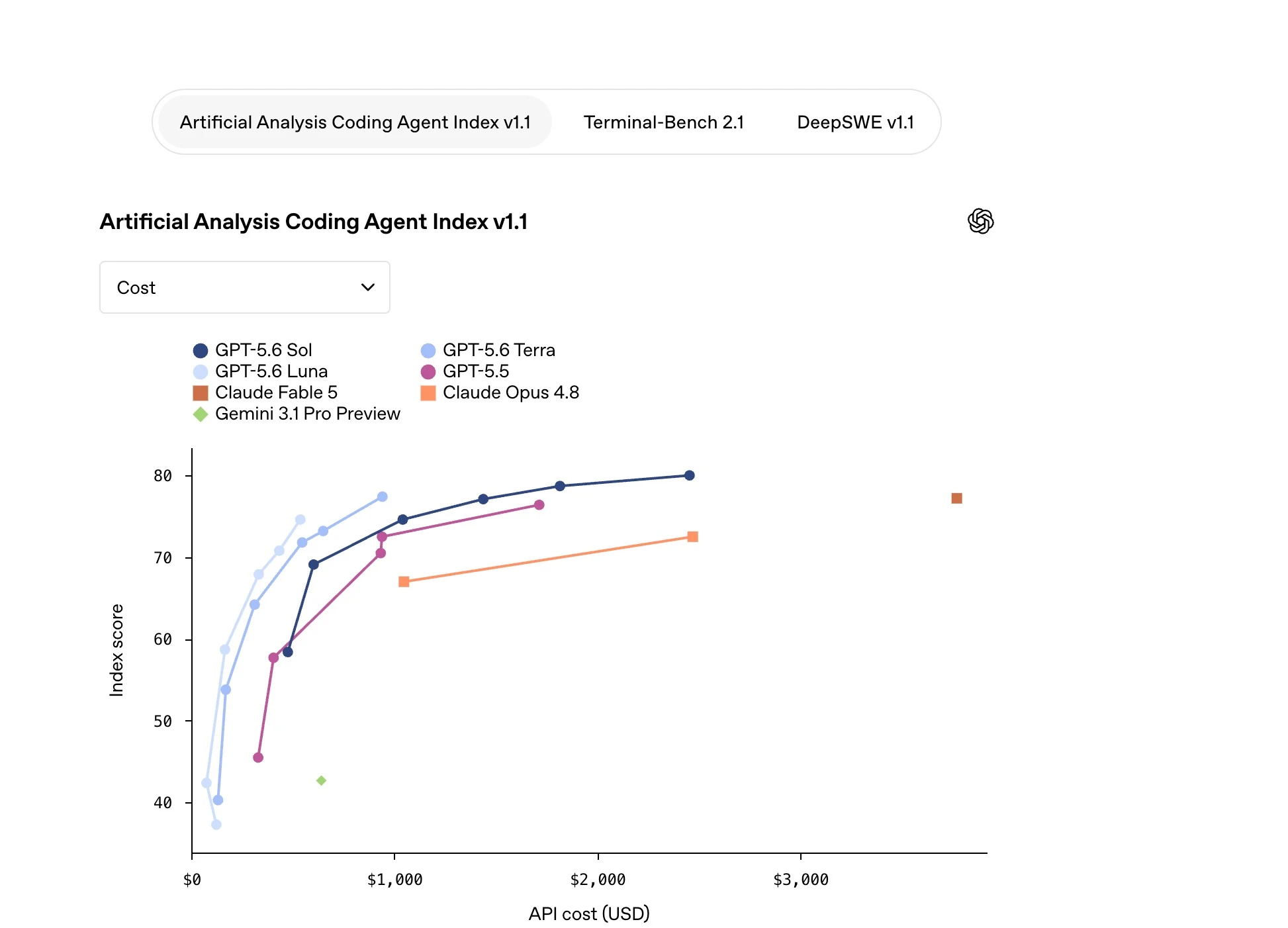
On benchmarks, Sol's numbers are genuinely strong. It scores 88.8% on Terminal-Bench 2.1 in standard mode and 91.9% in Ultra mode, edging past both Claude Mythos 5 (88.0%) and GPT-5.5 (88.0%). On ARC-AGI-1, Sol and Terra tie at 96.5%. On ARC-AGI-2, Sol hits 92% at $1.44 per task. On ARC-AGI-3, Sol scored 7.78%, the first frontier model to make meaningful progress on that benchmark at all, well past the previous best of 1.5% from Claude Opus 4.8.
There's one honest gap worth flagging: GPT-5.6 Sol underperforms Claude Fable 5 on SWE-Bench Pro, even though it beats Fable 5 on Artificial Analysis's Coding Agent Index, DeepSWE, and Terminal-Bench 2.1. No single benchmark tells the whole story, which is exactly why I built five real apps instead of trusting a leaderboard.
App 1: A 3D Portfolio Website (Score: 3/5)
My first build was a multi-page, animation-heavy frontend site using a "Helios" theme. I ran it on Sol's "high" reasoning tier, not Ultra, to see what the default experience looks like.
Build a multi-page portfolio website called Helios with a dark,
3D animated hero section, a work/portfolio page, a case study page,
a journal/blog page, and a contact page. Use smooth scroll-triggered
animations and modern typography.
The good parts showed up immediately. The background artwork looked genuinely premium, the scrolling was smooth, the typography was clean, and the footer and sample images all rendered correctly. But the same 3D animation showed up on every single page, including the journal and contact pages, where it actively made the text harder to read.
"The scattered elements are so much that it interferes with the text you can see here."
I never told it to restrict the heavy animation to the homepage, and that's on me. But a model this capable should have recognized on its own that a blog page and a contact form don't need the same visual weight as a 3D hero section. That single judgment call is where it lost points.
App 2: AI Support Ticketing System ("Triage") (Score: 5/5)
This is where GPT-5.6 Sol earned its keep. One prompt, one shot, and it built a working RAG-based customer support system with four user roles, an admin dashboard, and an embeddable JS widget.
Build a customer support ticketing app called Triage with RAG-based
AI triage. Include 4 roles (admin, agent, support, viewer), an admin
dashboard with ticket stats, a settings panel with a knowledge base
editor, and an embeddable JavaScript widget for websites. Connect it
to OpenRouter for the AI model.
I logged in as admin and opened a test ticket that read "Hello, I paid the order but not received." I clicked the AI Triage button, and it browsed its own knowledge base, detected sentiment, assigned a "normal" priority, correctly categorized it as billing, and drafted a reply: "Thanks for contacting us. Our billing will check the order status." It even offered a one-click "mark as resolved."
"This will be a great idea for any e-commerce owners to have their own ticketing system. With just one prompt, it managed to do everything, so I give it a five out of five. So GPT-5.6 Sol is so good. Did that in just few minutes. So wow, this is surprising for me."
The settings panel let me edit routing rules and knowledge base articles directly, like adding a "no refunds" policy entry that the AI then referenced in future replies. For anyone running an online store, this is the closest I've seen a single AI prompt come to shipping a real internal tool.
App 3: Python Real-Time Webcam Emotion Tracker (Score: 5/5)
App three moved off the browser entirely. I asked for a Python desktop app that watches a webcam feed and tracks facial expression and emotion in real time, connected through OpenRouter so I could pick a cheaper model tier for the vision calls.
Build a Python app that uses the webcam to track facial expression
and emotion in real time. Show a live percentage for detected emotion,
count blinks, detect drowsiness (eyes closed too long), and log
session stats: duration, average expression, total blinks.
I configured the OpenRouter API key and picked the cost-effective "5.5" model tier for the vision processing, then fixed a mirror-effect bug it introduced on the first pass. After that, it worked cleanly: smiling showed a live "happy" percentage, it counted three blinks accurately, and it correctly flagged a drowsy event when I held my eyes closed.
"This is just the starting point. You can add more features to it. This is a great app on the one go. I give it a five out of five for Python app here."
The session summary panel tracked duration, average expression, and total blink count without me asking for it explicitly, which felt like the model reading between the lines of my prompt in a way App 1 didn't.
App 4: macOS Voice-Note App With Local RAG Memory
For app four, I wanted something closer to a native macOS tool: a voice-note app, similar to a Whisper Flow clone, with local retrieval-augmented memory so I could ask it questions about past notes later.
Build a native-feeling macOS desktop app for recording voice notes.
Transcribe locally with whisper.cpp, index each note with local RAG
using an embedding model, and add an "Ask" feature that retrieves
relevant past notes to answer questions.
The UI genuinely looked native, not like a wrapped web app. I hit one setup snag: whisper.cpp wasn't installed, so I had to configure it manually before transcription worked. Once that was sorted, I recorded a note about how "incredible" GPT-5.6 felt compared to other frontier models, then tested the "Ask" feature by asking about "latest podcast season ideas." It correctly pulled up a note I'd logged earlier that day referencing an interview with Maya Chen, proving the RAG retrieval actually worked and wasn't just guessing.
"This is mind-boggling for me because with the one go... it actually created this, and I will also show you the credits it consumes. You will be shocked for a hundred dollar plan."
That credit reveal is the part most people skip past, and it's the whole reason the comparison article exists. Short version: the five apps combined only used 29% of my $100 Codex plan.
App 5: Browser Game in HTML, CSS, and JavaScript (Score: 4/5)
Last build, and the most fun one: a browser-based game with real controls, not a static demo.
Build a browser game in HTML, CSS, and JavaScript. WASD or arrow
keys for movement, spacebar for a boost, shift for a dodge move,
a health bar that reacts to damage, a first checkpoint, and
background audio.
Everything worked on the first test. WASD and arrow steering felt intuitive, the spacebar boost had real weight to it, the dodge move triggered cleanly, the health bar visibly decreased on damage, and the checkpoint and audio both landed.
"Control looks good with one go. This is what I wanted from this app and looks perfect with the controls, with the audio. I will give it a four out of five."
I docked one point purely on graphics polish compared to what I later saw from the same prompt on Claude Fable 5, which you can read about in the full head-to-head comparison.
How Much Did It Cost? Codex $100 Plan Credit Usage
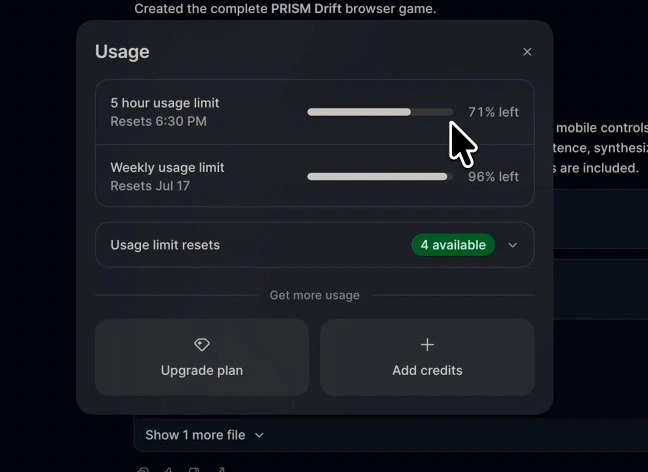
This is the number that actually matters if you're deciding which model to build with.
| Metric | GPT-5.6 Sol (Codex, $100 plan) |
|---|---|
| Apps built | 5 (website, support system, webcam app, voice app, game) |
| Total credits consumed | 29% |
| Weekly limit consumed | 4% |
| Credits remaining after all 5 apps | 71% |
For context, building just one comparable app on Claude Fable 5, the 3D portfolio site, consumed 51% of a Claude subscription's session credits on its own. I'll break that comparison down fully in the GPT-5.6 Sol vs Claude Fable 5 article,
but the short version is that Sol's pricing structure ($5/$30 per million tokens) runs at roughly half of Fable 5's rate ($10/$50 per million tokens), and it showed up directly in how far my $100 plan stretched.
My Verdict: Is GPT-5.6 Sol Worth It?
For five real builds, GPT-5.6 Sol landed 2 perfect fives, 1 four, 1 three, and one build (the voice app) I didn't formally score but walked away impressed by. Its strongest results came from apps with a clear, self-contained job: the support ticketing system and the webcam tracker. Its weakest result came from the one build that needed design judgment across multiple pages, where it applied the same heavy animation everywhere without knowing when to hold back.
If your work is backend logic, RAG pipelines, Python tooling, or anything with a clear functional spec, GPT-5.6 Sol is fast, cheap relative to Fable 5, and genuinely capable. If your work leans heavily on visual and UX judgment across many screens, I'd still lean toward pairing it with tighter, more explicit prompts, or reaching for Fable 5 when budget allows.
Either way, the quality of what you get out of any model comes down to the quality of what you put in. Before I run a prompt through GPT-5.6 Sol now, I run it through our free ChatGPT prompt generator first to tighten the spec, and I keep our AI Prompt Generator Chrome extension pinned so I can rewrite a prompt without leaving whatever tab I'm in. If you're building with Claude models too, the free Claude prompt generator does the same job tuned for Fable 5's prompting style.
Frequently Asked Questions (FAQs)
What is GPT-5.6 Sol?
GPT-5.6 Sol is OpenAI's flagship model in the GPT-5.6 family, released to general availability on July 9, 2026. It's built for complex reasoning, long-horizon agentic work, and coding, and runs on a 1.05 million token context window.
How much does GPT-5.6 Sol cost?
GPT-5.6 Sol costs $5 per million input tokens and $30 per million output tokens. The cheaper Terra tier runs $2.50/$15 per million, and the fastest Luna tier runs $1/$6 per million.
Is GPT-5.6 Sol better than Claude Fable 5?
It depends on the task. GPT-5.6 Sol beats Fable 5 on Terminal-Bench 2.1 and Artificial Analysis's Coding Agent Index, but Fable 5 leads on SWE-Bench Pro and SWE-Bench Verified. In my own testing, Sol was cheaper and faster; Fable 5 produced more polished UI judgment.
Can GPT-5.6 Sol build a full app from one prompt?
Yes, with the right scope. My AI support ticketing system and Python webcam tracker both worked correctly from a single detailed prompt. More complex, multi-page builds needed tighter constraints to avoid design mistakes like reused animations.
What's the difference between Sol, Terra, and Luna?
Sol is the flagship tier for hard reasoning and coding tasks. Terra is a balanced tier at roughly half the cost. Luna is the fastest and cheapest tier, meant for high-volume, lower-complexity work.
How do I write better prompts for GPT-5.6 Sol?
Be explicit about scope and constraints, especially for multi-page or multi-screen builds, since Sol won't always infer where to hold back on design elements. Our free ChatGPT prompt generator is built to tighten exactly this kind of prompt before you spend credits testing it.
Final Thoughts
GPT-5.6 Sol earned two perfect scores, one solid four, and one real miss out of five apps, and it did all of it on less than a third of a $100 Codex plan. That's not a model to dismiss. It's a model that rewards precise prompting and punishes vague instructions, especially on anything involving visual design across multiple screens. If you're deciding between GPT-5.6 Sol and Claude Fable 5 for your next build, read my full head-to-head comparison next, and tighten every prompt you send with our free prompt generator tools before you spend a single credit testing it.