Chrome Extension
Google calls Gemini 3.7 Flash its most intelligent workhorse model yet for coding and agents, and I wanted to know if that claim holds up outside a launch page.
I built five real apps with it, ran it head-to-head against Claude Sonnet 5, GPT-5.6 Luna, and Kimi K3 on the same UI briefs, and pulled every spec straight from Google's own documentation to check the marketing against the evidence.
You will see exactly where this model shines, where it falls apart, and precisely how to prompt it yourself once you know the difference.
Note: A New version is Launched i.e. Gemini 3.8 Flash, Check my review here.
Key Takeaways
How I Tested Gemini 3.7 Flash
Before I show you any app, I want to walk you through my setup, because it taught me something important about where this model actually performs. I tried three different ways to build with Gemini 3.7 Flash, and only one of them worked without a fight.
My first attempt used OpenCode, a terminal coding tool, connected to Gemini 3.7 Flash through my OpenRouter API key. Every coding task broke down with Google's familiar timeout warnings, the same issue I have run into with earlier Gemini Flash releases on this channel.
My second attempt used Google Antigravity, Google's own agentic development platform. This one genuinely surprised me, and not in a good way.
"It keeps getting stuck in between, and I had to just say again and again to continue, and it didn't work out."
That is Google's own coding agent, struggling with Google's own newest model. I ended up abandoning both tools entirely and switching to Google AI Studio, and the difference was immediate. It never crashed, it worked every single time, and I could download the finished code just like I would from Claude Code or ChatGPT.
If you take away one practical lesson from this review before I show you a single app, it is this: if you are building anything with Gemini 3.7 Flash, or honestly any current Gemini model, skip Antigravity and OpenCode for now and go straight to AI Studio.
I want to be fair to Google here, because Antigravity is still a genuinely new product in Google's own lineup, described on its own site as an agentic development platform rather than a mature, battle-tested tool like Claude Code or Codex. New agentic tooling is often rough around the edges in its first few releases, and my experience with it may not match yours depending on the exact task you throw at it. But for the specific coding and game-building briefs I ran in this review, AI Studio was the only environment that delivered a finished result every single time, and that reliability gap is worth knowing before you pick your workflow.
What I Built With Gemini 3.7 Flash
I want to walk you through every app I built, in the order I built them, with the same honest scoring I use for every model on this channel.
App 1: A Multiplayer Agency Portfolio Site (4 out of 5)
My first build was a multiplayer UI test, a full agency-style portfolio site with 3D work showcased behind the hero section. My first impression was genuinely strong. The 3D visuals rendered exactly as I described them.
The details started slipping once I looked closer. The hover state on a key button was missing a basic user experience element, an arrow that should have appeared below it, which is a small thing but exactly the kind of detail I expect a coding-focused model to get right.
I also tested the site's case study pages, and one of them botched a before-and-after image comparison, a component that should show a clean split view but instead rendered a plain resizable picture with no comparison logic behind it.
Deliver: a complete multi-page site — shared.css + shared.js + 5 pages + per-page JS. CDN only (Three.js r128, GSAP + ScrollTrigger, Lenis, Lucide, Google Fonts). Run at HIGH.

Build brief (hand all of this to the model):

Concept: "Cadence" — a design + motion studio. The whole site is a portfolio-grade demonstration of UI/UX craft: rhythm, whitespace, typographic hierarchy, and motion that feels intentional. Aesthetic distinct from prior packs — propose an editorial, high-contrast look with one refined accent (e.g. warm ivory + ink-black + a single electric accent), full dark + light themes.
Fonts: a characterful editorial display face + a clean grotesk body + a mono for meta/labels (real Google Fonts). Typography is a graded criterion here — make it sing.
5 pages, all sharing nav/footer/cursor/theme/page-transitions:
index.html (Home) — 10+ sections: a hero with a restrained 3D or canvas motion signature (real Three.js, mouse + scroll reactive, disposed on navigation); a kinetic-type moment; selected work preview (3 case-study cards with hover reveals); a pinned scroll interlude where a layout/wireframe "designs itself" — grids, type, and color blocks snapping into a finished composition as you scroll (a UI/UX- on-brand signature); services; process; awards/press; testimonials; CTA + footer.
work.html — a filterable project grid (masonry), each card a mini interaction on hover; a featured case study; a "selected clients" band; CTA.
case-study.html — a single project deep-dive: hero visual, challenge/approach/ outcome, a scroll-through of the design process, before/after, results metrics (animated counters), next-project link.
studio.html (About) — studio story; team cards (hover reveal); values; a timeline (SVG line draws on scroll); culture gallery; manifesto quote band.
contact.html — a validated project-inquiry form (name, company, budget select, project type, message) beside an animated SVG motion-signature; "what happens next" timeline; confetti on submit.
Shared systems (shared.js): Lenis + scroll-progress bar; a custom cursor unique to this pack (propose a small ink-dot that smears/trails subtly and grows on hover — fitting a motion studio); theme toggle persisted in localStorage; [data-reveal] scroll-entrance system; magnetic buttons; tilt cards; page-transition veil so the 5 pages feel like one continuous experience.
UI/UX-specific quality bar (this is what's being graded):
Impeccable spacing rhythm + vertical grid; nothing cramped or arbitrary
Typographic hierarchy that reads as designed, not defaulted
Motion with intent: eased, layered, never janky; a clear "signature" moment
Micro-interactions on every interactive element (hover, focus, active states)
Accessibility as craft: visible focus, semantic landmarks, aria labels, reduced-motion
Responsive down to mobile with a considered (not just stacked) layout + overlay menu
Optional reference-match test (leans into 3.7's new strength): additionally feed the model a screenshot of a design you admire and ask it to rebuild that section's layout faithfully in the Cadence system — then judge how closely 3.7 matches the reference.
Delivery: shared.css + shared.js in full first, then all 5 pages + js/ files, no truncation, ending with a validation checklist (fonts, both themes persist across pages, cursor, 3D disposes on transition, pinned "self-designing layout" interlude fires, all interactions wired, page-transition veil between all pages, active nav indicated, 60fps, mobile overlay, reduced-motion).
The rest of the build, the lite landing page, the standard work section, and the timeline, held up fine. But for a model Google is specifically marketing for coding and agentic work, small user experience misses like the missing hover arrow and the broken before-and-after slider are not what I expected. I am giving this one a 4 out of 5, and in my own testing, it performed roughly on par with Gemini 3.6 Flash on front-end work like this, not a clear step forward.
App 2: Hex Dominion, A Tactical Hex Strategy Game (5 out of 5)
My second build was Hex Dominion, a tactical hex strategy engine, and this is where Gemini 3.7 Flash genuinely impressed me. I selected the easy map, deployed my units to the battlefield, and the entire turn-based system worked exactly as designed.
Prompt I Used;
Deliver: ONE self-contained hex_dominion.html. Everything embedded. Fonts via CDN only. Run at HIGH.

Build brief:

Concept: a compact Civ/Advance-Wars-flavored hex strategy. Player (blue) vs AI (red) on a hex-grid map. Capture territory, manage a small economy, build + move units, and eliminate the opponent or hold the most territory after N turns.
Hex map system: an axial-coordinate hex grid (draw pointy-top or flat-top hexes), terrain types (plains, forest, mountain, water, resource node) affecting movement + defense, fog-of-war optional. Clean rendering + hex highlighting on hover/select.
Units (3–4 types): e.g. Scout (fast, weak, reveals), Soldier (balanced), Cavalry (high move + charge bonus), Artillery (ranged, fragile). Each: HP, move range, attack, defense, range. Movement range shown as highlighted hexes (pathfinding on the hex grid); attack targets highlighted; combat resolves with terrain + type modifiers + a clear damage preview before committing.
Economy: capture resource nodes / towns to earn gold each turn; spend gold to build units at your base. Simple, readable.
Turn structure: player moves/attacks each unit once + builds → End Turn → AI turn.
The AI opponent (the reasoning test — make it genuinely smart, not random):
Evaluate each unit's best action via a heuristic: expected damage dealt (bonus for kills), damage risk next turn (threat map over the hex grid), territory/economy value of moving toward objectives, terrain defense, and focus-firing wounded units.
Difficulty levels: Easy (greedy 1-ply), Normal (uses threat map + objectives), Hard (shallow lookahead: simulate the player's best reply).
A brief "AI is planning…" indicator so the player can follow its moves.
Rich UI: animated hex map, unit sprites drawn procedurally with clear factions, HP bars, move/attack range overlays, combat animations + damage numbers, a turn/economy HUD, a unit info panel, a build menu, animated menus (main / how-to / results), and a victory/defeat screen with stats. Smooth transitions throughout.
Audio: synthesized SFX via Web Audio (select, move, attack, capture, victory).
Persistence: localStorage for settings + best results per difficulty.
Structure (single file, sectioned): HexGrid (axial math + render), Unit, Terrain, Economy, Combat (resolution + preview), AI (heuristics + threat map + lookahead), TurnManager, UI (screen manager), HUD, AudioEngine, Storage.
Verify: hex math + rendering correct; units move within range along valid paths; combat applies terrain/type modifiers + shows a preview; economy earns + spends; capture works; the AI makes sensible tactical moves (avoids suicide, focus-fires, pursues objectives) at each difficulty; win/lose conditions fire; menus animated; 60fps.
Output the complete single HTML file, no truncation. The hex pathfinding + combat resolution + the AI heuristic/threat-map are the critical systems — verify mentally that the AI doesn't walk artillery into melee or attack into bad trades.
I recruited a vanguard unit to guard my base, ended my turn, and watched the AI opponent take its move and destroy one of my units. That is a real, functioning turn-based combat loop, not a static demo.
"The user interface looks amazing. You can see the 2D graphics, looks great."
The settings menu held up too. Toggling fog of war and the threat radar overlay both worked correctly, changing what I could see on the map in real time. Every single feature I tested in this game worked, which is exactly why I am giving it a 5 out of 5. If you want a genuine example of what this model can do at its best, this game is it.
App 3: The 3D Planet Generator (2 out of 5)
My third build was a 3D planet generator, and this is where the model fell apart. I asked for a customizable planet with different terrain types, and the result was, in my own words, invisible.
"This should be a planet here. The terrain should be here, but nothing is here. Everything is invisible."
I tried switching terrain colors and running a few iteration prompts to fix it, and none of them resolved the issue. For comparison, I ran the same brief through Claude Sonnet 5 with high thinking enabled, and it correctly rendered a full 3D planet with hoverable terrain data, showing grassland, ocean, desert, ice, lava, and alien biomes exactly as described.
Deliver: self-contained terraform.html (Three.js r128 + GSAP + Google Fonts via CDN). Run at HIGH.

Build brief:

Concept: an interactive 3D planet/terrain generator. A procedurally generated planet (sphere with displaced terrain) OR a terrain patch (toggle), which the user reshapes live with a control panel — mountains, oceans, biomes, atmosphere — and can spin, light, and screenshot. Think a playable "world seed" toy.
The 3D:
A sphere with procedural terrain displacement via noise (fBm/simplex in a vertex shader or CPU-displaced geometry): continents, mountain ranges, ocean basins.
Biome coloring by elevation + latitude: deep ocean → shallows → beach → grass → forest → rock → snow caps; a fragment shader or vertex colors mapping height+latitude to a palette. Poles get ice.
Water layer: a translucent sphere at sea level with a subtle animated surface.
Atmosphere: a soft rim-glow shell (fresnel) around the planet.
Clouds: an optional drifting cloud layer (noise-driven alpha).
A starfield skybox; a sun (directional light) with a lens-flare-ish glow.
Terrain-patch mode: a plane with the same noise + biome system for a close-up view.
Rich control panel (glassmorphism, live-updating — the interactivity test):
Seed (randomize button + numeric seed), noise scale, octaves, terrain height, sea level (raises/lowers oceans live), mountain sharpness
Biome palette presets (Earthlike, Desert, Ice, Alien, Lava) + custom accent
Atmosphere intensity, cloud coverage, cloud speed, sun angle/color, rotation speed
Toggles: water, clouds, atmosphere, wireframe, auto-rotate
Buttons: Randomize (animates params via GSAP to a new world), Reset, Screenshot (canvas → PNG download)
Every control updates the planet in real time (rebuild geometry only when needed; otherwise update uniforms) with smooth feedback.
Interaction: orbit + zoom (drag/scroll) with momentum; click-drag to spin the planet; hover the planet to show elevation/biome readout at the cursor point (raycast → sample).
Visual quality: real GLSL for displacement + biome coloring + atmosphere fresnel; soft lighting; 60fps target; cap pixel ratio; dispose geometry on rebuilds; reduced- motion fallback (calmer preset, no auto-rotate).
Structure: scene/lighting/star setup; planet builder (geometry + noise + biome shader); water/cloud/atmosphere layers; control panel (wired to uniforms/params); raycast readout; screenshot export; camera + interaction; animation loop.
Verify: planet generates with believable continents + oceans + snow caps; every panel control changes the world live; sea-level slider floods/drains oceans; biome presets reshape the palette; atmosphere + clouds + water toggles work; randomize animates to a new seed; screenshot downloads; hover readout samples elevation/biome; orbit/zoom smooth; 60fps.
Output the complete file, no truncation. The noise-displacement + biome shader + the live-wired control panel are the critical systems — the planet must look genuinely good and respond instantly to controls.
Gemini 3.7 Flash never got there, even after multiple attempts. A 3D rendering failure this complete, on a task that a competing model handled correctly on the first real attempt, is a real limitation. I am giving this one a 2 out of 5.
App 4: A Multi-Timezone SaaS Check-In App (Landing Page 5 Out Of 5, Dashboard 3 Out Of 5)
My fourth build was a SaaS app designed to track a team's daily check-ins across different timezones. The landing page came out clean, professional, and fully functional, complete with a free sign-up flow and demo logins for three separate account roles.
"This is clean landing page. Works great. Five out of five for this."
The dashboard experience is where it lost points. I tested all three demo roles, member, manager, and admin, and the member flow worked well: I updated my daily check-in, marked my status as blocked, and the app generated an AI-driven digest that correctly flagged my blocker and suggested a cross-functional alignment fix.
The manager and admin roles were the real disappointment. Neither one had any meaningfully different functionality or settings from the member view, despite being described as distinct roles. On top of that, the navigation menu should have been positioned on the side for a SaaS app, and the entire dashboard was not optimized for mobile screens.
Deliver: full Node/Express/Postgres app — landing page, auth with sample logins, and the complete product. AI via OpenRouter google/gemini-3.7-flash.

Build brief — Phase 1 (architecture, schema, sample logins, landing):

The problem it solves: live daily standups waste everyone's time across timezones. Standup lets each teammate post a quick async check-in (what I did / what I'm doing / blockers), and Gemini 3.7 Flash rolls the whole team's entries into ONE clear daily digest — highlights, blockers that need attention, and who's stuck — so managers read one summary instead of ten updates. It also flags recurring blockers over time.
Stack: Node 18+, Express, EJS, PostgreSQL (pg), bcryptjs, express-session, connect-pg-simple, Lucide, vanilla CSS, date-fns. AI via OpenRouter (google/gemini-3.7-flash), Bearer OPENROUTER_API_KEY, thinking level low/medium.
Schema: users (id, email, password, name, role[member|manager|admin], timezone, avatar_color), teams (id, name, slug), team_members (team_id, user_id, role), checkins (id, team_id, user_id, date, yesterday TEXT, today TEXT, blockers TEXT, mood[1-5], created_at), digests (id, team_id, date, ai_summary, highlights JSONB, blockers JSONB, at_risk JSONB, generated_at), blocker_flags (recurring blocker tracking).
Sample logins (seed; password standup2026), shown as one-click tiles + listed on the login page:
manager@standup.app / standup2026 (manager) — "Priya Nair", sees the digest view
dev@standup.app / standup2026 (member) — "Alex Rivera", posts check-ins
demo@standup.app / standup2026 (admin) — "Demo User", full access
Demo data (alive on first load): a team "Orbit Engineering" with 6 members, ~2 weeks of daily check-ins (realistic: shipped features, ongoing work, real blockers — a few recurring ones like "waiting on design", "flaky CI"), and cached daily digests for the past several days (summary + highlights + blockers + at-risk people). So the digest view is populated immediately.
Landing page (/) — a real marketing page: nav; hero ("Standups without the meeting" + CTA + an animated digest mockup); how-it-works (post → AI digests → manager reads one summary); features grid (async check-ins, AI daily digest, blocker tracking, timezone-friendly, integrations, history); a sample-digest strip; pricing (Free / Pro $8 per user / Team $12 per user, monthly-annual toggle); testimonials; FAQ; footer. Polished, animated on scroll, responsive.
App features:
Check-in composer: a clean daily form (yesterday / today / blockers / mood), edit today's entry, see your streak; timezone-aware "today".
Team feed: today's check-ins from all members (cards, avatars, mood, blockers highlighted); filter by member; a calendar to browse past days.
AI Daily Digest (the core feature): "Generate digest" (or auto at a set time) → Gemini 3.7 Flash reads all of today's check-ins and returns structured JSON: overall summary, key highlights, blockers needing attention (with who + suggested owner), and people "at risk" (stuck multiple days). Rendered as a clean digest card; cached to digests. Managers can copy/share it.
Blocker insights: recurring blockers surfaced over time (which blockers keep reappearing, who's repeatedly stuck) — a small analytics view.
Settings: profile + timezone, team management, digest schedule, OpenRouter API key
model (default google/gemini-3.7-flash) + thinking level.
Design: light-mode-first, calm + friendly (async, human). Distinct accent from prior packs (propose a fresh green or coral). Inter + JetBrains Mono. Lucide icons. The digest card is the hero — make it genuinely pleasant to read.

Build brief — Phase 2 (routes, views, AI): implement all routes (auth incl. demo-login, team feed, check-in CRUD, digest generate + view, blocker insights, settings), all EJS views (landing, login with demo tiles, signup, feed, composer, digest, insights, settings), and services/ai.js: generateDigest(checkins) → structured JSON (summary, highlights, blockers, at_risk) via Gemini 3.7 Flash, streamed; flagRecurringBlockers(history). Handle errors gracefully (never block the feed). Output all files complete, no truncation; README with the 3 sample logins + setup + deploy notes.
A strong landing page paired with role-based permissions that do not actually differ by role, plus a layout that ignores mobile users, is a real functional gap for a business tool. I am giving the overall dashboard experience a 3 out of 5, even with that excellent landing page pulling the average up.
App 5: A Multimodal macOS Video Digest App (4 out of 5)
My fifth and final build tested Gemini 3.7 Flash's multimodality directly, since Google's own documentation confirms this model accepts text, images, audio, and video as input. I built a macOS app, plugged in my own API key, and set thinking off to keep testing costs down.
The app's job was simple: grab a video file and turn it into a structured digest with a summary, action items, notable quotes, and clickable timestamps tied to specific moments in the video. I fed it a real video from my folder and watched it work in real time.
"It show you what time and what part it is there, and if you click on it, it will just move forward with it."
Every core piece worked: the analysis, the structured cards, the interactive timestamps, and the conversation history sidebar. My one real complaint is that I could not preview the video directly inside the generated app itself, which is a real gap for a tool built specifically to work with video. I am docking one mark for that and giving this build a 4 out of 5.
I Put Gemini 3.7 Flash Head-To-Head Against Sonnet 5, Luna, And Kimi K3
I wanted a fair, side-by-side test, not just my own subjective read on five separate apps, so I turned to UIPitch, a desktop AI design tool I already use on this channel. UIPitch has a dedicated UI Playground feature built exactly for this: you write one brief, run it through multiple models like Claude, GPT, and Gemini at the same time, and get back live, clickable components instead of static screenshots, using whatever API key and rate you already have with each provider.
Round 1: A Prize Wheel Component
I asked all four models for a prize bonanza wheel component with a matching color palette. Gemini 3.7 Flash's wheel did not actually spin. Clicking Spin simply handed me a coupon code with no animation at all, which is a real bug for a component whose entire purpose is the spin animation.
Claude Sonnet 5 built a working spin animation with a light and dark mode toggle and landed on a points reward with no coupon code. GPT-5.6 Luna's visual design was rough, in my own assessment genuinely weak, but its spin mechanic itself worked and returned a free shipping reward. Kimi K3, my personal favorite open source model, combined a spinning wheel that worked correctly with visual design I would call genuinely great.
Round 2: A Testimonial Card Section
For the second round, I kept the brief simple: a testimonial card section, nothing more. I ran this one against GPT-5.6 Sol specifically, a stronger OpenAI tier than Luna, to give Gemini a tougher comparison.
"I like the 3.7 one way, way better than all."
Gemini 3.7 Flash's card section matched my existing design language closely and looked genuinely polished. GPT-5.6 Sol's version, by contrast, did not impress me on this particular brief.
Between these two rounds, my takeaway is consistent with everything else in this review. Gemini 3.7 Flash is a strong visual designer, but round one shows it can still ship a broken core interaction, like a wheel that will not spin, inside an otherwise good-looking component. If you want to run this exact kind of side-by-side test yourself, UIPitch is a one-time $199 purchase with no subscription, and it works with your own API keys for Claude, GPT, Gemini, and OpenRouter models alike.
What Gemini 3.7 Flash Actually Is
Let me step back from my own builds and ground you in the official facts, since a review only means something if the numbers behind it hold up.
Release And Positioning
Google released Gemini 3.7 Flash on August 13, 2026, just three weeks after Gemini 3.6 Flash. According to Google's own launch announcement, it is "our most intelligent workhorse model yet for coding and agents," and Google is explicitly positioning it against Claude Sonnet 5, not against flagship-tier models.
Gemini 3.7 Flash is built directly on Gemini 3.6 Flash, with Google's own model card describing the update as "algorithmic improvements to its core reasoning foundation" rather than a new base architecture. It also supports customizable thinking configurations, which let you directly control the trade-off between output quality, cost, and response latency.
Specs At A Glance
| Spec | Detail |
|---|---|
| Release date | August 13, 2026 |
| Based on | Gemini 3.6 Flash |
| Input modalities | Text, images, audio, and video |
| Output modality | Text only |
| Context window | Up to 1,000,000 tokens |
| Max output | 64,000 tokens |
| Knowledge cutoff | March 2026 for most domains |
| Introductory input pricing | $0.75 per million tokens (through December 31, 2026) |
| Introductory output pricing | $3.75 per million tokens (through December 31, 2026) |
| Pricing from January 1, 2027 | $1.50 per million input tokens, $7.50 per million output tokens |
Source: Google DeepMind, Gemini 3.7 Flash Model Card
Benchmarks That Matter
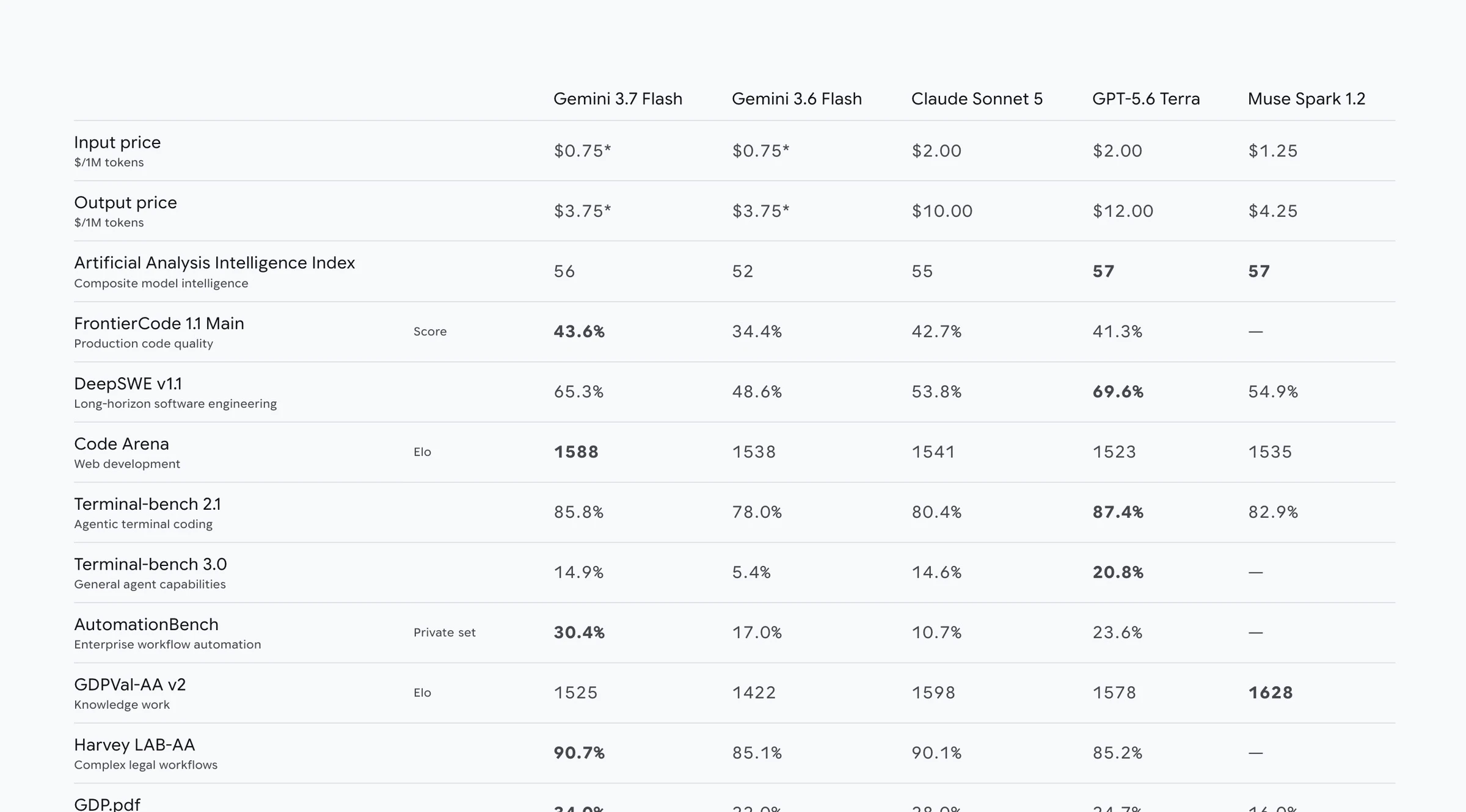
Google published a direct comparison table in its own model card, and I want to hand you the real numbers rather than paraphrase them into something vaguer.
| Benchmark | Gemini 3.7 Flash | Gemini 3.6 Flash | Claude Sonnet 5 | GPT-5.6 Terra |
|---|---|---|---|---|
| Input price / 1M tokens | $0.75 | $0.75 | $2.00 | $2.00 |
| Output price / 1M tokens | $3.75 | $3.75 | $10.00 | $12.00 |
| Artificial Analysis Intelligence Index | 56 | 52 | 55 | 57 |
| FrontierCode 1.1 Main (production code quality) | 43.6% | 34.4% | 42.7% | 41.3% |
| DeepSWE v1.1 (long-horizon engineering) | 65.3% | 48.6% | 53.8% | 69.6% |
| Code Arena Elo (web development) | 1588 | 1538 | 1541 | 1523 |
| Terminal-bench 2.1 (agentic terminal coding) | 85.8% | 78.0% | 80.4% | 87.4% |
| AutomationBench (enterprise workflow automation) | 30.4% | 17.0% | 10.7% | 23.6% |
| GDP.pdf (expert document comprehension) | 34.0% | 22.0% | 28.0% | 24.7% |
| OSWorld-2.0 (agentic computer use) | 47.9% | 33.8% | Not published | 50.2% |
Source: Google DeepMind, Gemini 3.7 Flash Model Card
This table lines up with what I actually experienced. Gemini 3.7 Flash beats Claude Sonnet 5 on most coding-specific benchmarks here, which matches how strong my Hex Dominion build turned out. But GPT-5.6 Terra still leads on DeepSWE v1.1, the benchmark specifically built around long-horizon software engineering, and my own 3D planet generator failure is exactly the kind of long, multi-step build where that gap would show up.
I also want to flag something in the interest of double-checking every fact in this review rather than just repeating Google's headline numbers. This is Google's own benchmark table, run on Google's own evaluation harness, so the comparison figures for Claude Sonnet 5 and GPT-5.6 Terra may not reflect those models running under conditions tuned to their own strengths. I am treating this table as a genuinely useful reference point, not as a neutral, third-party scorecard, and you should weigh it the same way.
Where You Can Actually Use It
Google distributes Gemini 3.7 Flash across several official channels, and my own testing showed real reliability differences between them.
Source: Google DeepMind, Gemini 3.7 Flash Model Card
Prompting Guide For Gemini 3.7 Flash
Google built Gemini 3.7 Flash around a genuinely useful idea: you, not the model, decide the trade-off between quality, cost, and speed. Here is how I would actually use that control based on everything I tested.
Use thinking on for anything spatial or 3D. My planet generator failure happened on a task that needs real spatial reasoning. If you are building something with genuine 3D logic, terrain, physics, or layout math, keep thinking enabled and do not chase the cheapest possible run.
Turn thinking off for straightforward, well-scoped builds. I switched thinking off for my multimodal macOS app specifically to control cost, and it still handled a genuinely complex task, video ingestion, summarization, and interactive timestamps, without issue.
Default to Google AI Studio, not Antigravity or third-party CLIs. Every one of my five successful builds came from AI Studio. If you want a reliable experience with this specific model today, that is where I would start.
Ask explicitly for role-based differences in any multi-role app. My SaaS app's manager and admin views were functionally identical to the member view, despite being different roles. State the specific permissions or UI differences you expect for each role directly in your prompt.
Demo Prompt: How I Would Brief Gemini 3.7 Flash Next Time
You are building [enter your app or game name here], a [describe your app category here] for [describe your target platform here]. Here is the complete feature list: [paste your full specification here]. If this app includes multiple user roles, explicitly list what is different about each role's permissions and layout, and do not ship two roles with identical functionality. If this app includes any 3D, spatial, or physics-based rendering, keep your thinking setting enabled and verify the rendered output is actually visible before finishing. Build this in Google AI Studio's environment assumptions, not a third-party terminal harness.
My Honest Verdict
Gemini 3.7 Flash earns Google's own framing as a workhorse model, but only for a specific kind of work. Hex Dominion, my testimonial card win in the UIPitch head-to-head, and the multimodal video digest app all show a model that is genuinely strong at UI, UX, and front-end design, and that matches Google's own benchmark table showing it ahead of Claude Sonnet 5 on several coding and design-adjacent scores.
But the 3D planet generator failure, the identical SaaS user roles, and a prize wheel that would not spin inside an otherwise well-designed component tell me this is not yet the model I would reach for on anything that depends on complex logic holding together end to end. If you are building something visual, whether that is a landing page, a game interface, or a UI component library, I would put Gemini 3.7 Flash on your shortlist. If you are building a functional SaaS product or a desktop app with real business logic, I would keep testing Claude Sonnet 5 or GPT-5.6 Terra alongside it before you commit.
Frequently Asked Questions (FAQs)
What is Gemini 3.7 Flash?
Gemini 3.7 Flash is Google's coding and agent-focused model, released August 13, 2026, built on Gemini 3.6 Flash with algorithmic improvements to its reasoning. Google positions it against Claude Sonnet 5, with a 1 million token context window and support for text, image, audio, and video input.
How much does Gemini 3.7 Flash cost?
Gemini 3.7 Flash costs $0.75 per million input tokens and $3.75 per million output tokens through December 31, 2026. Starting January 1, 2027, pricing rises to $1.50 per million input tokens and $7.50 per million output tokens.
Is Gemini 3.7 Flash better than Claude Sonnet 5?
On Google's own benchmark table, Gemini 3.7 Flash beats Claude Sonnet 5 on FrontierCode 1.1, Terminal-bench 2.1, Code Arena, AutomationBench, and GDP.pdf document comprehension. In my own testing, I also preferred its visual and UI output, but I ran into a full rendering failure on a 3D task that Claude Sonnet 5 handled correctly.
Should I use Google Antigravity to build with Gemini 3.7 Flash?
Based on my own testing, not yet. Antigravity repeatedly stalled and required me to manually prompt it to continue on the exact same tasks that Google AI Studio completed without issue. I would default to AI Studio for this model until Antigravity's reliability improves.
What is Gemini 3.7 Flash's context window?
Gemini 3.7 Flash supports a context window of up to 1 million tokens for input, with a maximum output of 64,000 tokens, according to Google's official model card.
Can Gemini 3.7 Flash handle video and audio input?
Yes. Google's official model card confirms Gemini 3.7 Flash accepts text, images, audio, and video files as input. I tested this directly by building a macOS app that summarizes video files into a structured digest with clickable timestamps, and it worked well.
Final Thoughts
I went into this test expecting another incremental Flash update, and what I got instead was a model that is genuinely excellent at one specific job, visual and UI-focused work, while still stumbling on anything that needs sustained logic across a full build. You saw it win a real head-to-head design battle against Sonnet 5, Luna, and Kimi K3, and you also saw it render an entire planet invisible on the same afternoon.
If you want to test this yourself, start in Google AI Studio, keep thinking enabled for anything spatial, and run your own side-by-side comparisons before you commit a real project to any single model. I run every one of these tests using the same prompt structures and comparison tools I share with the AI stack over at promptslove.com, including UIPitch for exactly this kind of live, multi-model UI test.