
 Chrome Extension
UIPitch. AI Frontend Tool.No Subscription.
Design websites, dashboards, and mobile apps with AI that runs on your machine.
Plug in your own API key. Pay one time. Never watch a credit meter again.
Windows and Mac. Signed and notarized by Apple. Your work stays on your computer.

Works with the models you already pay for
Model providers on the left. What UIPitch exports on the right: React, Tailwind CSS, WordPress, and Shopify.
You are paying every month for tools that keep the good part
Here is what building a frontend costs you right now.
You pay a design tool every month per person. You pay an AI builder every month for credits. The credits run out before the month does, so you buy more. When you finally get something you like, it lives on their server, in their format, behind their login.
Stop paying and it all goes away. Every month you are renting back your own work.
The meter is always running
Most AI builders sell credits. A real build eats through a month of them fast. Then you top up at retail.
Per seat, per month, forever
Design tools charge for every person on the team, every single month, whether you opened the app or not.
Your work sits on their server
Cancel the plan and the files stop being yours to open. Export is usually a paid tier.
UIPitch flips who owns what
The app runs on your computer. Your projects sit in a folder you choose. The AI runs on your API key at whatever rate you already get. You paid once, so there is nothing to cancel and nothing to lose access to.
The rented way
- Monthly fee per person
- Credits you buy at retail
- Files live on their server
- Cancel and lose access
- Export locked to paid tiers
- Needs a connection to work
The UIPitch way
Start with the whole site, not one screen at a time
Open a project and you get a canvas with every page laid out and connected. Drag to rearrange. Draw a link from one page to another and that is the real navigation. Drop sticky notes, shapes, frames, and freehand notes right next to the work, so feedback lives with the design instead of in a separate thread.
It works the same way for websites, dashboards, and mobile apps.
Ask once. Get three versions. Keep the one you like.
Describe a section and UIPitch generates three complete versions of it, side by side. Pick one and it drops into the page. Do not like any of them? Say what to change and go again.
You can even run each of the three on a different model, so you can put Claude, GPT, and Gemini against the same brief and judge the output yourself.
Click any element to edit it. Select text to rewrite it. Your header and footer stay locked across every page, so nothing drifts.
One click turns a rough project into a site you can click through
Full Prototype reads every page you have, works out what is missing, writes the content for the empty ones, wires the navigation across the whole site, and hands you something you can actually click through.
The sections it writes get saved as real components in your project. So it is not a throwaway preview. You keep editing it like anything else you made.
Runs on your API key. A typical eight page site takes a few minutes.
Ship it as a site, a WordPress theme, or a Shopify theme
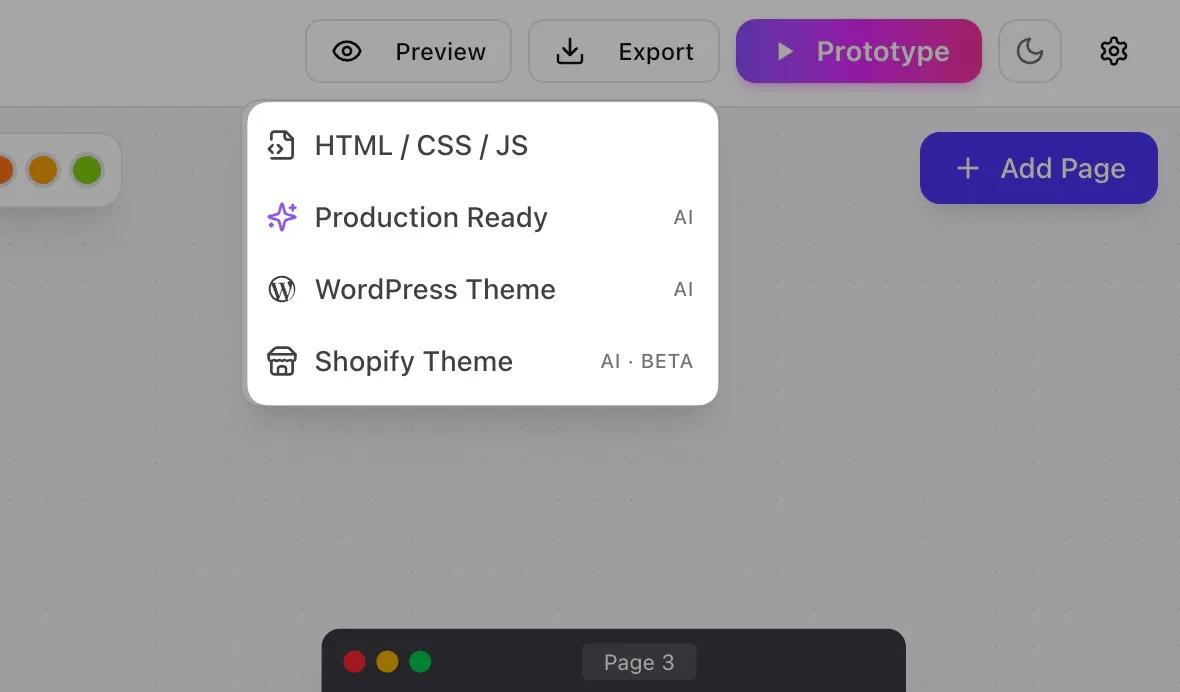
Design is only worth something when it ships. UIPitch exports four ways.
HTML, CSS, and JS
Clean static files in a zip. Open them, host them anywhere, edit them by hand. No account needed to use what you exported.
- index.html
- about.html
- assets/style.css
- assets/app.js
Production ready
An AI pass over every page for semantic structure, alt text, ARIA labels, and per page meta and Open Graph tags. Then packaged.
- index.html
- sitemap.xml
- robots.txt
- og-tags included
WordPress theme
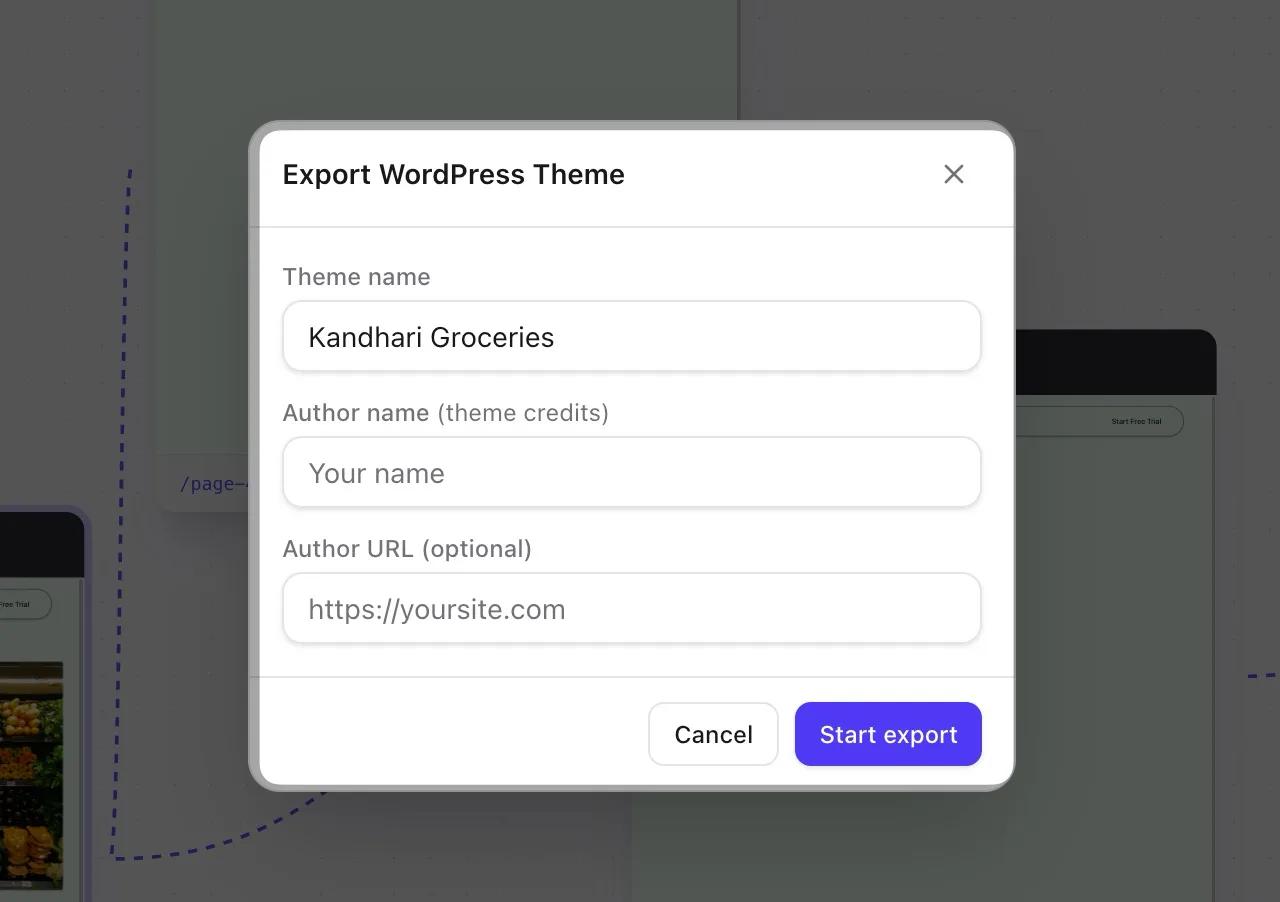
A real installable theme. Your header and footer, one template per page, pages created automatically when the theme is activated, screenshot included.
- style.css
- functions.php
- header.php
- screenshot.png
Shopify theme
An Online Store 2.0 starter theme. One section per page, JSON templates, and your brand colors wired into theme settings.
- layout/theme.liquid
- sections/
- templates/*.json
- config/settings_data.json
Put your own name in the theme author field. It is your work and it should say so.
You are not buying a prompt box. You are buying nine tools.
Every one of these is a product somebody else charges you monthly for. Here they are, in one app, for one payment.
Design the whole app flow before lunch, not one screen a week
Here is why most apps never ship. You design the home screen, it looks great, and then you stall. Onboarding, empty states, settings, the paywall. Nobody wants to draw those, so nobody does, and the project dies in a folder.
UIPitch puts every screen on one canvas inside real phone frames. You see the whole journey at once. Ask for the flow and it draws the boring screens too.
You stop designing screenshots and start designing a product.
- Phone frames drawn to scale, with status bars and safe areas already handled
- Onboarding, empty, loading and error states generated with the happy path
- Link screen to screen and click through it like the real thing
Your sitemap stops being a document nobody updates
Every team has a flow diagram somewhere. It was accurate for about nine days. Then the site changed and the diagram did not, so everyone quietly stopped opening it.
Say the flow in one sentence and the canvas lays out every page and draws the arrows. Drag a page across the board and the connections follow it. The diagram and the site are the same object, so it cannot go stale.
One sentence in. A working map out.
- Describe the site once and watch the pages and links appear
- Drag anything anywhere, connectors stay attached
- Sticky notes, shapes and freehand notes sit right on top of the work
Dashboards that look like a product, not a spreadsheet with opinions
Internal tools get built once and then everybody apologises for how they look for the next three years. Charts in one blue, buttons in another, dark mode that somebody started and never finished.
Pick a theme and every KPI card, chart, table and filter changes together. Light and dark are generated as a pair, so you never ship half of one.
Change your mind at 2am and it costs you one click, not a rebuild.
- KPI tiles, chart types, data tables and filter bars ready to drop in
- One theme controls color, radius, density and shadow across every screen
- Light and dark built together, never one bolted on later
A real website, not a pretty picture of one
Most AI design tools hand you an image. It looks incredible in a screenshot and it is worth nothing, because now a developer has to rebuild the entire thing by eye.
UIPitch writes the copy and builds the layout as real markup. Hero, features, pricing, testimonials, FAQ, footer. You click an element and edit it, because there is an actual element there to click.
What you see is what you ship.
- Copy written for the section, not lorem ipsum you have to replace
- Header and footer locked across every page so nothing drifts
- Click any element to edit it, select any text to rewrite it
Ten dials before you touch a single line of code
The reason AI output all looks the same is that most tools give you one lever, and that lever is the prompt. So everybody gets the same purple gradient and the same rounded card.
UIPitch gives you the actual dials. Turn one and the whole project follows it.
Same brief, ten dials, and suddenly it looks like you made it.
- Fonts, color palettes, UI design styles and animation styles
- Corner radius, shadow depth, spacing density and layout width
- Icon set, imagery direction, and a free text box for anything else you want changed
Regenerate the one section you hate, keep the eight you love
Whole page generation is fast and blunt. You get eight good sections and one bad one, you hit regenerate, and now you have nine different sections and two new problems.
Build section by section instead. Add a hero. Not right? Regenerate that hero only. Everything above and below it does not move a pixel.
You keep every win instead of gambling them on the next roll.
- Add, reorder and delete sections one at a time
- Regenerate any single section without touching the rest of the page
- Every generated section is saved as a real component you can reuse
Hand a client a WordPress theme with your name in the author field
The normal way is to sell them a page builder, which means you have just signed your client up to a subscription and tied your work to a plugin they now have to keep paying for.
UIPitch exports a real theme. A zip. They install it, activate it, and the pages are already created and populated. Your header, your footer, one template per page, screenshot included.
It is your work, it says your name, and nobody bills anybody monthly for it.
- Installable theme zip, not a plugin dependency
- Pages created and filled automatically on activation
- Your name in the theme credits, use it for as many clients as you want
- style.css
- functions.php
- header.php
- footer.php
- page-home.php
- screenshot.png
A Shopify theme in an afternoon instead of a quarter
Store owners have two options today. Buy a theme everybody else already has, or pay an agency to build one and wait.
UIPitch exports an Online Store 2.0 starter theme. One section per page, JSON templates, and your brand colors wired into theme settings so the client can adjust them without calling you.
Design it, export it, install it, sell it.
- Online Store 2.0 structure with sections and JSON templates
- Brand colors wired into native theme settings
- Merchant can edit content in the Shopify editor without touching code
- layout/theme.liquid
- sections/hero.liquid
- templates/index.json
- config/settings_data.json
- assets/theme.css
Stop arguing about which AI model designs best. Run all three.
Every week somebody posts that one model just beat another at building interfaces. Next week somebody posts the opposite. Both of them are guessing based on one prompt they liked.
Put the same brief into Claude, GPT and Gemini, get three live components back, and click all three. Not screenshots. Working components you can interact with.
Then pick the winner with your eyes instead of with your feed.
- One brief, three models, results side by side
- Live components you can click, not static previews
- Run it per component or per full page, as often as you like
Nine tools. One window. One payment of $199.
Your API key. Your rate. No middleman.
Most AI builders sell you credits. You pay them, they pay the model provider, and the gap is their margin. You never see the real price.
UIPitch does not do that. You paste in your own API key and the app talks to the model provider directly. You pay what they charge. Nothing in between.
That means you pick the model. Cheap and fast for drafts. Expensive and sharp for the final pass. Switch whenever you want. When prices drop, you get the drop that day, not whenever a company decides to pass it on.
There is no usage cap in UIPitch because there is nothing for us to meter. We do not see your prompts, your projects, or your key. All of it stays on your machine.
You hold the key
Paste your OpenRouter, Anthropic, OpenAI, or Google key into settings. It is stored on your computer.
You pick the model
Any model your provider offers. Change it per project, per generation, even per variation.
We see nothing
Prompts and projects never touch our servers. The app only checks that your membership is valid.
Two hops. The company keeps the gap between what you pay and what the model costs, and you never see the real price.
One hop. Your money reaches the model provider whole, at whatever rate you already get.
No subscription. No credits. No catch. You bought the tool, so you own the tool.
Here is the math
Same job, four ways to pay for it. Prices below are the public list prices as of August 2026.
| Feature | Figma | Lovable | Bolt | Google Stitch | UIPitch |
|---|---|---|---|---|---|
| Price | $15 per editor monthly, or $12 billed yearly | $25 monthly Pro | $25 monthly Pro | Free while in Google Labs | $199 once |
| Higher tier | $45 to $55 per editor for Organization | $50 Business | $30 per member Teams | Paid plans expected late 2026 | There is no higher tier |
| Usage limits | Seats, not usage | 100 credits monthly, 5 daily | 10M tokens monthly | 400 daily design credits, 15 daily redesigns | Your API key, your limit |
| Running out costs | Add another seat | $20 per 100 extra credits | Buy a bigger plan | Wait for the daily reset | You pay the provider directly |
| Runs on your machine | No | No | No | No | Yes, Windows and Mac |
| Files stay yours after you stop paying | Read only | No | No | No | Yes |
| Exports a WordPress theme | No | No | No | No | Yes |
| 3 year cost | $540 per editor | $900 plus overage credits | $900 | Unknown after the free period ends | $199 |
Use Figma to design, Lovable to build, and Bolt to prototype, which is what a lot of people actually do, and three years of that is $2,340 for one person.
UIPitch is $199. Once.
That is $2,141 you keep. And you still get to bring your own API key, so the AI part runs at cost instead of at retail.
To be fair: Figma is a deeper design tool than UIPitch and Stitch is free right now. If you live in Figma all day, keep it. UIPitch is for getting from an idea to shipped code without paying rent on four tools to do it.
UIPitch is one of three
The one payment covers all three desktop apps and the whole Promptslove library. There is no separate licence to buy and no upgrade tier to reach.


Buy any one of them and the other two are already in your account.
What you actually get for $199
UIPitch is not sold on its own. It comes inside the Promptslove lifetime membership, so the $199 buys the app and everything else in the bundle.
Everything in the bundle is valued at $3,414.
One time. It never renews.
A real app, not a browser tab
UIPitch installs on your computer like any other app. It opens fast, works when your connection drops, and keeps your projects in a folder you picked. You can point it at an external drive if you want.
The Mac build is signed with an Apple Developer ID and notarized by Apple, so it opens clean with no security warnings. Everything the app needs is inside the installer. There is nothing to set up afterwards.
macOS
Apple Silicon and Intel. Signed and notarized.
Windows
Windows 10 and 11, 64 bit.
Straight answers
Do I need to pay for an API key on top of the $199?
Yes, and that is the point. You buy credit directly from a provider like OpenRouter, Anthropic, OpenAI, or Google, and you pay their price with nothing added. Most people spend a few dollars getting a full site built. Compare that to $25 a month forever for credits that expire.
Is this really one payment?
Yes. $199 once, lifetime access, no renewal. Nothing on this page is a trial and nothing bills you later.
What happens if I stop paying?
There is nothing to stop paying. You made one payment. The app keeps working and your files stay on your computer in a folder you chose.
Does it work offline?
Yes, for up to 7 days between membership checks. The AI generation needs a connection because it calls your provider, but the app, your projects, and everything you already made keep working.
Can I use the code commercially?
Yes. What you export is yours. Use it for clients, for products, for anything. Put your own name in the theme credits.
Is my work sent anywhere?
No. Prompts and projects go straight from your machine to whichever model provider you chose. They never pass through our servers. We only check that your membership is valid.
Windows and Mac both?
Both. The Mac build is Apple notarized. The Windows build is a standard installer.
What if I already use Figma?
Keep it. Figma is a design tool. UIPitch takes you from an idea to code you can ship, and exports WordPress and Shopify themes, which Figma does not do.

Pay once. Build forever.
Every month you wait is another month of subscriptions for tools that keep your work when you leave.
$199. One time. Windows and Mac. Your API key, your files, your machine.
Only 100 seats at this price
Lifetime access. No renewal. Included with the Promptslove membership.