Chrome Extension
Instagram passed 3 billion monthly users in September 2025, and Meta says 75% of Instagram recommendations now come from original posts, after a 10-point rise in the US in Q4 2025.
That second number matters because Instagram is steering recommendations away from reposted and lightly edited content. ChatGPT drafts are not penalized as such, but generic output gives viewers little reason to watch or send.
This guide gives you 25 ChatGPT prompts for Instagram growth that start from your own voice, your own data and Instagram's own signals.
You will get copy-ready prompts in code blocks, a 30-day plan, the rules that can hurt your reach, and an honest look at what the evidence shows.
Key Takeaways
What Instagram Rewards in 2026 (And Why It Shapes Every Prompt)
Every prompt in this guide points at something Instagram or Meta has said in public. That keeps the output useful, because you stop asking ChatGPT to guess what works and start asking it to build for signals that are named.
Here is the short version. I list the source next to each row so you can check it.
| What Instagram or Meta says | What it means for your prompts | Source |
|---|---|---|
| Watch time, likes per reach and sends per reach are the three top signals. Likes matter slightly more for followers, sends slightly more for new audiences. | Write hooks for the first 3 seconds, structure for retention, and ideas people want to send to one friend. | Social Media Today, Jan 2025 |
| Mosseri called sends one of the biggest factors in what gets promoted and said the first 3 seconds matter a great deal. | Use a prompt that asks "who would send this, and why?" before you write anything. | Inman, Mar 2025 |
| 75% of Instagram recommendations now come from original posts, after a 10-point rise in the US in Q4 2025. | Feed ChatGPT your own stories and data. Never ask it to reword someone else's Reel. | Meta, Jan 2026 |
| Borders, watermarks, speed changes and crediting the creator do not count as meaningful edits. | A "rewrite this viral Reel" workflow puts your reach at risk. | Instagram original content guidelines |
| In December 2025 Instagram said it would gradually limit captions to 5 hashtags. Check your own account. | Ask for up to 5 targeted tags, and put keywords in the name field, bio and caption instead. | Social Media Today, Dec 2025 |
| Trial Reels show a Reel to non-followers first. 40% of creators posted Reels more often after trying them, and 80% of that group saw more non-follower reach. | Use ChatGPT to design one-variable tests, then run them as Trial Reels. | Meta, Jun 2025 |
| Social Media Today reports Mosseri's September 2026 videos stress originality, small creators getting tested with non-followers, and focusing on engagement rate instead of total views or likes to increase reach. | Track rates, not just reach, in the analytics prompts. | Social Media Today, Sep 2026 |
| Instagram's Reels guide calls 15 to 60 seconds the sweet spot for tutorials, day-in-my-life clips and most creative formats. | Write most scripts for 20 to 45 seconds unless the idea needs more. | Social Media Today, Sep 2026 |
Two notes on that table.
First, Instagram's detailed per-surface ranking write-up dates from May 2023. It is useful for context, but it is not a 2026 description. You can read it in Instagram Ranking Explained.
Second, the Mosseri statements reach me through trade press, because the original videos were not reachable. I say so wherever I rely on them.
My rule for every prompt in this guide: if the output could work for any other account in your niche, reject it and ask again with more of your own material.
The Big Shift: Sends and Originality
Meta reported in September 2025 that messaging had become the most popular way people share photos and videos on Instagram, and that people reshare Reels over 4.5 billion times a day across Meta platforms. You can read that in Meta's September 2025 announcement.
That is why I build around one question: why would someone send this to another person? Likes are easy to get. A send means your idea was useful or funny enough to put in front of someone the viewer cares about.
Originality works with that. If your content comes from your own experience, a system that favors original posts has something to recommend.
PROOF: How this system Skyrocket My New Instagram Profile
I started using this exact system for my own Instagram profile and Let me show the result straight as below;
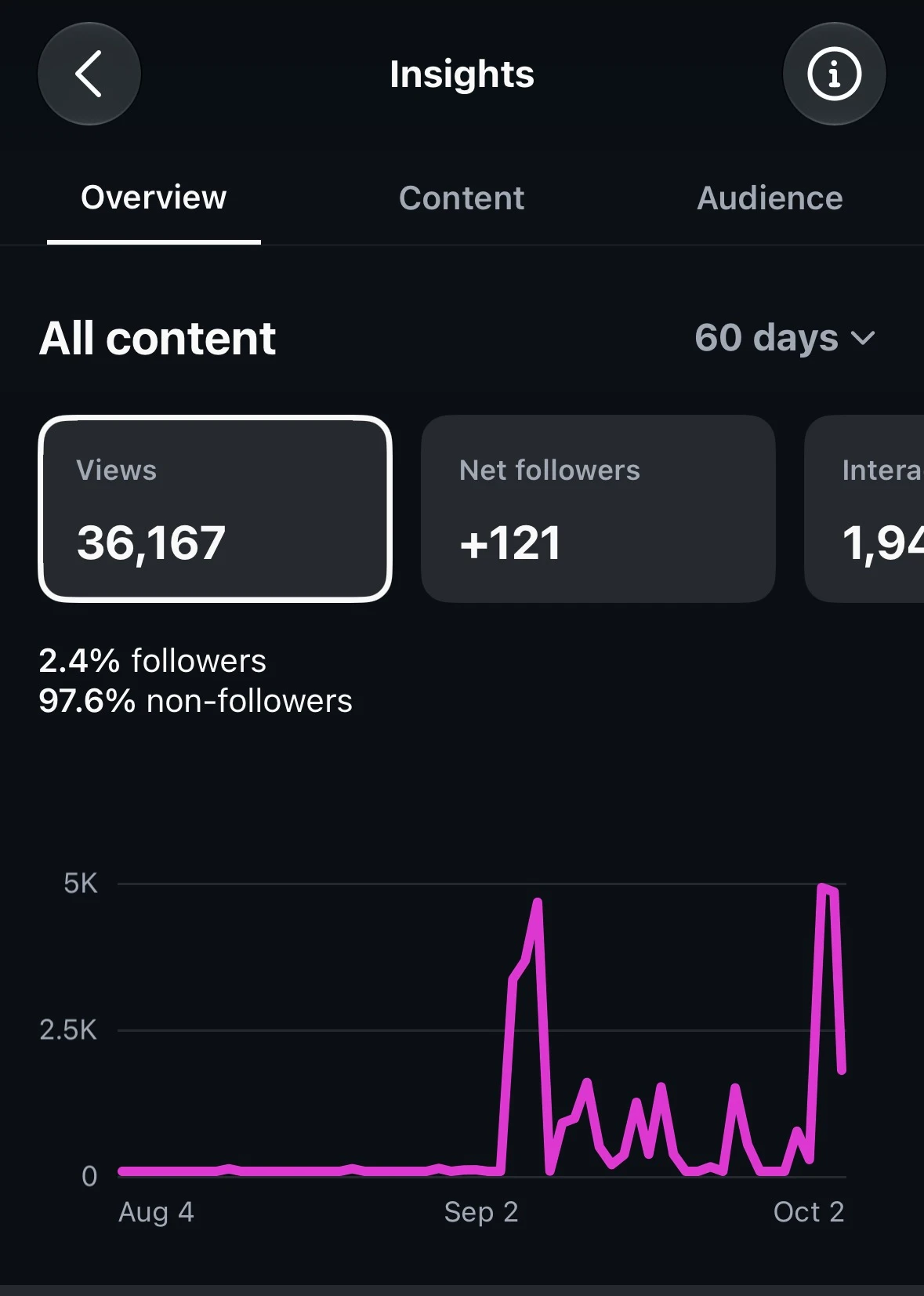
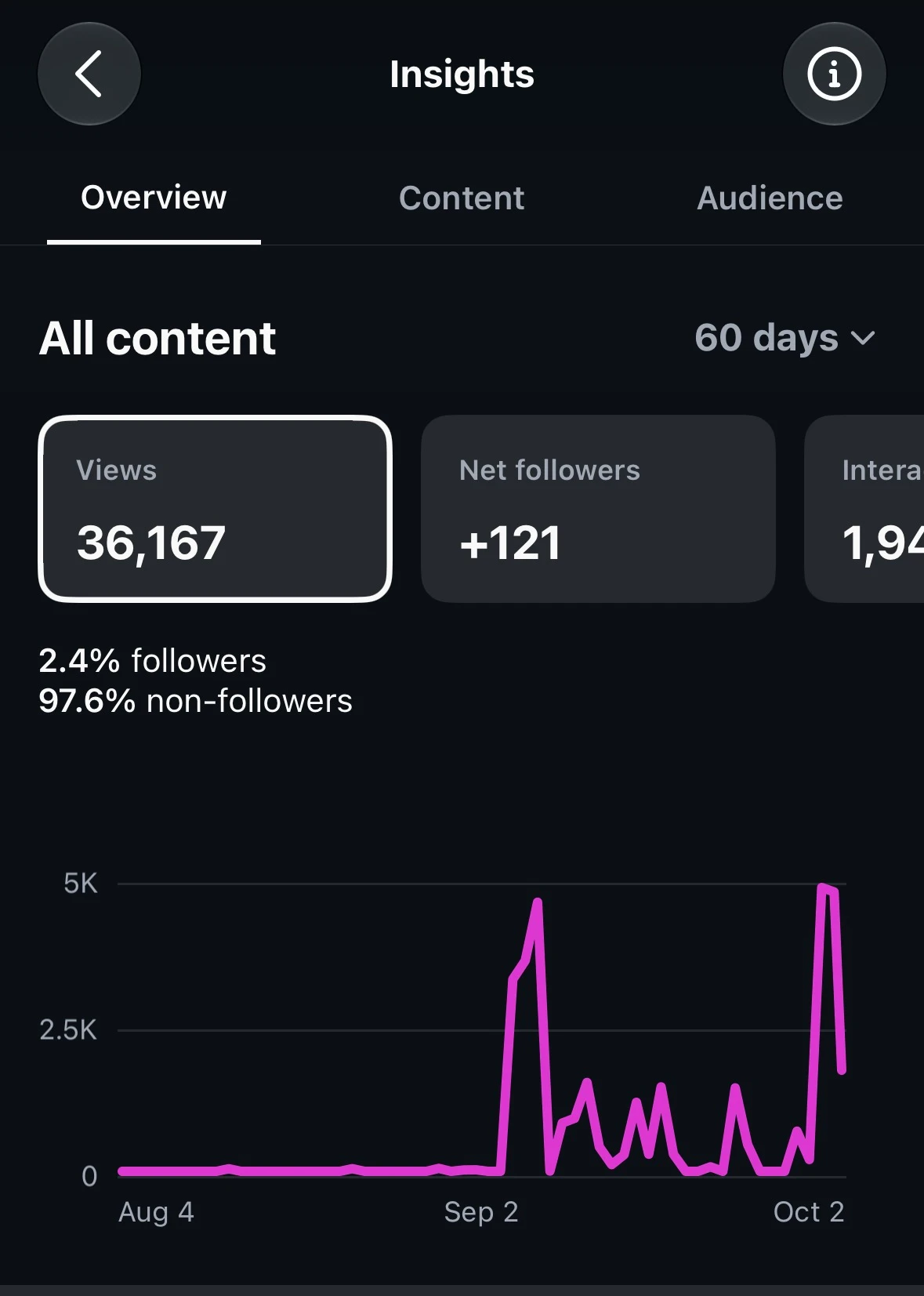
If you don't know my Instagram profile is pretty new as I launched it in August and then I started following my competitor's account what is working in my niche.
After brief study, I created this 25 prompt system that helped me to get 132 followers and nearly 40,000 impression in one week.
So Here's your proof and now let's get started with the system.
What ChatGPT Can and Cannot Do for Instagram
Know the limits first, because they decide how you set up the work.
| ChatGPT can | ChatGPT cannot |
|---|---|
| Draft hooks, scripts, captions, carousels and Story sequences from your inputs | Read your Instagram account, Insights or comments on its own. OpenAI's connected apps list does not include Instagram, though some third-party apps say they connect it. I have not tested those |
| Analyze a CSV or pasted list of your last 30 posts | Post or schedule to Instagram on its own. OpenAI's connected apps list does not include Instagram, so publishing generally needs the Instagram API plus a tool like Zapier or Make |
| Turn a YouTube script, blog post or newsletter into carousels, Reel scripts and Stories | Answer DMs by itself. Automated DMs need an approved tool that follows Meta's messaging rules |
| Keep your brief, files and voice rules in a Project | Know which hashtags, sounds or trends are live right now without current search, and even then it can be wrong |
| Run recurring reminders and checks through scheduled tasks | Watch your Reels the way a viewer does |
| Make images with ChatGPT Images 2.5, which OpenAI says continues to use C2PA metadata and invisible watermarking | Guarantee growth. Nothing in my research shows a prompt alone grows an account |
I did not test whether ChatGPT's agent mode can post to Instagram, so I make no claim either way.
Use a Project, Not a Custom GPT
Do not build your system as a custom GPT. OpenAI's help page says new GPT creation and publishing are not available on personal accounts, and that it plans to retire custom GPTs. Check that page for the current dates before you rely on any GPT.
A Project keeps your files and instructions together. Per OpenAI, file limits are 5 on Free, 25 on Go and Plus, and 40 on Pro and the business plans, and project instructions override your global custom instructions. That makes a Project the right home for your brief, your voice guide and your top posts.
The 25 ChatGPT Prompts for Instagram Growth
I group the prompts into seven stages. Run them in order the first time. After that, you will mostly loop through stages 3 to 6 each week and stages 5 and 6 (engage and measure) after every post.
| Stage | Prompts | The job | Signal it serves |
|---|---|---|---|
| 1. Set up | 1 to 2 | Give ChatGPT your brief and your voice | Originality |
| 2. Research | 3 to 6 | Find what your audience asks and searches | Relevance, search |
| 3. Ideate | 7 to 10 | Pick ideas people would watch and send | Sends, watch time |
| 4. Create | 11 to 16 | Write Reels, carousels, captions and Stories | Watch time, saves |
| 5. Engage | 17 to 19 | Reply to comments, run DMs, fix your profile | Conversations, conversion |
| 6. Measure | 20 to 23 | Read your numbers and run tests | Learning loop |
| 7. Check | 24 to 25 | Remove AI tells and catch policy risks | Originality, trust |
How to Use These Prompts
Square brackets mean "replace this with your own material". The bracketed material matters more than the wording around it.
Follow these four habits:
The pattern behind every prompt: inputs (your real material), task (one job), rules (what to avoid), output (the exact format), check (a final test it must apply to its own answer).
Stage 1: Set Up (Prompts 1 and 2)
Prompt 1: The Master Brief
Do this once. Put it in your Project instructions, so every chat starts with your context. Fill it in properly, because everything else depends on it.
You are my Instagram growth editor. Use this brief for every task in this Project.

ACCOUNT
Handle: [@handle]
Niche, in one sentence: [what you post about and for whom]
Followers today: [number]
Main goal for the next 90 days: [followers / leads / sales / authority]

AUDIENCE
Who they are: [age range, job, situation]
Their top 3 problems: [1] [2] [3]
Words they use for those problems: [paste 5 to 10 real phrases from comments or DMs]

ME
What I know that most people in my niche do not: [experience, results, opinions]
What I want people to do next: [buy, book, join a list, DM me]
Formats I can make every week: [number of Reels, carousels, Stories]
Time I have per week: [hours]

RULES FOR EVERY ANSWER
1. Use my experience and my audience's words. If you lack a real example, ask me for one before you write.
2. Never invent statistics, trends, hashtags, sounds or competitor numbers. If you are unsure, write CHECK THIS next to the claim.
3. Reject any idea that could work for any account in my niche.
4. Label every content idea with one goal: REACH, TRUST, COMMUNITY or SALES.
5. Use plain, spoken language. No hype words.
Why it works: Rule 2 stops invented numbers, which is the most common way ChatGPT output goes wrong. Rule 3 builds the originality test into every answer.
Prompt 2: The Voice Guide Builder
Generic captions come from a missing voice, not a weak model. This prompt turns five of your own posts into a reusable style guide.
Below are 5 of my Instagram captions or Reel scripts that sound most like me:

[PASTE 5 PIECES, with a line break between each]

Study them and build a voice guide I can reuse. Give me:

1. A 5-line description of how I sound (sentence length, humor, how direct I am).
2. 10 phrases or sentence patterns I use often, copied exactly from my text.
3. 10 words or phrases I never use but ChatGPT tends to use (for example hype words and corporate words).
4. 3 rules for how I open a post and 3 rules for how I end one.
5. One 60-word sample caption on [TOPIC] written in my voice.

Do not flatter me. If my samples are inconsistent, tell me which ones to leave out.
Save the answer in your Project as a file called voice-guide. From then on, add "Follow the voice guide" to your drafting prompts.
Watch for: If the sample caption sounds like a press release, your input posts were too polished. Use posts you wrote fast, in your own words.
Stage 2: Research (Prompts 3 to 6)
Prompt 3: The Audience Question Miner
Your comments hold free market research, and ChatGPT can sort them in minutes. This is the prompt I would run first after setup.
Below are comments, DMs and replies from my Instagram audience (names removed):

[PASTE 40 TO 100 COMMENTS]

Treat them as customer research. Sort them into these groups:
- Questions people ask
- Confusion and misconceptions
- Objections and doubts
- Frustrations
- Requests for more

For each group:
1. List the 5 most common themes and how many comments support each.
2. Quote the exact words people used (up to 8 words per quote).
3. Turn each theme into one specific Reel or carousel idea.

Then give me the top 10 ideas ranked by how many people asked, and flag any idea supported by fewer than 3 comments as WEAK SIGNAL.

Do not add themes that are not in the comments.
Why it works: Ranking by count keeps you honest. You post about what many people asked, not what one loud person said.
Privacy note: Remove usernames, emails and anything private before you paste comments or DMs into ChatGPT.
Prompt 4: The Content Pillar Builder
Pillars give your feed a shape. This version gives each pillar a different job, so you do not end up with five pillars that all say the same thing.
Using my brief, create 5 content pillars for my Instagram account.

Each pillar needs a different job:
1. DISCOVERY: content strangers would send to a friend
2. TRUST: content that shows how I think
3. PROOF: content that shows results or behind-the-scenes work
4. COMMUNITY: content that starts conversations
5. CONVERSION: content that leads to my offer

For each pillar give me:
- Name (3 words or fewer)
- Audience problem it solves
- 5 specific topic ideas drawn from my brief
- Best format (Reel, carousel, Story or single image) and why
- One recurring series idea with a title
- How I will know it works (one metric)

Reject any pillar that overlaps another by more than 30%.
Watch for: Ask ChatGPT to cut pillars if you cannot make five formats a week. Three pillars you can sustain beat five you abandon.
Prompt 5: The Competitor Gap Finder
This prompt studies what works in your niche and then tells you what to avoid copying. It matters because Instagram says it rewards original work. Read competitors for patterns. Do not reuse their words.
Below are the captions or transcripts of 5 to 8 high-performing posts from accounts in my niche:

[PASTE THEM, with the account name and approximate views if you know them]

Analyze patterns only. Do not reuse their topics or wording.

1. Hook structures: group the openings into 4 to 6 patterns.
2. Formats and lengths.
3. Emotional triggers: what feeling each post relies on.
4. Calls to action: what they ask viewers to do.
5. What EVERYONE is doing (overused).
6. What is MISSING that my audience would want, based on my brief.

Finish with 15 content ideas that fill the gaps in point 6 and use my own experience from the brief. Mark each idea REACH, TRUST, COMMUNITY or SALES.
My take: Point 5 is the useful one. If six competitors open with "Stop doing this", you now know to open differently.
Prompt 6: The Instagram SEO Keyword Map
Instagram says search matches your query against usernames, bios, captions, hashtags and places (that post dates from 2021). The marketing news site thekeyword.co also reports that since July 2025, public posts from adult-owned professional accounts can be indexed by Google and Bing unless the owner opts out. Treat both as reasons to write plain, searchable captions, not as a trick.
Act as an Instagram SEO editor.

My niche: [NICHE]
My audience: [AUDIENCE]
My topic this month: [TOPIC]

Create a keyword map:
1. One primary keyword phrase (2 to 4 words) a beginner would type into Instagram search.
2. 8 secondary phrases and 8 question-style phrases.
3. For each phrase, mark where it belongs: NAME FIELD, BIO, FIRST LINE OF CAPTION, ON-SCREEN TEXT, SPOKEN LINE. (Instagram documents the first three as searchable text. The last two help viewers, and I found no Instagram statement that they affect search.)
4. A suggested name field (up to 30 characters) and a 150-character bio that uses the primary phrase once, in natural language.
5. Up to 5 hashtags that describe the post topic, only if they add clarity. Instagram has said it will cap captions at 5.

Rules: write for humans first. Do not repeat a phrase more than twice in one caption. Label every phrase CHECK THIS, because I will verify each one in Instagram's search bar before I use it.
Do this after the answer: Type each phrase into Instagram's search bar and note which accounts, hashtags and places come up. That is a sanity check, not search-volume data, because Instagram does not show how often a phrase is searched. Keep the phrases that match real accounts and topics in your niche, and drop the rest.
On hashtags: Instagram told creators that fewer, more targeted tags can perform better than many generic ones. Mosseri has also said hashtags do not increase reach and mainly help describe what a post is about, per Social Media Today. Metricool's 2026 study found posts with at least one hashtag had about 32% fewer views than the platform average. That is a correlation, and the study did not compare different tag counts, so it cannot say whether 1 or 5 is better. Metricool's own takeaway is that natural-language captions and Instagram SEO matter more.
Stage 3: Ideate (Prompts 7 to 10)
Prompt 7: The Reel Idea Generator With a Rejection Rule
This replaces "give me viral ideas". It forces every idea to answer why someone would watch and why someone would send it.
Using my brief and the top themes from my audience research, generate 20 Reel ideas.

Use at least 6 of these structures:
Mistake, Myth, Before and after, Experiment, Case study, Comparison, Teardown, Story, Prediction, Behind the scenes

For each idea give me:
TOPIC (one sentence)
STRUCTURE
WHY SOMEONE WATCHES TO THE END (the payoff)
FIRST 3 SECONDS (spoken line plus what is on screen)
SEND TRIGGER (who would they send it to, and what would they say?)
PROOF I CAN SHOW (a real result, screenshot or demo from my brief)
GOAL (REACH, TRUST, COMMUNITY or SALES)

Rejection rule: delete every idea where I cannot show real proof, or where another creator in my niche could post the same Reel. Tell me how many you deleted and why.
Why it works: The PROOF line ties every idea to something you actually have. That is the originality test in practice.
Prompt 8: The Hook Lab
Mosseri has said the first 3 seconds matter a great deal for a Reel, so I treat the hook as its own task. Write hooks before scripts.
Topic: [TOPIC]
Audience: [AUDIENCE]
What the viewer gets by the end: [PAYOFF]

Write 30 spoken hooks for a Reel, 5 for each type:
1. Curiosity (an open question the video answers)
2. Mistake (what they are doing wrong)
3. Result (a specific outcome with a number I can back up)
4. Contrarian (a belief I disagree with)
5. Story (the first line of a short story)
6. Direct benefit (what they will be able to do)

Rules:
- 12 words or fewer, in plain spoken English.
- No "Did you know", no "Here are 5 tips", no "Stop scrolling".
- Do not promise anything the video cannot deliver.
- Do not invent numbers. Use [YOUR NUMBER] where a number would go.

Then score every hook from 1 to 5 on clarity, curiosity and specificity. Show the top 5 and rewrite each one 3 words shorter.
Watch for: Read the winners out loud. If you stumble, rewrite the line until it sounds like something you would say to a friend.
Prompt 9: The Send-Trigger Redesign
Sends carry extra weight for reaching new people, per Mosseri's January 2025 comments. This prompt takes an idea you already like and rebuilds it so someone wants to forward it.
Here is a Reel or carousel idea:

[IDEA IN 2 TO 3 SENTENCES]

Do not rewrite it yet. First, answer:
1. Who would send this, and to whom? Give 3 specific sender and receiver pairs (for example "a new manager sends it to their team lead").
2. What is the one sentence the sender would type with it?
3. Which trigger is strongest: USEFUL, FUNNY, RELATABLE, SURPRISING, IDENTITY ("this is us"), WARNING, or RESOURCE?

Then rebuild the idea around the strongest trigger. Give me:
- A new hook
- The payoff moment (the part someone would want to forward)
- A call to action that fits naturally. Do not write "share this with a friend".
My take: Do not beg for shares. Build something that gives the viewer a reason to send it.
Prompt 10: The Series Planner
A recurring series gives viewers a reason to follow. It also makes planning faster, because the format is already decided.
Create 5 recurring Instagram series I can run for 8 weeks.

Inputs: my brief, my pillars, the formats I can make each week.

For each series give me:
- Series title (specific, not "Tips Tuesday")
- What the viewer knows after 2 seconds
- Repeatable structure (3 to 5 beats)
- 8 episode topics drawn from my real experience and audience questions
- A simple visual or audio signature I can repeat
- The one metric that tells me to keep or cancel it after 4 episodes

Reject series that need more than [X] hours a week to make.
Stage 4: Create (Prompts 11 to 16)
Prompt 11: The 30-Second Reel Script
Instagram's Reels guide calls 15 to 60 seconds the sweet spot for tutorials and most creative formats, so I default to about 30 seconds and extend only when the idea needs it. The beat structure below keeps ChatGPT from padding the middle.
Write a Reel script I can say in about 30 seconds (about 75 to 90 spoken words).

Idea: [IDEA from Prompt 7 or 9]
Hook to use: [HOOK from Prompt 8]
Proof I can show: [REAL RESULT, SCREENSHOT OR DEMO]
Voice: follow my voice guide.

Beats:
0 to 3 seconds: the hook, spoken.
3 to 8 seconds: the problem, in one or two short sentences.
8 to 22 seconds: the answer in 3 steps, each with a visual change.
22 to 27 seconds: the surprise or the result.
27 to 30 seconds: one natural next step (follow for part 2, send to a friend who needs it, comment a word).

Rules:
- Short sentences. No intro. No "Hey guys". Do not repeat the hook.
- Every sentence must either move the story or show proof.
- Do not state numbers I did not give you.

Output: the spoken script, on-screen text for each beat, B-roll or screen recording to show, a caption, and cover text of 5 words or fewer.
Watch for: ChatGPT writes scripts, not video files. You still film, record screen and edit. If a script runs long, ask: "Cut this to 70 words without removing the proof."
Prompt 12: The Saveable Carousel
Carousels earn saves. Metricool's 2026 data shows carousels getting about 9 times the saves of single-image posts. Mosseri has also said Instagram will often give a carousel a second chance if someone does not swipe at first, as Inman reported. That makes slide 1 and slide 2 your two hooks.
Turn this topic into a carousel someone would save as a reference:

Topic: [TOPIC]
Audience: [AUDIENCE]
My real example or result to include: [PROOF]

Structure (maximum 8 slides):
Slide 1: headline that states the outcome in 10 words or fewer.
Slide 2: a different headline for the same carousel (this shows if someone skips slide 1).
Slides 3 to 6: one idea each, with one example.
Slide 7: a summary or checklist worth saving.
Slide 8: one next step.

Rules:
- Maximum 25 words per slide.
- One idea per slide, plain words.
- Include my proof on at least one slide.

Output: slide text, a visual note for each slide, a caption of 80 words or fewer that uses the primary keyword once, and up to 5 hashtags only if they add clarity.
If you make slide graphics in ChatGPT Images: read every word on every render. Text in generated images can still contain mistakes. Meta says it adds an "AI info" label when it detects industry standard AI image indicators or when people disclose AI use, and its February 2024 post names the C2PA and IPTC standards. OpenAI says it continues to use C2PA metadata and invisible watermarking on images made with its tools. So expect some ChatGPT-made images to carry a label. That is my inference from those facts.
Prompt 13: The Caption Writer
The caption has a different job from the hook. It confirms the topic in plain words, adds context and asks for one action.
Write 3 caption versions for this post:

Post summary: [WHAT THE REEL OR CAROUSEL SAYS]
Primary keyword: [PHRASE FROM PROMPT 6]
Goal of this post: [SEND, SAVE, COMMENT, FOLLOW or DM]
Voice: follow my voice guide.

Structure:
- First line: under 125 characters. State the benefit or the surprise. Include the primary keyword if it reads naturally.
- Middle: 2 to 4 short lines of context or a mini-story with one detail only I would know.
- Last line: one action that matches the goal. Make it a question people can answer in one word, or a clear next step.

Rules:
- No hashtags in the body. If you use any, put up to 5 at the end.
- No words from my banned list in the voice guide.
- Write 3 versions with different openings: direct, story, question.

After the 3 versions, tell me which one you would post and why, in one sentence.
Why 125 characters: Marketer Lilach Bullock recommends caption hooks under 125 characters. Captions often fold behind a "more" link after roughly that length in feed, but I could not find an Instagram source for the exact number. I treat it as a working rule of thumb, not an Instagram requirement.
Prompt 14: The Alt Text and On-Screen Text Pass
This small step helps accessibility and keeps your on-screen text short and clear. Instagram's search documentation lists names, bios, captions, hashtags and places, and I found no Instagram statement that alt text affects search. It takes two minutes per post.
Here is my post:

Visual description: [WHAT IS SHOWN ON EACH SLIDE OR IN THE REEL]
Topic and primary keyword: [TOPIC] / [PHRASE]

Write:
1. Alt text for each image or slide: one plain sentence, under 100 characters, describing what is shown. Mention the keyword only when it is true to the image.
2. On-screen text for the first 3 seconds of the Reel: 8 words or fewer.
3. A text version of the key point that I can say aloud in the first sentence of the Reel, using the keyword once.

Do not stuff keywords. Do not describe things that are not in the visual.
Add the alt text in the post's advanced settings before you publish.
Prompt 15: The Story Sequence
Stories work for conversation, not broadcast. This prompt builds five frames that are easy to reply to.
Create a 5-frame Instagram Story sequence to start conversations about: [TOPIC]

Frame 1: a pattern interrupt (a bold claim or a photo with a short line).
Frame 2: a problem my audience knows.
Frame 3: a poll or quiz sticker with 2 specific answer choices.
Frame 4: my short take or a result from my brief.
Frame 5: a reply prompt that invites a DM with one word.

Rules:
- Questions must be easy to answer with a tap or one word.
- Avoid "Thoughts?" and "What do you think?".
- Write the exact sticker text and answer options.
- Give me one version for people who know me and one for people who just found me.
Prompt 16: The Repurposing Engine
Repurposing is where ChatGPT saves the most time, as long as you start from your own material: a YouTube script, a podcast transcript, a blog post or a newsletter. Do not feed it other people's content to reword.
Here is my original long-form material (my own work):

[PASTE TRANSCRIPT, ARTICLE OR NEWSLETTER]

Find the 5 most useful, specific ideas in it. Then turn the best 3 into Instagram content.

For each of the 3 ideas, create:
- 1 Reel script (30 seconds) with a hook
- 1 carousel outline (6 to 8 slides)

Then add:
- 3 Story ideas that ask my audience a question
- 1 caption that links the idea to my main offer: [OFFER]

Rules:
- Use a different angle for each format. Do not just shorten the original.
- Keep my exact examples, numbers and names. Do not invent new ones.
- Mark any claim that came from outside my text as CHECK THIS.
Watch for: Thin source material gives generic output. If the transcript is short on specifics, add your own notes before running this prompt.
Stage 5: Engage (Prompts 17 to 19)
Prompt 17: The Comment Reply Drafter
Replying to comments helps the conversation and tells you what your audience cares about. Buffer's analysis links replying to comments with higher engagement. This is a correlation, so treat it as a reason to try, not a guarantee. Use ChatGPT for draft replies, then send them yourself.
Voice: follow my voice guide.
Post topic: [TOPIC]

Here are 15 comments on my post:

[PASTE COMMENTS]

For each comment, write a reply that:
1. Answers the question or reacts to the exact point made.
2. Is under 25 words.
3. Ends with a short question when it makes sense.
4. Never repeats the same opening word as the previous reply.

Mark any comment that needs my personal input as NEEDS ME, such as a customer problem, a complaint or a private matter. Do not draft a reply for those.

At the end, list the 3 comments that should become new posts.
Why I keep this manual: Bullock, a marketer who documents her own Instagram growth, says AI cannot handle the first-hour comment window. Show up yourself, and use the drafts to save typing time.
Prompt 18: The Comment-to-DM Funnel Script
Many creators ask people to comment a keyword and then send a link by DM. ChatGPT can write the message flow. A compliant tool has to send it.
First, know the rules. These come from Meta's developer documentation:
| Rule | What Meta's docs say | Source |
|---|---|---|
| Who can start a DM | An app can message a user after that user messages your professional account | Messaging API |
| Reply window | Your app has 24 hours to respond to a user's message | Messaging API |
| Private replies to comments | Allowed within 7 days of the comment, one message per comment. A follow-up can be sent only if the user replies, and it must go out within 24 hours of that reply | Private replies |
So the script needs to be short, ask one question and wait for an answer.
Write a DM flow for this offer:

Offer: [FREE GUIDE / TEMPLATE / BOOKING LINK]
Trigger: someone comments the word [KEYWORD] on my Reel
Audience: [AUDIENCE]
Voice: follow my voice guide.

Create:
Message 1 (sent as a private reply to the comment): under 30 words. Thank them, say what they will get and ask ONE easy question that needs a reply, such as "Which describes you best: A or B?"
Message 2 (after they reply): deliver the link or resource, plus one line on how to use it.
Message 3 (optional, only if they reply again): ask what result they want and offer help.

Rules:
- No more than 3 messages in total.
- Never ask for passwords, payment details or private information.
- No fake urgency and no claims I cannot back up.
- Tell the user clearly it is an automated message in Message 1.
My caution: Meta's rules limit what automation can do, and I could not find Meta's wording on third-party automation tools beyond the API terms. Use tools that work through the official API, and read their policy pages before you connect your account. Never use tools that ask for your Instagram password.
Prompt 19: The Profile Audit
A stranger decides quickly whether to follow. This prompt checks whether a new visitor understands who the account is for.
Audit my Instagram profile for a first-time visitor.

My name field: [TEXT]
My bio: [TEXT]
My link: [WHAT IT LEADS TO]
My highlight names: [LIST]
My 3 pinned posts: [DESCRIBE THEM]
My last 9 post topics: [LIST]
Who I want to follow me: [AUDIENCE]

Answer these as a stranger would:
1. In one sentence, who is this account for?
2. What will I get if I follow?
3. What should I do next?
4. What is confusing or missing?

Then rewrite:
- 3 options for the name field (searchable, under 30 characters)
- 3 bio options (under 150 characters, no emojis as replacements for words)
- A suggested set of 4 highlights
- Which 3 posts I should pin, and why

If my last 9 posts do not match my bio, say so directly.
Stage 6: Measure (Prompts 20 to 23)
This is the stage almost every competing guide skips, and it is where growth actually comes from. Writing prompts help you post. Measurement prompts help you post better.
Get Your Data Into ChatGPT
ChatGPT cannot see your account, so you export or copy the numbers yourself. These are the routes I have seen described, and menus change, so check your app:
Privacy rule: export files can contain personal data. Delete DMs, usernames and anything private before you upload a file to ChatGPT.
Math rule: Graphed notes ChatGPT can get metric math wrong while still finding good qualitative patterns. So I tell it to use code for calculations, and I spot-check two numbers in a spreadsheet.
What Numbers to Compare Against
Benchmarks differ because each company measures engagement differently. Use them as rough context, and compare yourself mostly with your own last 30 posts.
| Source | Sample | What it found |
|---|---|---|
| Socialinsider, 2026 | 35 million posts, 447,613 profiles (2025 data) | Average engagement rate 0.48%, down 24% year on year. Carousels 0.55%, Reels 0.52%, images 0.37%. Engagement rate is likes plus comments divided by followers. |
| Rival IQ, 2026 | 150 companies per industry from a database of 200,000+ | Median Instagram engagement rate 0.30%, down from 0.36%. Median 3.69 posts a week. |
| Metricool, 2026 | 24.4 million posts, 375,118 accounts | Reels got more than 4 times the interactions of single-image posts, and carousels about 9 times the saves. Average Reel watch time was 8.5 seconds. |
| Buffer (frequency and posting times) | 52 million+ posts for growth data, 9.6 million for timing | Links 3 to 5 posts a week with about twice the follower growth of 1 to 2. Its frequency guide shows growth still rising at 6 or more posts, with smaller gains per step, and recommends 3 to 5 for quality. Mid-week slots such as Wednesday and Thursday performed best, and results vary by industry. |
Social Media Today reports that Mosseri advised creators who want more reach to focus on engagement rates instead of total views or likes. That is why I compare rates against my own median instead of chasing view counts.
Prompt 20: The Insights Analyst
I am pasting (or attaching) performance data for my last 30 Instagram posts.

Columns: date, format, topic, hook (first line), length in seconds, views, reach, non-follower reach, average watch time, likes, comments, shares, saves, profile visits, follows.

DATA:
[PASTE OR ATTACH]

Step 1. Use code to calculate and show a table with these for each post:
- shares divided by reach (my stand-in for sends per reach)
- saves divided by reach
- likes divided by reach
- average watch time divided by video length
- follows per 1,000 reach
- non-follower share of reach

Step 2. Find patterns by format, topic, hook type and length. Report only differences supported by at least 3 posts. Mark anything with fewer as TOO FEW POSTS.

Step 3. Give me:
- 3 patterns to repeat
- 3 patterns to stop
- 3 one-variable experiments to run next
- what data is missing that could change your answer

Do not claim causes. Write "associated with" unless the data isolates a single change.
Why shares divided by reach: I use shares divided by reach as a stand-in for the sends per reach signal Mosseri named. Check which share or send numbers your own Insights screen shows, and adjust the column names.
Prompt 21: The Winner Reverse-Engineer
Do not ask for "more viral ideas". Ask why your best post worked, then borrow the structure, not the topic.
This post performed far above my median:

SCRIPT OR CAPTION: [PASTE]
RESULTS: reach [X], non-follower reach [X], average watch time [X], shares [X], saves [X], comments [X], follows [X]
MY MEDIAN FOR THESE METRICS: [X]

Analyze why it probably worked. Separate your analysis into:
- Topic demand
- Hook
- Structure and pacing
- Proof
- Emotion
- Send trigger
- Call to action
- Packaging (cover, title, first frame)

Label each as STRONG EVIDENCE (visible in the data or text) or GUESS.

Then extract the formula in 5 lines and give me 10 new ideas that use the same structure on different topics from my brief. Do not copy the original.
Prompt 22: The Underperformer Diagnosis
This post underperformed:

CONTENT: [PASTE]
RESULTS: [PASTE]
MY MEDIAN: [PASTE]

Sort the problem into one primary bucket and one secondary bucket:
1. IDEA problem (nobody wanted this)
2. HOOK problem (people left in the first 3 seconds)
3. EXECUTION problem (pacing, length, clarity)
4. AUDIENCE problem (wrong people saw it)
5. PACKAGING problem (cover, title, caption)

Explain which numbers point to each bucket. Then write Version 2 that changes only what the diagnosis supports. List what stays the same.
My take: The "what stays the same" line prevents the common mistake of changing five things and learning nothing.
Prompt 23: The Trial Reels Test Matrix
Trial Reels let you show a Reel to non-followers first. Check in your own app whether you are eligible, because requirements have changed before. Instagram has also let creators schedule Trial Reels. Social Media Today reports Mosseri suggested Trial Reels can help when you experiment with different approaches, per Social Media Today.
Meta's creator post states the evidence plainly: in an internal analysis of over 400,000 creators, 40% posted Reels more often after trying Trial Reels, and 80% of that group saw more non-follower reach. Meta adds that performance is not guaranteed.
Design 6 Trial Reel experiments for my account.

Inputs: my brief, my last 30 posts analysis, my median shares divided by reach: [X], my median watch time share: [X].

Rules for every test:
- Change ONE variable only: hook, topic, length, opening visual, format or call to action.
- Keep the topic constant when testing a hook, and keep the hook constant when testing length.

For each test give me:
HYPOTHESIS (one sentence)
CONTROL (what I already do)
VARIANT (the one change)
PRIMARY METRIC and SECONDARY METRIC
DECISION RULE (for example: promote to my main feed only if the variant beats my median on both metrics after 24 hours)
WHAT I WILL LEARN EVEN IF IT FAILS

Order the tests from highest expected impact to lowest.
Keep a simple log with the test name, date, variant, result and decision. After each test, paste the log into ChatGPT and ask: "What did these results change about my plan?"
Stage 7: Check (Prompts 24 and 25)
Prompt 24: The Anti-AI Edit Pass
Run this on every draft. Velocity explains that ChatGPT tends toward a neutral, mildly formal voice with recurring AI-isms. This prompt finds them.
Review this draft for writing that sounds like AI:

[DRAFT]

Voice guide: [PASTE OR REFER TO VOICE GUIDE]

Mark each of these:
- Generic phrases anyone could write
- Hype words and marketing clichés
- Predictable sentence patterns (for example "It's not X, it's Y")
- Fake enthusiasm
- Overexplaining
- Repeated ideas
- Claims with no proof

Then rewrite the draft so it sounds like one person talking to one person:
- Keep the facts and my examples.
- Use short sentences and specific details.
- Keep occasional imperfect phrasing if it sounds like me.
- Use no words from my banned list.

After the rewrite, list 3 places where I should add a real detail only I know.
Do the last step by hand. A number, a name or a mistake that only you know is the fastest way to make a draft sound human. Bullock puts it plainly: a polished AI caption reads flat, so she rewrites in her own voice.
Prompt 25: The Fact and Policy Check
AI generates content from patterns and cannot tell whether the data behind it is accurate, according to Penn Libraries. Before you post, run this check, then verify every flag yourself.
Act as a fact and policy checker for this Instagram draft. Do not rewrite it. List problems only.

DRAFT: [PASTE SCRIPT, CAPTION AND HASHTAGS]

Check and report:
1. STATISTICS: list every number or claim that needs a source. Mark whether it came from my brief or from you.
2. HASHTAGS: count them. Flag more than 5, and any that are misspelled or unrelated to the topic. Say you cannot verify current popularity or whether a tag is restricted.
3. ORIGINALITY: does any part copy another creator's wording, structure or footage?
4. AI DISCLOSURE: does the post show an AI-generated person that viewers could mistake for a real one? Does it include AI-made images that may need an AI info label?
5. PROOF: does every result I claim have something I can show?
6. SENSITIVE CLAIMS: health, money or legal claims that need a qualified source or a disclaimer.
7. AUTOMATION: does the call to action rely on a tool I have not confirmed follows Meta's rules?

For each issue give: location, risk (HIGH, MEDIUM, LOW), and the exact fix I should make.
Here are the platform rules this prompt checks against:
| Rule | What the sources say |
|---|---|
| Originality | Meta says 75% of Instagram recommendations now come from original posts (Meta). Instagram's guidelines say low-effort edits do not make a repost original, and accounts that primarily post unoriginal content may not be shown in recommendations to people who do not follow them. The policy now covers photos and carousels as well as Reels, per Engadget. |
| AI-generated people | On August 31, 2026, Instagram announced it will start limiting the reach of accounts that feature AI-generated people without saying so. TechCrunch reports that creators who use AI to edit photos, polish captions or make graphics do not need the label (TechCrunch). |
| AI info labels | Meta applies an "AI info" label when it detects industry standard AI image indicators or when people disclose AI use (Meta, 2024). Its February 2024 post names the C2PA and IPTC standards. |
| Hashtags | In December 2025 Instagram said it would gradually limit captions to 5 (Social Media Today). |
The practical reading: ChatGPT-drafted captions and scripts do not fall under the AI-profile rule, which targets AI personas. Even so, I would never post a number, a result or a story that is not yours.
Your 30-Day Plan (Prompts in Order)
Use this plan to turn the prompts into a routine. Scale the volume to your time. I would start with 3 posts a week and grow from there, because Mosseri advised picking a pace you can keep consistently, such as one video and one carousel a week, and warned that sudden jumps in frequency can alienate existing followers, per Inman.
| Week | Focus | Prompts | What you finish |
|---|---|---|---|
| 1 | Set up and research | 1, 2, 3, 4, 6, 19 | Project with brief and voice guide, 5 pillars, keyword map, updated profile |
| 2 | Ideate and publish | 5, 7, 8, 9, 11, 12, 13, 14 | 3 to 5 posts live, each with a hook, keyword and proof |
| 3 | Engage and test | 15, 17, 18 (if you use DMs), 10, 23 | Replies done within hours of posting, 2 Trial Reel tests, one series started |
| 4 | Measure and decide | 20, 21, 22, 16, 24, 25 | Insights analysis, 3 patterns to repeat, 3 to stop, next month's tests |
Every post also goes through Prompts 24 and 25 before you publish. After week 4, repeat the loop with the new data from Prompt 20.
A Weekly Rhythm That Fits Real Life
| Day | Task | Time |
|---|---|---|
| Monday | Run Prompts 3, 7 and 8 to pick ideas and hooks for the week | 45 minutes |
| Tuesday | Film or record, then write scripts with Prompts 11 and 12 | 90 minutes |
| Wednesday | Caption, alt text and checks (13, 14, 24, 25), then publish | 45 minutes |
| Thursday | Reply to comments within hours (17), post Stories (15) | 30 minutes |
| Friday | Review numbers (20 or 21), log one test result | 30 minutes |
These times are my estimate, not research. Adjust them to your speed.
Does ChatGPT Really Grow Instagram Accounts? What the Evidence Shows
I looked for case studies and tests. Honest answer: the evidence is thin, most of it is self-reported, and I found no strong, verified case where ChatGPT alone drove the growth.
| Source | What it reports | How much I trust it |
|---|---|---|
| Mika Reyes, Aug 2026 | Grew from about 1,500 to 23,000 followers in roughly four months (April to August 2026) after months stuck. She built her workflow mostly with Claude-based skills and says she only switched to ChatGPT for writing the week before publishing, so this is not a ChatGPT growth case. She credits focus. | Medium. A first-person account, and she sells a course. I include it as context only. |
| Lilach Bullock, Sep 2026 | Went from about 4,200 to 11,600 followers in ten months. One carousel brought 340 followers over six weeks, while a Reel with 412,000 views converted only 190. She uses ChatGPT for first drafts of captions and hook lines and rewrites the captions in her own voice. | Medium. Named marketer, self-reported numbers. |
| Fleseriu and Fron, 2025 | A field test on one 770-follower food account, 12 human posts against 12 AI posts. Likes, shares, saves and engagement rate were similar. Human posts drew more comments and hashtag impressions, while AI posts drew more profile visits and higher reach among non-followers. In surveys, people preferred human visuals and recipes but found the AI captions more appealing. | Useful but small. One niche, single-image posts only. |
| Picmim, 2026 | 10,024 posts from 200 European business accounts. AI-assisted Instagram posts averaged 4.2% engagement against 3.1% for human-only posts. | Low to medium. Vendor study, not randomized, and the AI content was human-reviewed. |
| Ihendeson Ehinomen, May 2026 | ChatGPT output was robotic until her prompts carried more context. She credited an audience-targeting tool as the biggest growth factor. | Low on numbers (none given), useful as an honest account. |
Three lessons come out of that table:
The Hype Check: What Creators Post on X
When I searched X for ChatGPT and Instagram, the high-engagement posts were mostly prompt threads with big view claims. Here are two I found, with what I could and could not verify.
| Post | Claim as stated | What I can verify |
|---|---|---|
| Tech_Rose1, Sep 2026 | Says they gave their Instagram to ChatGPT and got 2.2 million views in 30 days using 7 prompts. | Nothing beyond the post text. No account analytics in what I could read. |
| tec_aryan, Aug 2026 | Says ChatGPT can train you to make Reels hitting 2M+ views, with 7 prompts. | Nothing beyond the post text. The claim has no data attached. |
I am not saying these creators are lying. I am saying a view count alone tells you little, because views do not equal follows, sales or trust. Compare that to Bullock's honest example above.
Common Failure Modes and Fixes
| Problem | Why it happens | Fix in this guide |
|---|---|---|
| Robotic tone | ChatGPT defaults to neutral phrasing with AI-isms, per Velocity | Prompts 2 and 24 |
| Brand voice drift | Prompt-only AI caption tools start without your tone, brand description or banned words, so output varies with whoever types the prompt, per Sked Social | Put the voice guide in a Project (Prompt 2). Sked sells a brand-kit feature as its own fix |
| Samey feeds | When everyone uses the same AI tools the same way, captions read as generic and are easy to spot, per CRO:NYX Digital | Add proof, screenshots and behind-the-scenes (Prompt 7's PROOF line) |
| Invented stats, trends or hashtags | Models produce fluent text without knowing if it is accurate | Rule 2 in Prompt 1, plus Prompt 25 |
| Wrong metric math | ChatGPT can miscalculate metrics, per Graphed | Use code, spot-check two numbers (Prompt 20) |
| Low-effort output | Hootsuite's 2026 trends report says audiences reject low-effort content, not AI itself | Add your own details in every draft |
I found no Instagram-specific write-up of ChatGPT inventing a trending sound. The warnings about invented trends are general, so I treat that risk as plausible, not proven.
Frequently Asked Questions (FAQs)
Can ChatGPT really help me grow on Instagram?
Yes, as a research assistant, drafter and analyst, but not as an autopilot. The creators I found credit niche focus and a repeatable system, and Bullock uses ChatGPT for first drafts that she rewrites. No source I found shows a prompt alone grows an account, so use the prompts to work faster and learn from your numbers.
Does Instagram penalize AI-generated captions?
I found no Instagram rule that targets AI-assisted captions. The 2026 rule targets accounts that feature AI-generated people without disclosure, and TechCrunch reports it excludes human creators who use AI for editing or caption polishing. Originality still matters: Instagram says accounts that primarily post unoriginal content may not be shown in recommendations to new audiences, though followers still see the content. Make every draft carry your own experience.
How many hashtags should I use on Instagram in 2026?
Use up to 5, and make them specific to the post. Instagram said in December 2025 that it would gradually limit captions to 5 hashtags and that fewer, more targeted tags can perform better than many generic ones. Mosseri has also said hashtags do not increase reach, so put your keywords in the name field, bio and caption instead.
Can ChatGPT post to Instagram or reply to my DMs for me?
Not by itself. OpenAI's connected apps list does not include Instagram, and posting or DM automation generally needs the Instagram API through an approved tool. Some third-party apps say they let ChatGPT read Instagram data or publish, and I have not tested them. Meta's rules also limit automated DMs: an app can generally message someone after they message you, and private replies to a comment are allowed within 7 days, one per comment, and a follow-up is allowed only after the user replies.
How do I stop ChatGPT captions from sounding like AI?
Give it a voice guide built from five of your own posts, add a banned word list, and run the anti-AI edit pass (Prompt 24). Then change one real detail by hand: a number, a name or a mistake only you would mention. Bullock says a polished AI caption reads flat, so she rewrites her drafts in her own voice.
How often should I post on Instagram?
Mosseri gave no official number. He said to find a pace you can keep, gave one video and one carousel a week as an example, and warned that a sudden jump in posting can alienate followers. For reference, Rival IQ's 2026 median is 3.69 posts a week, and Buffer links 3 to 5 posts a week with about twice the follower growth of 1 to 2. I would start at 3 and add a fourth when your system feels easy.
Final Thoughts
ChatGPT will not grow your Instagram on its own, but a good system makes you faster and helps you learn from your data. The prompts that matter most are the ones built on your real material: your voice, your comments, your Insights and your proof. Instagram's own signals point the same way: watch time and sends reward content people want to finish and forward, and recommendations now favor original work.
Your next step takes about 20 minutes. Run Prompt 1 and Prompt 2 today, paste 40 real comments into Prompt 3, and post one piece of content from the best idea. For more copy-ready prompts, grab them at promptslove.com.