 Chrome Extension

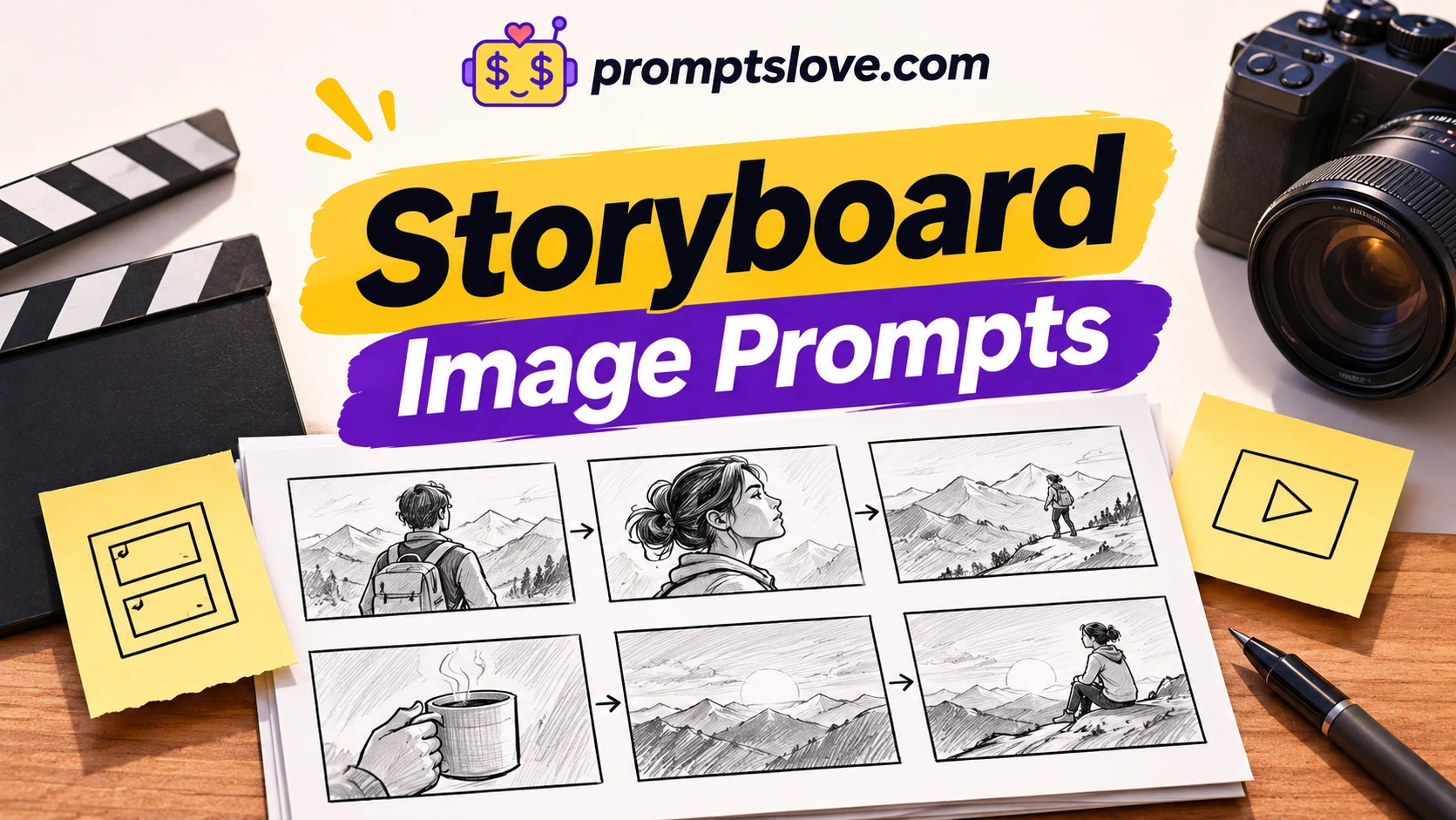
Kling 4.0 now makes clips from 3 to 30 seconds and lets you upload a storyboard image for the model to follow, shot by shot.
That makes storyboard image prompts the fastest way I know to control what happens in every second of an AI video.
I turned my own photo into a character sheet, then generated 24 timestamped storyboards from it in a single ChatGPT chat, including frame by frame boards with one panel every second or every half second. You get every prompt, the image it produced, fillable templates and the video prompts that turn a storyboard into a moving clip.
One rule before you start: every prompt here needs your character sheet attached. Make yours in Step 1, then attach it each time you paste a prompt.
Key Takeaways
What Is a Storyboard Image for AI Video?
A storyboard image is a single sheet with a grid of film frames. Each frame shows one shot, and a caption under it says the panel number, the time range and the shot size, like 2 | 0:03-0:05 | CLOSE UP.
You upload that sheet to a video model next to your prompt. The model reads the order of the panels, the framing in each one and the timing in the captions, then animates the shots in sequence.
This beats a text prompt alone because the model sees the composition instead of guessing it. Your text prompt only has to explain the motion between the frames.
Why Timestamps Matter
Timestamps turn a pretty grid into a shot plan. Artlist calls this timestamp prompting: tying each instruction to an exact moment instead of describing the whole clip at once.
Some prompt templates keep timestamps off the storyboard so they never appear in the video. I keep them, but only in a white caption strip under each frame, outside the picture. Then I tell the video model to show the frames only.
Big Grids vs Small Grids
More panels do not always mean more control. Invideo's tests found that a 9 panel grid gives each frame less detail, and one weak shot forces you to regenerate everything.
My rule: use a 3x3 grid to plan a 30 second story, then split it into smaller boards of 3 or 4 panels when a video tool starts to drift.
Which AI Video Tools Can Follow a Storyboard (November 2026)
The video tool decides how long your storyboard can be. Here is what each major model accepts right now.
| Video tool | Clip length | How it uses your storyboard |
|---|---|---|
| Kling 4.0 | 3 to 30 seconds | Upload the storyboard image and ask it to follow the shot order and camera paths; up to 10 images per task |
| Seedance 2.5 | Up to 30 seconds | Accepts storyboards, images, video and audio as references; write timed beats like 0-5s: |
| Gemini Omni 1.2 Flash | 3 to 15 seconds | Use panels as first and last keyframes in the Gemini app, Flow or Vids |
| Veo 3.1 | 4, 6 or 8 seconds | Crop the first and last panels and use them as start and end frames |
| Sora 2 | Discontinued | The app shut down on 26 April 2026 and the API on 24 September 2026 |
Sources: Kling 4.0 user guide, Dreamina on Seedance 2.5, Android Authority on Gemini Omni 1.2 Flash and Frameliq's model comparison.
How Many Panels for 5, 10, 15 and 30 Second Videos
One panel should hold one action. If a panel needs the word "then", split it into two panels.
| Video length | Panels | Seconds per panel | Grid | Best for |
|---|---|---|---|---|
| 5 seconds | 3 | 1 to 2 | One row | Hooks, bumper ads, quick gags |
| 10 seconds | 4 | 2 to 3 | 2x2 | Story beats, teasers, recipes |
| 15 seconds | 6 | 2 to 3 | 3x2 | UGC ads, Reels, brand stories |
| 30 seconds | 6 or 9 | 3 to 5 | 3x2 or 3x3 | Full ads, short films |
| Any length, every second | 1 per second | 1 | 5 across | Montages, transitions, keyframes |
| Any length, every half second | 2 per second | 0.5 | 5 across | Slow motion, sports, product reveals |
For social video, make the first panel 1 second or less. That first second decides whether someone keeps watching.
Step 1: Make a Character Sheet From Your Photo
Every prompt in this guide needs your character sheet attached. Without it, ChatGPT invents a different person in every board, and the video model has nothing to keep consistent.
I attached a photo of myself and asked ChatGPT for a reference sheet with body views, angles and expressions.
If you want the full method, read these character sheet prompts, which cover turnarounds, expression sheets and how to use a sheet in each video tool. Here is the exact prompt I used for this guide.
Character Sheet Prompt
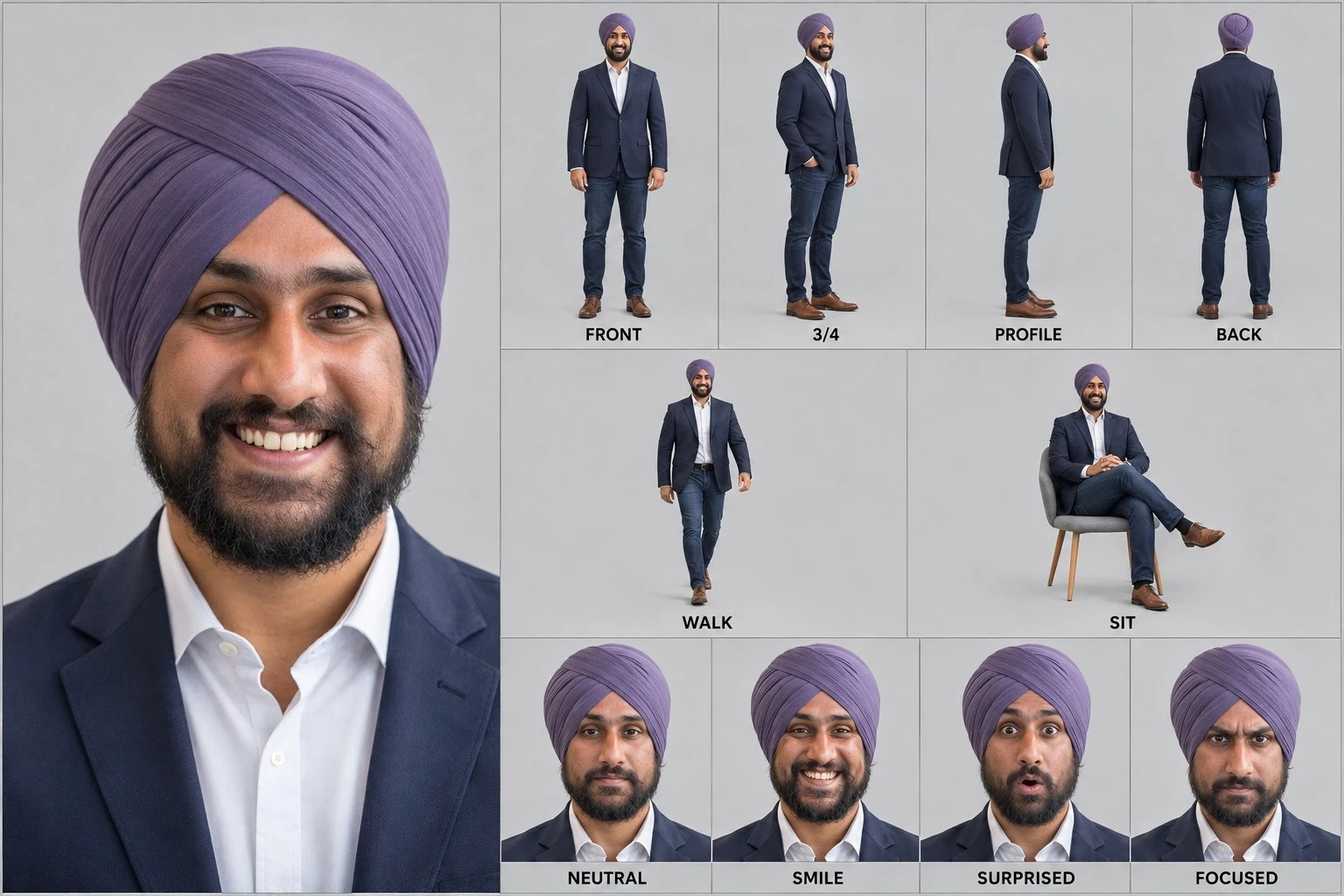
Create a character reference sheet for AI video from the attached photo. Keep his exact face, skin tone, purple turban, full beard and expression, and make the likeness the top priority. Layout: a clean light grey page with thin grid lines. Left third: a large head and shoulders portrait. Right two thirds: a grid of smaller panels showing the same man in full body front view, three quarter view, side profile, back view, walking and sitting, plus four face close ups: neutral, big smile, surprised and focused. Same outfit in every panel: navy blazer, crisp white shirt, dark blue jeans and brown leather shoes. Soft even studio lighting, photorealistic. Under each panel, a small black label: "FRONT", "3/4", "PROFILE", "BACK", "WALK", "SIT", "NEUTRAL", "SMILE", "SURPRISED", "FOCUSED". Landscape 3:2. Spell every label exactly. No other text, no watermark.
All ten labels came out spelled correctly, and the face matched my photo. Use only your own photo or a photo you have permission to use.
How I Reused the Sheet
I generated every storyboard in the same ChatGPT chat as the sheet. Each new prompt started with "New image. Use the character sheet you made earlier in this chat as the attached character sheet."
In a new chat, add the sheet yourself before every prompt:
Every prompt below says "Use the attached character sheet for the main character", so the sheet must be in the same message or earlier in the same chat.
The Core Storyboard Prompt (Fill In the Brackets)
This is the one prompt every other storyboard in this guide is built from. Attach your character sheet, swap the brackets and you can storyboard almost any short video.
Create a [LENGTH] second storyboard sheet for an AI video. Use the attached character sheet for [CHARACTER]; keep [FACE, HAIR, OUTFIT] identical in every panel. Layout: [NUMBER] panels in a [GRID] on a clean white page, each panel a [PANEL RATIO] film frame with a thin black border. Under each panel, a caption strip with the panel number, timestamp and shot size. Header at the top: "[TITLE] | [LENGTH]s | [PANEL RATIO]". Story: [ONE SENTENCE STORY]. Panel 1, caption "1 | [START]-[END] | [SHOT SIZE]": [ACTION]. Panel 2, caption "2 | [START]-[END] | [SHOT SIZE]": [ACTION]. [ADD ONE LINE PER PANEL]. Style: [STYLE], same color grade in every panel, clear motion in every frame. [PAGE SHAPE]. Spell all text exactly. No other text, no watermark.
Here is what each part does:
The Core Prompt Filled In: Unboxing Day
[place storyboard-core-prompt-example.jpg]
Create a 10 second storyboard sheet for an AI video. Use the attached character sheet for the main character; keep his face, purple turban, beard and navy blazer identical in every panel. Layout: 4 panels in a 2x2 grid on a clean white page, each panel a 16:9 film frame with a thin black border. Under each panel, a caption strip with the panel number, timestamp and shot size. Header at the top: "UNBOXING DAY | 10s | 16:9". Story: he unboxes a mystery package and finds a vintage film camera. Panel 1, caption "1 | 0:00-0:03 | WIDE": he carries a cardboard box down a sunny apartment hallway. Panel 2, caption "2 | 0:03-0:05 | MEDIUM": he sets the box on a wooden table and slices the tape. Panel 3, caption "3 | 0:05-0:08 | CLOSE UP": warm golden light from inside the box lights up his amazed face. Panel 4, caption "4 | 0:08-0:10 | MEDIUM": he lifts out a vintage film camera and grins at the camera. Style: photorealistic cinematic film stills, warm afternoon light, same color grade in every panel, clear motion in every frame. Landscape 3:2. Spell all text exactly. No other text, no watermark.
ChatGPT finished this board in 55 seconds. Notice how panel 3 is the only close up: that is the moment the video should land on.
Storyboard Prompts by Video Length
These four boards show the same character at each length. Attach your character sheet first, then use them as starting points and jump to the category sections for more ideas.
5 Second Storyboard: The Perfect Shot
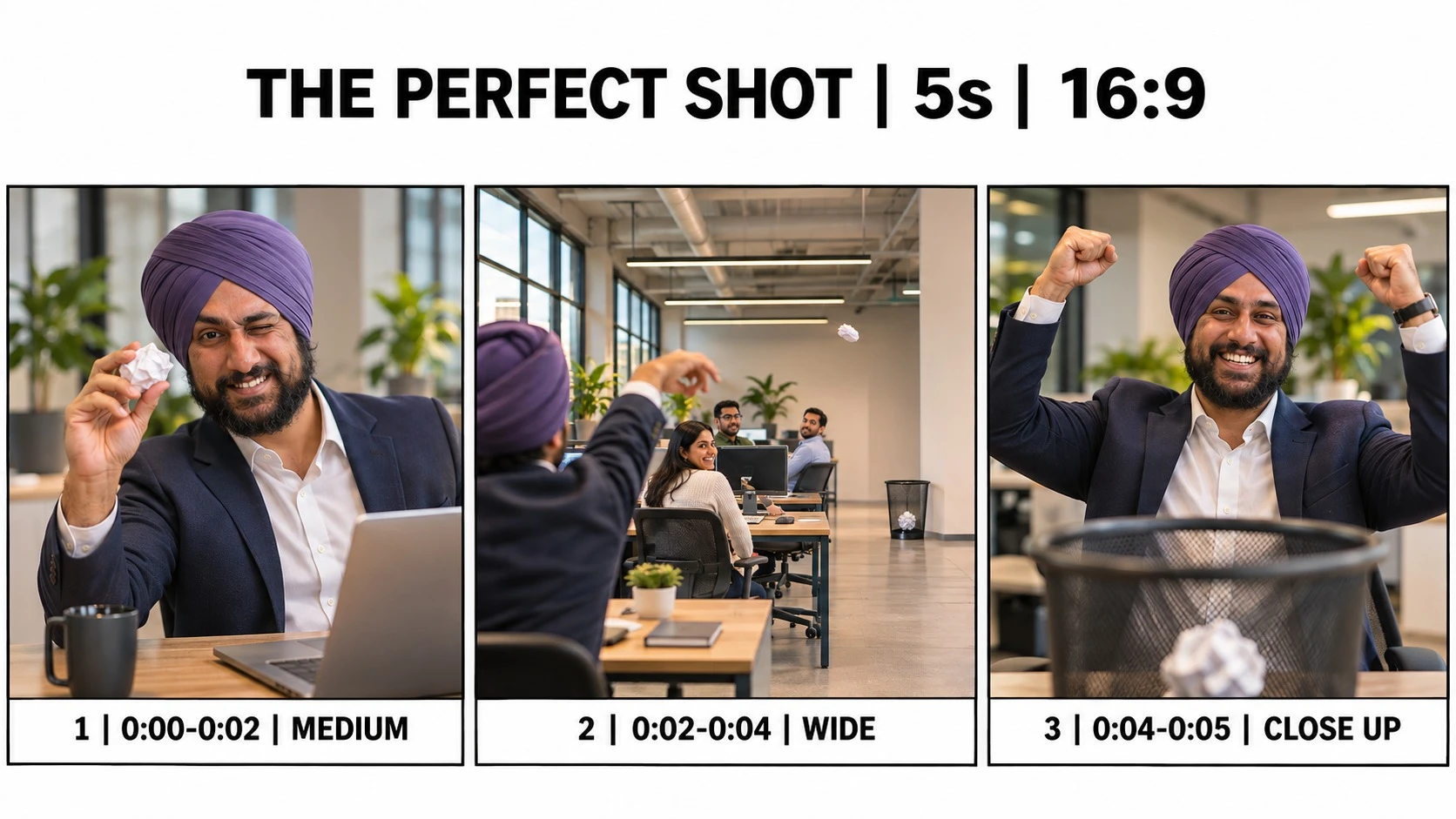
Create a 5 second storyboard sheet for an AI video. Use the attached character sheet for the main character; keep his face, purple turban, beard and navy blazer identical in every panel. Layout: 3 panels in one row on a clean white page, each panel a 16:9 film frame with a thin black border. Under each panel, a caption strip with the panel number, timestamp and shot size. Header at the top: "THE PERFECT SHOT | 5s | 16:9". Story: he throws a paper ball across the office and lands it in the bin. Panel 1, caption "1 | 0:00-0:02 | MEDIUM": he lines up a crumpled paper ball at his desk, one eye closed. Panel 2, caption "2 | 0:02-0:04 | WIDE": the paper ball flies in a high arc across the open office as coworkers turn to watch. Panel 3, caption "3 | 0:04-0:05 | CLOSE UP": the ball drops into the bin and he throws both arms up in celebration. Style: photorealistic, bright modern office, soft daylight, same color grade in every panel, clear motion in every frame. Wide 16:9 page. Spell all text exactly. No other text, no watermark.
Three panels in one row gave me a short page with tall frames, so I switched to "Wide 16:9 page" for every 3 panel board. ChatGPT still drew the frames taller than a true 16:9 frame, which is fine for a 5 second clip.
10 Second Storyboard: Rain Check
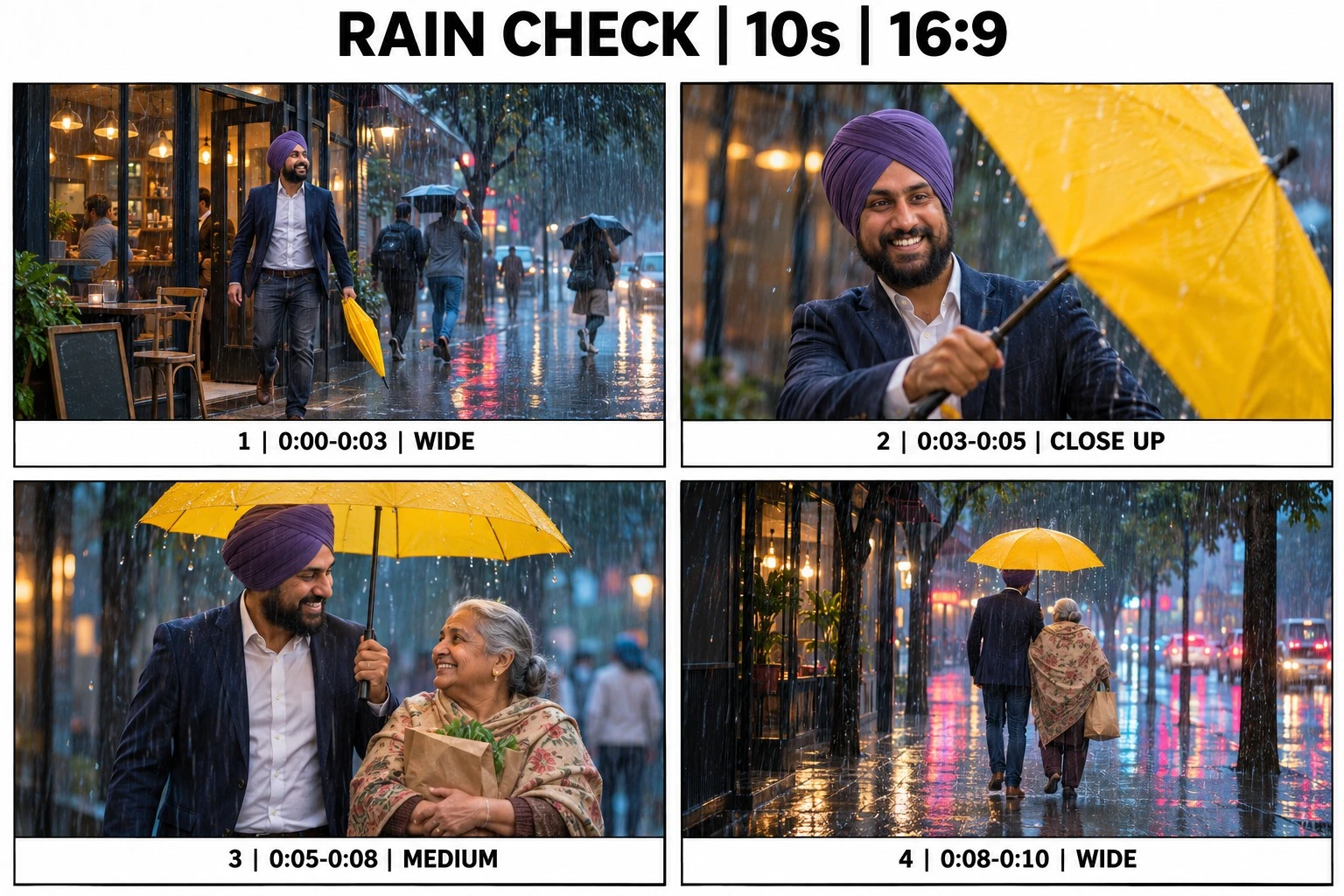
Create a 10 second storyboard sheet for an AI video. Use the attached character sheet for the main character; keep his face, purple turban, beard and navy blazer identical in every panel. Layout: 4 panels in a 2x2 grid on a clean white page, each panel a 16:9 film frame with a thin black border. Under each panel, a caption strip with the panel number, timestamp and shot size. Header at the top: "RAIN CHECK | 10s | 16:9". Story: caught in sudden rain, he shares his umbrella with a stranger. Panel 1, caption "1 | 0:00-0:03 | WIDE": he steps out of a corner cafe as heavy rain starts and people run for cover. Panel 2, caption "2 | 0:03-0:05 | CLOSE UP": he snaps open a bright yellow umbrella. Panel 3, caption "3 | 0:05-0:08 | MEDIUM": he holds the umbrella over an elderly woman carrying grocery bags. Panel 4, caption "4 | 0:08-0:10 | WIDE": they walk away together under the yellow umbrella, neon reflections on the wet street. Style: photorealistic cinematic, blue evening light, rain streaks, the yellow umbrella as the only bright color, same grade in every panel, clear motion in every frame. Landscape 3:2. Spell all text exactly. No other text, no watermark.
The single yellow umbrella in a blue scene gives the video model one color to track across all four shots. Use the same trick with any hero prop.
Here's the video created using Google Omni;
15 Second Storyboard: The Interview
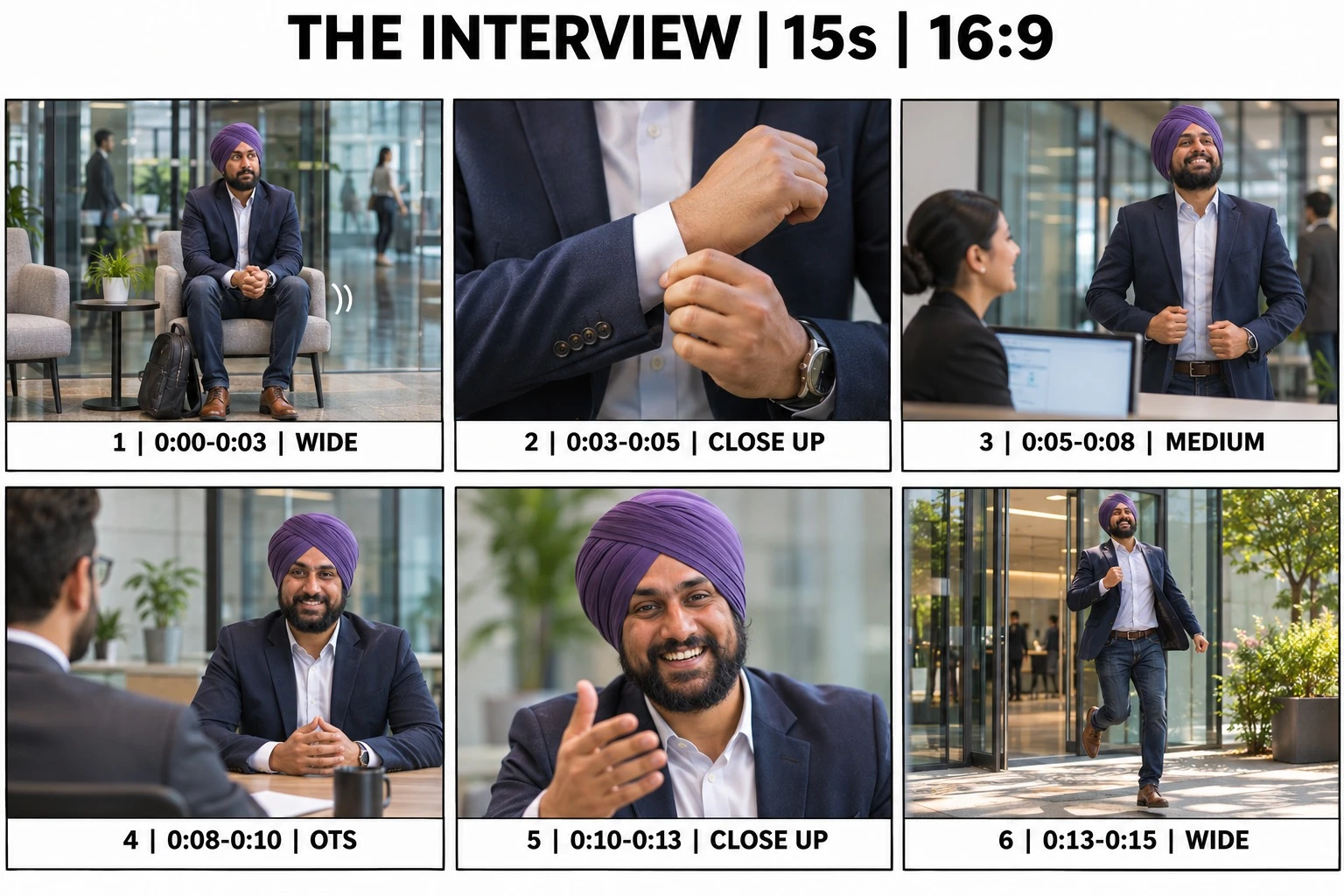
Create a 15 second storyboard sheet for an AI video. Use the attached character sheet for the main character; keep his face, purple turban, beard and navy blazer identical in every panel. Layout: 6 panels in a 3x2 grid (3 across, 2 down) on a clean white page, each panel a 16:9 film frame with a thin black border. Under each panel, a caption strip with the panel number, timestamp and shot size. Header at the top: "THE INTERVIEW | 15s | 16:9". Story: a nervous job interview that ends well. Panel 1, caption "1 | 0:00-0:03 | WIDE": he waits in a glass office lobby, knee bouncing. Panel 2, caption "2 | 0:03-0:05 | CLOSE UP": his hands straighten his blazer cuff. Panel 3, caption "3 | 0:05-0:08 | MEDIUM": a receptionist calls his name and he stands up, taking a deep breath. Panel 4, caption "4 | 0:08-0:10 | OTS": over the interviewer's shoulder, he sits across the table. Panel 5, caption "5 | 0:10-0:13 | CLOSE UP": he answers with a confident smile. Panel 6, caption "6 | 0:13-0:15 | WIDE": he walks out into bright sunlight and does a small happy skip down the steps. Style: photorealistic, clean corporate interiors, soft daylight, same color grade in every panel, clear motion in every frame. Landscape 3:2. Spell all text exactly. No other text, no watermark.
"OTS" means over the shoulder. Short shot labels like WIDE, MEDIUM, CLOSE UP and OTS fit cleanly in the caption strip.
30 Second Storyboard: Side Hustle
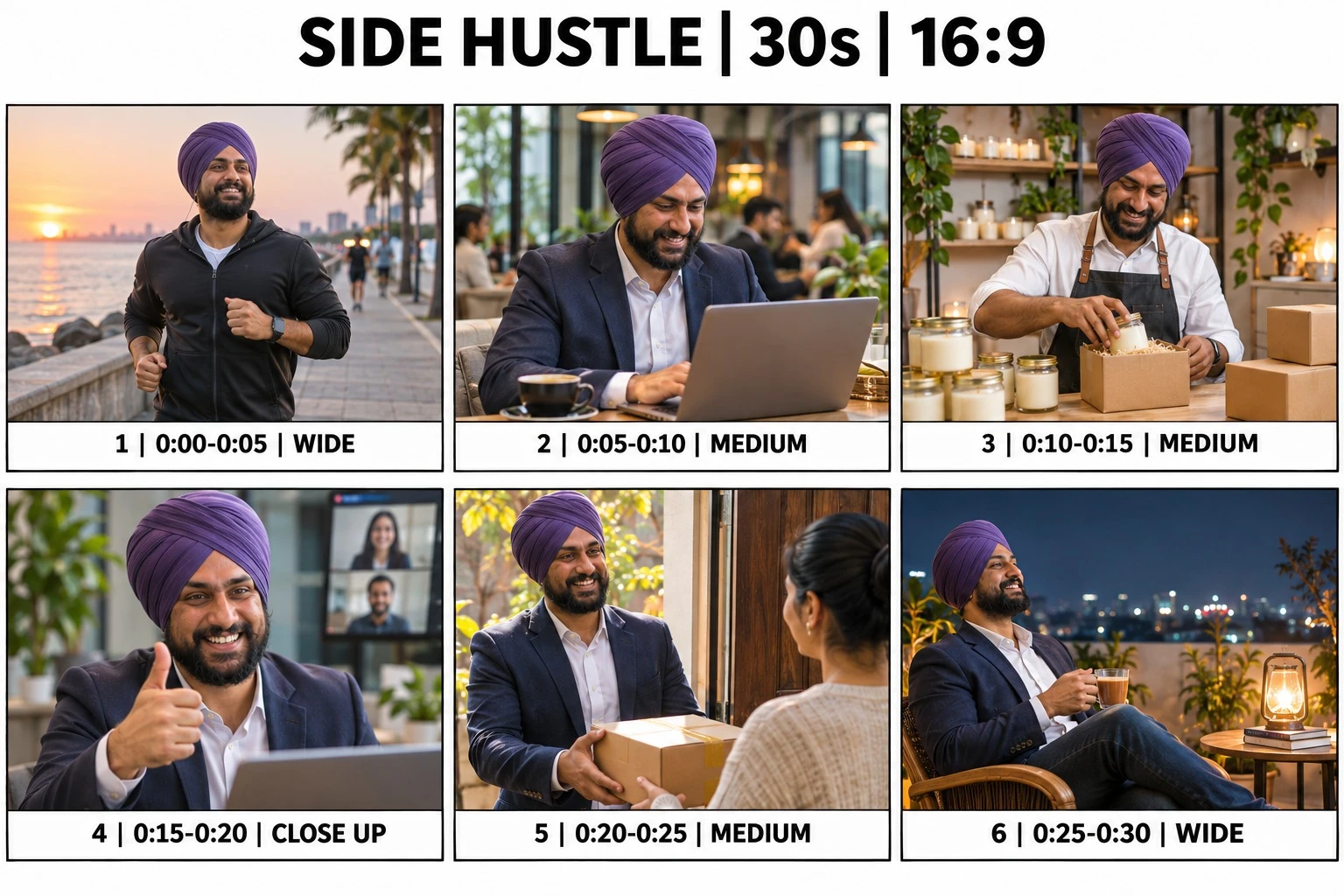
Create a 30 second storyboard sheet for an AI video. Use the attached character sheet for the main character; keep his face, purple turban and beard identical in every panel. Layout: 6 panels in a 3x2 grid (3 across, 2 down) on a clean white page, each panel a 16:9 film frame with a thin black border. Under each panel, a caption strip with the panel number, timestamp and shot size. Header at the top: "SIDE HUSTLE | 30s | 16:9". Story: one full day building a small business. Panel 1, caption "1 | 0:00-0:05 | WIDE": he jogs along a seaside promenade at sunrise. Panel 2, caption "2 | 0:05-0:10 | MEDIUM": he codes on a laptop in a busy cafe. Panel 3, caption "3 | 0:10-0:15 | MEDIUM": he packs handmade candles into boxes in a small home studio. Panel 4, caption "4 | 0:15-0:20 | CLOSE UP": he gives a thumbs up on a video call. Panel 5, caption "5 | 0:20-0:25 | MEDIUM": he hands a parcel to a smiling customer at a front door at golden hour. Panel 6, caption "6 | 0:25-0:30 | WIDE": he sits on a rooftop at night with a cup of chai, looking at the city lights. Style: photorealistic, light shifting from cool sunrise to warm night across the panels, clear motion in every frame. Landscape 3:2. Spell all text exactly. No other text, no watermark.
Six panels at 5 seconds each is the calmest way to plan 30 seconds. For a faster edit, use the 9 panel noir board in the cinematic section.
Frame by Frame Storyboards: One Panel Every Second or Half Second
Sometimes you want control over every single second. These boards give each second, or each half second, its own panel and its own timestamp, so nothing happens by accident.
As with every prompt in this guide, attach your character sheet before you paste these.
When to Use Every Second vs Every Half Second
0:02.0-0:02.5.Every Second, 5 Seconds: The Snap (Vertical)
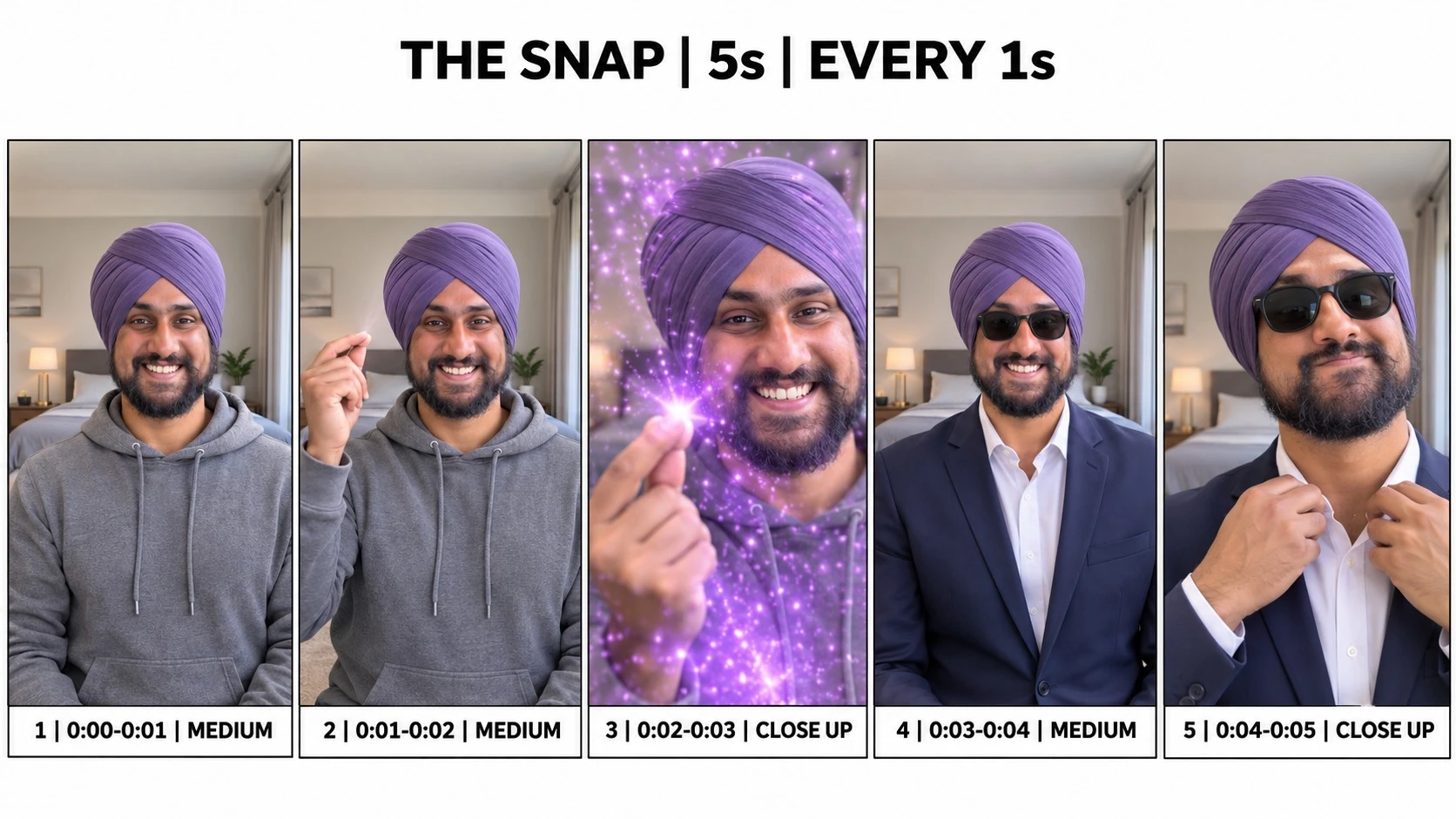
Create a 5 second storyboard sheet for a vertical social media video with one panel for every second. Use the attached character sheet for the main character; keep his face, purple turban and beard identical in every panel. Layout: 5 tall 9:16 panels in one row on a clean white page, each with a thin black border. Under each panel, a caption strip with the panel number, timestamp and shot size. Header at the top: "THE SNAP | 5s | EVERY 1s". Story: an outfit change transition. Panel 1, caption "1 | 0:00-0:01 | MEDIUM": he looks at the camera in a grey hoodie in his bedroom. Panel 2, caption "2 | 0:01-0:02 | MEDIUM": he raises one hand next to his face. Panel 3, caption "3 | 0:02-0:03 | CLOSE UP": he snaps his fingers and a burst of purple sparkles fills the frame. Panel 4, caption "4 | 0:03-0:04 | MEDIUM": he now wears his navy blazer, white shirt and sunglasses in the same spot. Panel 5, caption "5 | 0:04-0:05 | CLOSE UP": he fixes his collar and smirks at the camera. Style: bright phone camera look, same room and lighting in every panel, clear motion in every frame. Wide 16:9 page. Spell all text exactly. No other text, no watermark.
Outfit change transitions live or die on the snap. Giving the snap its own 1 second panel tells the video model exactly where the cut happens.
Every Second, 10 Seconds: Paper Plane
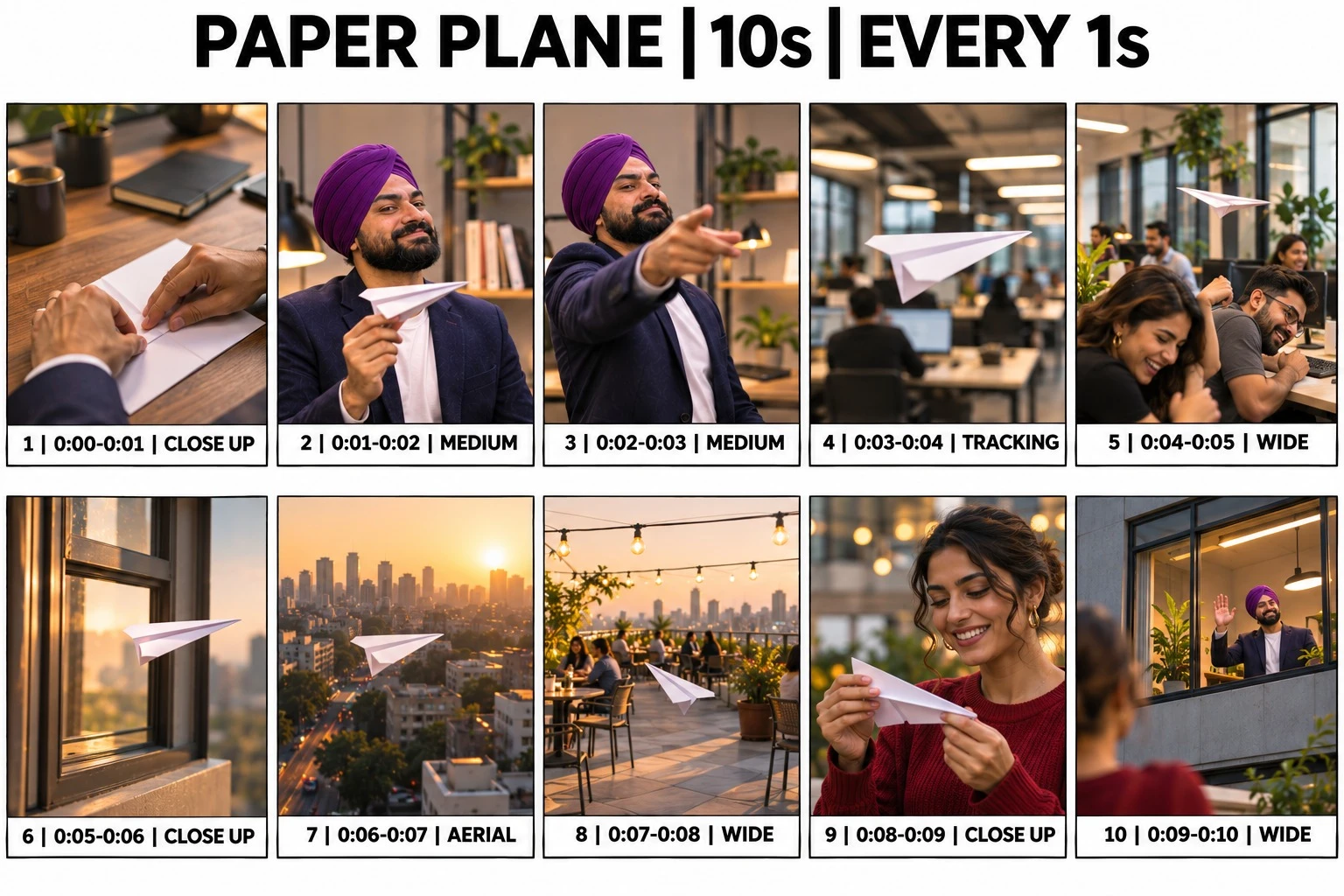
Create a 10 second storyboard sheet for an AI video with one panel for every second. Use the attached character sheet for the main character; keep his face, purple turban, beard and navy blazer identical in every panel where he appears. Layout: 10 panels in a 5x2 grid (5 across, 2 down) on a clean white page, each panel a 16:9 film frame with a thin black border. Under each panel, a caption strip with the panel number, timestamp and shot size. Header at the top: "PAPER PLANE | 10s | EVERY 1s". Panel 1, caption "1 | 0:00-0:01 | CLOSE UP": his hands fold a sheet of paper at his office desk. Panel 2, caption "2 | 0:01-0:02 | MEDIUM": he holds up the finished paper plane and grins. Panel 3, caption "3 | 0:02-0:03 | MEDIUM": he throws the plane. Panel 4, caption "4 | 0:03-0:04 | TRACKING": the plane glides over rows of desks. Panel 5, caption "5 | 0:04-0:05 | WIDE": coworkers duck as it flies past. Panel 6, caption "6 | 0:05-0:06 | CLOSE UP": the plane slips through an open window. Panel 7, caption "7 | 0:06-0:07 | AERIAL": the plane glides over the city at golden hour. Panel 8, caption "8 | 0:07-0:08 | WIDE": it drifts down toward a rooftop cafe. Panel 9, caption "9 | 0:08-0:09 | CLOSE UP": a woman at the cafe catches it. Panel 10, caption "10 | 0:09-0:10 | WIDE": across the street, he waves from his office window. Style: photorealistic, warm golden hour light, same grade in every panel, clear motion in every frame. Landscape 3:2. Spell all text exactly. No other text, no watermark.
The character only appears in some panels, so the prompt says "in every panel where he appears". Kling's guide says keyframes cannot be combined with Omni Reference in the same task, so if you crop these 10 panels into keyframes, the panels themselves carry the character.
Every Second, 15 Seconds: Goa Weekend Montage
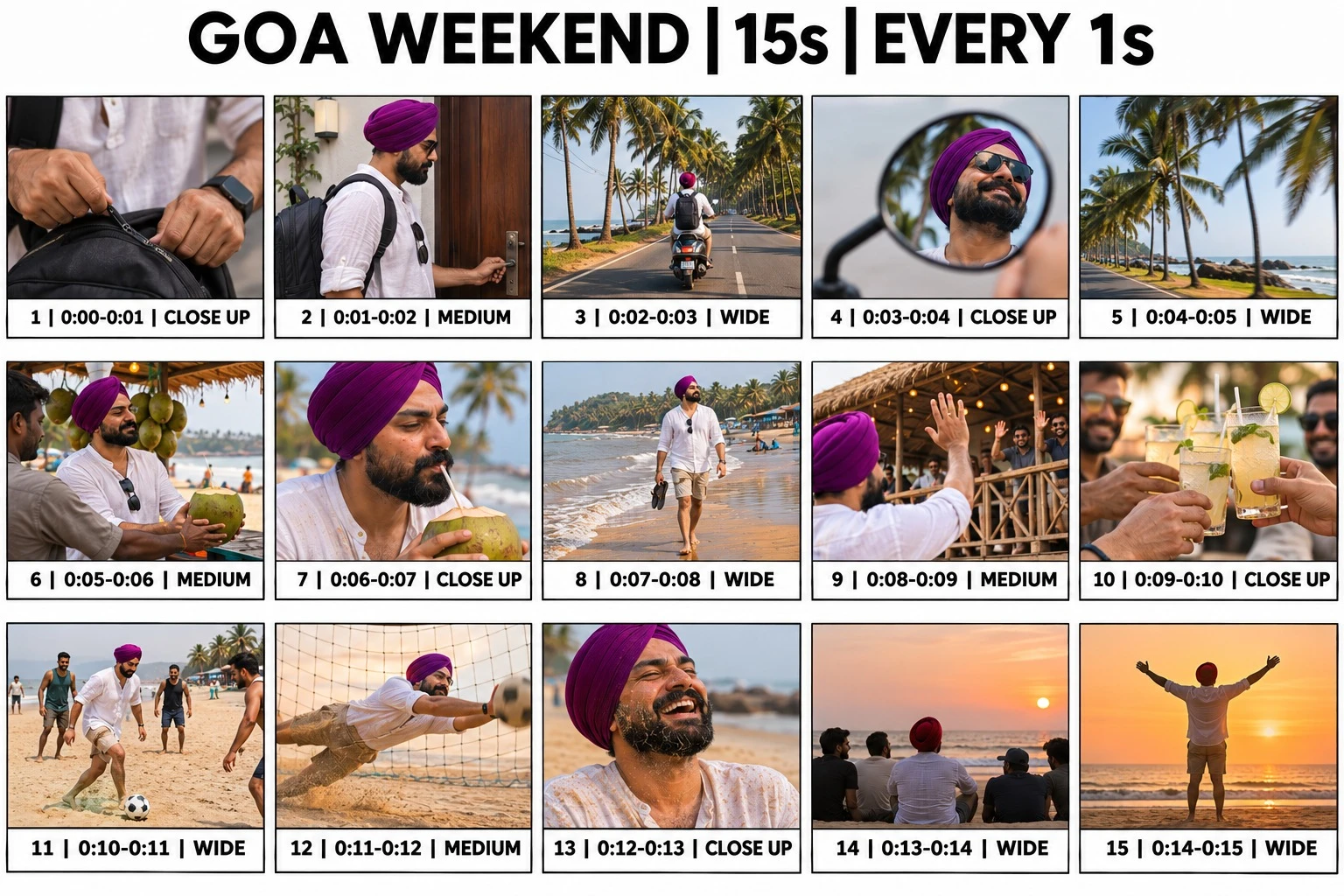
Create a 15 second montage storyboard sheet for an AI video with one panel for every second. Use the attached character sheet for the main character; keep his face, purple turban and beard identical in every panel where he appears, wearing a white linen shirt and shorts. Layout: 15 panels in a 5x3 grid (5 across, 3 down) on a clean white page, each panel a 16:9 film frame with a thin black border. Under each panel, a caption strip with the panel number, timestamp and shot size. Header at the top: "GOA WEEKEND | 15s | EVERY 1s". Panel 1, caption "1 | 0:00-0:01 | CLOSE UP": he zips up a backpack. Panel 2, caption "2 | 0:01-0:02 | MEDIUM": he locks his front door. Panel 3, caption "3 | 0:02-0:03 | WIDE": he rides a scooter onto a coastal road. Panel 4, caption "4 | 0:03-0:04 | CLOSE UP": his smile reflects in the scooter mirror. Panel 5, caption "5 | 0:04-0:05 | WIDE": palm trees rush past. Panel 6, caption "6 | 0:05-0:06 | MEDIUM": he buys a coconut at a beach stall. Panel 7, caption "7 | 0:06-0:07 | CLOSE UP": he sips from the coconut. Panel 8, caption "8 | 0:07-0:08 | WIDE": he walks barefoot along the beach. Panel 9, caption "9 | 0:08-0:09 | MEDIUM": he waves at friends on a beach shack deck. Panel 10, caption "10 | 0:09-0:10 | CLOSE UP": friends clink glasses of lemonade. Panel 11, caption "11 | 0:10-0:11 | WIDE": they play football on the sand. Panel 12, caption "12 | 0:11-0:12 | MEDIUM": he dives to save a goal. Panel 13, caption "13 | 0:12-0:13 | CLOSE UP": he laughs, covered in sand. Panel 14, caption "14 | 0:13-0:14 | WIDE": the group watches the sunset. Panel 15, caption "15 | 0:14-0:15 | WIDE": his silhouette raises both arms against the orange sky. Style: photorealistic travel montage, warm sunny colors, same grade in every panel, clear motion in every frame. Landscape 3:2. Spell all text exactly. No other text, no watermark.
Fifteen panels is the most I would put on one sheet. The captions were still readable, but each frame is small, so check faces at full size before you use the board.
Here's video created by Google Omni (Gemini has default 10 seconds in the app);
Every Half Second, 5 Seconds: The Six (Slow Motion)
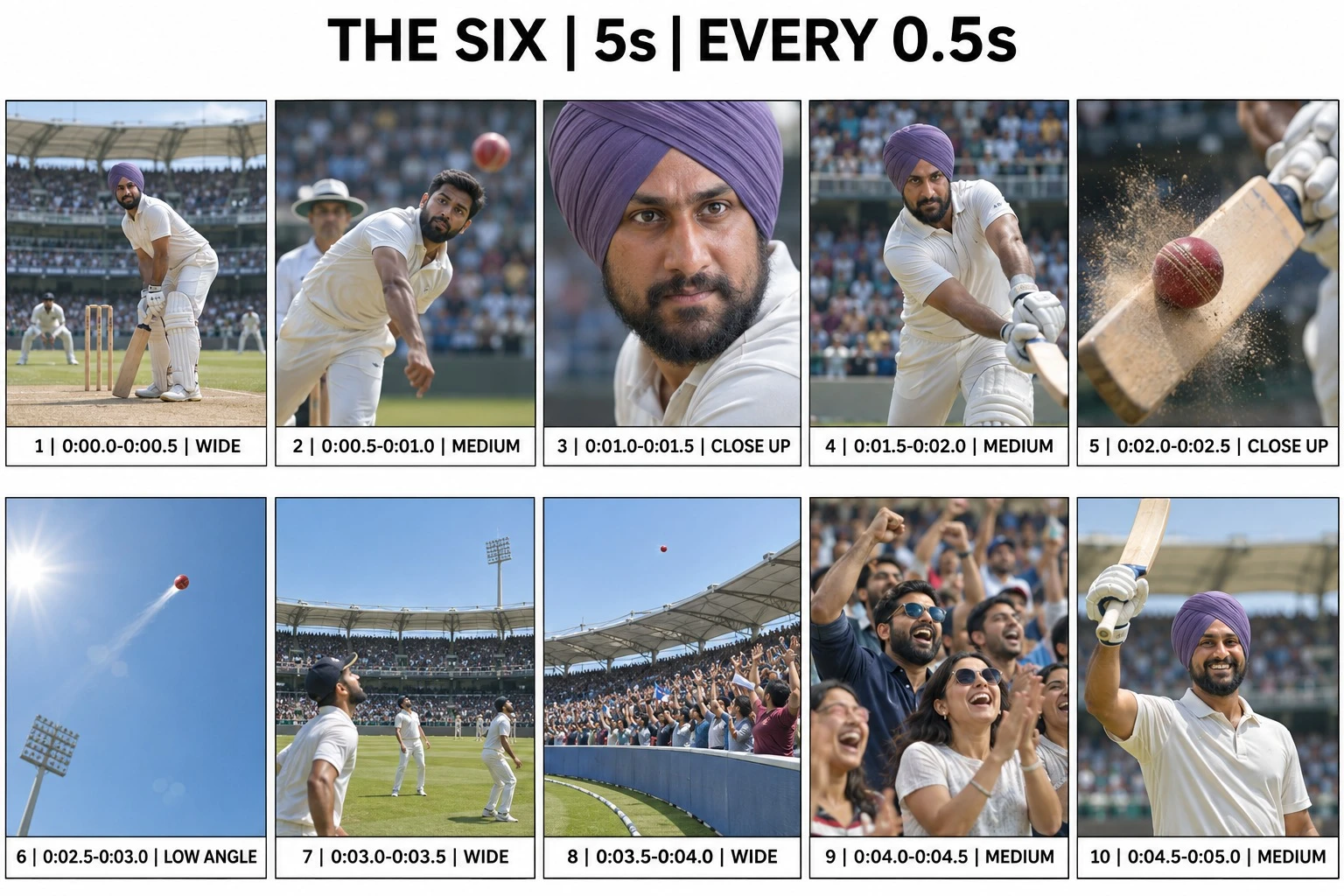
Create a 5 second slow motion storyboard sheet for an AI video with one panel for every half second....

[Sign up to unlock the full prompt]
The half second timestamps came out exactly right when I zoomed in, from 0:00.0-0:00.5 onward. In your video prompt, ask for slow motion on panels 4 to 6 so the bat hitting the ball gets the most time.
Every Half Second, 3 Seconds: Stride Zero Sneaker Ad
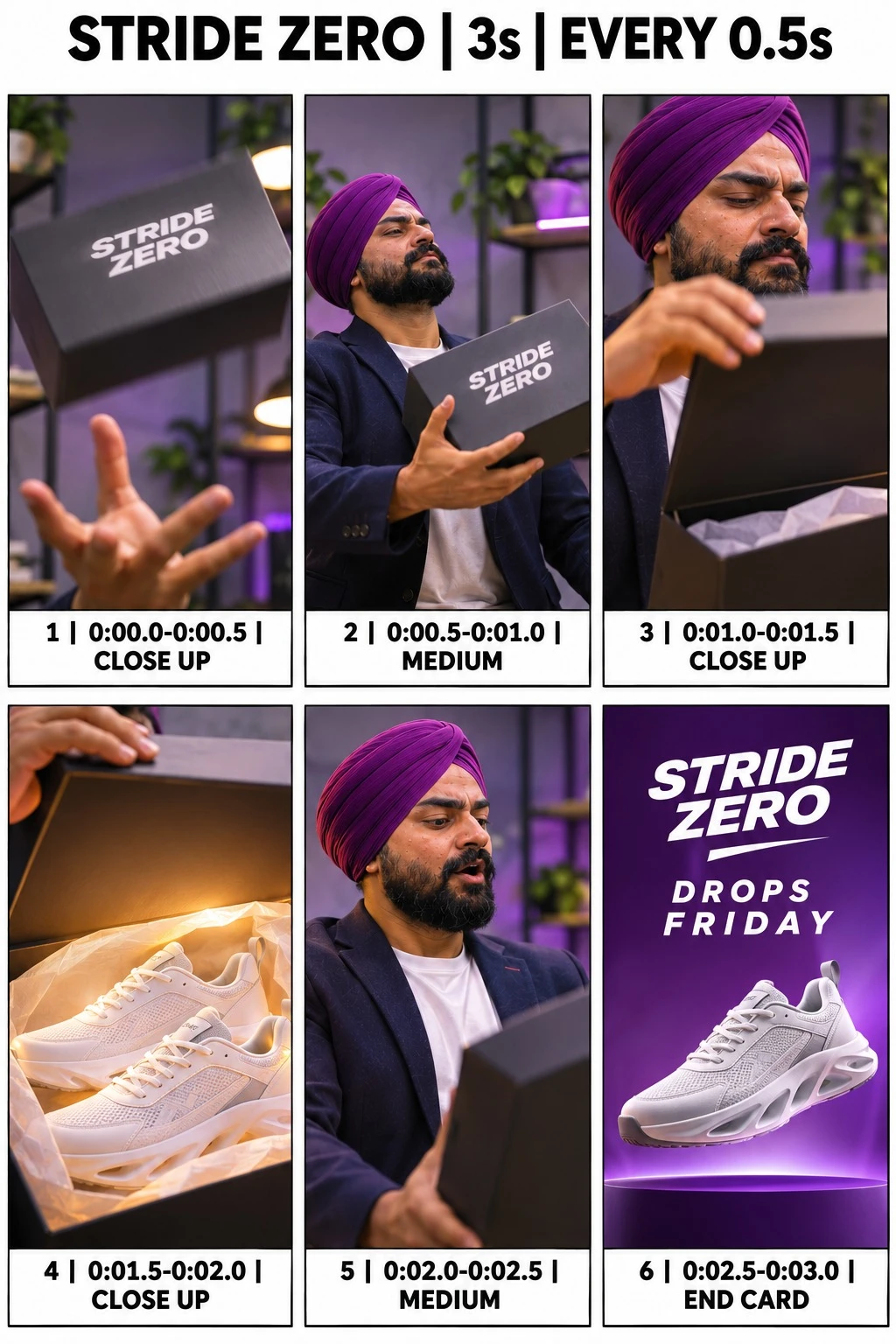
Create a 3 second ad storyboard sheet for a fictional sneaker brand called "STRIDE ZERO", with one panel for every half second. Use the attached character sheet for the main character; keep his face, purple turban, beard and navy blazer identical in every panel where he appears. Layout: 6 tall 9:16 panels in a 3x2 grid (3 across, 2 down) on a clean white page, each with a thin black border. Under each panel, a caption strip with the panel number, timestamp and shot size. Header at the top: "STRIDE ZERO | 3s | EVERY 0.5s". Panel 1, caption "1 | 0:00.0-0:00.5 | CLOSE UP": a shoe box flies into the frame. Panel 2, caption "2 | 0:00.5-0:01.0 | MEDIUM": he catches it with one hand. Panel 3, caption "3 | 0:01.0-0:01.5 | CLOSE UP": the lid flips open. Panel 4, caption "4 | 0:01.5-0:02.0 | CLOSE UP": white sneakers glow inside the box. Panel 5, caption "5 | 0:02.0-0:02.5 | MEDIUM": his jaw drops in surprise. Panel 6, caption "6 | 0:02.5-0:03.0 | END CARD": one sneaker on a purple background with "STRIDE ZERO" and "DROPS FRIDAY" in bold white letters. The sneakers are an original design with no real logos. Style: punchy commercial, bright studio light, clear motion in every frame. Vertical 2:3 page. Spell all text exactly. No other text, no watermark.
A 3 second ad at half second steps feels like a fast social bumper. ChatGPT also printed the brand name on the shoe box, which works for an ad but breaks "no other text", so remove it if you need a clean box.
Fantasy Storyboard Prompts
Fantasy is where a character sheet earns its keep. I changed the costume and even the art style, and the face, turban and beard still carried through.
Fantasy 10 Seconds: The Last Egg
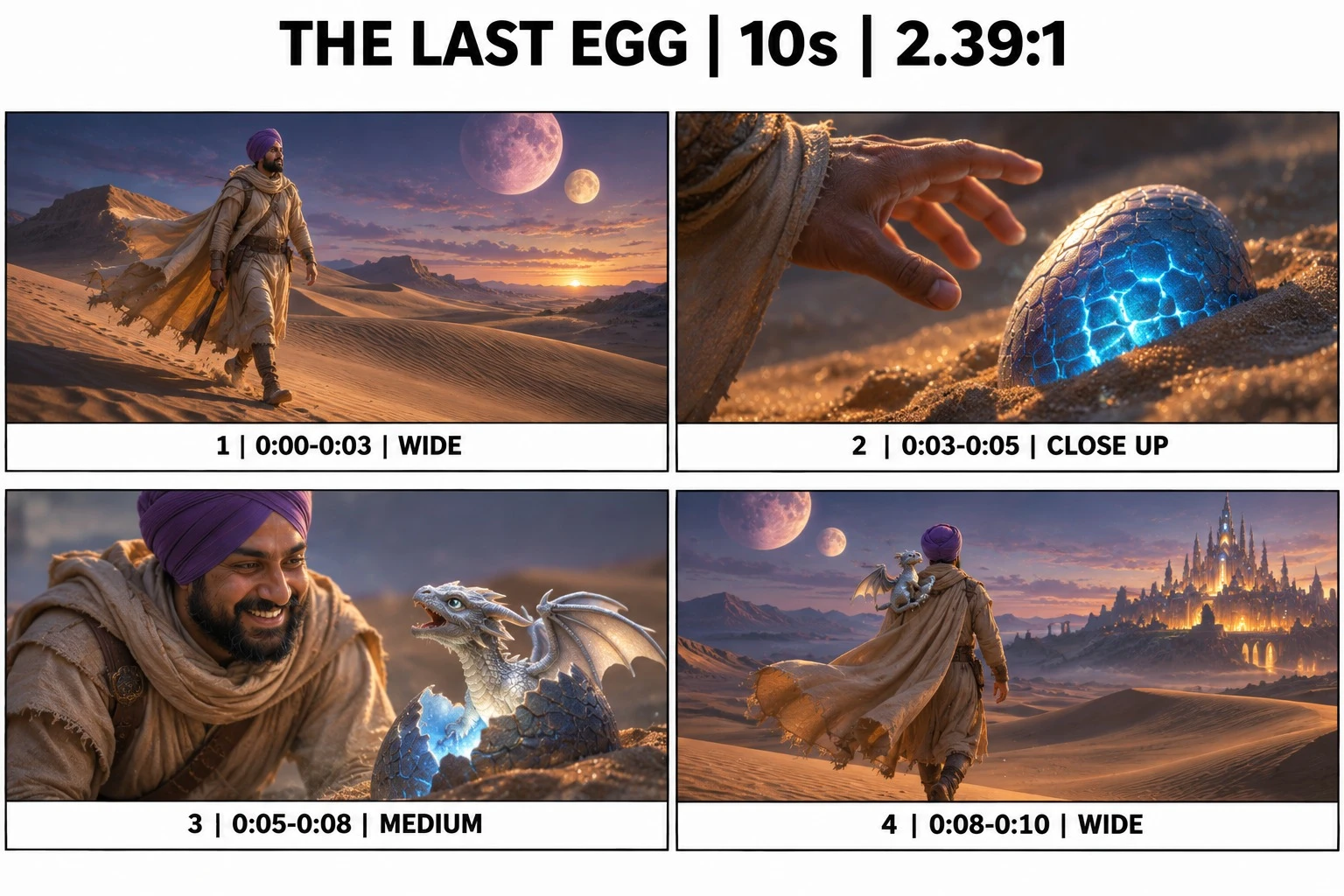
Create a 10 second fantasy storyboard sheet for an AI video. Use the attached character sheet for the main character; keep his face, purple turban and beard identical in every panel, and dress him in flowing sand colored desert robes. Layout: 4 panels in a 2x2 grid on a clean white page, each panel a wide 2.39:1 film frame with a thin black border. Under each panel, a caption strip with the panel number, timestamp and shot size. Header at the top: "THE LAST EGG | 10s | 2.39:1". Story: a desert wanderer finds a dragon egg. Panel 1, caption "1 | 0:00-0:03 | WIDE": he walks across giant dunes at dusk under two moons. Panel 2, caption "2 | 0:03-0:05 | CLOSE UP": a glowing blue egg lies half buried in the sand. Panel 3, caption "3 | 0:05-0:08 | MEDIUM": the egg cracks and a tiny silver dragon peeks out at him. Panel 4, caption "4 | 0:08-0:10 | WIDE": the baby dragon rides on his shoulder as they walk toward a distant glowing city. Style: epic photorealistic fantasy film, deep blue and gold palette, same grade in every panel, clear motion in every frame. Landscape 3:2. Spell all text exactly. No other text, no watermark.
Add a wardrobe line like "dress him in flowing sand colored desert robes" right after the reference line. The sheet keeps the face while the costume changes.
Fantasy 15 Seconds: The Map Book (3D Animated Style)
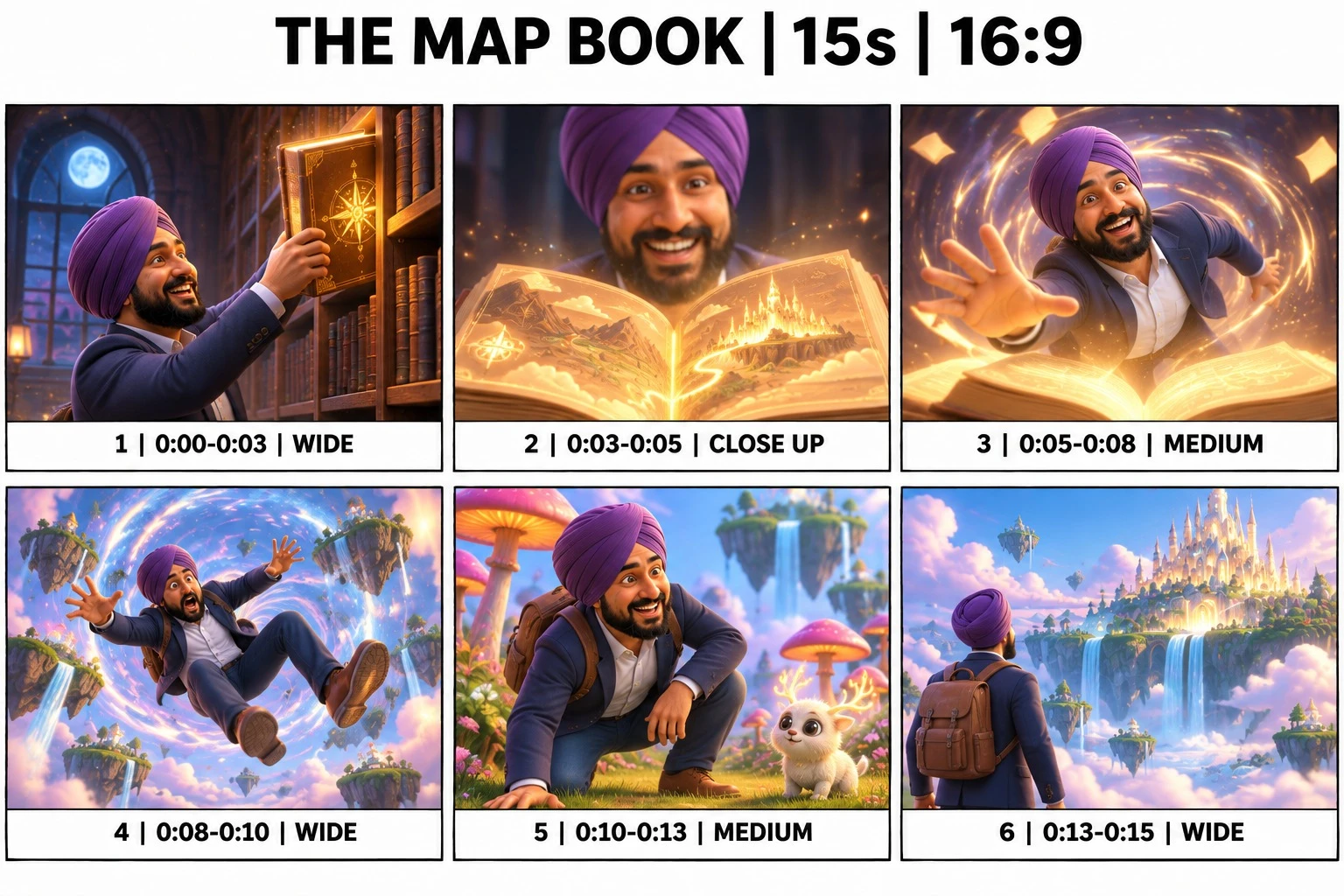
Create a 15 second fantasy storyboard sheet for an AI video in a 3D animated family film style with soft rounded shapes. Use the attached character sheet for the main character; keep his face, purple turban, beard and navy blazer recognizable in every panel. Layout: 6 panels in a 3x2 grid (3 across, 2 down) on a clean white page, each panel a 16:9 film frame with a thin black border. Under each panel, a caption strip with the panel number, timestamp and shot size. Header at the top: "THE MAP BOOK | 15s | 16:9". Story: a glowing book pulls him into a sky kingdom. Panel 1, caption "1 | 0:00-0:03 | WIDE": in a dusty library at night, he pulls a glowing book from a high shelf. Panel 2, caption "2 | 0:03-0:05 | CLOSE UP": the pages flutter open and a golden map lights up. Panel 3, caption "3 | 0:05-0:08 | MEDIUM": a swirl of light pulls him into the pages. Panel 4, caption "4 | 0:08-0:10 | WIDE": he tumbles through a tunnel of floating islands. Panel 5, caption "5 | 0:10-0:13 | MEDIUM": he lands on a floating island covered in giant mushrooms. Panel 6, caption "6 | 0:13-0:15 | WIDE": he gazes at a sky kingdom with waterfalls pouring into the clouds. Same colors and lighting style in every panel, clear motion in every frame. Landscape 3:2. Spell all text exactly. No other text, no watermark.
For a style change, swap "identical" for "recognizable". That word gives the model room to stylize the face without losing the person.
Fantasy 5 Seconds: The Blade
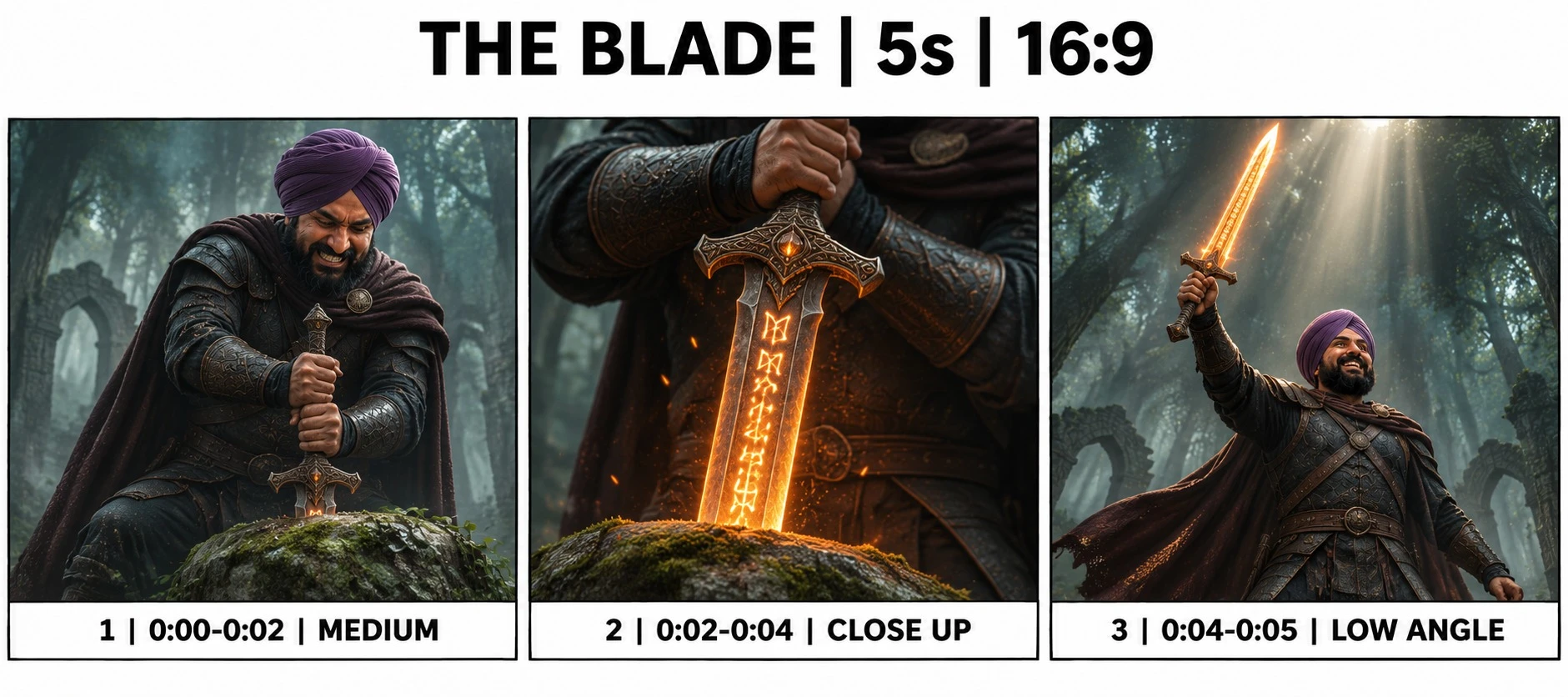
Create a 5 second dark fantasy storyboard sheet for an AI video. Use the attached character sheet for the main character; keep his face, purple turban and beard identical in every panel, and dress him in dark leather armor with a long cloak. Layout: 3 panels in one row on a clean white page, each panel a 16:9 film frame with a thin black border. Under each panel, a caption strip with the panel number, timestamp and shot size. Header at the top: "THE BLADE | 5s | 16:9". Story: he pulls a magic sword from a stone. Panel 1, caption "1 | 0:00-0:02 | MEDIUM": he grips a sword stuck in a mossy stone in a misty forest. Panel 2, caption "2 | 0:02-0:04 | CLOSE UP": runes on the blade glow orange. Panel 3, caption "3 | 0:04-0:05 | LOW ANGLE": he raises the sword as a beam of light breaks through the trees. Style: photorealistic dark fantasy, cold green mist with warm orange glow, same grade in every panel, clear motion in every frame. Wide 16:9 page. Spell all text exactly. No other text, no watermark.
Social Media Storyboard Prompts
For Reels, TikTok and Shorts, draw tall 9:16 panels. The video tool then sees the vertical framing you want instead of cropping a wide shot.
Social 5 Seconds: The Hook
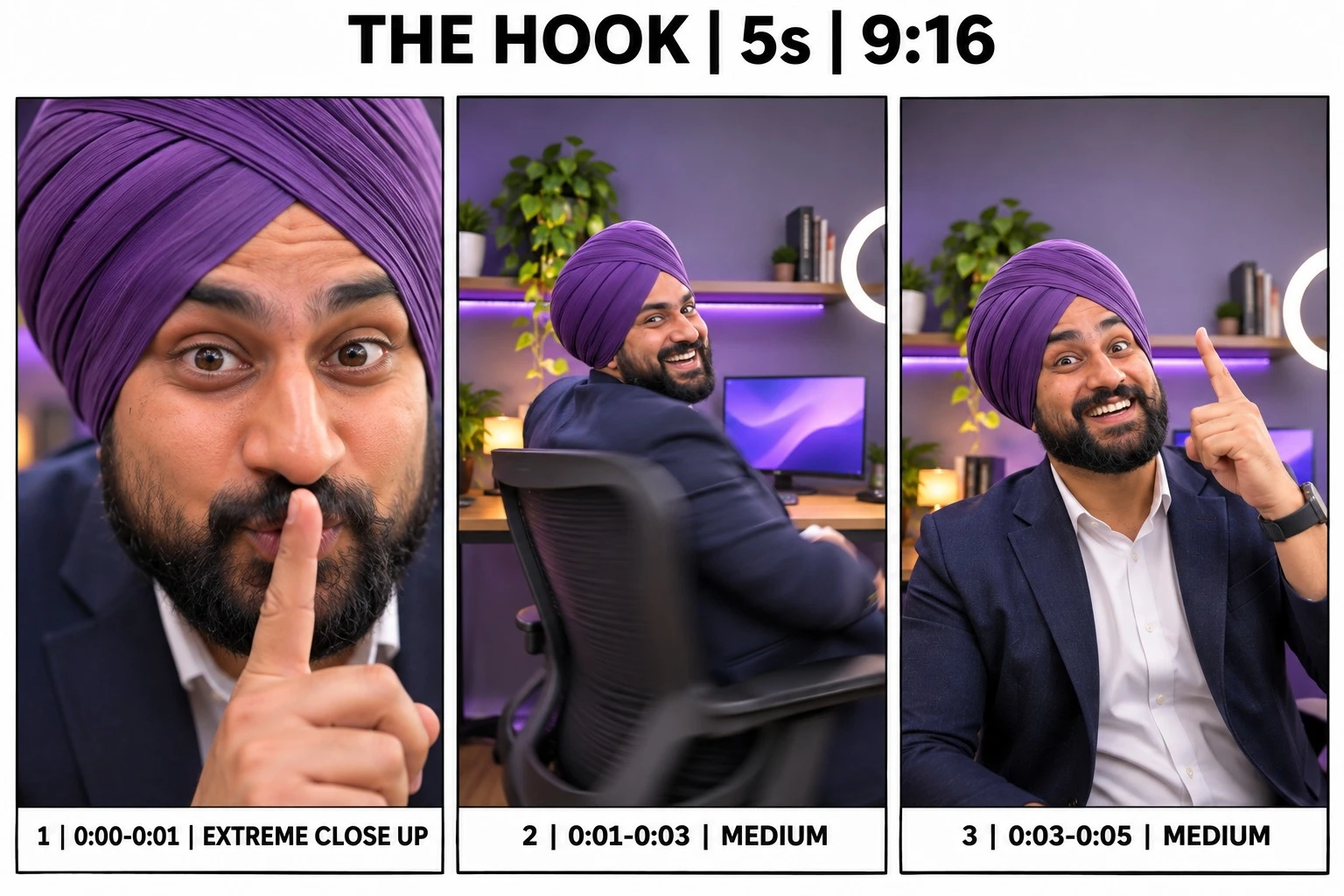
Create a 5 second storyboard sheet for a vertical social media video hook. Use the attached character sheet for the main character; keep his face, purple turban, beard and navy blazer identical in every panel. Layout: 3 tall 9:16 panels side by side on a clean white page, each with a thin black border. Under each panel, a caption strip with the panel number, timestamp and shot size. Header at the top: "THE HOOK | 5s | 9:16". Story: a creator grabs attention in the first second. Panel 1, caption "1 | 0:00-0:01 | EXTREME CLOSE UP": he leans right into the lens with a finger on his lips. Panel 2, caption "2 | 0:01-0:03 | MEDIUM": he spins his desk chair around to face the camera. Panel 3, caption "3 | 0:03-0:05 | MEDIUM": he points up at empty space at the top of the frame for a text overlay, eyebrows raised. Style: bright creator desk setup with a ring light and purple LED strip, phone camera look, same grade in every panel, clear motion in every frame. Landscape 3:2. Spell all text exactly. No other text, no watermark.
Panel 1 lasts only one second on purpose. The empty space in panel 3 leaves room for your text overlay in the edit.
Social 15 Seconds: Day in My Life
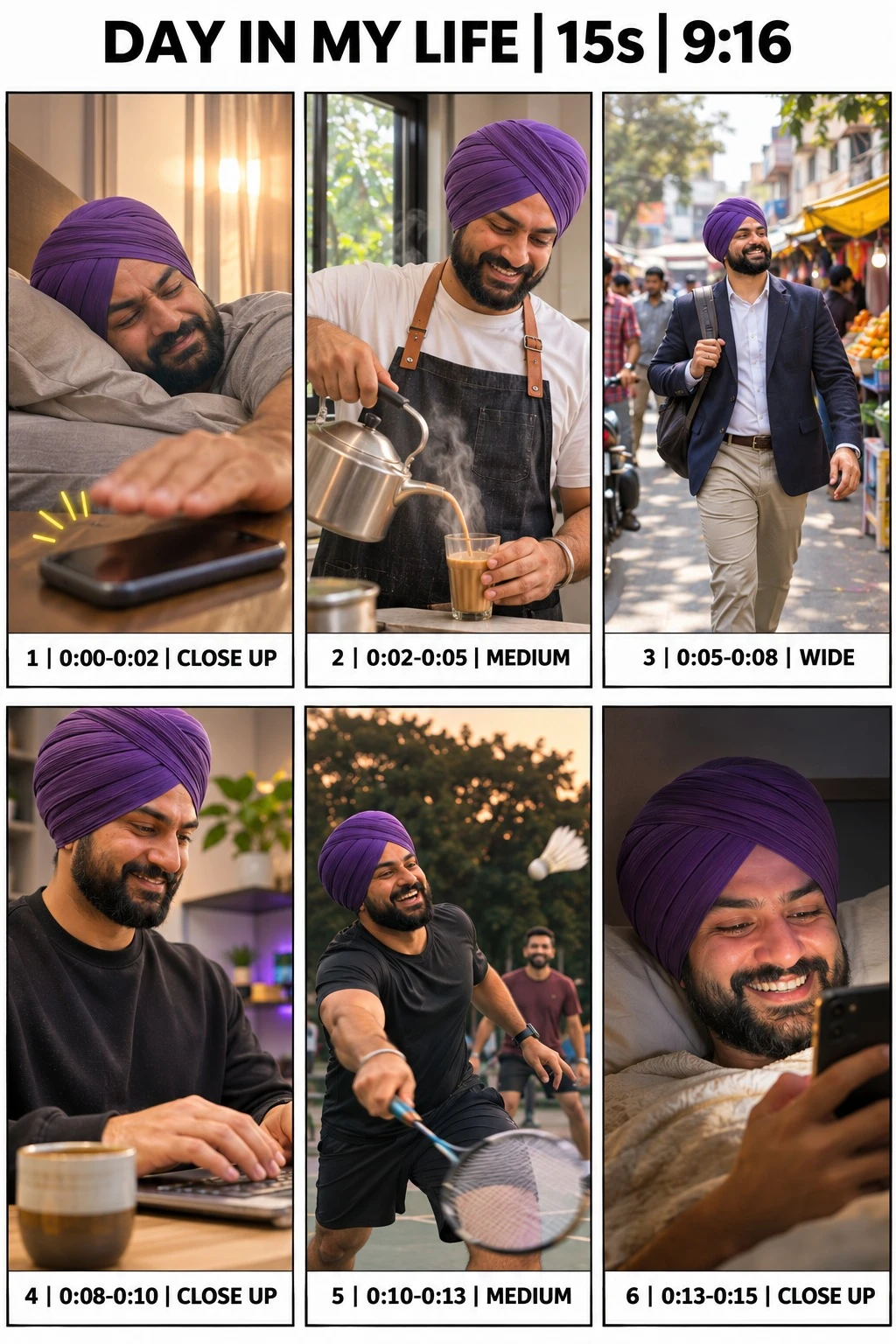
Create a 15 second storyboard sheet for a vertical "day in my life" social video. Use the attached character sheet for the main character; keep his face, purple turban and beard identical in every panel, and let his clothes change with each moment. Layout: 6 tall 9:16 panels in a 3x2 grid (3 across, 2 down) on a clean white page, each with a thin black border. Under each panel, a caption strip with the panel number, timestamp and shot size. Header at the top: "DAY IN MY LIFE | 15s | 9:16". Panel 1, caption "1 | 0:00-0:02 | CLOSE UP": his hand slaps a ringing phone alarm at sunrise. Panel 2, caption "2 | 0:02-0:05 | MEDIUM": he pours chai into a glass by a small kitchen window. Panel 3, caption "3 | 0:05-0:08 | WIDE": he walks to work through a busy street market. Panel 4, caption "4 | 0:08-0:10 | CLOSE UP": he types on a keyboard next to a coffee mug. Panel 5, caption "5 | 0:10-0:13 | MEDIUM": he plays badminton with friends in evening light. Panel 6, caption "6 | 0:13-0:15 | CLOSE UP": he lies in bed smiling, his face lit by his phone. Style: natural phone camera look, warm light, clear motion in every frame. Vertical 2:3 page. Spell all text exactly. No readable phone screens, no other text, no watermark.
I let the clothes change in every panel and locked only the face, turban and beard. All six panels kept the same purple turban.
Social 10 Seconds: 2 Minute Chai Recipe
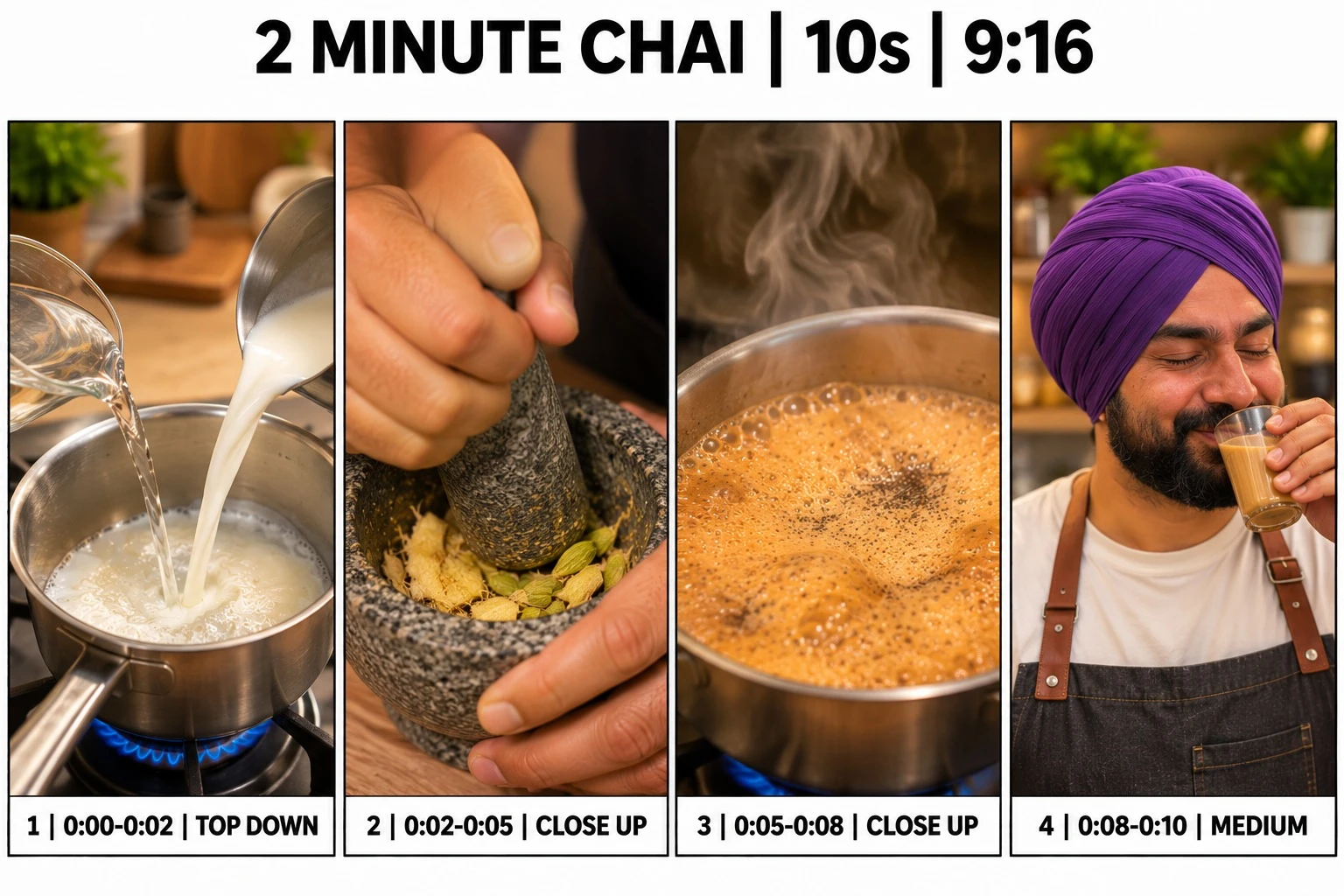
Create a 10 second storyboard sheet for a vertical recipe video. Use the attached character sheet for the main character; keep his face, purple turban and beard identical in the panels where he appears. Layout: 4 tall 9:16 panels side by side on a clean white page, each with a thin black border. Under each panel, a caption strip with the panel number, timestamp and shot size. Header at the top: "2 MINUTE CHAI | 10s | 9:16". Panel 1, caption "1 | 0:00-0:02 | TOP DOWN": water and milk pour into a steel pan on a gas stove. Panel 2, caption "2 | 0:02-0:05 | CLOSE UP": his hands crush cardamom and ginger in a stone mortar. Panel 3, caption "3 | 0:05-0:08 | CLOSE UP": the chai boils up with rising steam. Panel 4, caption "4 | 0:08-0:10 | MEDIUM": he sips from a small glass with his eyes closed, happy. Style: warm home kitchen, food video close up detail, same grade in every panel, clear motion in every frame. Landscape 3:2. Spell all text exactly. No other text, no watermark.
Recipe videos work best with hands in the first panels and the face only at the end. Write "in the panels where he appears" so the model does not force a face into every shot.
Ad Creative Storyboard Prompts
Each ad below uses a fictional brand, so you can swap in your own product name. Always end with an end card panel that holds the brand name and one short line.
5 Second Bumper Ad: Hush One Headphones
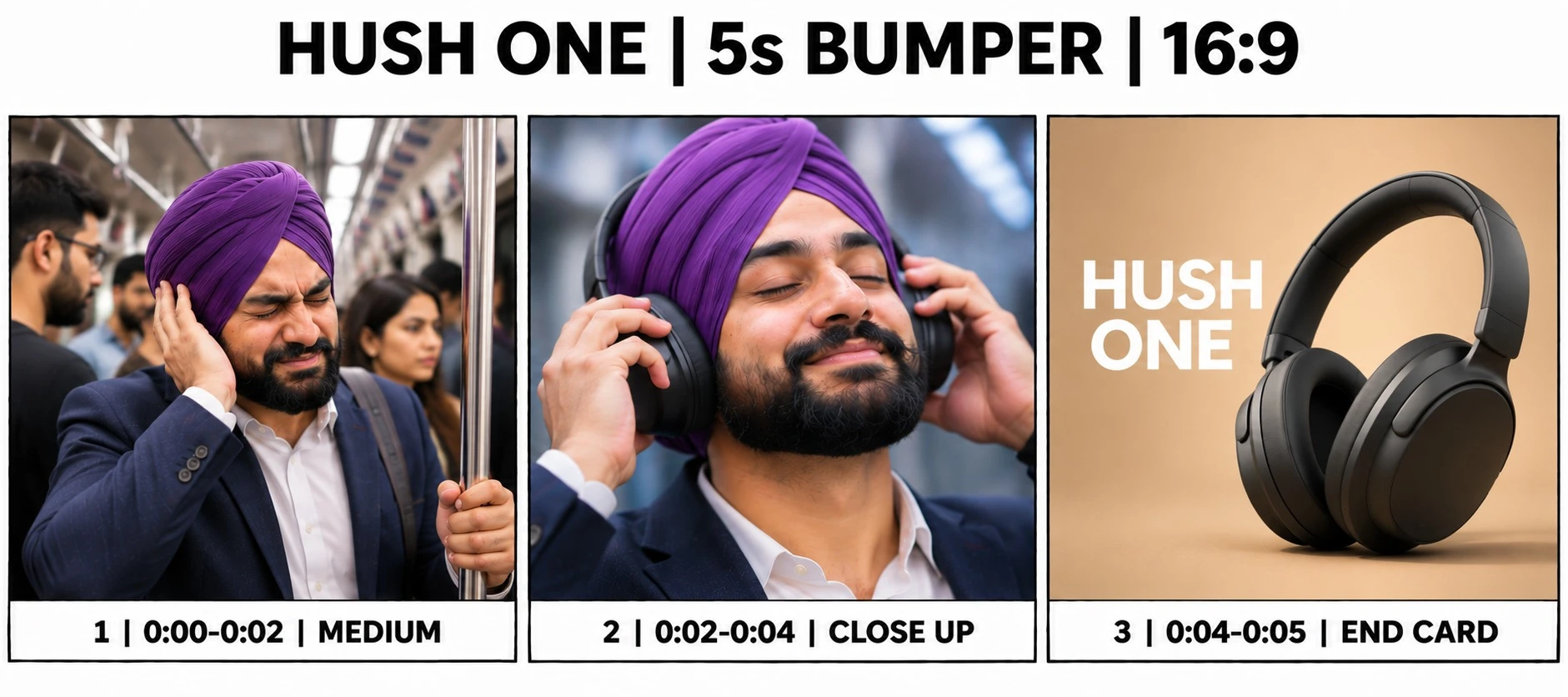
Create a 5 second bumper ad storyboard sheet for a fictional headphone brand called "HUSH ONE". Use the attached character sheet for the main character; keep his face, purple turban, beard and navy blazer identical in every panel. Layout: 3 panels in one row on a clean white page, each panel a 16:9 film frame with a thin black border. Under each panel, a caption strip with the panel number, timestamp and shot size. Header at the top: "HUSH ONE | 5s BUMPER | 16:9". Panel 1, caption "1 | 0:00-0:02 | MEDIUM": he winces on a crowded, noisy metro train. Panel 2, caption "2 | 0:02-0:04 | CLOSE UP": he slides on matte black over ear headphones and the train fades into a soft blue blur. Panel 3, caption "3 | 0:04-0:05 | END CARD": the headphones on a plain sand colored background with the brand name "HUSH ONE" in clean white letters. The headphones are an original design with no real logos. Style: glossy commercial, photorealistic, clear motion in every frame. Wide 16:9 page. Spell all text exactly. No other text, no watermark.
A 5 second bumper needs a problem, a fix and a logo, nothing more. Here the noisy train, the headphones and the end card do exactly that.
15 Second UGC Ad: Beardwise Beard Oil
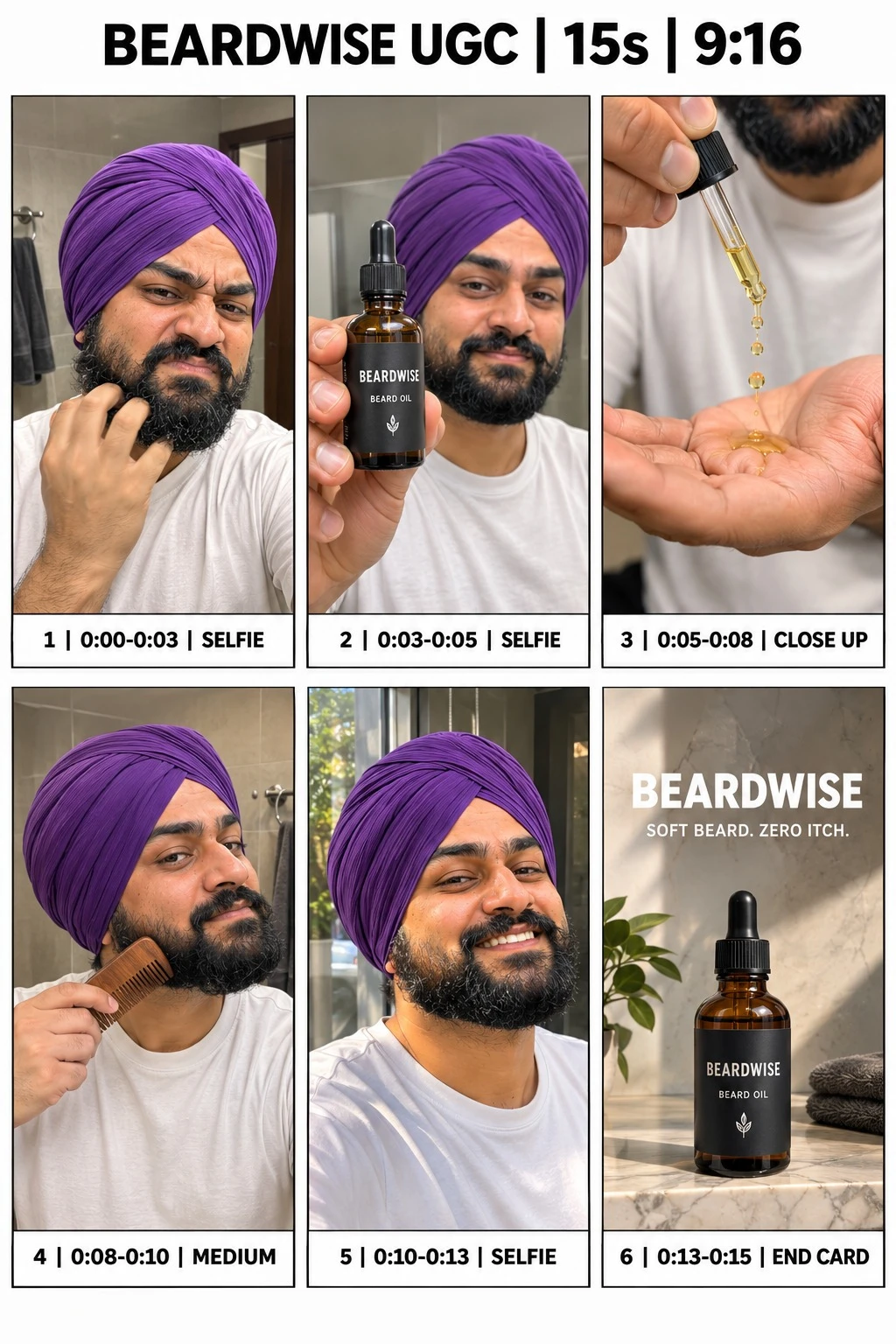
Create a 15 second UGC style ad storyboard sheet for a fictional beard oil brand called "BEARDWISE". Use the attached character sheet for the main character; keep his face, purple turban and beard identical in every panel, wearing a plain white t shirt. Layout: 6 tall 9:16 panels in a 3x2 grid (3 across, 2 down) on a clean white page, each with a thin black border. Under each panel, a caption strip with the panel number, timestamp and shot size. Header at the top: "BEARDWISE UGC | 15s | 9:16". Panel 1, caption "1 | 0:00-0:03 | SELFIE": he scratches his frizzy beard and frowns at his phone camera in a bathroom. Panel 2, caption "2 | 0:03-0:05 | SELFIE": he holds a small amber glass dropper bottle up to the lens. Panel 3, caption "3 | 0:05-0:08 | CLOSE UP": three drops of oil fall into his palm. Panel 4, caption "4 | 0:08-0:10 | MEDIUM": he combs the oil through his beard with a wooden comb. Panel 5, caption "5 | 0:10-0:13 | SELFIE": his beard shines in window sunlight and he grins. Panel 6, caption "6 | 0:13-0:15 | END CARD": the bottle on a marble shelf with the text "BEARDWISE" and "SOFT BEARD. ZERO ITCH." Style: handheld phone footage look, natural bathroom light, clear motion in every frame. Vertical 2:3 page. Spell all text exactly. No other text, no real logos, no watermark.
ChatGPT showed me two versions of this board and asked me to pick one. I chose the version with the brand name and tagline as a headline on the end card.
30 Second Ad: Zenride Folding Electric Bike
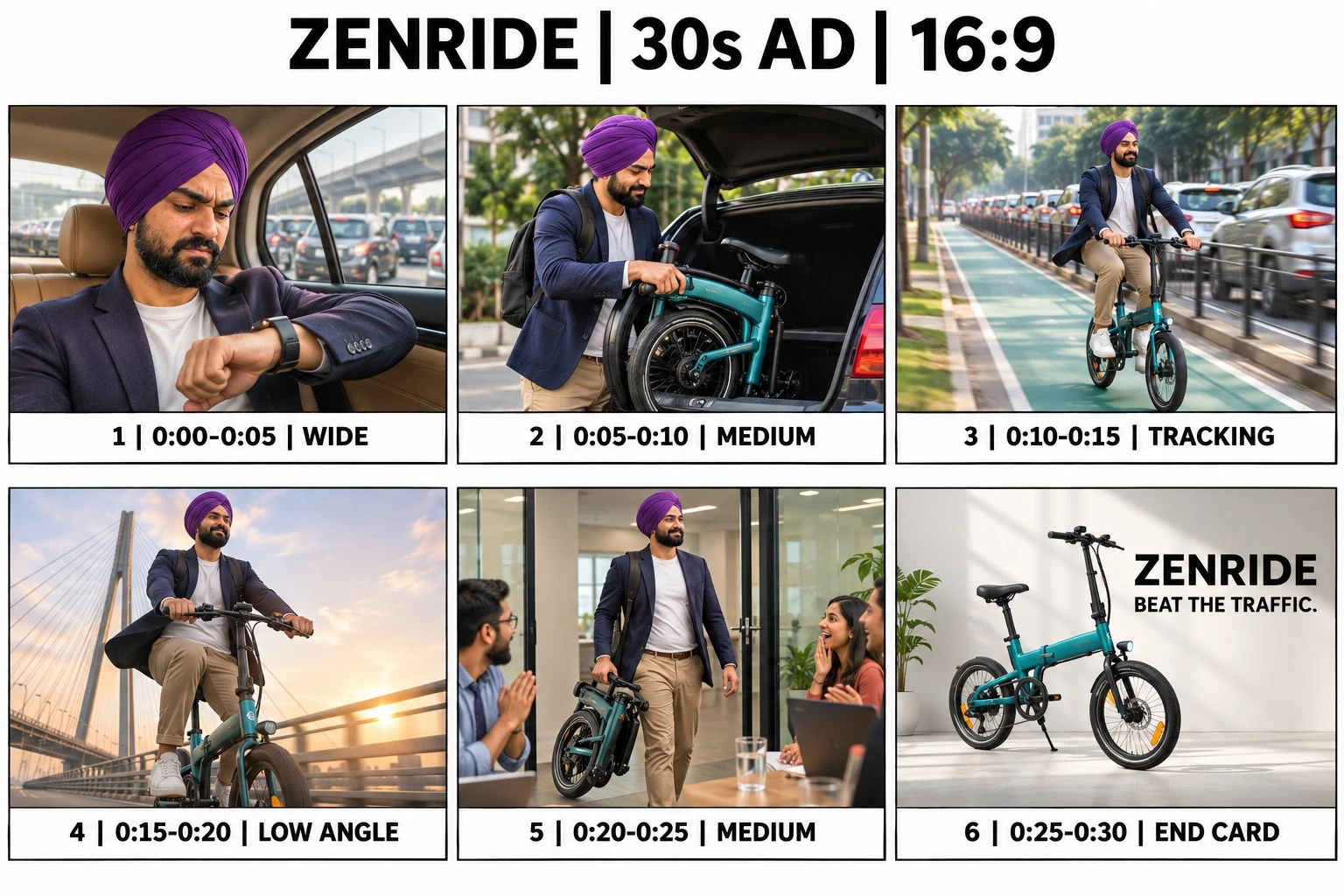
Create a 30 second ad storyboard sheet for a fictional folding e-bike brand called "ZENRIDE". Use the attached character sheet for the main character; keep his face, purple turban, beard and navy blazer identical in every panel. Layout: 6 panels in a 3x2 grid (3 across, 2 down) on a clean white page, each panel a 16:9 film frame with a thin black border. Under each panel, a caption strip with the panel number, timestamp and shot size. Header at the top: "ZENRIDE | 30s AD | 16:9". Panel 1, caption "1 | 0:00-0:05 | WIDE": he checks his watch in a taxi stuck in gridlocked morning traffic. Panel 2, caption "2 | 0:05-0:10 | MEDIUM": he hops out and unfolds a sleek teal folding e-bike from the trunk. Panel 3, caption "3 | 0:10-0:15 | TRACKING": he glides along a green bike lane past the stuck cars. Panel 4, caption "4 | 0:15-0:20 | LOW ANGLE": he rides over a bridge at sunrise, blazer flapping in the wind. Panel 5, caption "5 | 0:20-0:25 | MEDIUM": he walks into a meeting room on time with the folded bike, and his colleagues look surprised. Panel 6, caption "6 | 0:25-0:30 | END CARD": the teal e-bike on a clean white studio floor with "ZENRIDE" and "BEAT THE TRAFFIC." in bold letters. The bike is an original design with no real logos. Style: glossy commercial, crisp daylight, same grade in every panel, clear motion in every frame. Landscape 3:2. Spell all text exactly. No other text, no watermark.
The story follows the classic ad shape: problem in panel 1, product in panel 2, proof in panels 3 to 5, and the end card in panel 6.
Marketing Storyboard Prompts
Marketing videos sell a brand or a launch more than a single product. These two boards cover a founder story and a teaser.
15 Second Founder Story: PromptsLove
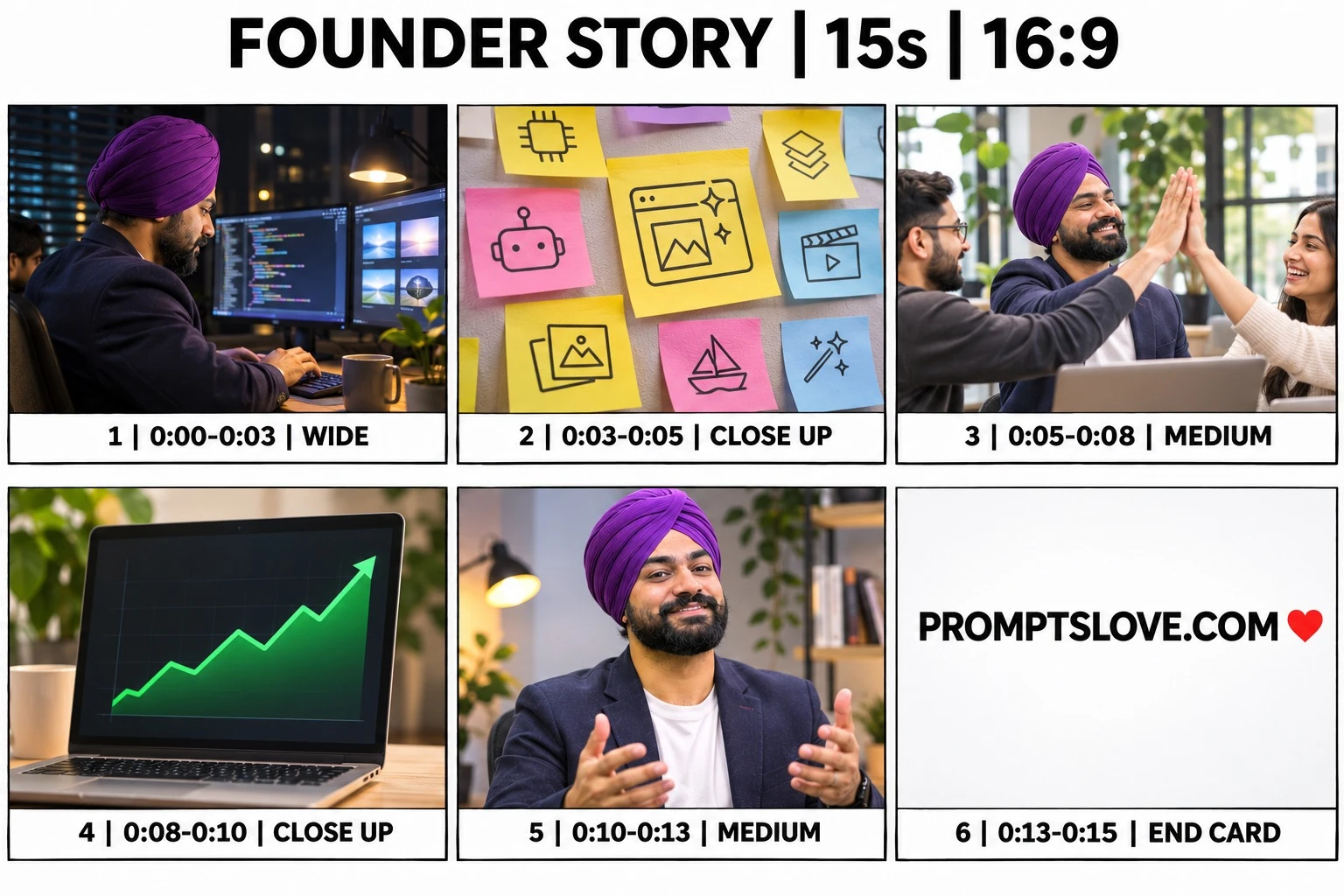
Create a 15 second brand story storyboard sheet for "PROMPTSLOVE.COM", an AI prompt library. Use the attached character sheet for the main character as the founder; keep his face, purple turban, beard and navy blazer identical in every panel. Layout: 6 panels in a 3x2 grid (3 across, 2 down) on a clean white page, each panel a 16:9 film frame with a thin black border. Under each panel, a caption strip with the panel number, timestamp and shot size. Header at the top: "FOUNDER STORY | 15s | 16:9". Panel 1, caption "1 | 0:00-0:03 | WIDE": at 2 AM he codes alone in a dark room lit by two monitors. Panel 2, caption "2 | 0:03-0:05 | CLOSE UP": a wall covered in colorful sticky notes with sketches of prompt cards and no readable words. Panel 3, caption "3 | 0:05-0:08 | MEDIUM": a small team high fives around a laptop in a sunny office. Panel 4, caption "4 | 0:08-0:10 | CLOSE UP": a laptop screen shows a rising green line chart with no numbers. Panel 5, caption "5 | 0:10-0:13 | MEDIUM": he speaks to the camera in a bright studio with a warm smile. Panel 6, caption "6 | 0:13-0:15 | END CARD": a white background with "PROMPTSLOVE.COM" in bold black letters and a small red heart. Style: documentary brand film, natural light, same grade in every panel, clear motion in every frame. Landscape 3:2. Spell all text exactly. No other text, no watermark.
I asked for "no readable words" on the sticky notes and "no numbers" on the chart. That keeps fake text out of the frames the video model will animate.
10 Second Launch Teaser: Nova Lamp
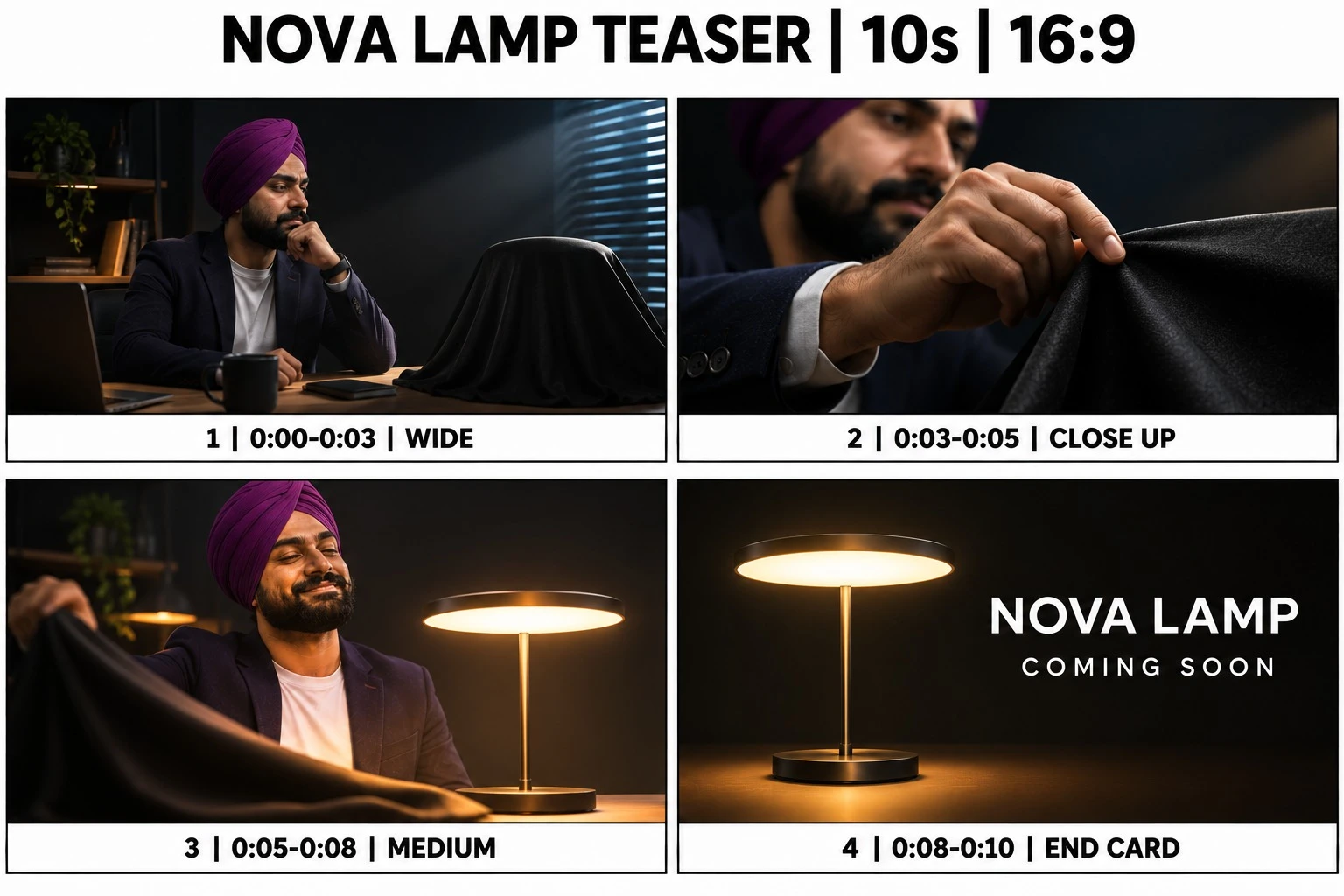
Create a 10 second product launch teaser storyboard sheet for a fictional smart lamp called "NOVA LAMP". Use the attached character sheet for the main character; keep his face, purple turban, beard and navy blazer identical in every panel. Layout: 4 panels in a 2x2 grid on a clean white page, each panel a 16:9 film frame with a thin black border. Under each panel, a caption strip with the panel number, timestamp and shot size. Header at the top: "NOVA LAMP TEASER | 10s | 16:9". Panel 1, caption "1 | 0:00-0:03 | WIDE": he sits at a desk in a dark room lit by a thin sliver of light. Panel 2, caption "2 | 0:03-0:05 | CLOSE UP": his hand reaches for an object hidden under a black cloth. Panel 3, caption "3 | 0:05-0:08 | MEDIUM": he pulls the cloth away and warm light floods over his face. Panel 4, caption "4 | 0:08-0:10 | END CARD": a sleek round lamp glows on a black background above the words "NOVA LAMP" and "COMING SOON". The lamp is an original design with no real logos. Style: moody product film, high contrast, clear motion in every frame. Landscape 3:2. Spell all text exactly. No other text, no watermark.
Teasers work by hiding the product until the last panel. Light the first panels dark and let the product create the light in panel 3.
Cinematic Storyboard Prompts
Use 2.39:1 panels and one consistent color grade for a film look. Shot names like AERIAL, INSERT and OTS tell the video model exactly what kind of shot you want.
Cinematic 30 Seconds: Night Shift (9 Panels)
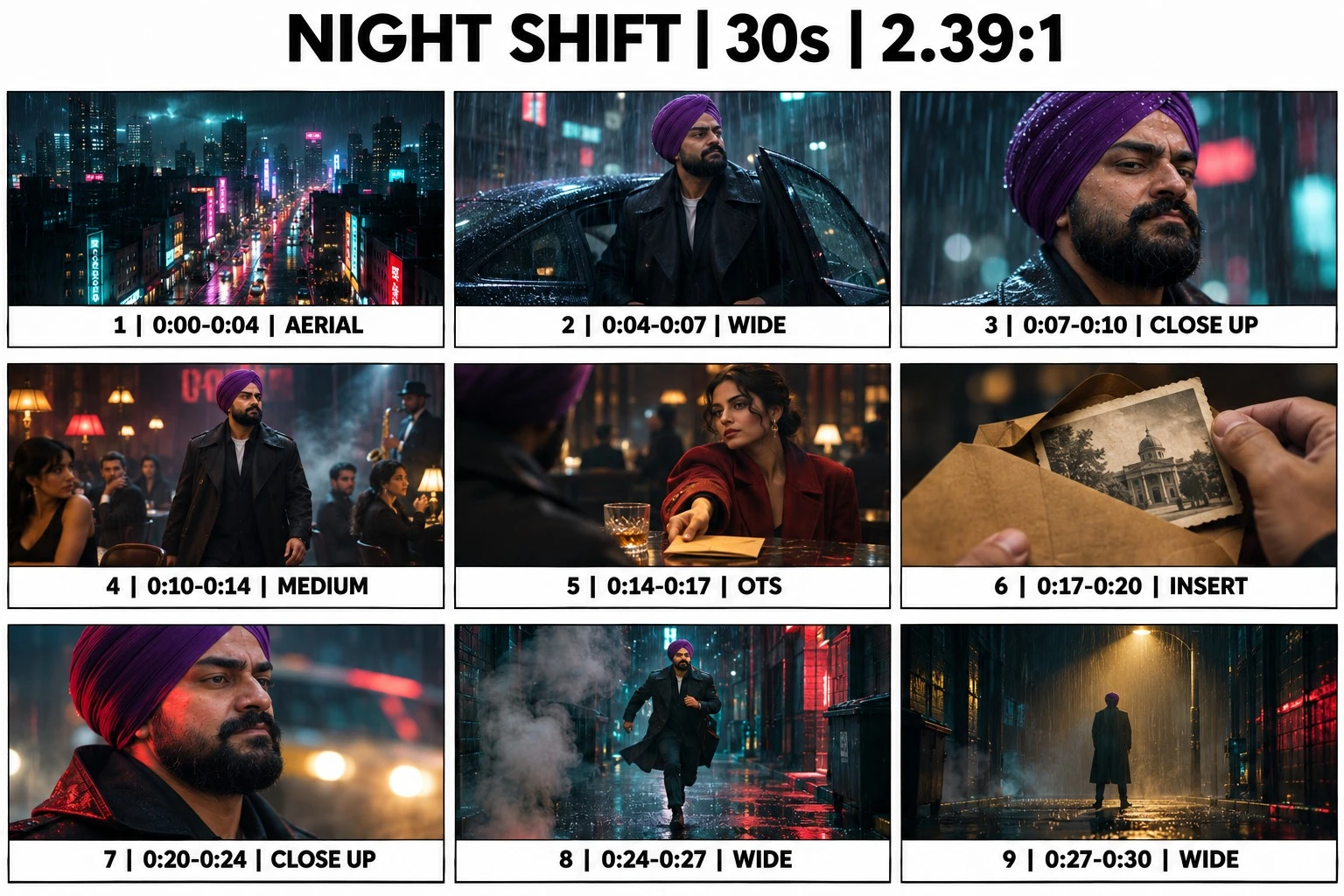
Create a 30 second cinematic storyboard sheet for an AI video. Use the attached character sheet for the main character; keep his face, purple turban and beard identical in every panel, and dress him in a long dark trench coat over his navy blazer. Layout: 9 panels in a 3x3 grid on a clean white page, each panel a wide 2.39:1 film frame with a thin black border. Under each panel, a caption strip with the panel number, timestamp and shot size. Header at the top: "NIGHT SHIFT | 30s | 2.39:1". Panel 1, caption "1 | 0:00-0:04 | AERIAL": a rain soaked city at night full of neon signs. Panel 2, caption "2 | 0:04-0:07 | WIDE": he steps out of a black car into the rain. Panel 3, caption "3 | 0:07-0:10 | CLOSE UP": rain drips from his turban and beard, eyes narrowed. Panel 4, caption "4 | 0:10-0:14 | MEDIUM": he walks into a smoky jazz bar and heads turn. Panel 5, caption "5 | 0:14-0:17 | OTS": over his shoulder, a woman in a red coat slides an envelope across the bar. Panel 6, caption "6 | 0:17-0:20 | INSERT": the envelope opens to reveal a single old photograph. Panel 7, caption "7 | 0:20-0:24 | CLOSE UP": passing headlights sweep across his face as he realizes something. Panel 8, caption "8 | 0:24-0:27 | WIDE": he runs down a wet alley through steam from street vents. Panel 9, caption "9 | 0:27-0:30 | WIDE": he stops at the end of the alley under a flickering streetlight, a lone silhouette. Style: neo noir, teal and red neon, anamorphic lens flares, film grain, same grade in every panel, clear motion in every frame. Landscape 3:2. Spell all text exactly. No other text, no watermark.
This is my most detailed board: nine shots in 30 seconds. If your video tool mixes up shots, split it into three boards of three panels and render them as 10 second clips.
Cinematic 10 Seconds: Last Train
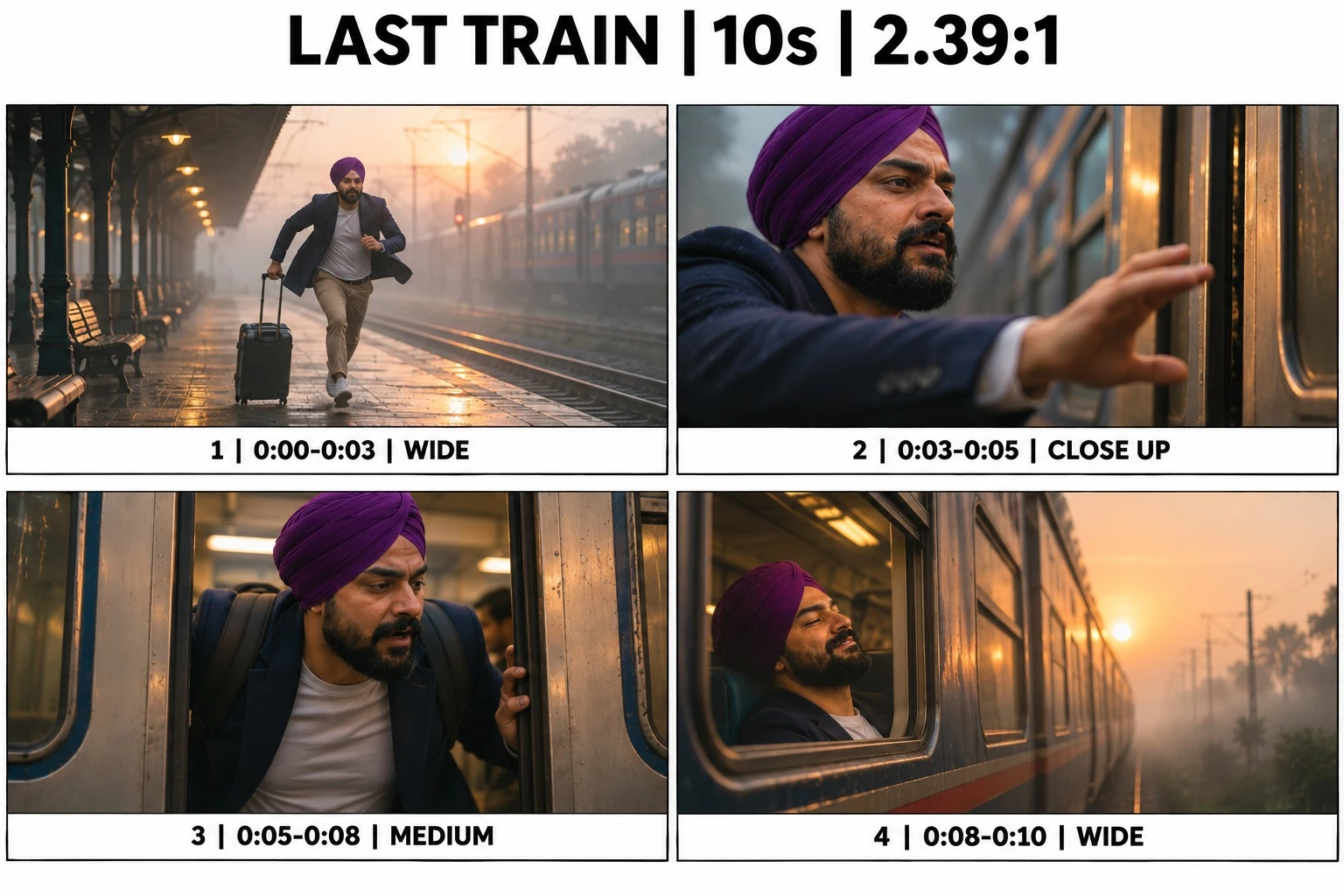
Create a 10 second cinematic storyboard sheet for an AI video. Use the attached character sheet for the main character; keep his face, purple turban, beard and navy blazer identical in every panel. Layout: 4 panels in a 2x2 grid on a clean white page, each panel a wide 2.39:1 film frame with a thin black border. Under each panel, a caption strip with the panel number, timestamp and shot size. Header at the top: "LAST TRAIN | 10s | 2.39:1". Panel 1, caption "1 | 0:00-0:03 | WIDE": he runs down a foggy, empty train platform at dawn with a suitcase. Panel 2, caption "2 | 0:03-0:05 | CLOSE UP": the train doors begin to close. Panel 3, caption "3 | 0:05-0:08 | MEDIUM": he slips through the closing doors, out of breath. Panel 4, caption "4 | 0:08-0:10 | WIDE": the train pulls away into the sunrise, his relieved smile visible in the window. Style: cinematic 35mm film, soft golden fog, same grade in every panel, clear motion in every frame. Landscape 3:2. Spell all text exactly. No other text, no watermark.
Cinematic 15 Seconds: One Take With Camera Arrows
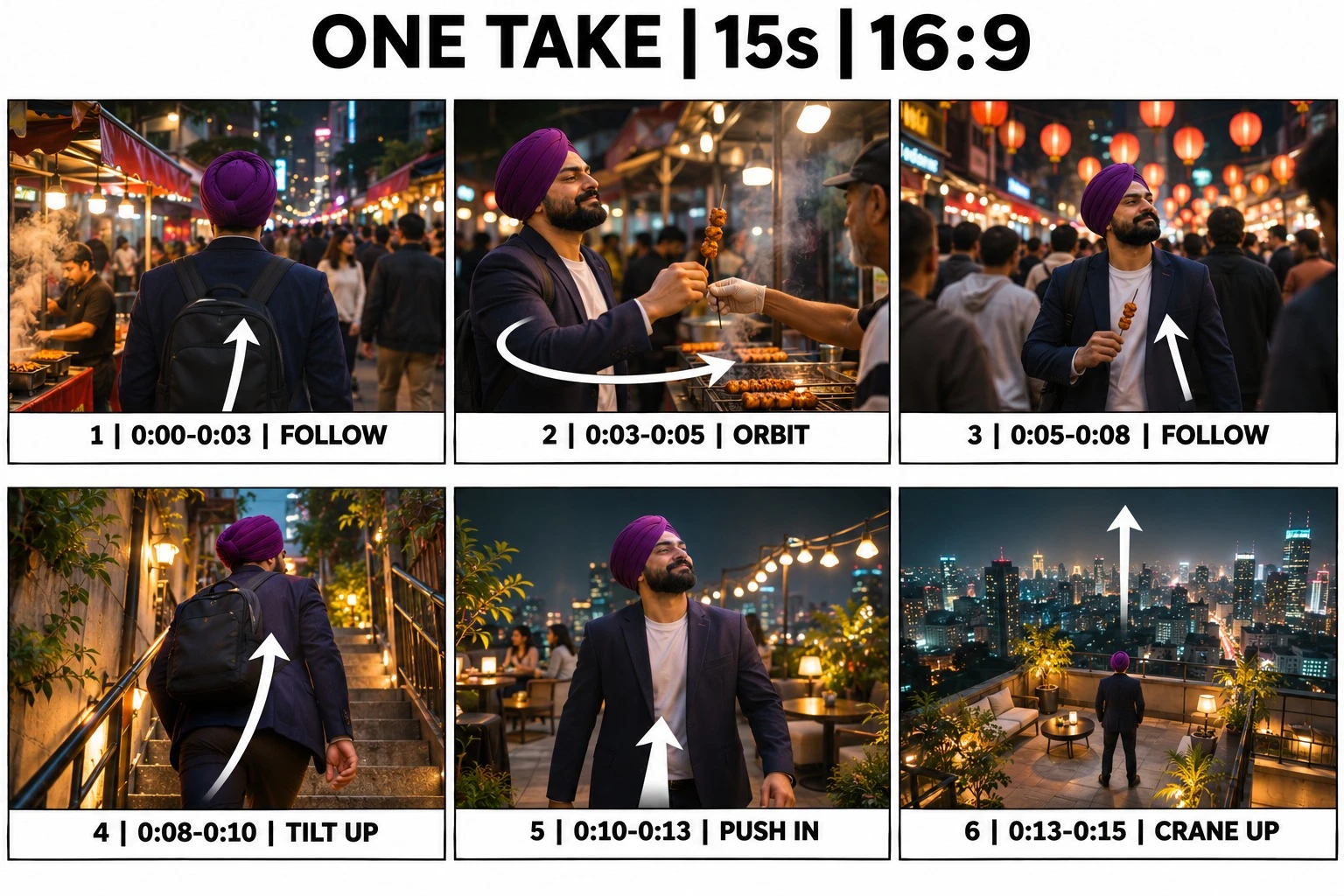
Create a 15 second storyboard sheet for a single continuous camera shot in an AI video. Use the attached character sheet for the main character; keep his face, purple turban, beard and navy blazer identical in every panel. Layout: 6 panels in a 3x2 grid (3 across, 2 down) on a clean white page, each panel a 16:9 film frame with a thin black border and a bold white arrow drawn over the frame to show the camera move. Under each panel, a caption strip with the panel number, timestamp and camera move. Header at the top: "ONE TAKE | 15s | 16:9". Story: the camera follows him through a night market and up to a rooftop in one unbroken shot. Panel 1, caption "1 | 0:00-0:03 | FOLLOW": the camera follows him from behind into a glowing night market, arrow pointing forward. Panel 2, caption "2 | 0:03-0:05 | ORBIT": the camera circles him as he buys a skewer from a vendor, curved arrow. Panel 3, caption "3 | 0:05-0:08 | FOLLOW": he weaves through the crowd under paper lanterns, arrow pointing forward. Panel 4, caption "4 | 0:08-0:10 | TILT UP": he climbs a narrow staircase, arrow pointing up. Panel 5, caption "5 | 0:10-0:13 | PUSH IN": he steps out onto a rooftop, arrow pointing forward. Panel 6, caption "6 | 0:13-0:15 | CRANE UP": the camera rises above him to reveal the city skyline, arrow pointing up. Style: photorealistic night, warm lantern light, same grade in every panel. Landscape 3:2. Spell all text exactly. No other text, no watermark.
The white arrows show the camera path, which Kling 4.0 says it can follow from a storyboard. Ask for "one unbroken shot" in your video prompt too, or the model may cut between panels.
Fillable Storyboard Prompt Templates
Attach your character sheet, copy a template and fill the brackets. Each one already has the right panel count and timestamps for its length.
Fillable 5 Second Template
Create a 5 second storyboard sheet for a [VERTICAL OR WIDE] AI video. Use the attached character sheet for [CHARACTER]; keep [FACE, HAIR, OUTFIT] identical in every panel. Layout: 3 [9:16 OR 16:9] panels side by side on a clean white page, each with a thin black border. Under each panel, a caption strip with the panel number, timestamp and shot size. Header at the top: "[TITLE] | 5s | [RATIO]". Panel 1, caption "1 | 0:00-0:01 | [SHOT SIZE]": [THE HOOK]. Panel 2, caption "2 | 0:01-0:03 | [SHOT SIZE]": [THE TURN]. Panel 3, caption "3 | 0:03-0:05 | [SHOT SIZE]": [THE PAYOFF]. Style: [STYLE], same grade in every panel, clear motion in every frame. [LANDSCAPE 3:2 OR WIDE 16:9 PAGE]. Spell all text exactly. No other text, no watermark.
Fillable 10 Second Template
Create a 10 second storyboard sheet for an AI video. Use the attached character sheet for [CHARACTER]; keep [FACE, HAIR, OUTFIT] identical in every panel. Layout: 4 panels in a 2x2 grid on a clean white page, each panel a [16:9 OR 9:16 OR 2.39:1] film frame with a thin black border. Under each panel, a caption strip with the panel number, timestamp and shot size. Header at the top: "[TITLE] | 10s | [RATIO]". Story: [ONE SENTENCE STORY]. Panel 1, caption "1 | 0:00-0:03 | WIDE": [SET THE SCENE]. Panel 2, caption "2 | 0:03-0:05 | CLOSE UP": [THE DETAIL OR PROBLEM]. Panel 3, caption "3 | 0:05-0:08 | MEDIUM": [THE ACTION]. Panel 4, caption "4 | 0:08-0:10 | [SHOT SIZE]": [THE ENDING]. Style: [STYLE], same grade in every panel, clear motion in every frame. Landscape 3:2. Spell all text exactly. No other text, no watermark.
Fillable 15 Second Template
Create a 15 second storyboard sheet for an AI video. Use the attached character sheet for [CHARACTER]; keep [FACE, HAIR, OUTFIT] identical in every panel. Layout: 6 [16:9 OR TALL 9:16] panels in a 3x2 grid (3 across, 2 down) on a clean white page, each with a thin black border. Under each panel, a caption strip with the panel number, timestamp and shot size. Header at the top: "[TITLE] | 15s | [RATIO]". Panel 1, caption "1 | 0:00-0:03 | [SHOT SIZE]": [ACTION]. Panel 2, caption "2 | 0:03-0:05 | [SHOT SIZE]": [ACTION]. Panel 3, caption "3 | 0:05-0:08 | [SHOT SIZE]": [ACTION]. Panel 4, caption "4 | 0:08-0:10 | [SHOT SIZE]": [ACTION]. Panel 5, caption "5 | 0:10-0:13 | [SHOT SIZE]": [ACTION]. Panel 6, caption "6 | 0:13-0:15 | [SHOT SIZE OR END CARD]": [ENDING OR BRAND NAME AND TAGLINE]. Style: [STYLE], same grade in every panel, clear motion in every frame. [LANDSCAPE 3:2 OR VERTICAL 2:3 PAGE]. Spell all text exactly. No other text, no watermark.
Fillable 30 Second Template (6 Panels)
Create a 30 second storyboard sheet for an AI video. Use the attached character sheet for [CHARACTER]; keep [FACE, HAIR, OUTFIT] identical in every panel. Layout: 6 panels in a 3x2 grid (3 across, 2 down) on a clean white page, each panel a [16:9 OR 2.39:1] film frame with a thin black border. Under each panel, a caption strip with the panel number, timestamp and shot size. Header at the top: "[TITLE] | 30s | [RATIO]". Story: [ONE SENTENCE STORY]. Panel 1, caption "1 | 0:00-0:05 | [SHOT SIZE]": [ACTION]. Panel 2, caption "2 | 0:05-0:10 | [SHOT SIZE]": [ACTION]. Panel 3, caption "3 | 0:10-0:15 | [SHOT SIZE]": [ACTION]. Panel 4, caption "4 | 0:15-0:20 | [SHOT SIZE]": [ACTION]. Panel 5, caption "5 | 0:20-0:25 | [SHOT SIZE]": [ACTION]. Panel 6, caption "6 | 0:25-0:30 | [SHOT SIZE OR END CARD]": [ENDING]. Style: [STYLE], same grade in every panel, clear motion in every frame. Landscape 3:2. Spell all text exactly. No other text, no watermark.
Fillable 30 Second Template (9 Panels)
Create a 30 second storyboard sheet for an AI video. Use the attached character sheet for [CHARACTER]; keep [FACE, HAIR, OUTFIT] identical in every panel. Layout: 9 panels in a 3x3 grid on a clean white page, each panel a [16:9 OR 2.39:1] film frame with a thin black border. Under each panel, a caption strip with the panel number, timestamp and shot size. Header at the top: "[TITLE] | 30s | [RATIO]". Panel 1, caption "1 | 0:00-0:04 | [SHOT SIZE]": [ACTION]. Panel 2, caption "2 | 0:04-0:07 | [SHOT SIZE]": [ACTION]. Panel 3, caption "3 | 0:07-0:10 | [SHOT SIZE]": [ACTION]. Panel 4, caption "4 | 0:10-0:14 | [SHOT SIZE]": [ACTION]. Panel 5, caption "5 | 0:14-0:17 | [SHOT SIZE]": [ACTION]. Panel 6, caption "6 | 0:17-0:20 | [SHOT SIZE]": [ACTION]. Panel 7, caption "7 | 0:20-0:24 | [SHOT SIZE]": [ACTION]. Panel 8, caption "8 | 0:24-0:27 | [SHOT SIZE]": [ACTION]. Panel 9, caption "9 | 0:27-0:30 | [SHOT SIZE]": [ENDING]. Style: [STYLE], same grade in every panel, clear motion in every frame. Landscape 3:2. Spell all text exactly. No other text, no watermark.
Fillable Every Second Template (10 Panels)
Create a 10 second storyboard sheet for an AI video with one panel for every second. Use the attached character sheet for [CHARACTER]; keep [FACE, HAIR, OUTFIT] identical in every panel where he appears. Layout: 10 panels in a 5x2 grid (5 across, 2 down) on a clean white page, each panel a [16:9 OR 9:16] film frame with a thin black border. Under each panel, a caption strip with the panel number, timestamp and shot size. Header at the top: "[TITLE] | 10s | EVERY 1s". Panel 1, caption "1 | 0:00-0:01 | [SHOT SIZE]": [ACTION]. Panel 2, caption "2 | 0:01-0:02 | [SHOT SIZE]": [ACTION]. [CONTINUE ONE PANEL PER SECOND]. Panel 10, caption "10 | 0:09-0:10 | [SHOT SIZE]": [ENDING]. Style: [STYLE], same grade in every panel, clear motion in every frame. Landscape 3:2. Spell all text exactly. No other text, no watermark.
Fillable Every Half Second Template (10 Panels)
Create a 5 second slow motion storyboard sheet for an AI video with one panel for every half second. Use the attached character sheet for [CHARACTER]; keep [FACE, HAIR, OUTFIT] identical in every panel where he appears. Layout: 10 panels in a 5x2 grid (5 across, 2 down) on a clean white page, each panel a [16:9 OR 9:16] film frame with a thin black border. Under each panel, a caption strip with the panel number, timestamp and shot size. Header at the top: "[TITLE] | 5s | EVERY 0.5s". Panel 1, caption "1 | 0:00.0-0:00.5 | [SHOT SIZE]": [ACTION]. Panel 2, caption "2 | 0:00.5-0:01.0 | [SHOT SIZE]": [ACTION]. [CONTINUE ONE PANEL PER HALF SECOND]. Panel 10, caption "10 | 0:04.5-0:05.0 | [SHOT SIZE]": [ENDING]. Style: [STYLE], same grade in every panel, clear motion in every frame. Landscape 3:2. Spell all text exactly. No other text, no watermark.
Style Lines for Each Category
Swap the [STYLE] bracket for one of these lines:
| Category | Style line |
|---|---|
| Cinematic | cinematic 35mm film, anamorphic lens flares, soft film grain |
| Fantasy | epic photorealistic fantasy film, deep blue and gold palette |
| Animated | 3D animated family film style with soft rounded shapes |
| Social media | natural phone camera look, warm light |
| Ad creative | glossy commercial, crisp daylight |
| UGC ad | handheld phone footage look, natural indoor light |
| Marketing | documentary brand film, natural light |
| Noir | neo noir, teal and red neon, film grain |
How to Turn Your Storyboard Into a Video
The storyboard is half the job. The video prompt tells the model to follow it, keep the character and hide the captions.
Video Prompt for Kling 4.0
Upload the storyboard and the character sheet, then use this prompt. Kling's guide says to give every uploaded asset a clear role, so the prompt names both.
Image 1 is the storyboard: follow its panels in order, one shot per panel, at the times shown in the captions. Image 2 is the character sheet: keep the man's face, purple turban, beard and navy blazer identical in every shot. 0:00-0:03: [panel 1 action and camera move]. 0:03-0:05: [panel 2]. 0:05-0:08: [panel 3]. 0:08-0:10: [panel 4]. Style: [style from the storyboard]. Audio: [ambient sound, music mood, any dialogue]. The video shows only the film frames, with no panel borders, captions, timestamps or header text. Length: 10 seconds, 16:9.
Replace "Image 1" and "Image 2" with the reference tags your tool shows after upload. For an every second board, you can instead crop each panel and upload up to 10 of them as Kling keyframes.
Video Prompt for Seedance 2.5
Dreamina's Seedance guide says to name your references first and say what each one controls.
References: Image 1 is the storyboard and controls shot order, framing and timing. Image 2 is the character sheet and controls the man's identity, turban, beard and clothes. 0-3s: [panel 1 action and camera]. 3-5s: [panel 2]. 5-8s: [panel 3]. 8-10s: [panel 4]. Keep the same lighting and color grade as the storyboard. No subtitles, no captions, no watermark, no panel borders.
Video Prompt for Gemini Omni and Veo 3.1 (Keyframes)
These tools work from a start frame and an end frame. Crop panel 1 and your last panel out of the storyboard, upload them as the first and last frame, then describe the motion between them.
Start on the first frame and end on the last frame. In between: [describe the middle panels as one continuous action, in order]. Camera: [camera move]. Keep the man's face, purple turban and beard the same as the first frame. [8 OR 15] seconds, [16:9 OR 9:16], [style].
Veo 3.1 stops at 8 seconds, so use a 5 second board or split a 10 second board into two clips.
Make a 30 Second Video on a 15 Second Tool
Split a 6 panel board into panels 1 to 3 and panels 4 to 6. Render the first half, take its last frame, and use it as the first frame of the second half, so the cut matches.
Common Storyboard Problems and Fixes
Frequently Asked Questions (FAQs)
What is a storyboard prompt for AI video?
A storyboard prompt asks an image model like ChatGPT to draw every shot of your video on one sheet, in order, with timestamps. You then upload that sheet to a video tool such as Kling 4.0 or Seedance 2.5 as the shot plan for the clip.
How many panels does a 10 second storyboard need?
Four panels work best for 10 seconds, at about 2 to 3 seconds each. Fewer panels give each shot more time to move, and more than six panels in 10 seconds usually feels rushed.
How do I make a storyboard with a frame every second?
Ask for one panel per second and give each caption a one second range, like 0:03-0:04. Use 5 panels for 5 seconds, 10 for 10 seconds and 15 for 15 seconds, laid out 5 across. For half seconds, double the panels and write timestamps like 0:02.0-0:02.5.
Do I need a character sheet for these storyboard prompts?
Yes. Every prompt in this guide says "Use the attached character sheet", so upload your sheet in ChatGPT before you paste the prompt, or ChatGPT invents a new face in each board. Make one from your own photo with the Step 1 prompt, using only your face or a photo you have permission to use.
Which AI video generator follows a storyboard image?
Kling 4.0 is the clearest option because its guide says you can upload a storyboard image and ask it to follow the shot order and camera paths. Seedance 2.5 accepts storyboards as references, while Gemini Omni and Veo 3.1 work best with panels cropped into first and last frames.
Final Thoughts
A storyboard image turns a vague video prompt into a shot plan the model can actually follow. Make one character sheet, attach it to every prompt, and pick the panel count that fits your clip, from 3 panels for 5 seconds to one panel every half second. Copy the core prompt, fill in your own story, and render your first 10 second storyboard today.