Chrome Extension

I built five apps with Claude Fable 5.1 the week it launched: a 3D racing game, an eVTOL air taxi landing page, a competitor-monitoring SaaS, a short-form video analyzer, and a desktop face recognition tool.
Four of them came out of a single prompt each. I am going to walk you through every one, show you what broke, and give you the honest usage numbers, because those matter more than the benchmarks here.
I also went through Anthropic's official documentation line by line, since a few things the community is repeating about this model are not what Anthropic actually published. Every spec below links to its source.
Previously I have done review of Fable 5 and Mythos 5 here do check that out to compare.
Key Takeaways
What Claude Fable 5.1 Actually Is
Let me get the official facts straight first, because I saw a lot of confident wrong claims in my feed this week.
Anthropic released Fable 5.1 alongside Claude Mythos 5.1 on September 1, 2026. The announcement calls them "the world's most advanced models for coding and knowledge work", with research capabilities Anthropic frames as an early look at how AI will contribute to scientific work.
The model documentation is more specific about the job it is meant for:
"For demanding reasoning and long-horizon agentic work"
Here is what I verified from Anthropic's own pages:
| Spec | Value |
|---|---|
| Model ID | claude-fable-5-1 |
| Released | September 1, 2026 |
| Context window | 1M tokens |
| Max output | 128K tokens |
| Knowledge cutoff | June 2026 |
| Thinking | Adaptive, always on |
| Default effort | high |
| Input | Text and images |
| Retirement | Not sooner than September 1, 2027 |
One thing worth knowing: Fable 5 is not deprecated. Both models are listed active, with Fable 5 running until at least June 9, 2027.
The Effort Levels, Since I Used High
In the video I mention running "high reasoning." The official parameter is output_config.effort, and Anthropic documents five levels:
lowmediumhigh (default)xhighmaxAnthropic's own guidance is to start at high and step up to xhigh or max only for capability-sensitive agentic and coding work.
Here is a detail most people miss. high is the default in Claude Code, but the announcement states Fable 5.1 defaults to Medium in Claude Cowork and on claude.ai. So if you are testing on the web app and wondering why your results feel weaker than what you see in demos, that is probably why. Bump the effort.
Pricing
| Item | Price |
|---|---|
| Input | $10 / MTok |
| Output | $50 / MTok |
| Cache write (5m) | $12.50 / MTok |
| Cache write (1h) | $20 / MTok |
| Cache read | $0.25 / MTok |
| Batch API | 50% discount |
The headline price did not move from Fable 5. The savings are entirely in cache reads, which are 75% cheaper. Anthropic says typical workloads land about 25% cheaper and heavily agentic ones up to 45% cheaper, indexed on four weeks of real August 2026 usage.
What The Benchmarks Say
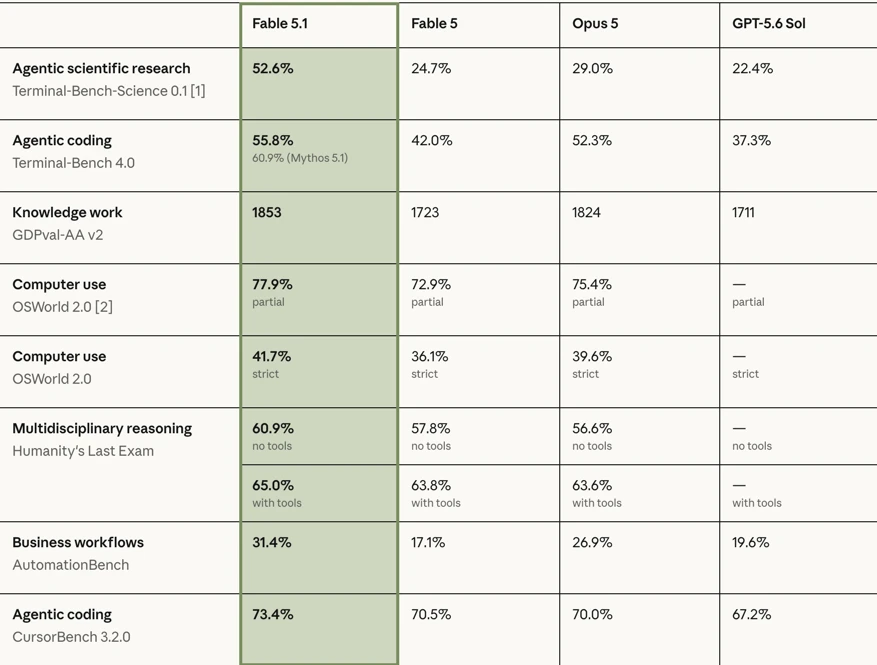
Anthropic published these in the launch post. I am including the competitor columns because the gaps are the interesting part:
| Benchmark | Fable 5.1 | Fable 5 | Opus 5 | GPT-5.6 Sol |
|---|---|---|---|---|
| Terminal-Bench-Science 0.1 | 52.6% | 24.7% | 29.0% | 22.4% |
| Terminal-Bench 4.0 | 55.8% | 42.0% | 52.3% | 37.3% |
| AutomationBench | 31.4% | 17.1% | 26.9% | 19.6% |
| CursorBench 3.2.0 | 73.4% | 70.5% | 70.0% | 67.2% |
| GDPval-AA v2 | 1853 | 1723 | 1824 | 1711 |
That Terminal-Bench-Science jump is the one that stands out, roughly doubling Fable 5.
Two honesty notes. Anthropic states the standard error on that benchmark is ±3.5 to 4.5 points per model. And Anthropic published no SWE-bench score for Fable 5.1, so if you see one quoted, it did not come from Anthropic.
There is also a caveat I think deserves more attention than it got. Anthropic evaluated Fable 5.1 with production safeguards active, and states that where safeguards intervened, the model scored zero on those OSWorld 2.0 tasks. In their words, this "likely reduces the performance of Fable 5.1 and Fable 5 on these benchmarks." I ran into the same behavior in practice, which I will come back to.
App 1: Apex, A 3D Racing Game
I started with a game, because games break AI models fast. Physics, state, collision, camera, UI, all at once.
Apex has a garage where you pick and colour your car, three maps, and a working race with live position tracking. I ran it in orange, went to Canyon Run in the mountains, and finished a lap moving from last to first.
The prompt was one shot. It took about an hour to generate.
Build "Apex" — a 3D racing game with realistic graphics, three tracks, and three camera
views. Deliver ONE self-contained apex.html (all HTML/CSS/JS embedded) that runs by opening
it in a browser. External 3D assets and textures are loaded from CDNs at runtime; no build
step, no bundler, no local files required.

═══════════════════════════════════════════════════════
STACK
═══════════════════════════════════════════════════════
Modern three.js via ES modules and an import map (NOT the old global build — you need the
addons for realistic rendering):

<script type="importmap">
{ "imports": {
    "three": "https://cdn.jsdelivr.net/npm/three@0.170.0/build/three.module.js",
    "three/addons/": "https://cdn.jsdelivr.net/npm/three@0.170.0/examples/jsm/"
}}
</script>
<script type="module"> ... </script>

Addons to use: GLTFLoader, DRACOLoader, RGBELoader, EffectComposer, RenderPass,
UnrealBloomPass, SMAAPass (or FXAA), OutputPass, and optionally SSAOPass/SAOPass.
Google Fonts allowed for UI. No other libraries — write the vehicle physics yourself.

═══════════════════════════════════════════════════════
ASSET MANIFEST + FALLBACK CHAIN (implement this FIRST)
═══════════════════════════════════════════════════════
Put a single ASSETS object at the top of the script holding every external URL, plus a
USE_LOCAL_ASSETS boolean that swaps all paths to './assets/<filename>'. Every entry must
have a fallback, and the game MUST be fully playable if every network request fails.

CANDIDATE SOURCES (verify each at runtime; fall back on any failure):

  CAR MODELS (glTF/GLB):
    Primary:   https://threejs.org/examples/models/gltf/ferrari.glb
               (the model from three.js's official car-materials example; its named nodes
                include a body mesh and four wheels — parent the wheels so you can spin and
                steer them independently)
    Alternate: Khronos glTF Sample Assets via jsDelivr, e.g.
               https://cdn.jsdelivr.net/gh/KhronosGroup/glTF-Sample-Assets@main/Models/...
    FALLBACK:  build a good-looking low-poly car procedurally from primitives — a chamfered
               body (BoxGeometry with beveled proportions or a lathe/extrude profile), a
               cabin, four wheels (CylinderGeometry, rotated), spoiler, headlights (emissive),
               and a clearcoat paint material. It should still look intentional, not a box.

  HDRI ENVIRONMENT MAPS (for realistic reflections — the single biggest visual win):
    Primary:   https://threejs.org/examples/textures/equirectangular/venice_sunset_1k.hdr
               https://threejs.org/examples/textures/equirectangular/royal_esplanade_1k.hdr
               https://threejs.org/examples/textures/equirectangular/quarry_01_1k.hdr
    Alternate: Poly Haven CDN (CORS-enabled), pattern:
               https://dl.polyhaven.org/file/ph-assets/HDRIs/hdr/1k/<slug>_1k.hdr
               (try slugs like kloppenheim_06, dikhololo_night, sunset_fairway)
    FALLBACK:  generate a gradient sky environment procedurally — render a vertical gradient
               (horizon → zenith) plus a sun disc to a canvas/render target, run it through
               PMREMGenerator, and use that as scene.environment. Reflections still work.

  ROAD / GROUND TEXTURES (albedo + normal + roughness):
    Primary:   Poly Haven textures CDN, pattern:
               https://dl.polyhaven.org/file/ph-assets/Textures/jpg/1k/<slug>/<slug>_diff_1k.jpg
               (and _nor_gl_1k.jpg, _rough_1k.jpg) — try asphalt, concrete, gravel, grass slugs
    FALLBACK:  procedural canvas textures — asphalt as tiled noise with speckle, lane
               markings drawn directly into the texture, grass as noise. Generate normal maps
               procedurally from the height/noise.

  AUDIO: synthesize everything with the Web Audio API (see AUDIO below). Do not fetch audio files.

LOADING RULES:
  - Load everything through a LoadingManager with a real progress bar on a loading screen
  - Wrap every load in a try/catch with a per-asset timeout (~8s); on failure log a clear
    console warning ("HDRI failed, using procedural sky") and use the fallback
  - Show a small "Assets: 7/9 loaded (2 fallbacks)" line on the loading screen so it's
    obvious what happened — this makes debugging trivial
  - Set crossOrigin = 'anonymous' on loaders that support it

═══════════════════════════════════════════════════════
REALISTIC RENDERING (this is the visual bar — do all of it)
═══════════════════════════════════════════════════════
RENDERER:
  WebGLRenderer({ antialias: true, powerPreference: 'high-performance' })
  renderer.outputColorSpace = THREE.SRGBColorSpace
  renderer.toneMapping = THREE.ACESFilmicToneMapping; toneMappingExposure ≈ 1.0 (tunable)
  renderer.shadowMap.enabled = true; type = THREE.PCFSoftShadowMap
  setPixelRatio(Math.min(devicePixelRatio, 2))

ENVIRONMENT & LIGHTING:
  - RGBELoader → PMREMGenerator → scene.environment (drives ALL PBR reflections)
  - scene.background = the same env map (or a matching gradient sky)
  - One DirectionalLight as the sun, positioned to match the HDRI's light direction, with a
    TIGHT shadow camera frustum that FOLLOWS THE CAR (recompute its target and bounds each
    frame around the player) — this is what makes shadows sharp instead of mushy
  - Subtle ambient/hemisphere fill; exponential fog tuned per track

MATERIALS (MeshPhysicalMaterial where it counts):
  - CAR PAINT: metalness ~0.9, roughness ~0.15, clearcoat 1.0, clearcoatRoughness ~0.03,
    plus a subtle env-map intensity boost. This is what reads as "realistic car."
  - GLASS: transmission or transparent with low roughness, high env-map contribution
  - TIRES: near-black, roughness ~0.9, metalness 0
  - CHROME/TRIM: metalness 1.0, roughness ~0.05
  - ROAD: albedo + normal + roughness maps, repeat-wrapped and tiled along the track,
    anisotropy set to renderer.capabilities.getMaxAnisotropy()

POST-PROCESSING (EffectComposer):
  RenderPass → (optional SSAO/SAO, subtle) → UnrealBloomPass (threshold high, strength LOW —
  bloom only on headlights, sun glints, and emissive trim; it must not wash the image out) →
  a custom RADIAL MOTION BLUR pass that scales with speed → SMAA (or FXAA) → OutputPass.

SPEED FEEL (crucial for a racer — most builds miss this):
  - FOV rises with speed (e.g. 65° at rest → 85° at top speed), eased, not snapped
  - Radial motion blur strength scales with speed
  - Subtle camera shake that grows with speed and spikes on kerbs/collisions
  - Screen-edge speed streaks at high velocity
  - Chromatic aberration nudge during boost

═══════════════════════════════════════════════════════
VEHICLE PHYSICS (write it yourself — arcade-realistic, not a physics engine)
═══════════════════════════════════════════════════════
Custom arcade model, fixed timestep (e.g. 120Hz) decoupled from render, interpolated for
display. Do NOT make physics frame-rate dependent.

  - 4-WHEEL RAYCAST SUSPENSION: cast a ray down from each wheel mount; compute spring force
    (stiffness, damping, rest length) to keep the body floating at ride height. This gives
    you body roll, pitch under braking/acceleration, and correct behavior over elevation
    changes and kerbs — it's what makes the car feel like it has weight.
  - LONGITUDINAL: throttle → engine force via a torque curve; drag (v²) + rolling resistance;
    brakes; reverse. 6 gears with an RPM readout, upshift/downshift at thresholds.
  - LATERAL GRIP + SLIP: compute the slip angle at front and rear; grip is linear up to a
    limit, then falls off — exceed it and the car DRIFTS. Rear slip > front = oversteer.
    Handbrake sharply cuts rear grip for deliberate drifts.
  - SPEED-SENSITIVE STEERING: max steering angle decreases as speed rises (otherwise the
    car is undriveable at 200km/h).
  - WEIGHT TRANSFER: shift the load between front/rear under accel/braking, feeding back
    into per-axle grip.
  - COLLISIONS: track walls/barriers as simple colliders; impacts scrub speed, kick the car,
    shake the camera, and spawn sparks. Off-track surfaces (grass/gravel) have lower grip
    and add drag + a rumble effect.
  - BOOST: a meter that fills from clean driving and drifting; spend for a speed surge with
    exhaust flame, FOV kick, and stronger motion blur.

  Tune it so it's FUN first and plausible second: responsive, forgiving on the limit,
  satisfying to drift. Expose a TUNING object at the top of the file (mass, engine force,
  grip coefficients, spring stiffness, steering curve) so values are easy to adjust.

═══════════════════════════════════════════════════════
THREE CAMERA VIEWS (press C to cycle; all three must be properly implemented)
═══════════════════════════════════════════════════════
1. CHASE CAM ("Car") — third-person behind and above the car. Spring-damped follow with
   lag, so the camera swings wide through corners and settles on straights. Look-ahead
   biased toward the racing direction. Slight roll with the car's body roll. Height and
   distance ease with speed. This is the default view.

2. COCKPIT CAM ("Steering") — inside the car, eye level behind the wheel. You must MODEL
   AND RENDER a visible interior: a steering wheel that ROTATES with steering input, a
   dashboard with a working analog tachometer needle and speed readout, mirrors, an A-pillar
   and roofline framing the view, and the hood visible ahead. Add subtle head movement —
   the view leans slightly into corners and pitches under braking. If the loaded car model
   has no interior geometry, build the cockpit procedurally (wheel, dash, pillars) and
   position it correctly relative to the car body. This is the view that proves the model
   can do detail work.

3. POV / BUMPER CAM ("POV") — a low first-person camera at the front bumper, no car
   geometry in view (or just a sliver of hood). Very close to the road, exaggerated sense of
   speed, more camera shake, wider FOV. The fastest-feeling view.

  All three: smooth transitions when cycling (lerp position/rotation over ~0.4s rather than
  cutting), and each has its own FOV curve and shake profile.
  Bonus: a free-orbit photo mode (P) that pauses and lets you orbit the car for screenshots.

═══════════════════════════════════════════════════════
THREE TRACKS (generate procedurally from spline definitions — reliable and distinct)
═══════════════════════════════════════════════════════
Define each track as a CatmullRomCurve3 of control points plus a width and a banking/
elevation profile. Extrude the road surface along the curve (build the geometry yourself
from the curve's frames), and derive from the same curve: the racing line for AI, the
checkpoint positions, the minimap path, and the start grid.

TRACK 1 — "Coastal" (sunset)
  A flowing seaside circuit: long sweeping curves, one hairpin, gentle elevation. Sunset
  HDRI, warm light, an ocean plane with a subtle animated normal map, cliff walls, palm
  silhouettes, guard rails. Warm haze fog. Medium difficulty, fast average speed.

TRACK 2 — "Neon District" (night, wet)
  A tight city circuit: 90° corners, a chicane, a tunnel section, barriers close to the
  road. Night HDRI, WET ASPHALT — high reflectivity, low roughness, reflected neon. Emissive
  signage and street lights (their bloom is the visual signature here), building blocks
  lining the circuit, headlights actually illuminating the road ahead (SpotLights from the
  car). Hardest track.

TRACK 3 — "Canyon Run" (day, desert)
  A high-speed canyon circuit with real elevation change: crests that go light on the
  suspension, a banked corner, a long straight for top speed. Bright midday HDRI, red rock
  walls, dust particles, sparse vegetation, gravel run-off areas with reduced grip.

  Each track needs: correct start/finish line, 8–12 checkpoints for lap validation and
  wrong-way detection, kerbs at corner apexes (with a rumble effect and slight grip change),
  barriers, and a distinct skybox/lighting mood so all three feel like different places.

═══════════════════════════════════════════════════════
RACE STRUCTURE
═══════════════════════════════════════════════════════
  - 3 laps (configurable). Countdown start (3-2-1-GO) with the engine idling.
  - LAP TIMING: current lap, last lap, best lap, and per-sector splits with green/red
    delta indicators vs your best.
  - 4 AI OPPONENTS: each follows the racing-line spline with a per-car speed profile, brakes
    for corners based on upcoming curvature, takes slightly different lines, avoids
    collisions with simple lateral offsets, and has mild rubber-banding so races stay close.
    Difficulty setting scales their pace.
  - Position tracking (P1/5) computed from lap + spline progress.
  - Wrong-way warning; off-track detection; a reset-to-track key (R) with a small time penalty.
  - Results screen: finishing position, total time, best lap, sector bests, animated reveal.
  - GHOST: record your best lap's transform history and replay it as a translucent car.
  - Persist best lap per track, unlocked content, and settings in localStorage.

═══════════════════════════════════════════════════════
CARS
═══════════════════════════════════════════════════════
  3 selectable cars with genuinely different handling (feed different values into the same
  TUNING model): a balanced GT, a light/nimble/low-grip drifter, and a heavy high-top-speed
  machine. Show stat bars (speed / accel / grip / weight). Selectable paint colors applied to
  the car-paint material at runtime. If only one model loads, re-color and slightly re-scale
  it per car and say so in the UI — don't fake three distinct models you don't have.

═══════════════════════════════════════════════════════
HUD & UI
═══════════════════════════════════════════════════════
  IN-RACE HUD: analog speedometer with a sweeping needle + digital km/h, tachometer with
  redline, current gear, lap counter, position, lap/sector times with deltas, boost meter,
  a MINIMAP drawn from the track spline with live car dots, and a countdown/finish banner.
  Style it like a real racing game's overlay — crisp, tight, readable at speed.

  SCREENS (all animated, no hard cuts): main menu (with the car slowly rotating under the
  HDRI — your best-looking shot), track select (3 cards with previews, best-lap times, and
  difficulty), car select (rotating car + stat bars + paint picker), settings, pause,
  results, and the loading screen with the asset-status line.

  SETTINGS: graphics quality preset (Low / Medium / High / Ultra) that toggles post-
  processing passes, shadow map resolution, pixel ratio, and particle counts — Low must run
  smoothly on integrated graphics. Plus: camera default, FOV, motion-blur intensity, audio
  volumes, control remapping, assists (traction control / racing line on/off).

═══════════════════════════════════════════════════════
EFFECTS & AUDIO
═══════════════════════════════════════════════════════
  VISUAL: tire smoke particles when slipping; skid marks written to the road (draw into a
  canvas texture or spawn decal quads) that persist for the lap; sparks on wall contact;
  dust on gravel; exhaust flame on boost/upshift; headlight cones and emissive brake lights
  that brighten under braking; a wet-road reflection treatment on Track 2.

  AUDIO — all synthesized with the Web Audio API, no files:
    - Engine: layered oscillators whose frequency tracks RPM, with a gear-change interrupt;
      it must rise and fall convincingly with the throttle. This is the hardest audio piece —
      make it sound like an engine, not a siren.
    - Tire squeal when slip exceeds the grip limit, scaled by slip amount
    - Wind noise scaling with speed; collision thud; kerb rumble; boost whoosh
    - Countdown beeps, lap-complete chime, race-finish sting
    - Master/SFX volume in settings

═══════════════════════════════════════════════════════
CONTROLS
═══════════════════════════════════════════════════════
  WASD / arrows (steer, throttle, brake) · Space handbrake · Shift boost · C cycle camera ·
  R reset to track · P photo mode · Esc pause. Gamepad support via the Gamepad API if
  present (analog steering and triggers). Show a control overlay on first run.

═══════════════════════════════════════════════════════
PERFORMANCE
═══════════════════════════════════════════════════════
  Target 60fps at High on a mid-range laptop. Frustum-cull aggressively; instance repeated
  track props (barriers, poles, vegetation); keep shadow-casting objects to a minimum; cap
  particle counts; dispose geometries/materials/textures on track change; pause rendering
  when the tab is hidden. Respect prefers-reduced-motion by damping camera shake and
  motion blur.

═══════════════════════════════════════════════════════
CODE ORGANIZATION (single file, but structured and commented)
═══════════════════════════════════════════════════════
  ASSETS manifest + AssetLoader (with fallbacks) · TUNING constants · SceneSetup ·
  EnvironmentManager (HDRI/PMREM/fog per track) · TrackBuilder (spline → road geometry,
  checkpoints, racing line, minimap path) · CarModel (load or procedural build, wheel rig) ·
  VehiclePhysics (fixed-step, suspension, grip, slip) · AIDriver · CameraRig (three modes) ·
  PostFX (composer + custom motion blur) · ParticleSystem · SkidMarks · AudioEngine ·
  RaceManager (laps, checkpoints, positions, timing, ghost) · HUD · UI (screen manager) ·
  Storage · main loop (fixed-step physics + interpolated render).

═══════════════════════════════════════════════════════
VERIFY BEFORE YOU FINISH
═══════════════════════════════════════════════════════
  □ The game is fully playable with EVERY external asset failing to load (test that path)
  □ Physics is frame-rate independent — identical behavior at 30fps and 144fps
  □ All three cameras work and transition smoothly; the cockpit's steering wheel actually
    rotates with input and the tachometer needle tracks RPM
  □ All three tracks load, are drivable, have valid checkpoints, and look distinctly different
  □ Lap counting is correct and cannot be cheated by cutting the course
  □ AI cars complete laps without leaving the track or stalling on walls
  □ Wheels rotate at a speed matching ground velocity and steer with input
  □ Drifting is achievable and controllable; the handbrake does what it should
  □ Best lap times persist across reloads
  □ Quality presets meaningfully change performance
  □ No console errors; every asset failure is logged clearly with its fallback

Output the complete single HTML file, no truncation. The vehicle physics (fixed-step
suspension + slip model), the TrackBuilder (spline → geometry + checkpoints + racing line),
and the asset fallback chain are the three critical systems — get those correct before
polish, because a racer with bad physics or a broken loader is unplayable regardless of
how it looks.
What impressed me was not the driving. It was everything around it:
Nothing was pulled from an external asset library. The car models, the tracks and the city are all generated.
My score: 5 out of 5. Honestly, if I had more than five points to give, I would have.
App 2: Ascent A1, An eVTOL Air Taxi Landing Page
Next I wanted to test frontend and design, so I built a marketing site for a fictional electric air taxi network. There are real startups in this space, so it felt like a fair brief.
Build "Ascent" — the marketing website for an electric air-taxi (eVTOL) network that flies
people over city traffic. A complete MULTI-PAGE site: 6 interlinked pages sharing one design
system, one nav, and smooth page transitions. This should look like a well-funded aviation
startup's site — precise, confident, technical, beautiful. Not a template.

STACK (CDN only, no build step): Three.js r128, GSAP 3.12 + ScrollTrigger, Lenis smooth
scroll, Lucide icons, Google Fonts. Pure HTML/CSS/JS.

FILES:
  shared.css  — all tokens, components, patterns, both themes
  shared.js   — Lenis, custom cursor, theme toggle, [data-reveal], magnetic buttons,
                tilt cards, nav behavior, PAGE TRANSITIONS
  index.html · aircraft.html · network.html · safety.html · pricing.html · company.html
  js/home.js · js/aircraft.js · js/network.js · js/safety.js · js/pricing.js · js/company.js

DESIGN DIRECTION — "precision aviation":
  Light-first (aviation reads clean and bright), with a full dark theme. A cool
  aluminium/sky palette: near-white base, deep slate ink, one confident accent (propose an
  electric sky-blue) plus a warm signal-amber for data highlights. Fonts: a precise
  technical sans for display + a clean grotesk body + a mono for telemetry/metrics. The
  feel should be instrument-panel exact: tight alignment, real numbers, generous air.

THE 3D HERO (real Three.js WebGL, not CSS fakery):
  An eVTOL aircraft built from primitives — fuselage, wing, six tilting rotor nacelles,
  landing skids. Brushed-aluminium MeshStandardMaterial with env-map reflection, soft key
  light + sky fill. It hovers with a subtle bob, rotors spinning. Mouse parallax orbits it
  slightly. ON SCROLL: the camera arcs around the aircraft while the rotors TILT from
  vertical (hover) to horizontal (forward flight) — a real transition-to-cruise animation
  driven by ScrollTrigger scrub. Dispose the scene on page transition; gradient fallback
  if WebGL is unavailable.

PAGE 1 — index.html (11 sections):
  1. Hero: the 3D aircraft + headline + subhead + "Book a flight" / "See the network" CTAs
  2. Trust bar: certification bodies, partners, investor logos (marquee)
  3. The problem: a ground-vs-air time comparison (animated bars — "47 min driving / 7 min flying")
  4. PINNED SCROLL INTERLUDE (300vh): "a flight, end to end" — as you scroll, an isometric
     city map draws itself, a route arcs from a downtown vertiport to the airport, the
     aircraft icon travels the arc, and telemetry callouts (altitude, speed, ETA, CO₂ saved)
     count up alongside at the right moments. This is the signature moment — make it precise
     and beautiful.
  5. How it works: 4 steps (book → arrive → board → land), animated numbered cards
  6. The aircraft, briefly: 3 spec highlights with animated micro-visualizations
  7. Live network stats band (animated counters: routes, vertiports, flights flown, minutes saved)
  8. Testimonials (draggable carousel, [data-cursor-text="DRAG"])
  9. Sustainability: emissions comparison chart (CSS/SVG) vs car, rideshare, helicopter
  10. FAQ accordion (safety, weather, noise, pricing)
  11. Final CTA band + rich footer

PAGE 2 — aircraft.html: the machine. A hero with an EXPLODED-VIEW diagram that assembles on
  scroll (SVG); spec table (range, cruise speed, payload, charge time, noise dB); a
  rotor-tilt explainer with an interactive slider the user drags to tilt the rotors in a small
  3D viewport; battery + charging section; noise comparison (interactive dB chart); materials;
  maintenance program; CTA.

PAGE 3 — network.html: where it flies. An interactive city map (SVG) with vertiport pins;
  hovering a pin highlights its routes and shows a card (location, routes served, daily
  flights); a route list with times and prices; coverage-expansion timeline; a
  "plan your trip" widget (from → to → shows time saved vs driving); partner airports; CTA.

PAGE 4 — safety.html: the trust page. Certification status with a progress tracker;
  redundancy explainer (an SVG diagram showing dual systems highlighting on scroll); pilot
  training program; flight-hours statistics; weather policy; emergency procedures; an
  independent-audit section; safety-record numbers; FAQ; CTA.

PAGE 5 — pricing.html: per-route pricing + membership. Route price table with a
  from/to selector; monthly/annual membership toggle animating prices; 3 tiers with the
  middle featured (slow rotating gradient border); what's included comparison; corporate
  accounts; a cost-vs-time calculator (input your hourly rate → see the break-even);
  refunds/weather policy; FAQ; CTA.

PAGE 6 — company.html: story + team. Founding narrative; a timeline whose SVG line draws on
  scroll; leadership cards with hover reveal; engineering culture; investors; press quotes;
  open roles; regulatory partnerships; CTA.

SHARED SYSTEMS (shared.js):
  - Lenis smooth scroll + a thin scroll-progress bar
  - CUSTOM CURSOR: an aviation-style reticle — a small dot with a thin rotating ring and
    four tick marks that converge on hover over interactive elements, showing a label in
    [data-cursor-text] zones. Hidden on touch.
  - Theme toggle persisted in localStorage, smooth transition, icon swap
  - [data-reveal] entrance system (up/left/right/scale, batched with stagger)
  - Magnetic buttons; tilt cards with an inner glow tracking the cursor
  - PAGE TRANSITION VEIL: intercept internal links → veil in → navigate → veil out on load

REQUIREMENTS: 6 distinct background patterns across sections; active nav link indicated;
  frosted-glass nav after scroll; mobile overlay menu; fully responsive; reduced-motion
  fully respected; accessible (semantic HTML, visible focus, aria labels, aria-hidden on
  decorative SVG); 60fps; cap pixel ratio at 2. All numbers used should be internally
  consistent across pages (a spec on aircraft.html must match the one on index.html).

DELIVERY: output shared.css and shared.js complete FIRST, then each page with its JS.
No truncation, no "rest is similar" shortcuts. End with a validation checklist.
This one took 20 to 30 minutes from a single prompt, and it is the output I keep going back to.
The 3D aircraft model is generated by Fable 5.1 itself. No Three.js asset imports, no sourced models, no external libraries. Then it animated the thing:
Then there is a full booking flow. You pick a route, pricing updates, and a seat-selection screen opens with a 10-minute hold timer.
Every instruction in my prompt got followed. I wrote out design explanations for sections five, six and seven, and it built all of them.
If you want the prompt patterns behind work like this, I put the full set on promptslove.com, along with the courses and prompt library I use for this kind of build.
App 3: Lookout, A Competitor-Watching SaaS
This is the one I actually tested against reality, and it is the result that surprised me most.
The idea came to me in the moment: a tool that watches your competitor's website and tells you what changed and why it matters.
Build "Lookout" — a SaaS that watches your competitors' websites and tells you what changed
and why it matters. Teams add competitors; Lookout snapshots their key pages on a schedule,
diffs them over time, and uses Claude Fable 5.1 to turn raw diffs into a readable weekly
intelligence briefing.

Include a real LANDING PAGE, full AUTH with SAMPLE LOGINS, and the complete app.

STACK: Node 18+, Express 4.x, EJS, PostgreSQL 16 (pg), bcryptjs, express-session,
  connect-pg-simple, node-cron (scheduled crawls), cheerio + node-fetch (fetch & extract),
  diff (text diffing), Lucide icons, vanilla CSS, date-fns.
AI: Anthropic API, model claude-fable-5-1, effort High (XHigh for the weekly synthesis).
  NOTE: tool_choice "any"/"tool" returns 400 — use "auto" with structured outputs.
  Use prompt caching (cache_control) on the competitor-context prefix — at $0.25/M cache
  reads, re-analyzing the same competitor repeatedly is nearly free on input.

WHY IT PLAYS TO FABLE 5.1: this is long-horizon, context-heavy agentic work — its stated
sweet spot. A weekly synthesis reads months of diffs across many competitors in one 1M-token
call, which is exactly the workload the cache-read cut was built for.

SCHEMA:
  users (id, email, password, name, company, plan[free|pro|team], created_at)
  competitors (id, user_id, name, domain, logo_url, category, is_active, added_at)
  watched_pages (id, competitor_id, url, page_type[pricing|homepage|features|changelog|
    blog|careers|docs], check_frequency[daily|weekly], last_checked_at, is_active)
  snapshots (id, watched_page_id, content_text, content_hash, title, meta_description,
    captured_at)
  changes (id, watched_page_id, from_snapshot_id, to_snapshot_id, diff_text,
    change_magnitude[minor|moderate|major], ai_summary, ai_category, ai_significance[1-5],
    ai_implication, detected_at, is_read, is_starred)
  briefings (id, user_id, period_start, period_end, ai_headline, ai_summary,
    ai_key_moves JSONB, ai_recommendations JSONB, generated_at)
  alerts (id, user_id, keyword, competitor_id nullable, is_active)

SAMPLE LOGINS (seed; password for all: lookout2026) — ONE-CLICK tiles AND listed visibly on
the login page:
  demo@lookout.app  / lookout2026  — "Demo Co" (pro), 5 competitors, 3 months of history
  sarah@lookout.app / lookout2026  — "Sarah Chen" (team), 3 competitors, recent major change
  free@lookout.app  / lookout2026  — "Free User", 1 competitor, light history

DEMO DATA (must look alive immediately — this is what sells the demo):
  For demo@: 5 competitors in a plausible SaaS category, each with 3–5 watched pages and
  ~12 weeks of snapshots. Seed ~40 realistic detected changes spanning:
    - a competitor raising prices 20% (major, significance 5)
    - a new enterprise tier appearing on a pricing page
    - a homepage headline/positioning shift
    - features quietly removed from a comparison table
    - a hiring surge on a careers page (12 new engineering roles)
    - changelog entries revealing a new integration
    - minor copy tweaks (to show the noise the AI filters out)
  Each with an AI summary, category, significance score, and implication. Plus 12 weekly
  briefings already generated. Smaller sets for sarah@ and free@.

LANDING PAGE (/) — a real marketing page:
  Nav; hero ("Know what your competitors changed before your customers tell you" + CTA +
  an animated mockup showing a diff highlighting a price change); how it works (add
  competitors → we watch → you get a briefing); features grid (page monitoring, smart
  diffing, AI significance scoring, weekly briefings, keyword alerts, change history);
  a sample-briefing strip; pricing (Free 1 competitor / Pro $29 / Team $79, monthly-annual
  toggle); testimonials; FAQ; footer. Animated on scroll, responsive.

THE APP:
  DASHBOARD — a change feed across all competitors, newest first. Each row: competitor logo,
    page type, AI summary line, significance badge (1–5, color-coded), timestamp, star/read.
    Filters by competitor, significance, category, date. An "unread major changes" callout.
  COMPETITOR VIEW — profile, watched pages with last-checked status, a timeline of all
    changes, and a "what they've been up to" AI summary of the last 90 days.
  CHANGE DETAIL (the core screen) — a side-by-side or inline DIFF view (before/after with
    additions green, deletions red), the AI summary, category, significance, and implication
    ("they're moving upmarket — expect enterprise pressure in deals"), plus the raw snapshot
    timestamps and a link to the live page.
  WEEKLY BRIEFING — a clean, readable digest: a headline, an executive summary, key moves
    grouped by competitor, and recommended actions. Generate on demand or on schedule.
    Copy/export as Markdown or email-ready HTML.
  ALERTS — keyword watches ("pricing", "enterprise", "acquisition"); matching changes get
    flagged and surfaced.
  SETTINGS — competitors CRUD, watched pages CRUD, crawl frequency, alerts, API key, model.

THE CRAWLER (node-cron):
  Fetch each active watched_page on its schedule → extract main text with cheerio (strip
  nav/footer/scripts) → hash → if the hash differs from the last snapshot, store a new
  snapshot, compute a text diff, and queue it for AI analysis. Respect robots.txt, set a
  descriptive user-agent, rate-limit per domain, and handle failures without breaking the run.

THE AI (Fable 5.1):
  analyzeChange(diff, pageType, competitorContext) → structured JSON:
    { ai_summary: "one clear sentence on what changed",
      ai_category: pricing|positioning|product|hiring|content|design|legal|other,
      ai_significance: 1-5,
      ai_implication: "what this likely means strategically, 1-2 sentences",
      change_magnitude: minor|moderate|major }
    Must ignore noise (cache-busting strings, dates, rotating testimonials) and only flag
    substantive change. This filtering is the product.
  generateBriefing(changes, period, competitors) → { ai_headline, ai_summary,
    ai_key_moves[], ai_recommendations[] } — a synthesis across ALL competitors for the
    period. Run this at XHigh effort; it's the long-context showcase.
  Validate all JSON server-side before persisting.

DESIGN: light-mode-first, dense but calm, "intelligence terminal" feel. Distinct accent.
  Inter + JetBrains Mono. Significance colors: 5=red, 4=orange, 3=amber, 2=blue, 1=grey.
  The diff view and the briefing are the two screens that must be genuinely excellent.

README: what it does, the 3 sample logins in a table, setup (createdb → migrate → seed →
  ANTHROPIC_API_KEY → npm run dev), how crawling + diffing works, crawl-ethics notes,
  deploy notes.

Output all files completely, no truncation. The diff engine + noise filtering, and the
weekly briefing synthesis, are the critical pieces.
One prompt. What came back was a working product:
I Tested It Live, And It Worked
Demo data proves nothing, so I ran it against a real site.
I logged into the team-tier account, added promptslove.com as a competitor, and pointed it at the pricing page, homepage and blog. It ran its first check and reported unchanged, which was correct.
Then I opened promptslove.com and changed a price from $49 to $99.
The app caught it. The status flipped from unchanged to changed, and the diff read exactly what I expected: it was 49, now it is 99, with a timestamp and an explanation of what the change meant.
That is a genuinely useful product from one prompt.
My score: 5 out of 5.
The One Thing That Stopped Me
Here is the limitation I promised, and it is the only real one I hit across all five apps.
I wanted to run vulnerability testing against my own app. Fable 5.1 refused. Its safeguards do not distinguish between "test my own build" and "attack something," so I had to switch to Opus 5 to do that work.
This lines up with what Anthropic disclosed in the benchmark methodology, where safeguard interventions zeroed out certain tasks and other intervened cyber tasks had to be completed by Opus 4.8 instead. It is a deliberate design choice, not a bug. But if security testing is part of your loop, plan on switching models for that step.
App 4: Reprise, A Short-Form Video Analyzer
I make short-form content, so this one was selfish. I wanted a tool that decodes why a Short works.
Build "Reprise" — a macOS app (Electron) that analyzes a short-form video, decodes exactly
WHY it works, and generates a complete remix script adapted to the user's own brand.

STACK: Electron 31, better-sqlite3 (library + FTS5), electron-store (brand profiles),
  Lucide icons (CDN), vanilla JS/HTML/CSS.
  ffmpeg-static — keyframe extraction, thumbnails, duration, scene-change detection, waveform
  whisper (local, via whisper.cpp binary or a Node binding) — audio transcription with timestamps
AI: Anthropic API, model claude-fable-5-1, x-api-key header, anthropic-version: 2023-06-01.
  Effort: XHigh for analysis, High for remix generation.
  Send: an ordered stack of extracted keyframes as image blocks + the timestamped transcript
  as text. Put the frames + transcript in a CACHED prefix (cache_control) so follow-up
  queries about the same video are ~40× cheaper on input.
  NOTE: tool_choice "any"/"tool" returns 400 on this model — use "auto" with structured
  outputs if you add tools.

WINDOWS: main 1180×800 (frameless, vibrancy, custom title bar); settings window.

═══════════ MEDIA PIPELINE (local, before any API call) ═══════════
  1. On video drop: probe duration/resolution/fps with ffmpeg
  2. Extract keyframes: one per scene change (ffmpeg scene detection) PLUS a forced frame
     every 0.5s for the first 5 seconds (the hook window needs dense coverage) and every
     2s thereafter. Cap at ~150 frames; downscale to 512px wide to control token cost.
  3. Transcribe audio locally with whisper → word-level timestamps
  4. Generate the waveform data for the UI
  5. Assemble the multimodal payload: frames labeled with their timestamps + the transcript

═══════════ THE ANALYSIS REPORT (structured JSON from Fable 5.1) ═══════════
A. HOOK DECODE (0–3s) — the most important section
   - hook_type from this taxonomy: curiosity_gap · open_loop · negative_warning ·
     contrarian_mythbust · result_first · direct_question · pov_relatable ·
     listicle_promise · story_cold_open · niche_callout · visual_shock · pattern_interrupt ·
     authority_credential · timeliness_newsjack · before_after · mistake_confession ·
     challenge_experiment
   - verbal_hook (verbatim first 3s of speech), text_hook (verbatim on-screen text),
     visual_hook (what's in frame 1 and why it stops the scroll)
   - hook_mechanics: the specific tension created and the question planted in the viewer
   - time_to_value: seconds until the first payoff
   - hook_score 1–10 + reasoning
B. STRUCTURE MAP — timestamped beats, each with beat_type (hook · setup · promise_restate ·
   value_beat · open_loop · payoff · escalation · turn · cta), what happens, retention purpose
C. RETENTION DEVICES — every technique with timestamps: pattern interrupts, cuts, zooms,
   b-roll inserts, sfx, text pops, silence, re-hooks, open loops opened AND closed.
   Plus cuts_per_minute, average_shot_length, longest_static_shot.
D. AUDIO & DELIVERY — VO pace/energy/cadence, music presence + energy curve, sfx, silence use
E. ON-SCREEN TEXT CADENCE — every overlay with timestamp, role, and overall rhythm
F. CTA ANALYSIS — type (soft/hard/none), placement, exact wording, the ask
G. WHY IT WORKED — 3–5 sentences, grounded only in what's observable
H. THE TRANSFERABLE FORMULA — the video abstracted with the topic stripped out
   (e.g. "[surprising claim] → [proof in 5s] → [3 reasons] → [twist] → [soft CTA]")
Plus a CONFIDENCE NOTE: observed directly vs inferred from sparse frames.

═══════════ BRAND PROFILE (settings — what makes it "for yourself") ═══════════
Multiple saved profiles, switchable:
  - Creator/channel name · niche + sub-niche
  - Target audience: who, skill level, top 3 pain points
  - Tone sliders: formal↔casual, calm↔high-energy, teacher↔peer, dry↔playful
  - VOICE SAMPLES: paste 2–3 of your own scripts so it matches your actual phrasing
  - Banned words/phrases + signature phrases
  - Format: talking head · screen recording · b-roll heavy · voiceover-only · mixed
  - Typical length + platform(s)
  - Primary CTA goal (subscribe · link · product · newsletter · comment)
  - Products/offers to weave in (name + one-line pitch)
  - Visual identity: colors, fonts, lower-third style, editing pace
  - Hard nos: topics, claims, or styles never to use
Injected into every remix prompt. Persist with electron-store.

═══════════ THE REMIX OUTPUT ═══════════
  1. FULL TIMESTAMPED SCRIPT in the user's voice — every VO line, on-screen text card,
     visual/b-roll cue, and cut marker, mapped to the source's retention structure but about
     the user's topic
  2. 10 HOOK VARIANTS for the user's niche, each labeled with its hook_type, ranked by
     predicted strength with a one-line rationale
  3. 5 ALTERNATIVE ANGLES using the same proven formula
  4. SHOT LIST — every shot with type (talking head / screen rec / b-roll / graphic)
  5. B-ROLL & GRAPHICS LIST — specific and shootable
  6. 8 TITLES + 4 THUMBNAIL CONCEPTS (composition + text)
  7. RETENTION MAP — where each open loop opens and closes in the new script
  8. CTA placement + exact wording, matched to the brand's CTA goal

═══════════ UI ═══════════
  LEFT: library — analyzed videos (thumbnail, hook_type badge, hook_score, date), FTS search,
    filter by hook type, collections
  CENTER: video player + waveform + a TIMELINE STRIP marking every structure beat and
    retention device — clicking a marker seeks the video to that exact moment (make this
    precise; it's the delight feature). A frame-strip showing which keyframes were sent.
  RIGHT: tabs — Analysis · Remix Script · Hooks · Assets. Streamed generation with a
    thinking state. Copy any section; export Markdown/PDF/plain script.
  TOP: brand-profile switcher + "Analyze" / "Remix for me"
  Design: dark editorial studio aesthetic, distinct accent, generous type, hook-type badges
  color-coded, everything one-click copyable.

═══════════ ALSO ═══════════
  - COMPARE MODE: select 2–5 analyses → side-by-side matrix of hook types, pacing, structure,
    plus a synthesized "what these have in common" (this is how you find a niche's pattern)
  - PATTERN LIBRARY: auto-collect every transferable formula into a searchable template list
  - Cost meter: show tokens used per analysis and the cache-hit savings on re-queries
  - Ship ONE bundled short sample clip + a pre-generated analysis so it demos with no API key

STRUCTURE:
  reprise/
  ├── main.js            # windows, file handling, IPC
  ├── preload.js
  ├── services/
  │   ├── media.js       # ffmpeg keyframes/scene detect/waveform + whisper transcription
  │   ├── analyze.js     # frame stack + transcript → Fable 5.1 → structured analysis (cached prefix)
  │   └── remix.js       # analysis + brand profile → full remix output
  ├── db/ (schema.js, queries.js — analyses, scripts, profiles, FTS5)
  ├── renderer/ (index.html, styles.css, app.js — player, timeline strip, panels)
  ├── settings/ (brand profile editor)
  └── package.json

Output all files completely, no truncation. services/media.js (the local frame+transcript
pipeline) and services/analyze.js (the cached multimodal prompt) are the critical pieces.
You give it a video. It detects scene changes, synthesizes each frame, and returns a structured breakdown:
Then there is the part I will actually keep using. Remix. You feed it a hook that is working, give it your own topic, and it rewrites the structure for you. I gave it "Fable 5.1 launch review" and a short-form target length, and it returned shot specs down to "host sits in a standard studio, talking head framing" plus a heavy whoosh swipe sound effect.
It also extracts hooks into a saved hooks library, keeps an asset shortlist, and lets you compare a video against your own back catalogue.
My score: 5 out of 5. I looked for a loophole or something half-built in this one and could not find it.
App 5: Threshold, A Desktop Face Recognition App
Last one, and a different shape of problem: a desktop app rather than a web app.
I wanted something I could point at a CCTV feed to check whether the person at the door is someone I know.
Build "Threshold" — a desktop app that recognizes ENROLLED people through the webcam in
real time, logs their presence, and lets you query that log in plain English.
Launch: python main.py — window opens, webcam starts immediately.

STACK:
  Python 3.11+
  opencv-python==4.10.x        (capture + drawing)
  face_recognition==1.3.0      (dlib-based 128-d encodings + matching)  [fallback: InsightFace]
  customtkinter==5.2.2         (app shell)
  Pillow, numpy
  requests                     (optional AI layer)
  sqlite3, json, threading, datetime, pathlib (stdlib)
  ALL face detection, encoding, and matching runs LOCALLY on-device.

WINDOW: 1200×760, dark theme.
  LEFT/CENTER: live webcam feed with recognition overlays
  RIGHT (360px): enrolled people panel + live recognition log + the Ask box
  BOTTOM: status bar (FPS, faces detected, detection model, camera)

═══════════ ENROLLMENT ═══════════
  "Add Person" flow:
    1. Name (+ optional role/note, e.g. "Team — designer")
    2. Capture 5–10 guided samples from the webcam with a countdown per shot:
       "look straight" · "turn slightly left" · "turn slightly right" · "look up" ·
       "different lighting" — OR import existing photos from disk
    3. Compute a 128-d encoding per sample; AVERAGE the encodings per person (this is what
       makes accuracy acceptable — implement it properly, don't just store the last one)
    4. Store encodings + one small thumbnail in local SQLite. Show enrollment quality
       feedback (sample count, encoding variance, a simple "good/fair/poor" rating)
  Manage: rename, add more samples, view thumbnail, DELETE (removes all encodings AND log
  entries for that person), export/import a person's data.

═══════════ REAL-TIME RECOGNITION (~15–30fps) ═══════════
  Each frame:
    - Downscale 4× → detect faces (HOG default; CNN option in settings) → scale coords back
      up. This downscale step is essential for real-time performance.
    - Compute encodings for detected faces; match against enrolled encodings by face distance
    - Recognized if best distance < tolerance (default 0.6, adjustable)
    - Draw: bounding box (green = recognized, amber = unknown), NAME + confidence % below,
      a small landmark overlay, and a confidence bar
    - Unknown faces are labeled "Unknown" — never guessed at
  Performance: run recognition every Nth frame (default 3) in a WORKER THREAD with a frame
  queue, interpolating boxes between recognitions so the feed stays smooth. Capture must
  never block on recognition.

═══════════ PRESENCE LOG & HISTORY ═══════════
  - Live log: timestamped entries ("14:32 — Raman recognized (94%)"), newest first
  - Session presence: who's currently in frame and for how long
  - History table: searchable, filterable by person and date range (person, timestamp,
    confidence, session duration)
  - Daily summary: who appeared, first/last seen, total time on camera
  - Optional per-person greeting toast + TTS on first recognition of a session
  - Export log to CSV

═══════════ OPTIONAL AI LAYER (Claude Fable 5.1) ═══════════
  An "Ask" box in the right panel — query your own presence log in plain English:
    "Who came in yesterday afternoon?" · "How long was Sarah here this week?" ·
    "What days did nobody show up?" · "Summarize this week's activity"
  Implementation: send the relevant LOG ROWS (names, timestamps, durations — never images,
  never encodings) to claude-fable-5-1 with the question, and render the answer.
  Also: "Generate daily summary" → a short natural-language recap of the day's presence.
  Model: claude-fable-5-1, effort Medium (these are light queries). API key in settings.
  Without a key: everything else works fully; only the Ask box is disabled with a clear note.

═══════════ SETTINGS ═══════════
  - Recognition tolerance slider (strict ↔ lenient) with a live plain-English explanation
  - Detection model: HOG (fast) / CNN (accurate)
  - Frames-between-recognition (performance tuning)
  - Camera selection, resolution, mirror toggle
  - Greeting on/off + TTS on/off
  - Logging on/off; log retention (auto-delete entries older than N days)
  - Anthropic API key (for the Ask box)
  - "Delete all data" (wipes every encoding, thumbnail, and log entry)
  - Theme

═══════════ DATA HANDLING (build these in — they're features) ═══════════
  - Everything stored locally in one SQLite file beside the app; no video is ever recorded
  - Store numeric ENCODINGS, not photos (except one small UI thumbnail per person)
  - Per-person delete removes their encodings and their history
  - Settings shows the storage path and total data size
  - An on-screen indicator whenever the camera is active
  - The AI layer only ever sends log text, never imagery or biometric vectors

═══════════ FIRST RUN ═══════════
  With nobody enrolled, show a friendly empty state explaining the flow — but run live face
  DETECTION immediately (boxes + "Unknown") so it's never a blank screen on camera.

═══════════ PROJECT STRUCTURE ═══════════
  threshold/
  ├── main.py           # app shell, layout, thread wiring, status bar
  ├── capture.py        # webcam loop, frame pipeline, overlay drawing
  ├── recognizer.py     # encoding, matching, tolerance, confidence, threaded worker
  ├── enrollment.py     # guided multi-sample capture, averaging, quality feedback, import
  ├── db.py             # SQLite: people, encodings, thumbnails, presence_log + queries
  ├── panels.py         # people panel, live log, history table, daily summary, Ask box
  ├── ai.py             # optional Fable 5.1 log queries + daily summaries
  ├── settings.py       # settings dialog + persistence + delete-all
  ├── theme.py
  └── requirements.txt

IMPLEMENTATION ORDER:
  1. capture.py — smooth 30fps webcam feed in the window
  2. recognizer.py — detection + encoding + matching in a worker thread with a frame queue
  3. db.py — schema + CRUD
  4. enrollment.py — guided capture with multi-sample averaging
  5. panels.py — people list, live log, history, summary
  6. ai.py — the Ask box (optional)
  7. settings.py + theme.py + main.py wiring

CRITICAL:
  - Real-time performance first: downscale, every-Nth-frame, worker thread, never block capture
  - Multi-sample encoding averaging is what makes accuracy usable — implement it correctly
  - Handle: no camera, camera busy, no faces, several faces at once, low light (surface a
    "low light detected" hint rather than silently failing)
  - face_recognition needs dlib — README must include macOS install steps (cmake via brew)
    and note the InsightFace fallback if dlib won't build

Output all files completely, no truncation. recognizer.py (the threaded matching pipeline)
and enrollment.py (multi-sample averaging) are the critical files.
The enrollment flow is what sold me. It walks you through capturing multiple angles: straight at the camera, left, slightly right, looking up, and under different lighting. It scores the quality of each capture as you go.
I enrolled myself with a name and a role, saved, and it recognized me at 79% similarity on the next frame. It also reads expression, which it called neutral, correctly.
The person list shows enrollment date, last seen, and capture quality per person, and you can import more people into it.
My score: 5 out of 5.
The Usage Numbers Nobody Talks About
This is the part I want you to pay attention to, because it changed how I plan my sessions.
After building all five apps, my Claude usage sat at:
Anthropic's support documentation explains what those numbers mean. The session limit resets every five hours. The weekly limit resets at a fixed time assigned to your account, regardless of when you started using it.
There is a rule specific to Fable models that I think everyone should know before they subscribe. Per Anthropic's plan documentation:
So "20x" does not mean 20 times the messages. Anthropic defines it as 20 times more usage per session than Pro, and they do not publish absolute token counts.
Five substantial apps against 72% of a five-hour window is my real data point. Budget accordingly.
What People Are Building With Fable 5.1
I went through X to see what everyone else was shipping in the first days, and the pattern is consistent: single prompts producing things that used to take a team.
The build everyone is talking about is a playable Minecraft-style open world set in a Red Dead Redemption-inspired town, generated from one prompt. It includes a train station, bars, NPCs and buildings.
AI game development is getting ridiculous.
— Damian (@damian173_) September 2, 2026
A vibe coder just built a playable Minecraft style open world set in a Red Dead Redemption inspired town using Claude Fable 5.1 from a single prompt.
And it didn’t just generate a basic map.
It created:
A train station
Bars
Buildings… pic.twitter.com/OQ5HsOJYN9
A 3D snake and ladder game, again from a single prompt, from Tim Jayas:
https://x.com/TimJayas/status/209509929140183460
His framing was that the Flash game era ends here, which is dramatic, but having built Apex the same week, I understand the reaction.
A focus app, open-sourced. Dogan built a focus tool with Fable 5.1 in one shot and put the repository up publicly:
https://x.com/doganeth_en/status/2095088777509163319
If you want to try it without a subscription, it is available on v0's free plan with $5 in monthly credits and 7 messages a day:
https://x.com/itsjdraven/status/2095050250008629744
One correction worth making while I am here. A widely shared post claims Fable 5.1 blocks a technique people used to copy model reasoning by editing conversation history while leaving thinking blocks untouched. That is broadly accurate, and it is in Anthropic's docs as a breaking change: editing earlier turns now invalidates thinking blocks, and earlier models cannot read Fable 5.1's thinking blocks. If you have tooling that depends on either behaviour, it will break.
My Honest Verdict
Five apps, four of them from a single prompt, and I gave all five a 5 out of 5. I want to be clear about what that does and does not mean.
What Fable 5.1 is genuinely excellent at, based on what I built:
What I would flag before you switch everything over:
Frequently Asked Questions (FAQs)
What is Claude Fable 5.1?
Claude Fable 5.1 is Anthropic's model released on September 1, 2026, positioned for demanding reasoning and long-horizon agentic work. It has a 1M token context window, 128K max output, a June 2026 knowledge cutoff, and always-on adaptive thinking.
Is Fable 5.1 more expensive than Fable 5?
No. Input stays at $10 per million tokens and output at $50 per million, identical to Fable 5. Cache reads dropped 75% to $0.25 per million, which Anthropic says makes typical workloads about 25% cheaper in practice.
Do I need a Max plan to use Fable 5.1?
Effectively yes for subscription access. On Pro and standard Team seats, Fable 5.1 is not included and runs on pay-as-you-go credits. On Max plans it is included, but Fable models can consume up to 50% of your weekly limit.
What reasoning modes does Fable 5.1 support?
Five effort levels: low, medium, high, xhigh and max. High is the default in Claude Code, while claude.ai and Claude Cowork default to Medium.
Can Fable 5.1 do security testing on my own apps?
Not reliably. It refused vulnerability testing on an app I built myself. Anthropic's own benchmark notes confirm safeguards intervene on cyber tasks. Switch to Opus 5 for that work.
How much usage does building a full app consume?
In my testing on the Max 20x plan, five complete apps consumed 72% of a single 5-hour session window and 15% of my weekly limit. Your mileage will vary with effort level and iteration count.
Final Thoughts
Fable 5.1 is the first model where I stopped thinking about whether the output would work and started thinking about whether I had budgeted enough session time to finish. That is a different kind of constraint, and I think it is a better one.
If you are testing it this week, do two things. Set your effort level explicitly instead of trusting the default, and plan your session around the 5-hour window rather than the model's capability. The capability is not what will stop you.
I put the full prompts I used for these five builds, plus the prompt library and courses I work from, on promptslove.com.