 Chrome Extension

YouTube featured Shorts creator Jenny Hoyos in a January 2025 blog post, and she said you get about one second to hook someone on Shorts.
That makes your opening line, your first frame and your on screen text the most valuable 12 words in the whole video.
This guide gives you 60 YouTube Shorts hooks in copy and paste code blocks, seven AI prompts that write and grade hooks for you, and a testing routine built on YouTube's own viewed versus swiped away metric. I start with my free library at promptslove.com/hooks, which holds 1,488 video hooks and 790 written hooks, then I walk through the formulas, the data and the prompts.
Key Takeaways
Start With the Promptslove Hooks Library
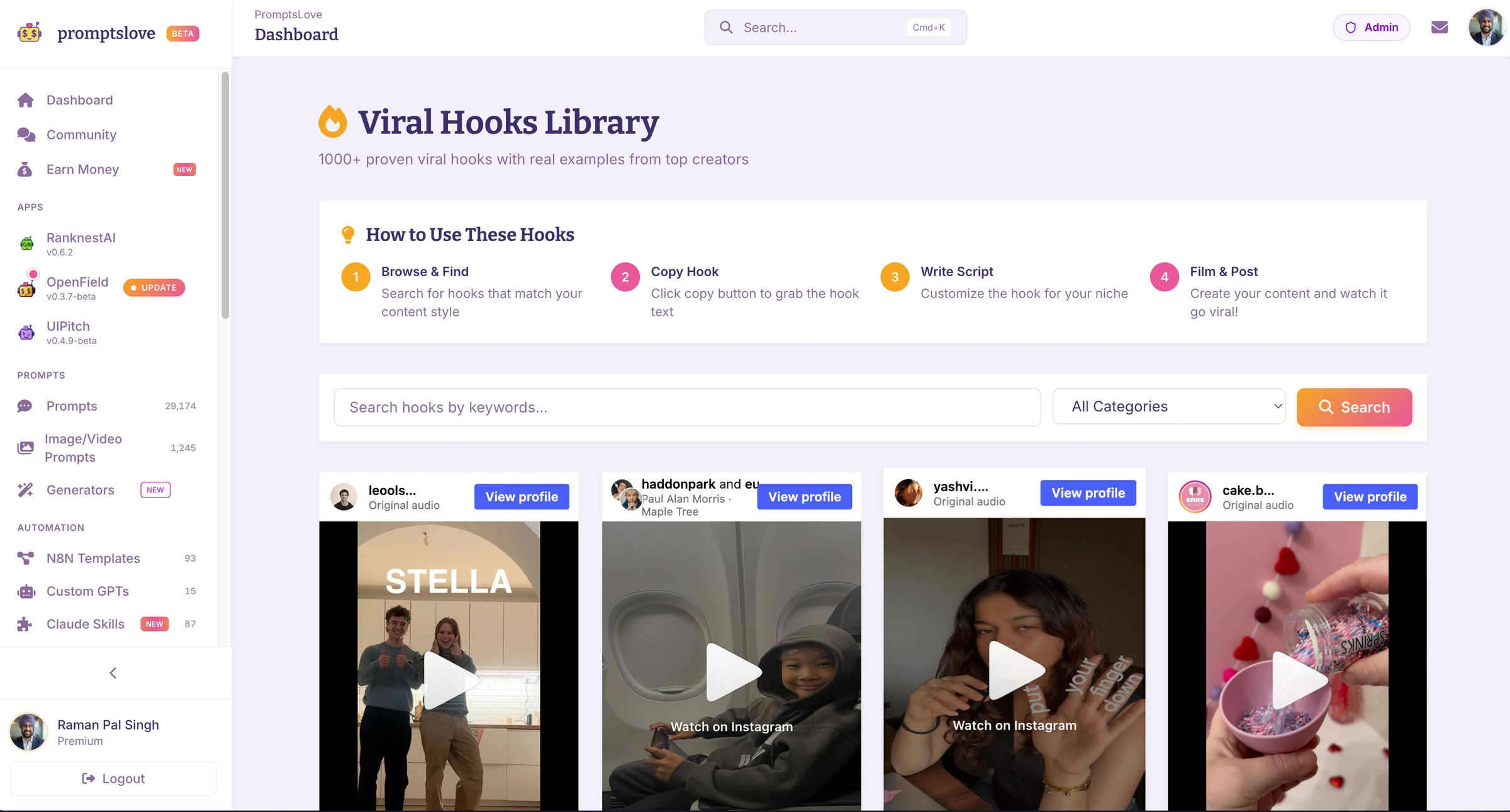
I built the Promptslove hooks library for the moment you finish editing and the opening still feels flat. Instead of staring at a blank timeline, you drop a ready made attention grabber into the first seconds and cut straight to your real content. It works for YouTube Shorts, Instagram Reels and TikTok.
Here is what the page gives you today.
Grab this 2100+ hooks on Promptslove here.
How to Use a Library Hook in Five Moves
A video hook borrows an emotion, not a topic. Fails and smashes bring drama, satisfying clips bring calm and stunts bring a "wait, what?" reaction. Use that feeling to match the clip to your Short.
Here is the kind of line to put on top of a clip.
This is what happened when I stopped posting daily
Only use a clip when you can connect it to your point in the first line. A clip with no link to your video creates a payoff gap, and viewers leave when they notice it. The AI prompts later in this guide help you write that connecting line.
What YouTube Measures on a Shorts Hook
Before you write a single hook, you need to know what YouTube counts. Three facts shape every decision in this guide, and none of them is a secret.
Viewed Versus Swiped Away
Todd Sherman, YouTube's product lead for Shorts, said in an interview that Search Engine Journal reported in August 2023 that a view should reflect a meaningful threshold where the person decided to watch. He also said YouTube does not share the exact thresholds, partly to prevent gaming. The same report describes a YouTube Analytics metric that shows how often a Short was viewed versus swiped away.
That metric is your hook score. If most people swipe, the hook failed. If most people stay and leave later, the middle of the video failed.
How Views Are Counted Now
YouTube changed Shorts view counting on March 31, 2025. A Shorts view now counts when the Short starts or replays, with no minimum watch time. On August 24, 2026, YouTube extended that rule to every format, and YouTube counts a public view the moment a video starts playing. YouTube says the change does not affect Partner Program eligibility, and Shorts earnings still depend on engaged Shorts views.
This matters for hook testing because raw views now rise faster without more people actually watching. vidIQ suggests adding the Engaged views metric in YouTube Studio's Advanced mode, and it warns that comparing views from before and after August 24 is not apples to apples. Judge your hooks on engaged views and viewed versus swiped away.
Shorts Can Run Up to 3 Minutes
YouTube announced on October 3, 2024 that Shorts can be up to 3 minutes long, starting October 15. A longer Short does not need a longer hook. It needs the same one second opening, plus a reason to keep watching every 10 to 15 seconds.
What the Data Says About Hook Length, Questions and Openers
Several top results quote numbers without naming a source. Two published datasets do show their method, so I use those. Both come from companies that sell creator tools, and both have limits that I list below.
OverseerOS: 1,178 Shorts Hooks With 1 Million or More Views
OverseerOS compared 1,178 English Shorts hooks with 2,788 English long form hooks. Every video had at least 1 million recorded views, and the hooks came from 1,032 channels. The study extracted each hook from the first 150 words of the transcript.
The limits are real. The study only includes winners, so it has no failed Shorts to compare. It has no retention data, and OverseerOS sells hook writing tools.
My takeaway is simple. Keep your spoken hook near a dozen words, do not force a question, and use "you" when the line is about the viewer's problem.
OpusClip: 13.5 Million Clips, Small Samples
OpusClip's 2026 Shorts research says its engine processed more than 13.5 million clips in early 2026, and it analyzed the hooks of 8,254 clips. Expertise, authority and credibility hooks averaged 6,706 views in 7 days, the highest of the categories it lists, but that figure rests on 77 clips. Several other categories rest on fewer than 10 clips, so their averages are not stable.
Captions appeared in 80.2 percent of the clips it analyzed, and conversational delivery appeared in 59.4 percent. Those numbers describe what clips contain, not what drives views. Use them as a sign of common practice: most Shorts carry captions, and credentials in the first line are worth testing.
Build the Three Layer Hook
A Shorts hook is more than a spoken sentence. vidIQ's hooks guide splits it into a visual, a line of text and a spoken line, and it suggests 3 to 7 words of on screen text and 5 to 10 spoken words. Many viewers watch with the sound off, so the text and the first frame have to carry the promise alone.
Fill in this template before you hit record.
FIRST FRAME: [what the viewer sees at 0.0 seconds]
TEXT (3 to 7 words): [the promise in large letters]
SPOKEN (about 12 words): [the same promise in your voice]
PAYOFF BY SECOND [10]: [where the viewer gets the answer]
Here is a filled in example for a Short about a coding mistake.
FIRST FRAME: My screen freezes on a red error message
TEXT: This bug cost me 4 hours
SPOKEN: One missing setting broke my app. The fix takes 10 seconds.
PAYOFF BY SECOND 8: Show the setting, then the fixed app
The three layers agree: a bug, a cost and a fast fix. If one layer promises something else, viewers feel the mismatch and swipe.
Six Visual Openers You Can Film in One Take
1. Start mid action: slam the laptop shut, then show the title.
2. Show the finished result in the first frame, then rewind to how you made it.
3. Hold a real object up to the lens and say what it cost you.
4. Zoom into a red error message, then cut to the fix.
5. Split the screen: the before on the left, the after on the right.
6. Open on a close up of your face mid sentence, with no greeting.
60 YouTube Shorts Hooks You Can Copy
These hooks come from 10 formulas that show up across the guides I read, and I wrote every line myself. Each one runs 7 to 12 words before you fill in the brackets, which sits close to the 11 word median in the OverseerOS study. Replace every [bracket] with your own detail, keep the finished line near 12 words, and only use a number or a result you can back up on screen.
Pick the formula by the promise your Short can keep. A curiosity hook needs a surprise at the end, and a result first hook needs proof in the first 10 seconds.
Curiosity Gap Hooks
A curiosity gap states a fact and leaves one piece missing. The missing piece has to be the payoff of your Short, and it has to arrive before the video ends.
1. Nobody tells you what happens to [thing] after you [action].

2. I found the setting hiding behind [feature], and it changes everything.

3. There is one number in [tool] that explains your [problem].

4. Here is why your [result] stops right at [number].

5. The strangest part of [topic] happens at second [number].

6. I almost deleted [thing], then I saw what was inside.
Contrarian Claim Hooks
A contrarian hook challenges a belief that your audience already holds. It only works when you can defend the claim in the next 20 seconds, so keep the proof ready before you post.
7. Posting every day is not why your channel stopped growing.

8. Stop [common advice]. It is quietly hurting your [result].

9. [Popular tool] is great, but I would not use it for [task].

10. You do not need [expensive thing] to get [result].

11. The advice to [common advice] is costing you [result].

12. I quit [habit] for 30 days, and my [metric] went up.
Hook 12 is only true if you really ran the 30 days. If you did not, use hook 10 or hook 11.
Mistake Warning Hooks
A mistake hook names a specific error and a cost. It speaks to loss avoidance, and it fits tutorials, reviews and any Short that ends with a fix.
13. You are probably making this [topic] mistake right now.

14. If you [action], you are losing [result] and do not know it.

15. This mistake cost me [number] hours on my first [project].

16. Three mistakes that ruin every [topic] beginner's results.

17. Do not [action] before you check this one setting.

18. I made this [topic] mistake for [number] years.
Result First Hooks
A result first hook shows the outcome, then explains how you got there. It works for demos, case studies and transformations, because the viewer sees the payoff before they decide to stay.
19. I went from [number] views to [number] views with one change.

20. This [thing] took me [short time] and replaced [old way].

21. [Result]. Here is the exact [tool or step] I used.

22. I built [thing] in [short time]. Watch how.

23. My [metric] jumped [number] percent after I changed [one thing].

24. Here is [result] in [short time], with no [common requirement].
Show the result on screen in the first frame. A result you only describe is a claim, and viewers treat it like one.
Number and List Hooks
A number gives the viewer a clear finish line. They know how long the list runs, so they stay for the last item.
25. [Number] [topic] tools I use every day, and [number] I deleted.

26. Three [topic] settings I turn on before anything else.

27. [Number] things I wish I knew before my first [project].

28. The [number] second [task] that saves me [number] hours a week.

29. [Number] [topic] tools. Only [number] are worth your time.

30. Here are [number] [topic] mistakes in under [number] seconds.
Story Teaser Hooks
A story teaser opens in the middle of something that matters. Skip the setup, start at the moment the problem hits, and finish the story inside the Short.
31. It was [time] when my [thing] stopped working.

32. The email said [short phrase], and I almost ignored it.

33. My first [project] failed in [number] minutes. Here is why.

34. Last week a stranger [action], and it changed my [topic].

35. I had [number] dollars left when I tried [action].

36. The client replied with one word, and it saved the project.
Experiment and Challenge Hooks
An experiment hook sets a task with an uncertain outcome. The viewer stays to see who wins, which makes these hooks strong for comparisons and reviews.
37. I tested [number] [tools] on the same [task]. One clearly won.

38. Can I [goal] in [short time]? Let us find out.

39. I used [thing] for [number] days. Here is the honest result.

40. What happens if you [action] every day for [number] days?

41. I gave [tool A] and [tool B] the same [task]. Watch the difference.

42. I have [number] minutes to fix this broken [thing].
Credential Hooks
OpusClip's data put expertise and credibility hooks at the top of its list, though that result rests on 77 clips. A credential hook states your experience in one breath, then points at what you learned.
43. I have edited [number] [videos]. This is my one rule.

44. After [number] years in [field], I check this first.

45. I help [audience] [result], and this mistake shows up every time.

46. As a [role], I would never [action] without this.

47. I reviewed [number] [things]. The best ones all [pattern].

48. I have spent [number] hours on [topic]. Here is the shortcut.
State a real credential or a real number. A fake one hurts you the moment someone checks it.
Direct Call Out Hooks
A call out hook names the viewer's situation, so the right people stop and the wrong people keep scrolling. That trade is fine, because a smaller, matched audience holds better than a broad one.
49. Still under [number] [metric]? Check this before you post again.

50. Creators with fewer than [number] subscribers, try this first.

51. If you struggle with [problem], one change fixes most of it.

52. This is for anyone who [situation] and still [problem].

53. Running a [type of business]? Do not skip this.

54. If you [action] every day, this will save you hours.
Before and After Hooks
A before and after hook shows the change in the first frame and explains the cause later. Use a split screen or a quick cut, and make sure both sides show the same thing.
55. Before: [number] hours of [task]. After: [number] minutes.

56. This was my [thing] on day one. This is day [number].

57. Same [thing], same [tool], one change. Look at the difference.

58. Left is my old [method]. Right is what I use now.

59. I rebuilt my [thing] in [short time]. Compare the two.

60. Day 1 versus day [number] of [project].
Fill the Brackets: Three Niche Examples
Here is how the same templates read after you fill them in. These examples are illustrations, not results, so swap in your own facts.
For a coding channel, using hooks 37, 2, 55 and 49:
I tested 3 AI coding tools on the same bug. One clearly won.

I found the setting hiding behind the export menu, and it changes everything.

Before: 3 hours of editing. After: 20 minutes.

Still under 500 views? Check this before you post again.
For a fitness channel, using hooks 13, 16, 56 and 40:
You are probably making this squat mistake right now.

Three mistakes that ruin every squat beginner's results.

This was my morning walk on day one. This is day 30.

What happens if you stretch every day for 14 days?
For a small food business, using hooks 37, 53, 28 and 6:
I tested 4 air fryers on the same recipe. One clearly won.

Running a bakery? Do not skip this.

The 5 second trick that saves me 3 hours a week.

I almost deleted this recipe, then I saw what was inside.
7 AI Prompts to Generate YouTube Shorts Hooks
Paste these prompts into ChatGPT, Claude or Gemini, and replace every [bracket] before you send. Each one sets a word limit, asks for a reason behind the answer and tells the model to stay inside what your Short can prove. That last rule matters, because AI loves a bigger promise than your video can keep.
The Promptslove hooks page also has its own copy and paste prompts for on screen lines, script matching, hook grading and captions. The seven below go a different direction: batches, script rewrites, full opening plans, grading, data analysis, titles and AI video clips.
Prompt 1: Write 20 Hooks in 5 Formulas
Use this when you have a topic and no opening. It forces a mix of formulas, so you can test different ones.
You are a YouTube Shorts scriptwriter. Write 20 opening hooks for a Short about [topic].

Audience: [who watches and what they struggle with]
Channel style: [funny, calm, expert or fast paced]
Proof I can show on screen: [a result, demo, screenshot or object]

Rules:
- Every hook is 12 words or fewer.
- Write 4 hooks each for these 5 formulas: curiosity gap, contrarian claim, mistake warning, result first, story teaser.
- Only promise what my proof can deliver in the first 20 seconds.
- Use plain words. Skip hype phrases like "you won't believe".
- Label each hook with its formula.

End by naming the 3 hooks most likely to hold viewers, with one line of reasoning for each.
Prompt 2: Turn a Finished Script Into Hooks
Use this when the script exists and the opening is the weak part. The model hunts for the most surprising line in your own script, so the hook stays honest.
Here is my Short script:
[paste the script]

1. Find the single most surprising line or result in the script.
2. Write 5 hooks that open with that line or result, each 12 words or fewer.
3. For each hook, write a 3 to 7 word on screen text version.
4. Tell me what the viewer should see in the first frame for each hook.
5. Flag any hook that promises more than the script delivers.
Prompt 3: Build a Three Layer Opening Plan
Use this when you want the first frame, the text and the spoken line to agree. It gives you three full plans you can film in one take.
Build 3 complete opening plans for a YouTube Short about [topic].

For each plan, give me:
FIRST FRAME: what the viewer sees at second 0, something I can film in one take.
TEXT: 3 to 7 words, large, matching the spoken line.
SPOKEN: one sentence of 12 words or fewer.
PAYOFF: the second where the viewer gets the answer, before second 15.

My setup: [phone, screen recording, props, location].
My niche: [niche].
Do not suggest anything that needs a crew, paid actors or a studio.
Prompt 4: Grade Your Hook Before You Post
Use this as a final check. The model scores the hook on five criteria and rewrites it three ways without changing the promise.
Grade this YouTube Shorts opening.

Spoken hook: [paste]
On screen text: [paste]
First frame: [describe]
What the Short delivers: [one sentence]

Score each item from 1 to 10 and explain each score in one line:
1. Clarity: does a stranger know the topic by second 2?
2. Curiosity: is exactly one thing left unresolved?
3. Match: do the visual, the text and the spoken line promise the same thing?
4. Honesty: does the Short deliver what the hook promises?
5. Length: is the spoken line 12 words or fewer?

Then rewrite the hook 3 ways without changing the promise.
If your model accepts video uploads, such as Gemini, you can attach the first 3 seconds of your edit and ask it to describe what a viewer understands at second 1, second 2 and second 3.
Prompt 5: Find Patterns in Your Own Results
Use this after you have at least 10 Shorts. It turns your YouTube Studio numbers into a next test, and it must tell you when the sample is too small.
Here are my last [number] YouTube Shorts with their results.

For each Short I list: the hook, the viewed versus swiped away percentage, the average percentage viewed and the engaged views.
[paste a table or a list]

1. Group the hooks by formula and compare the viewed percentage for each group.
2. Point out patterns in hook length, first word and on screen text.
3. Tell me which formula to test next, and write 5 hooks in that formula for [topic].
4. Say plainly if the sample is too small to conclude anything.
Prompt 6: Write the Title, Description and Pinned Comment
Use this once the Short is done. The title repeats the promise of the hook without copying the line.
My Short opens with the hook "[hook]" and is about [topic].

Write:
1. 5 YouTube Shorts titles under 60 characters, each repeating the hook's promise without copying it.
2. A 2 sentence description with [main keyword] in the first sentence.
3. 5 hashtags, 2 broad and 3 niche.
4. A pinned comment that asks one question connected to the hook.
Prompt 7: Generate a 3 Second Visual Hook With an AI Video Model
Use this in Veo, Sora, Kling or any text to video model when you need an opening clip you cannot film. Keep the scene to one subject and one action, because short clips with several moving parts look messy.
Create a 3 second vertical 9:16 video clip to open a YouTube Short about [topic].

Scene: [one subject, one action, one location, for example "a coffee cup tips over onto a laptop keyboard"]
Camera: [handheld close up, slow push in or fixed top down shot]
Lighting: [window daylight, neon desk lamp or soft studio light]
Motion: the action starts in the first frame, with no fade in.
Sound: [one sound effect, for example "a sharp thud"]
Avoid: text, logos, watermarks and any real person's likeness.
AI footage that looks real can raise disclosure questions. Check YouTube's current rules on altered or synthetic content before you publish it, and never use AI footage to fake a result you claim in the hook.
Test and Fix Your Hook in YouTube Studio
You do not have to guess which hook works. You do have to test carefully, because one Short tells you very little.
I did not find a YouTube feature that splits one Short into hook variants, so I test openers as separate Shorts. Here is the routine I would run.
The 3 to 5 Shorts rule is my own rule of thumb, not a YouTube number. Views also vary with topic and timing, so a single high result is a hint and not proof.
Read the Signals
| What you see | What it likely means | What to change |
|---|---|---|
| A high share of viewers swipe away | The opening did not stop the scroll | Rewrite the first frame and the spoken line, then try a different formula |
| Most viewers stay, but average percentage viewed is low | The hook works and the middle loses people | Move the payoff earlier and cut the setup |
| A wide gap between views and engaged views | Many people start the Short and few stay | Check that the first frame matches the promise |
vidIQ's guide credits strategist Paddy Galloway with the finding that the best Shorts hold 70 to 90 percent of viewers on the viewed versus swiped away metric. I could not trace the original data, so use that range as a target to chase and not a rule. Compare your hooks against your own past Shorts first.
YouTube Shorts Hook Mistakes to Avoid
Most weak hooks fail for the same five reasons. Check your draft against this list before you publish.
Frequently Asked Questions (FAQs)
What is a good hook for YouTube Shorts?
A good Shorts hook makes one clear promise in the first second and keeps it for the rest of the Short. It pairs a strong first frame with a short line of text and a spoken line of about 12 words. In YouTube's January 2025 blog post, Jenny Hoyos describes her formula as shock, intrigue and satisfaction.
How long should a YouTube Shorts hook be?
Aim for about 12 spoken words and 3 to 7 words of on screen text. OverseerOS found a median of 11 words across 1,178 Shorts hooks, and the middle half ran from 9 to 13 words. Those numbers describe winning videos and not a YouTube rule, so use them as a target for your first draft.
How many seconds do you have to hook someone on Shorts?
Sources differ, so I plan for one second and finish the promise by second three. Jenny Hoyos says you have about one second, vidIQ's guide says viewers decide within the first 1 to 2 seconds, and many guides say 3 seconds. YouTube does not publish an exact threshold.
Should a YouTube Shorts hook be a question?
No, a question is optional. In OverseerOS's same channel comparison of 74 channels, 10.8 percent of Shorts hooks were questions and 10.6 percent of long form hooks were questions. Use a question only when the question is the curiosity gap, as in hook 40, and use a statement when a statement is sharper.
How does YouTube count Shorts views now?
Since March 31, 2025, a Shorts view counts when a Short starts or replays. Since August 24, 2026, YouTube counts a public view the moment any video starts playing, across Shorts, long form videos and live streams. Engaged views still exist as a separate metric, and Shorts earnings still depend on engaged Shorts views, so use engaged views to judge your hooks.
Can AI write YouTube Shorts hooks?
Yes, AI drafts options quickly, but you still need to check every claim and make the line sound like you. Give it your script, your proof and a 12 word limit, as in prompts 1 and 2 above. Then keep only the hooks your Short can deliver on screen.
Final Thoughts
A Shorts hook has one job: make a clear promise in the first second and keep it by the end. The data says to write about a dozen words, to skip the question when a statement is sharper and to judge every hook on viewed versus swiped away and engaged views, not on raw views.
Your next step is simple. Open promptslove.com/hooks, download this week's 30 free video hooks, pick the one that matches the feeling of your next Short and write the connecting line with prompt 2 or prompt 3. Then publish three Shorts with three different formulas and let your own numbers pick the winner.