Chrome Extension
I ran one five bullet release notes file through six Claude Code setups. A plain run followed 2 of my 5 style rules.
The same run with one skill followed all 5. When I moved a similar job into a subagent, the cost roughly doubled. This guide explains Claude skills vs agents with real files, real output and real numbers, so you can pick the right tool before you build anything.
Key Takeaways
skills:, or a skill runs inside a subagent with context: fork.Claude Skills vs Agents in One Minute
A Claude skill teaches Claude how to do something. A Claude agent is the thing that does the work. I think of a skill as the recipe and an agent as the cook.
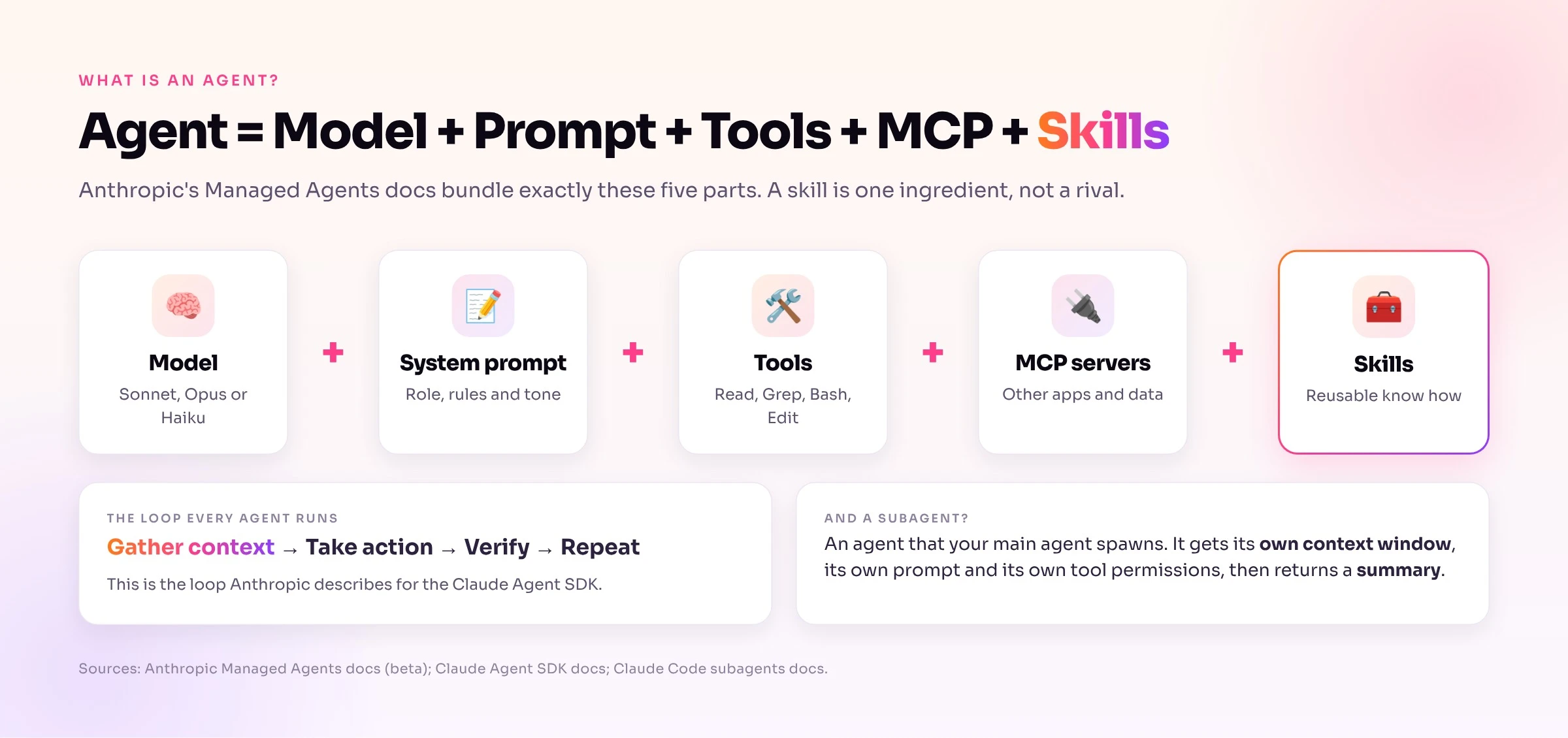
Anthropic's own docs back that up. The Managed Agents docs bundle "The model, system prompt, tools, MCP servers, and skills" into one agent. That makes a skill one ingredient inside an agent, not an alternative to it.
Many articles still frame the two as rivals. Daniel Miessler points out that skills, workflows and agents are all Markdown files that hold prompts. Claude Blattman draws the more useful line: skills run in your main conversation, while agents run in a separate context.
The Five Building Blocks Around Claude
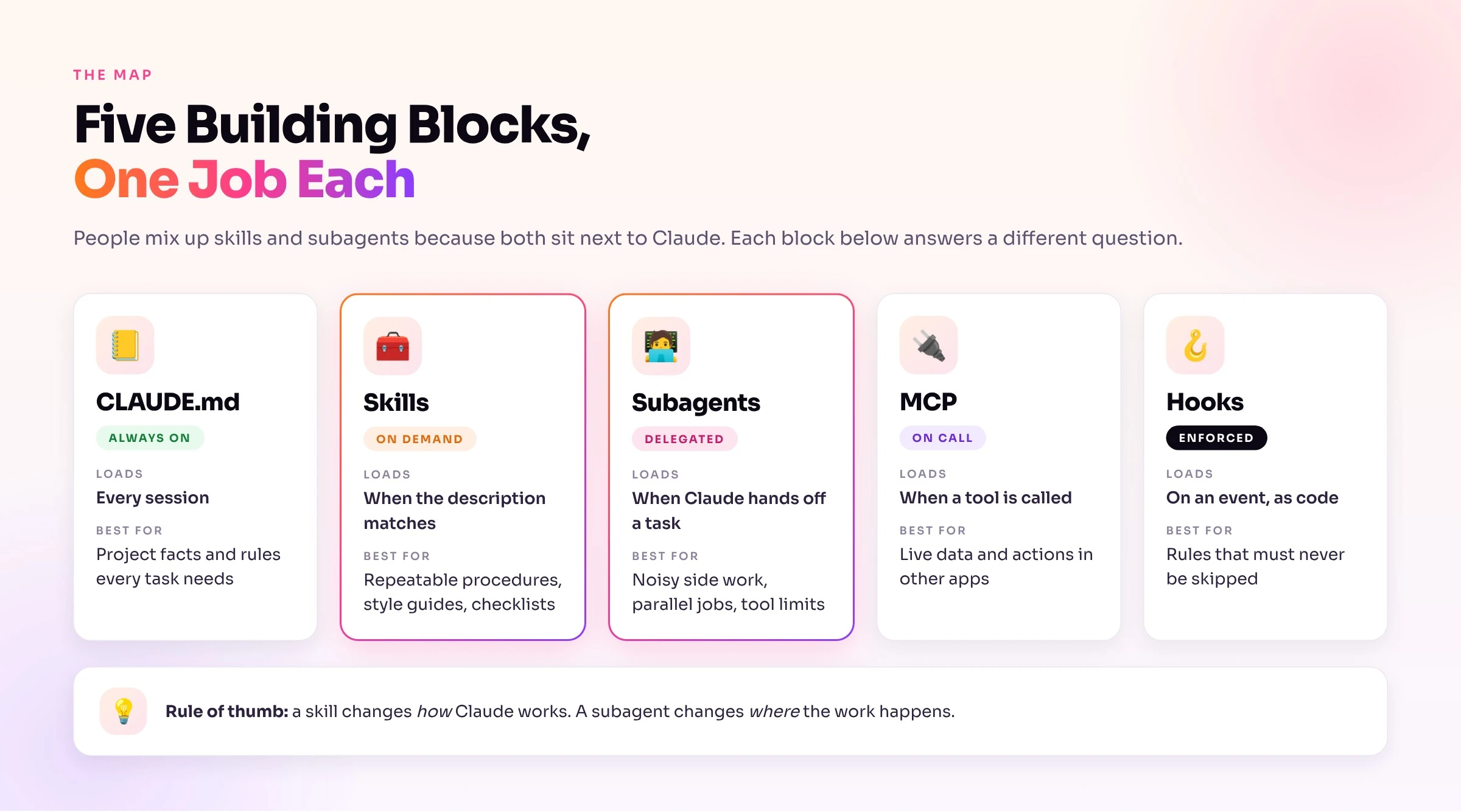
Five pieces sit around Claude, and each answers a different question.
Skills and subagents cause most of the confusion because both are Markdown files in a .claude folder. The rule of thumb that held up in my tests: a skill changes how Claude works, and a subagent changes where the work happens.
Grab 87 Pro Claude Skills pack for Marketers, Coders and Business owners;
What Is a Claude Skill?
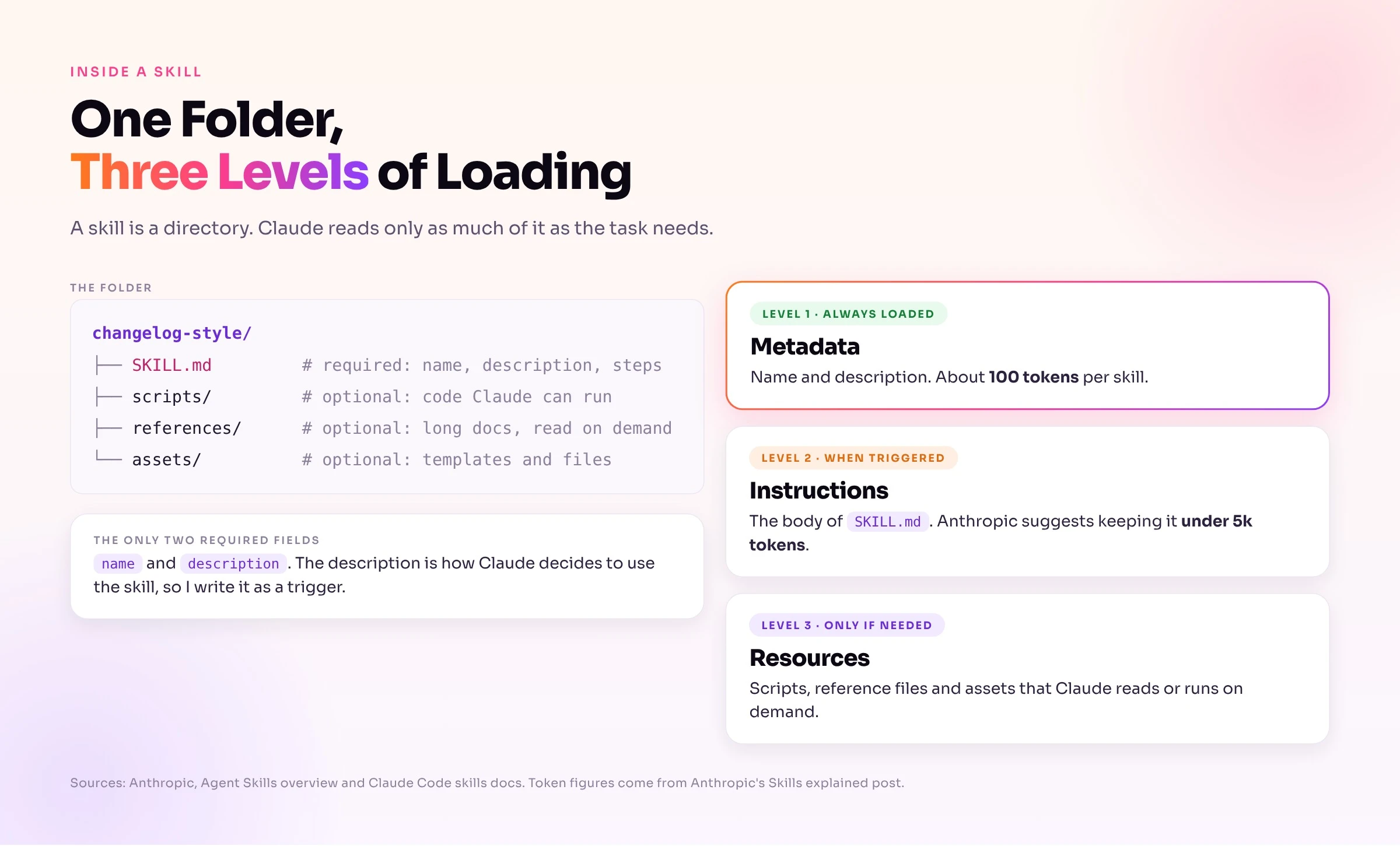
A skill is a directory with a SKILL.md file in it. The file starts with YAML frontmatter and continues with instructions. You can add scripts, reference files and templates to the same folder.
Skills use progressive disclosure. Claude keeps only the name and description of each skill in context, which Anthropic illustrates as about 100 tokens per skill. When your request matches, Claude loads the body of SKILL.md, which Anthropic suggests keeping under about 5k tokens. Bundled files load only when Claude reads or runs them.
A Real Skill: changelog-style
This is the skill I used in my tests. It holds five rules for rewriting release notes.
---
name: changelog-style
description: Rewrites release notes into the Acme changelog format. Use when the user asks to clean up, rewrite, or format release notes or a changelog.
---

# Acme changelog style

Apply these rules to every bullet:

1. Start with a past tense verb: Added, Fixed, Improved, Removed, Updated.
2. One sentence, under 15 words, no exclamation marks.
3. Group bullets under these headings, in this order: Added, Improved, Fixed, Removed.
4. Spell out numbers with a percent sign (40%), not "40 percent".
5. End the file with the line: `Reviewed by the Acme docs team.`

Output only the rewritten file content.
The description does the triggering work. Claude Code cuts the combined description and when_to_use text at 1,536 characters in its skill listing, so I put the key use case first.
How Claude Decides to Use a Skill
Claude matches your request against every skill description. You can also call a skill yourself by typing /changelog-style. Project skills live in .claude/skills/, and personal skills live in ~/.claude/skills/.
Two frontmatter fields control who can start a skill. Set disable-model-invocation: true to stop Claude from loading it on its own. Set user-invocable: false to hide it from the / menu when only Claude should use it.
Older .claude/commands/ files still work. Anthropic merged custom commands into skills, so a command file and a skill with the same name both create the same slash command.
What a Skill Cannot Do
A skill cannot isolate noisy work. It runs in the context you already have, so every file Claude reads while following it stays in your chat.
A skill also gives advice, not a lock. The allowed-tools field pre approves tools so Claude stops asking permission for that turn. A subagent's tools list is the field that limits what a worker can touch, and a hook is the tool for a rule that must never be skipped.
What Is a Claude Agent?
Anthropic's Building Effective Agents post separates workflows from agents. Workflows follow predefined code paths. Agents are systems where the model dynamically directs its own process and tool use. The Claude Agent SDK post describes the loop an agent runs: gather context, take action, verify the work, repeat.
The Managed Agents docs turn that into a concrete bundle. An agent holds a model, a system prompt, tools, MCP servers and skills. Claude Code itself fits this definition, and a skill is one of the parts you can add to it.
Subagents: The Agent Your Agent Spawns
A subagent is an agent that your main agent launches for one task. It gets its own context window, its own system prompt and its own tool permissions. It sends back a summary when it finishes.
Subagents also cost real usage. The Claude Code docs say each subagent sends its own requests, and those requests count toward the same usage limits as your main conversation. Claude Code ships built in subagents such as Explore (read only, for searching code) and Plan, and you can write your own.
Three Places Agents Live
The word "agent" points at a different thing on each Claude surface.
.claude/agents/. Only name and description are required, and the body becomes the system prompt.AgentDefinition object in your own code, with a description, prompt, tools, model and skills.managed-agents-2026-04-01) and is not eligible for zero data retention or HIPAA.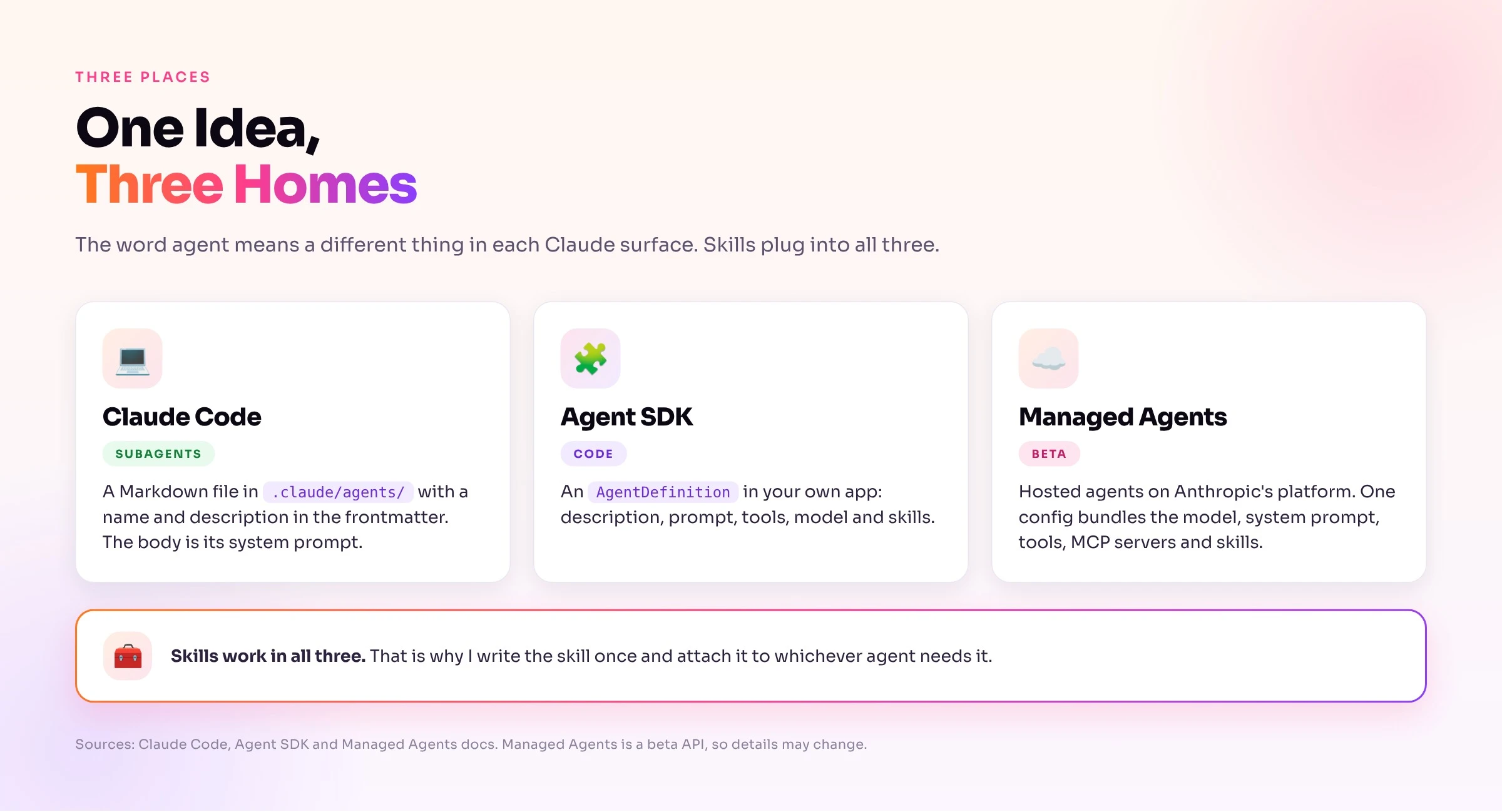
Skills work on all three surfaces. I write a skill once and attach it to whichever agent needs it.
A Real Subagent: note-reviewer
This is the read only reviewer I used in my tests. The tools line is what makes it read only.
---
name: note-reviewer
description: Reviews a markdown file for tone and clarity problems. Use proactively when asked to review or critique writing in a file.
tools: Read, Grep, Glob
model: sonnet
---

You are a careful copy reviewer. Read the file you are given and report at most 5 problems.
Return a numbered list. Each item has the line text and a one line fix. Do not edit files.
Claude reads the description to decide when to delegate. If Claude does not delegate on its own, name the subagent in your prompt. The SDK docs list that fix first, followed by a clearer description.
The Real Difference: Context, Control and Cost
Three things separate a skill from a subagent. One is where the work runs. One is who sets the limits. One is what you pay.
Context: Same Window or Separate Window
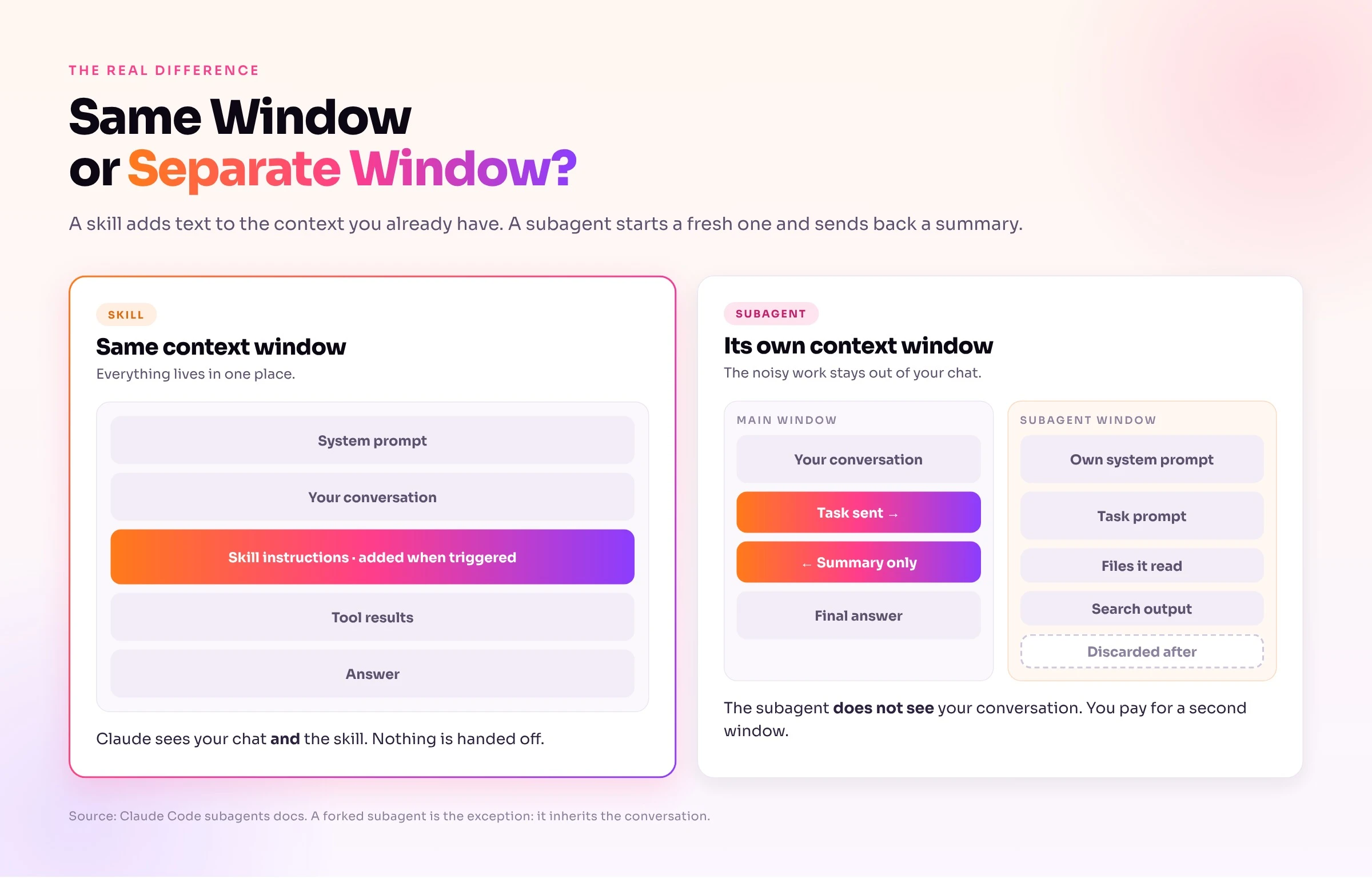
A skill adds its text to the window you already have. Claude sees your conversation and the skill together, so nothing gets handed off.
A subagent starts with a fresh window. It does not see your conversation history, skills you already invoked or files Claude already read. Claude writes a delegation message, and that message is the only task context the subagent gets. A fork is the exception, because it inherits the whole conversation.
This gap explains most subagent surprises. If you made a decision ten messages ago, the subagent does not know about it unless the delegation message says so.
Control: Who Sets the Limits
A skill adds guidance, and Claude's normal tools and permissions stay the same. A subagent can carry its own limits: a tools allowlist, a disallowedTools list, a model, a permissionMode and a maxTurns cap.
The model field gives you a cost lever. You can route a high volume job to a cheaper model such as Haiku while your main conversation stays on a stronger one.
Cost: You Pay for a Second Window
A subagent reads its own prompt, runs its own tool calls and writes its own summary. Anthropic's research team measured about 4x the tokens of a chat for agents and about 15x for multi agent systems. I cover those numbers, and my own, in later sections.
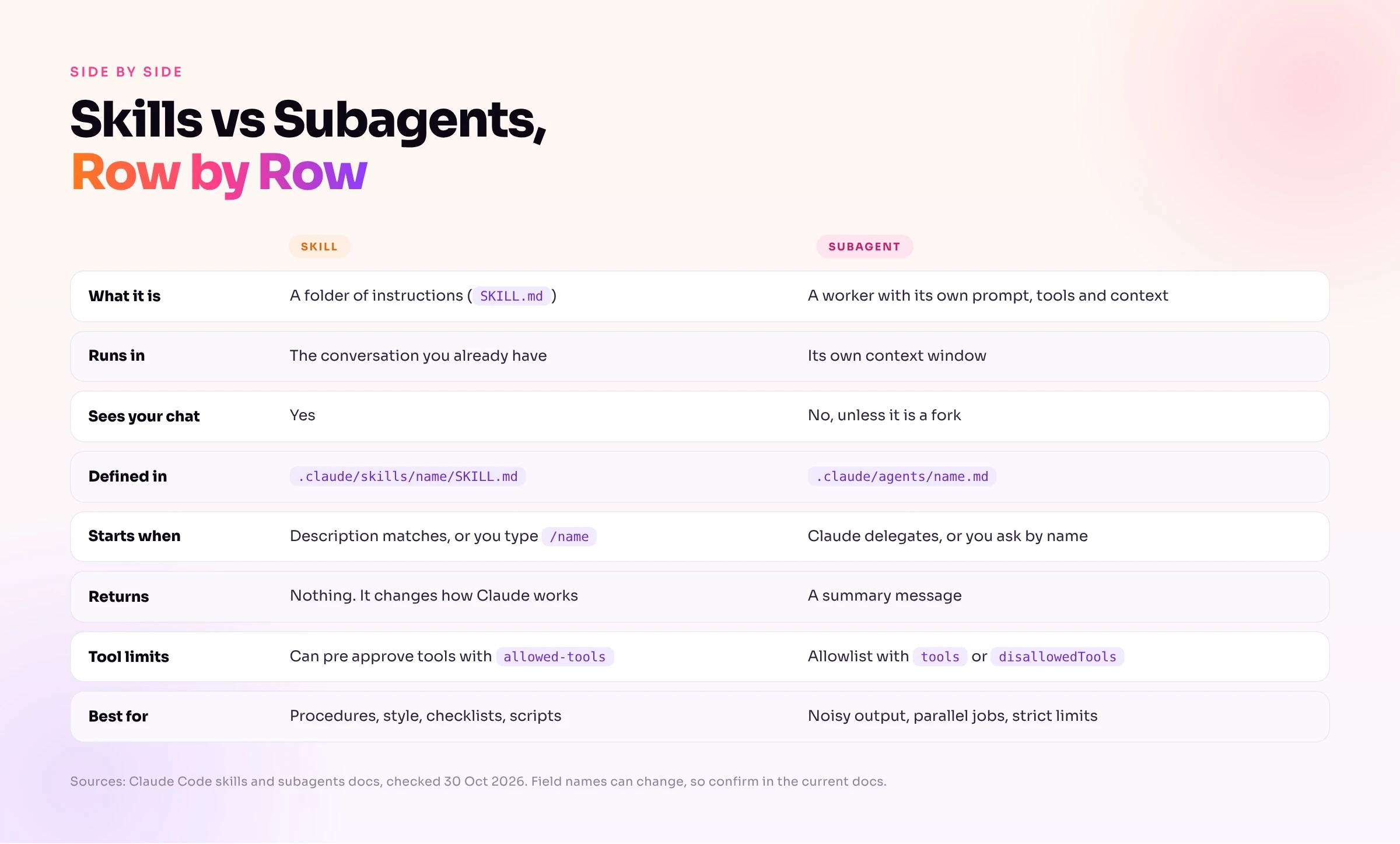
| Skill | Subagent | |
|---|---|---|
| What it is | A folder of instructions | A worker with its own prompt, tools and context |
| Runs in | Your current conversation | Its own context window |
| Sees your chat | Yes | No, unless it is a fork |
| Defined in | .claude/skills/name/SKILL.md | .claude/agents/name.md |
| Starts when | A description matches, or you type /name | Claude delegates, or you ask by name |
| Returns | Nothing, it changes how Claude works | A summary message |
| Tool limits | Can pre approve tools with allowed-tools | Allowlist with tools or disallowedTools |
| Idle cost | About 100 tokens for the description | A short description in the agent list |
| Best for | Procedures, style, checklists, scripts | Noisy output, parallel jobs, strict limits |
Example 1: A Skill Changes How Claude Writes
My test file is a five bullet release notes draft. It has the usual problems: inconsistent grammar, an exclamation mark, a vague bullet and a number written as "40 percent".
# Release 4.2

- Fixed a bug where the export button did nothing on Safari
- we added dark mode!!
- Improved performance of the dashboard by 40 percent
- Updated deps
- Removed the legacy billing page
I asked Claude Code the same question twice. The first run used a project with no skill. The second used a project with changelog-style in .claude/skills/.
claude -p "Rewrite src/release_notes.md as a clean changelog. Print the result only, do not write files." --model sonnet
Without the skill, Claude read the file and produced a tidy changelog. It was a sensible changelog, but it was not my changelog. It invented a "Changed" heading, put "Removed" before "Fixed" and left off the closing line.
# Changelog

## 4.2

### Added
- Dark mode

### Changed
- Improved dashboard performance by 40%
- Updated dependencies

### Removed
- Legacy billing page

### Fixed
- Export button did nothing on Safari
With the skill, Claude called the Skill tool with changelog-style, read the file and followed all five rules.
# Release 4.2

## Added

- Added dark mode.

## Improved

- Improved dashboard performance by 40%.
- Updated dependencies.

## Fixed

- Fixed the export button doing nothing on Safari.

## Removed

- Removed the legacy billing page.

Reviewed by the Acme docs team.
I scored each output against the five rules with a short script. The plain run passed 2 of 5 rules (short bullets and "40%") in all 3 runs. The skill run passed 5 of 5 in all 3 runs.
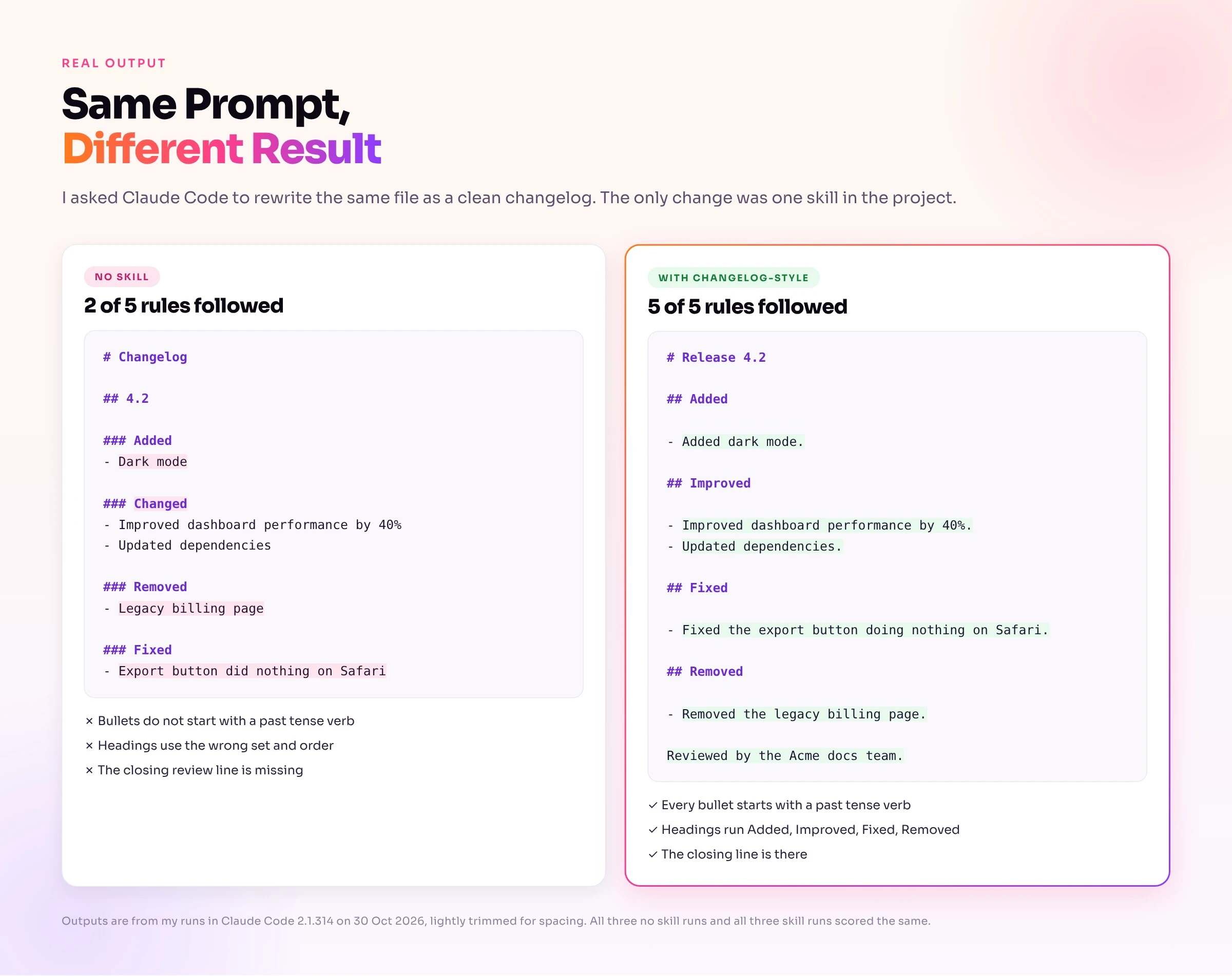
This is what a skill does best. It turns your house style into something Claude applies every time without you pasting rules into the chat. The price was one extra turn to load the skill: 4 turns instead of 2, and about 1.4x the cost on warm cache runs.
Example 2: A Subagent Keeps Noise Out of Your Chat
For the second example I asked Claude to review the same file with the note-reviewer subagent from earlier.
claude -p "Use the note-reviewer subagent to review src/release_notes.md and give me its findings." --model sonnet
The transcript shows one top level Agent call with subagent_type: note-reviewer. The Read call sits under that subagent, so the file read happened in the subagent's window and not in mine. Claude then relayed the findings, for example:
The review cost about 2.1x the same review done in the main thread, and it took 12 to 14 seconds instead of 7 to 9. I paid for that overhead and got no benefit, because the file has 5 lines. The benefit appears when the subagent reads 40 files and your chat receives 5 lines.
Anthropic gives a good example of when that trade pays off. In a support agent, one order lookup adds more than 2,000 tokens to the context. An order lookup subagent returns a summary of 50 to 100 tokens, and the main agent keeps its window clean.
Example 3: Use Both, in Two Directions
Claude Code lets you combine the two in either direction. The difference is who is in charge.
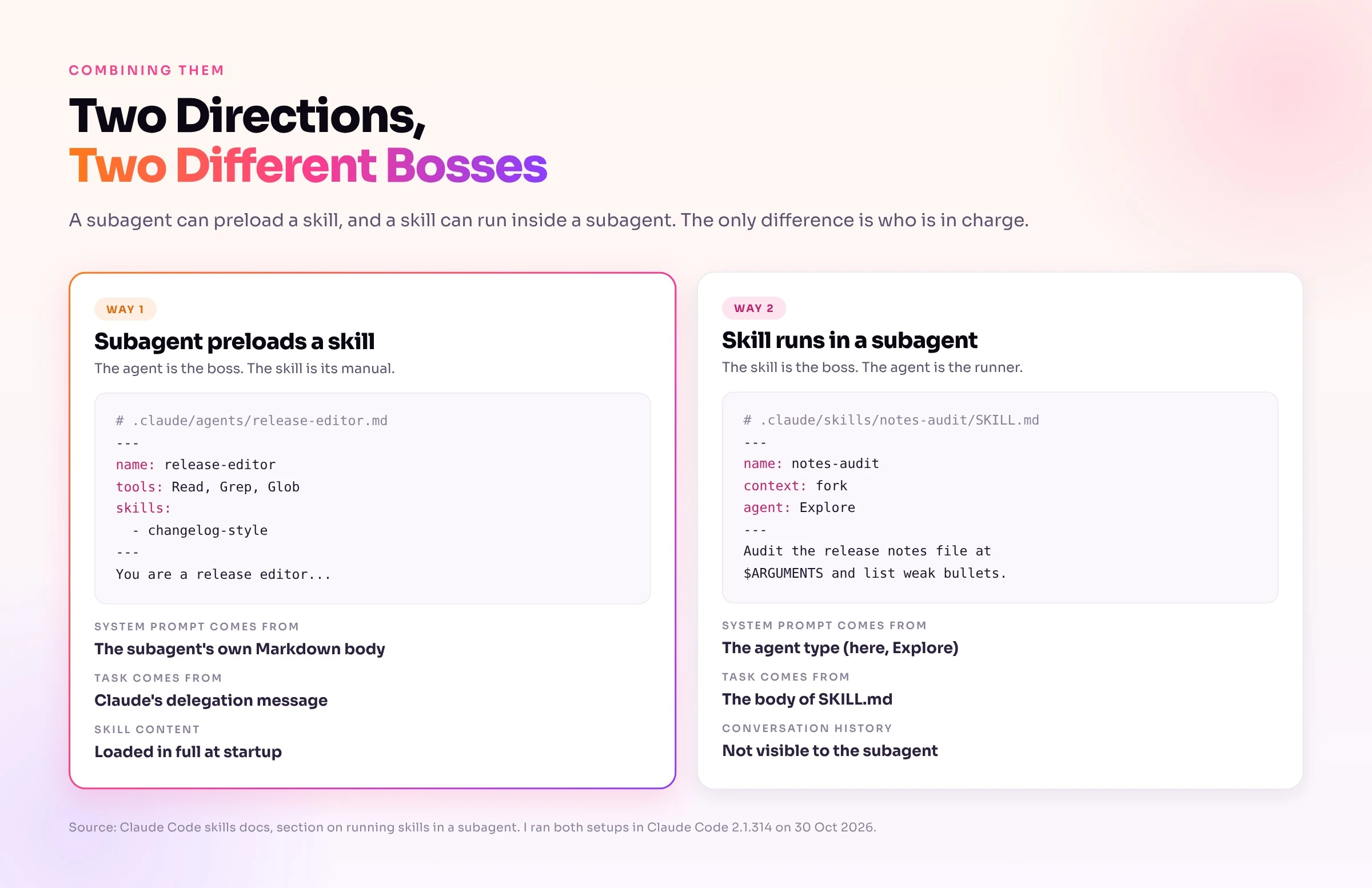
Way 1: A Subagent That Preloads a Skill
Here the agent is the boss and the skill is its manual. You list the skill in the subagent's skills: field.
---
name: release-editor
description: Rewrites release notes files into the Acme changelog format. Use when asked to rewrite or format release notes.
tools: Read, Grep, Glob
model: sonnet
skills:
  - changelog-style
---

You are a release editor. Read the file you are given, apply the preloaded changelog style, and return only the rewritten content.
Claude Code injects the full skill content when the subagent starts, which goes beyond the description. The subagent keeps its own Markdown body as the system prompt, and Claude's delegation message becomes its task. In my runs it followed 5 of 5 rules in 3 of 3 runs.
One more thing happened that you should expect. The subagent had only read tools, so it could not write the file. The main agent said so and offered to write it.
Three details matter here:
skills: field controls what gets preloaded, not what the subagent can reach. If you leave tools out, the subagent inherits every tool and can call the Skill tool for skills you did not list.disable-model-invocation: true cannot be preloaded.Way 2: A Skill That Runs in a Subagent
Here the skill is the boss and the agent is the runner. You add context: fork and an agent: type to the skill's frontmatter.
---
name: notes-audit
description: Audits a release notes file for weak bullets and returns a short report. Use when asked to audit release notes.
context: fork
agent: Explore
---

Audit the release notes file at $ARGUMENTS.
Read the file, then list every bullet that is vague, informal, or missing a number.
Return a numbered list with at most 5 items. Do not edit anything.
I ran it with /notes-audit src/release_notes.md. Claude Code reported 0 main agent turns, and the only tool call, Read, sat inside the forked agent. The audit flagged four bullets, including "we added dark mode!!" for its informal tone and "Updated deps" for vague slang.
The system prompt now comes from the agent type, and the body of SKILL.md becomes the task. The subagent does not see your conversation. The docs add a warning: context: fork only makes sense for a skill with an explicit task. A skill that holds only guidelines hands the subagent rules with nothing to do, and it returns nothing useful.
The name is misleading, too. Despite "fork" in the field, this does not fork your conversation. A true fork inherits the conversation, and that is a different feature.
Both in One Request
I also tested one request that uses both. I asked Claude to review the notes with note-reviewer and then rewrite them with changelog-style.
claude -p "Rewrite src/release_notes.md as an Acme changelog. First use the note-reviewer subagent to find weak bullets, then do the rewrite with the changelog-style skill. Print only the final rewrite."
Both runs made the same four tool calls in the same order: Read, Agent (note-reviewer), Skill (changelog-style), Read. The final output kept all five rules.
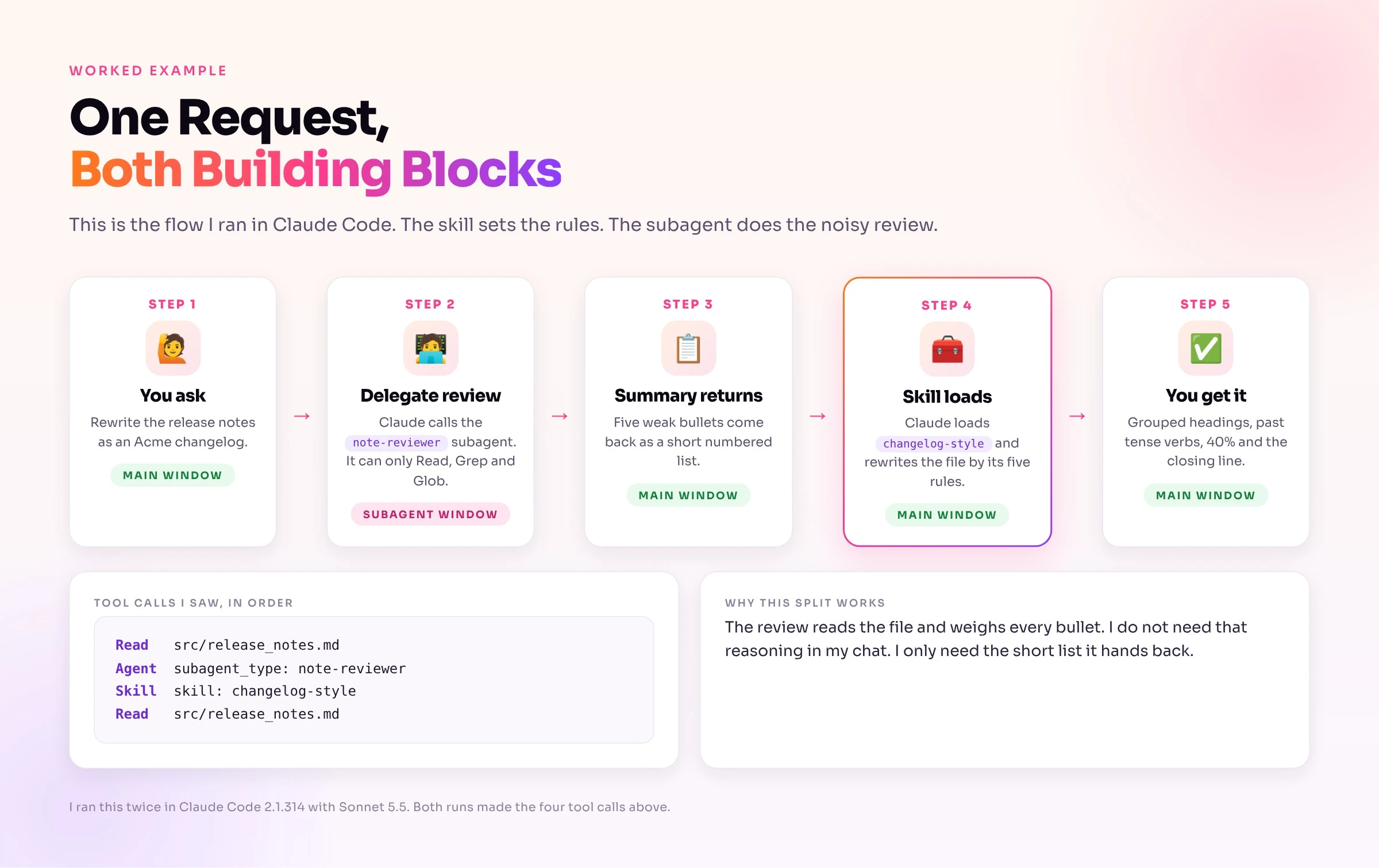
Which direction should you pick? Use way 1 when a specialist agent repeats one procedure, such as a release editor. Use way 2 when a procedure should run away from your chat, such as an audit.
The Same Idea in the Agent SDK
The Agent SDK defines the same agent in code. I adapted this from Anthropic's SDK docs and did not run it. The SDK finds skills through its setting sources, so keep the project source enabled.
import asyncio
from claude_agent_sdk import query, ClaudeAgentOptions, AgentDefinition


async def main():
    async for message in query(
        prompt="Use the release-editor agent to rewrite src/release_notes.md",
        options=ClaudeAgentOptions(
            setting_sources=["project"],
            allowed_tools=["Read", "Grep", "Glob", "Agent"],
            agents={
                "release-editor": AgentDefinition(
                    description="Rewrites release notes into the Acme changelog format.",
                    prompt="You are a release editor. Apply the preloaded changelog style and return only the rewritten content.",
                    tools=["Read", "Grep", "Glob"],
                    model="sonnet",
                    skills=["changelog-style"],
                ),
            },
        ),
    ):
        if hasattr(message, "result"):
            print(message.result)


asyncio.run(main())
What My Tests Showed About Quality, Speed and Cost
I ran six setups across two tasks. Task 1 rewrote the notes in a five rule style. Task 2 reviewed the notes and listed weak bullets. Each task has its own main thread baseline, so the cost ratios compare like with like.
| Setup | Task | Rules followed | Cost (warm cache) | Versus main thread | Wall time |
|---|---|---|---|---|---|
| Main thread, no skill | Rewrite | 2 of 5 | $0.011 | 1.0x | 4 to 9 s |
| Main thread + skill | Rewrite | 5 of 5 | $0.015 | 1.4x | 6 to 7 s |
| Subagent + preloaded skill | Rewrite | 5 of 5 | $0.019 to $0.023 | 1.7 to 2.1x | 17 to 18 s |
| Main thread | Review | not scored | $0.014 | 1.0x | 7 to 9 s |
Subagent (note-reviewer) | Review | not scored | $0.028 to $0.029 | 2.1x | 12 to 14 s |
Skill with context: fork | Review | not scored | $0.008 to $0.009 | about 0.6x | 5 to 9 s |
Three lessons came out of the numbers:
Read these results with care. I ran each setup 3 times on a 5 line file in a cloud sandbox. Ten processes ran in parallel for some of them, so wall times are noisy, and each setup's first run paid for cache creation, so I excluded those runs from the cost columns. Treat the ratios as a direction, and run your own test on your own files.
What Anthropic Says About Agent Cost
Anthropic's research team measured token use in its multi agent research system. In their data, agents typically use about 4x more tokens than chat, and multi agent systems use about 15x more. They add that these systems only make sense for tasks valuable enough to pay for the extra performance.
The payoff is real on the right job. A system with Claude Opus 4 as lead and Claude Sonnet 4 subagents beat a single Opus 4 agent by 90.2% on Anthropic's internal research eval. Token use alone explained 80% of the variance on the BrowseComp benchmark, and running subagents in parallel cut research time by up to 90% on complex queries.
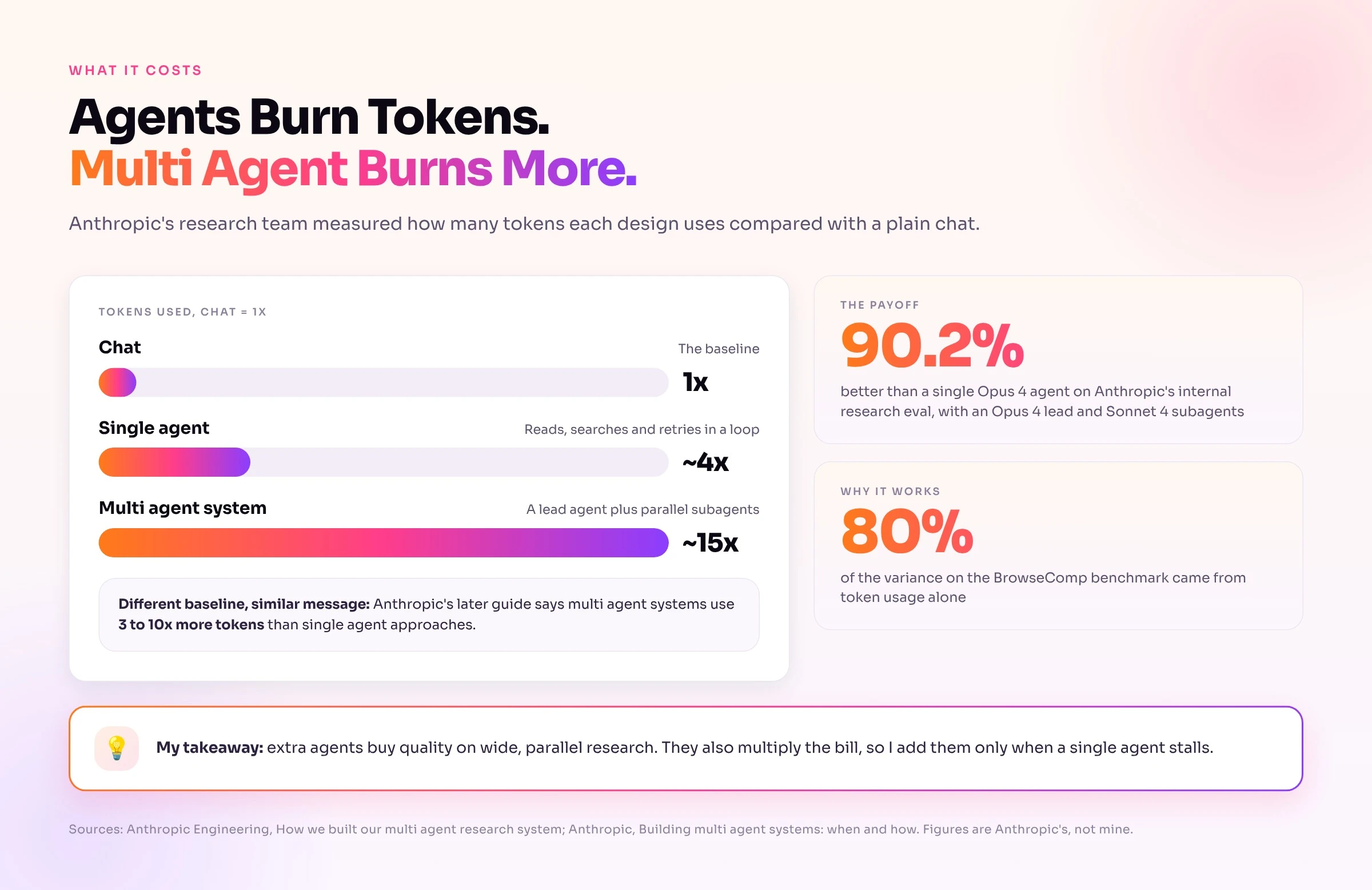
Anthropic's later guide on multi agent systems uses a different baseline. It says multi agent implementations typically use 3 to 10x more tokens than single agent approaches for equivalent tasks. It also reports that some teams spent months on elaborate multi agent designs and then found that better prompting on one agent gave equivalent results.
The research team's scaling rules show how to keep the bill in check. Simple fact finding gets 1 agent with 3 to 10 tool calls. A direct comparison gets 2 to 4 subagents with 10 to 15 calls each, and only complex research gets more than 10 subagents. Anthropic embedded those rules because agents struggle to judge effort, and early versions spawned 50 subagents for simple queries.
Coding is a weaker fit than research. Anthropic notes that most coding tasks have fewer parts that can truly run in parallel.
Anthropic's October 2026 Advice: Fold Subagents Into Skills
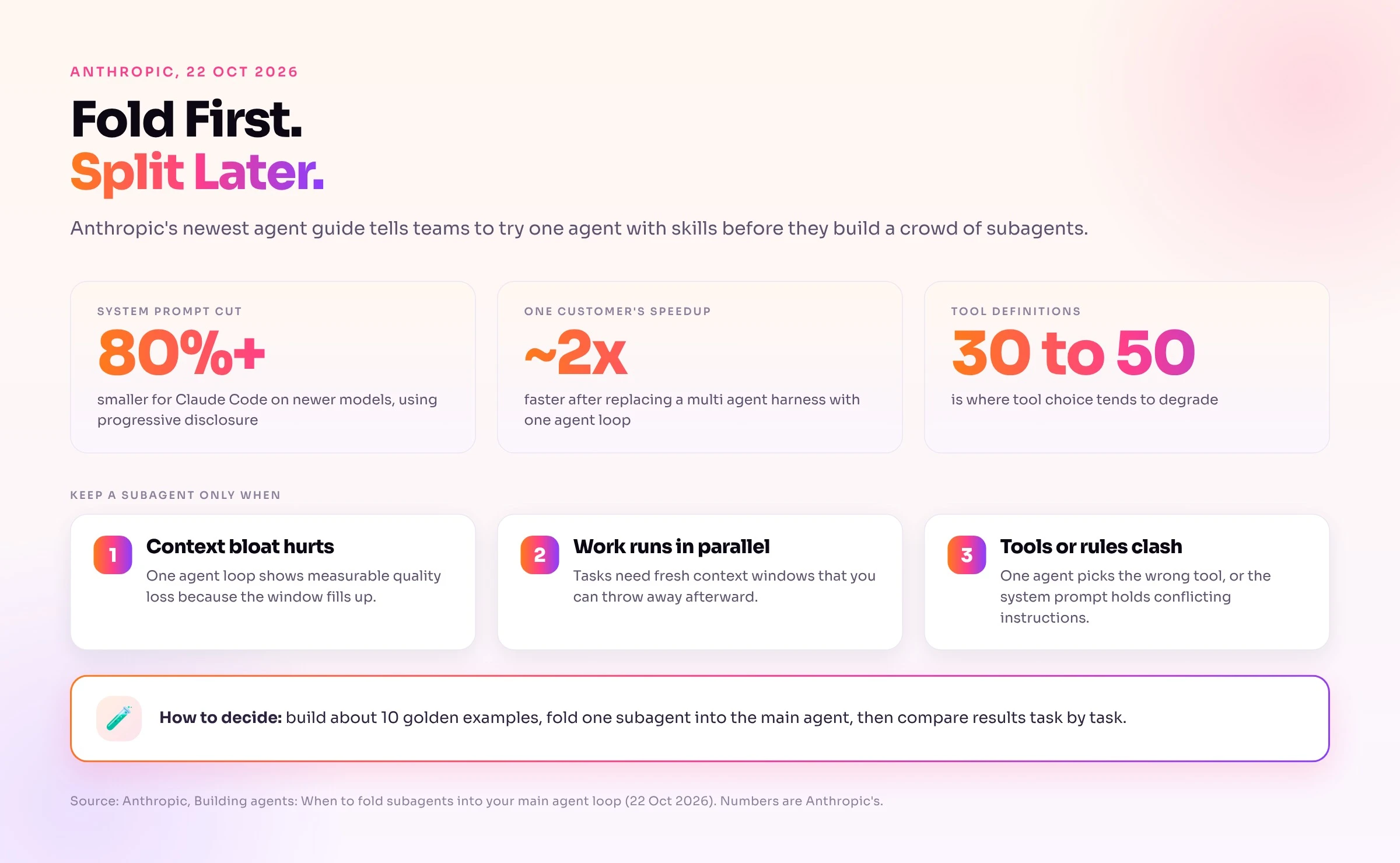
The ChatGPT answer I collected recommends an orchestrator plus specialist agents. Anthropic published the opposite default on 22 Oct 2026 in "Building agents: When to fold subagents into your main agent loop". Its comparison across several enterprise deployments found that "a single agent with skills frequently outperformed" the subagent design, often at lower cost and latency per task.
The post backs that up with concrete numbers. One customer saw a roughly 2x faster runtime after replacing a multi agent harness with a single agent loop. Anthropic cut Claude Code's system prompt by more than 80% for newer models by using progressive disclosure, which is the skill loading pattern from earlier. It also warns that tool choice tends to degrade once you pass 30 to 50 tool definitions.
When Anthropic Still Says to Keep a Subagent
Anthropic does not say subagents are bad. It lists three situations where they earn their cost:
My tests fit this list. The review subagent cost more because my file was tiny and nothing hit condition 1. A subagent that reads 40 files and returns 5 lines would.
Four Failure Modes to Avoid
Anthropic names several failure modes in large organizations. I find four of them worth remembering.
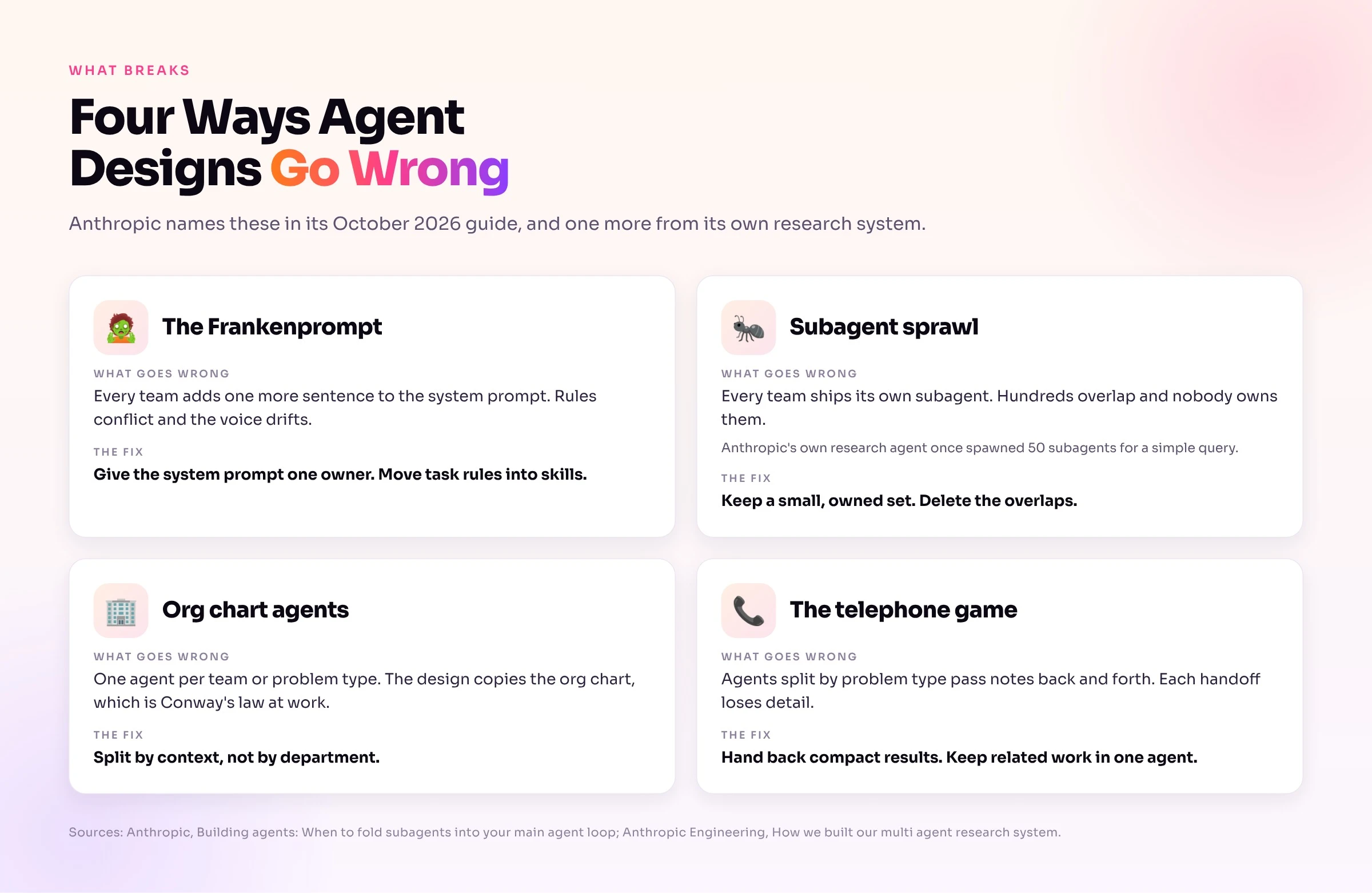
Anthropic's fix for the last two is to split work by context, not by department. Give each subagent a piece of work that needs little from the rest of the system and have it return a compact result.
How to Fold One Subagent Safely
Anthropic's process is simple enough to copy:
The task by task comparison matters. Anthropic describes a case where folding broke a process that had been passing, and the failure appeared in only 1 of 2 runs. An average score would have hidden it.
How to Choose: Skill, Subagent or Hook
I use five questions in this order. I stop at the first yes.
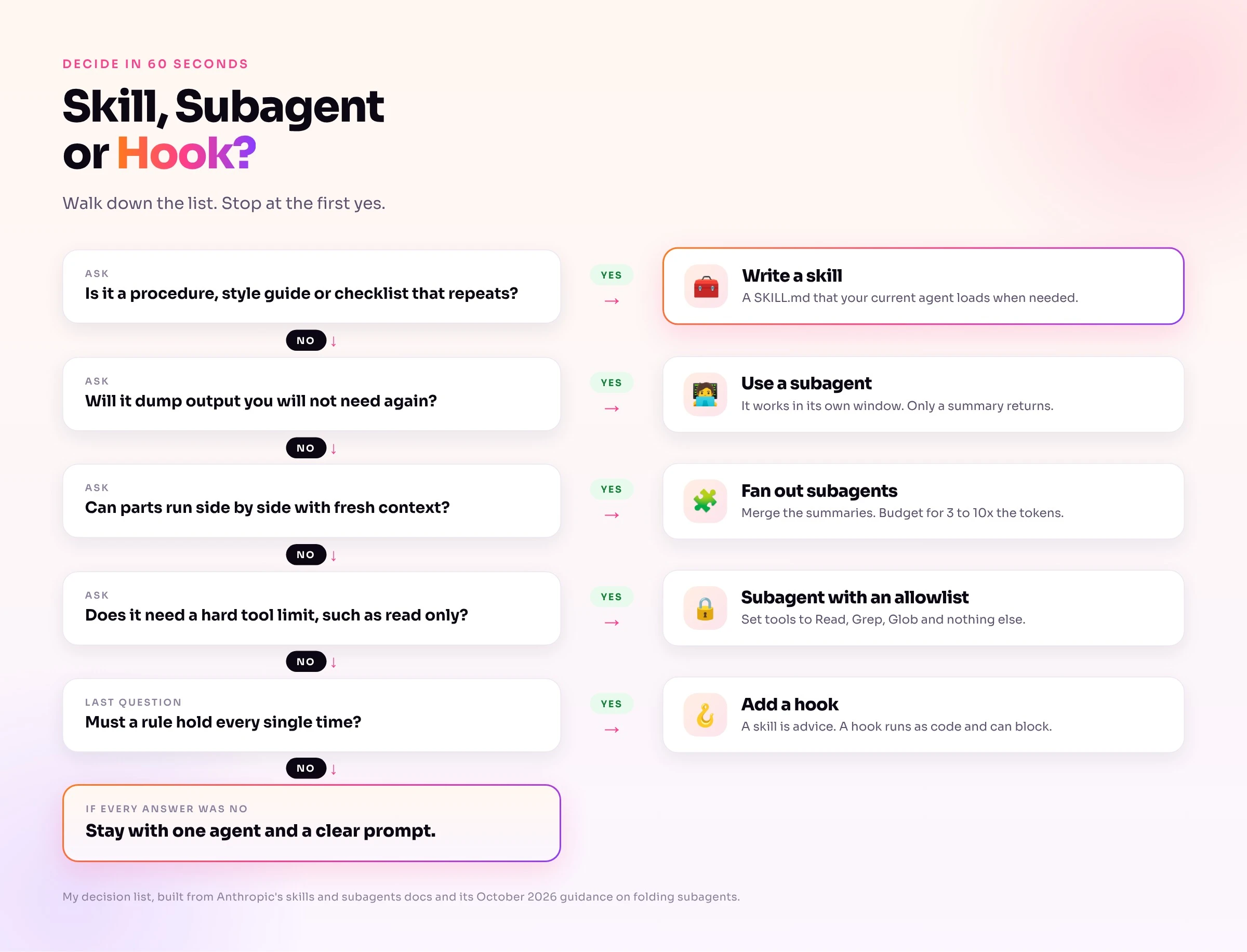
tools allowlist.If every answer is no, stay with one agent and a clear prompt. Add a skill when you notice yourself pasting the same instructions twice.
Common Mistakes and Fixes
when_to_use.context: fork on a guidelines only skill. The subagent gets rules and no task, so it returns nothing useful. Put an explicit task in the body.tools off a subagent. It then inherits every tool. List only what the job needs..claude/agents/ directory, which needs a session restart. Also check for invalid frontmatter and duplicate names.setting_sources and leave out user and project, the SDK does not load skills. If you pass a skills list, add the skill's name or call it with /name.Run My Test Yourself
You can reproduce my setup in five minutes. Create a project with the three files shown earlier: src/release_notes.md, .claude/skills/changelog-style/SKILL.md and .claude/agents/note-reviewer.md. Then run these commands.
# 1. Main thread with the skill
claude -p "Rewrite src/release_notes.md as a clean changelog. Print the result only, do not write files." --model sonnet

# 2. Subagent review
claude -p "Use the note-reviewer subagent to review src/release_notes.md and give me its findings." --model sonnet

# 3. Both together
claude -p "Rewrite src/release_notes.md as an Acme changelog. First use the note-reviewer subagent to find weak bullets, then do the rewrite with the changelog-style skill. Print only the final rewrite." --model sonnet
To see which tools ran, add --output-format stream-json --verbose and look for tool_use entries. Calls made inside a subagent carry a parent_tool_use_id, which is how I confirmed where each file read happened. For a no skill baseline, copy release_notes.md into a second folder that has no .claude directory and run command 1 there.
Cheatsheet: Pick One, Then Test It
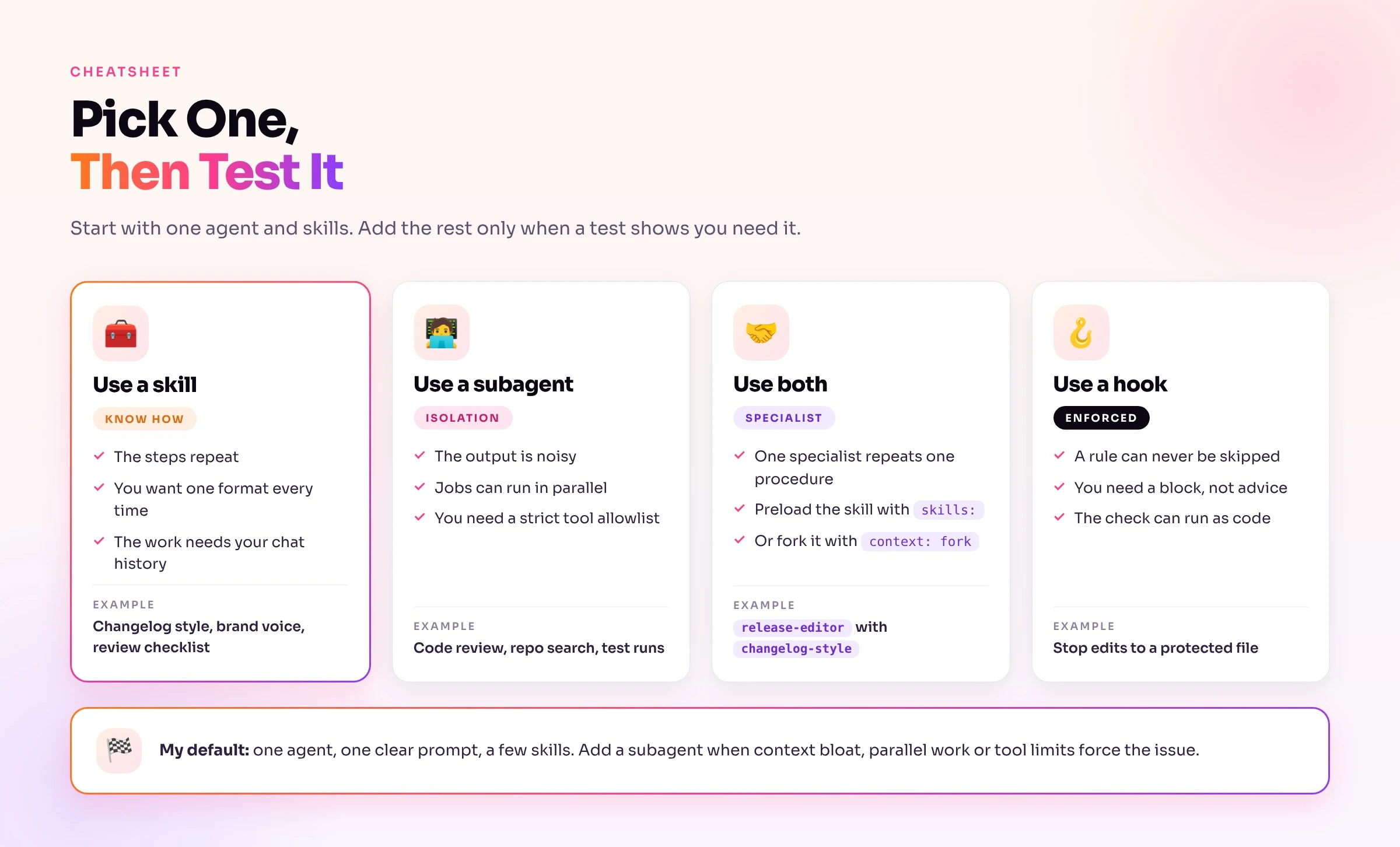
skills: or fork it with context: fork.Frequently Asked Questions (FAQs)
Is a Claude skill an agent?
No. A skill is a folder of instructions that loads into whichever agent you are using. An agent is the model plus its system prompt, tools, MCP servers and skills, so a skill is one ingredient of an agent. Claude Code with a skill loaded is an agent using a skill.
What is the difference between a Claude skill and a subagent?
A skill runs in your current conversation and changes how Claude works. A subagent runs in its own context window with its own system prompt and tool permissions, and it returns a summary. The skill shares your chat, while the subagent does not see it.
Can a subagent use skills?
Yes, in two ways. List the skill in the subagent's skills: field and Claude Code preloads its full content at startup. Or leave tools open so the subagent can call the Skill tool itself. A subagent does not see skills your main conversation already invoked.
When should I use a subagent instead of a skill?
Use a subagent when context bloat hurts quality, when tasks can run in parallel with fresh context, or when one agent picks the wrong tool or faces conflicting instructions. Those are the three conditions in Anthropic's October 2026 guide. Otherwise start with a skill, because Anthropic found that a single agent with skills frequently outperformed subagent designs.
What happened to Claude Code commands?
Anthropic merged custom commands into skills. A file at .claude/commands/deploy.md and a skill at .claude/skills/deploy/SKILL.md both create /deploy and work the same way. Existing command files keep working, and skills add options such as supporting files and context: fork.
How are skills different from MCP?
MCP connects Claude to live data and actions in other apps. A skill tells Claude how to do a job, including which steps to follow and which rules to apply. Anthropic's fold post draws the same line: skills hold how a team does work, and tools take actions, read live data or return a result in a fixed shape.
Final Thoughts
Skills and agents are not rivals. A skill is the recipe, and an agent is the cook that uses it. My tests showed the practical result: one skill lifted a plain run from 2 of 5 rules to 5 of 5 for about 1.4x the cost, while a subagent roughly doubled the cost of a small job. Pick your most repeated task this week, turn it into a skill, and test it on three real examples. Add a subagent only when context bloat, parallel work or a hard tool limit forces the issue, and measure the result before you keep it.