 Chrome Extension

Claude skills turn Claude from a chat window into a worker that handles live jobs: it reads production errors in Sentry, researches leads for your pipeline, tests your site in a real browser and renders finished videos.
This list ranks the 56 best Claude skills across 14 niches, including coding, design, sales, legal, finance, data, security and video. Every entry gives you a download link on a high authority site, a prompt to try, install steps and a YouTube video to watch before you commit.
I left out file format helpers and style template packs, because a skill earns a spot here only when it acts on a real task. The first pick comes from us at Promptslove, and I label it that way.
Key Takeaways
anthropics/knowledge-work-plugins covers sales, marketing, legal, finance and data, and anthropics/claude-plugins-official covers coding, security and developer tools.SKILL.md and any scripts/ folder before you install a community skill, because Anthropic warns about prompt injection and data exfiltration.How I Picked These Skills
I held every candidate to four rules, and only skills that passed all four made the list.
Anything paid carries a label. Entry 1 is ours and costs $49 once, and every other skill is a free download, although some connect to paid services. Star counts and view counts come from 1 November 2026, and they change daily.
Two cautions apply to the whole list. First, treat each sample prompt as a starting point, and run a new skill on a small task before you trust it with real work. Second, plugins in Anthropic's official marketplace install with /plugin install name@claude-plugins-official, and if Claude Code cannot find one, you run /plugin marketplace add anthropics/claude-plugins-official first.
Our Pick: The Best Claude Skill for Motion Graphics and Video
I start with the skill my own team builds, and I tell you the price up front. Promptslove makes it, so judge it by the facts on its page and by what you see in the example videos.
1. Motion Graphics PRO (Promptslove)
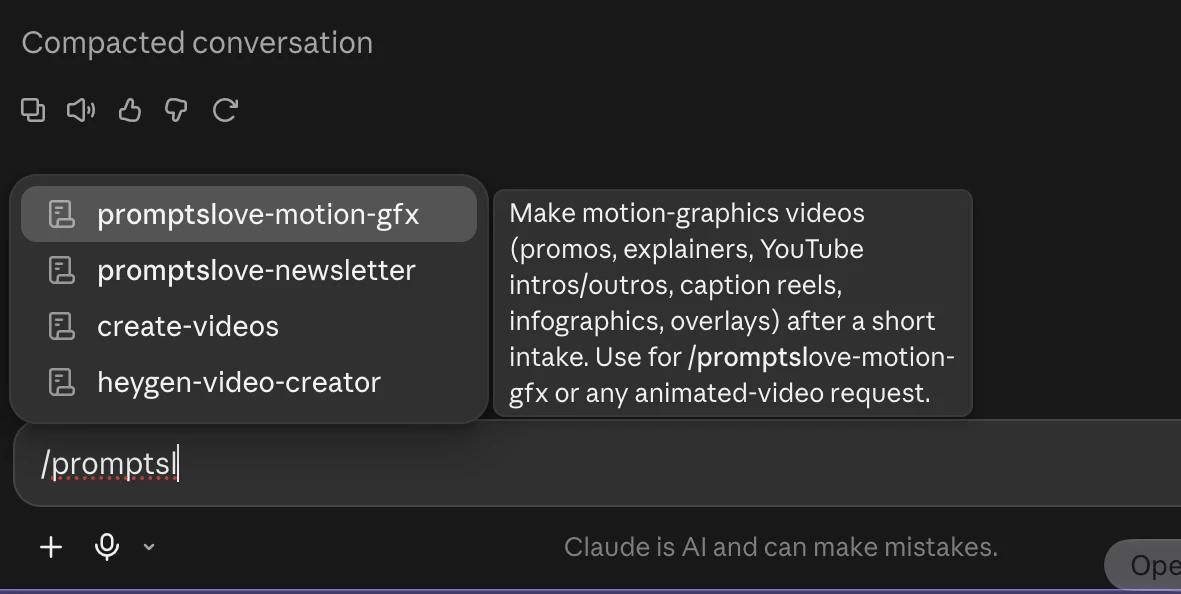
Motion Graphics PRO turns a chat message into a finished 1080p MP4. You type /promptslove-motion-gfx, answer a few questions, approve a storyboard, and the skill renders the video on your own machine. The page promises "zero timelines": you describe the video and approve the storyboard instead of editing frames.
The skill covers 54 video types in 8 families: product and marketing (11), explainer and education (6), data and information (7), repurposing (7), brand and identity (7), YouTube and creator (9), live streaming (4), and interface and presentation (3). You pick from 18 design styles, 184 motion moves and 14 transitions, or you bring your own logo and brand colours. Every render has a beat synced soundtrack at minus 14 LUFS and no watermark. You can ask for revisions by scene number, and you can export transparent overlays.
Best for: founders, marketers and creators who need launch ads, explainers, data videos, YouTube intros and reels without hiring an editor.
Try this prompt:
/promptslove-motion-gfx Make a 45 second 16:9 launch ad for my SaaS.
Start with the pain point, show three product screenshots, use my brand
colours, and end on a free trial call to action.
Works with: Claude Code, Claude Desktop, claude.ai, ChatGPT, Cursor, Gemini CLI, OpenCode, Devin, Antigravity and Codex.
Download: Get the skill from the Promptslove members area or read the full details on the Motion Graphics PRO page.
Best Claude Skills for Design and Front End Work
Design skills fix the biggest complaint about AI output, which is that everything looks the same. These picks critique your live interface, search design data for your industry, pull real frames from Figma and bundle working apps. If you want a video walkthrough first, Griffin Wooldridge's How to Use Claude Skills as a Designer has 331,115 views.
2. Frontend Design (frontend-design)
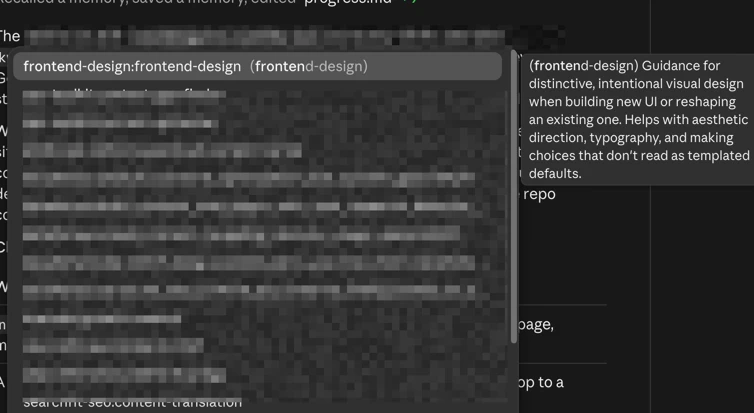
The frontend-design skill gives Claude a design process instead of a default template. Claude grounds the design in your subject, makes opinionated choices about palette, type and layout, then reviews the result against your brief.
The skill lists the common tells of AI generated design so Claude can avoid them. The folder carries an Apache 2.0 license.
Best for: founders, developers and marketers who build landing pages, dashboards and internal tools and want them to look intentional.
Try this prompt:
Design a landing page for a small batch coffee roaster. Pick a distinctive
type pairing and palette, and explain your choices.
Download: anthropics/skills, frontend-design folder
Install:
/plugin marketplace add anthropics/skills
/plugin install example-skills@anthropic-agent-skills
3. Web Artifacts Builder (web-artifacts-builder)
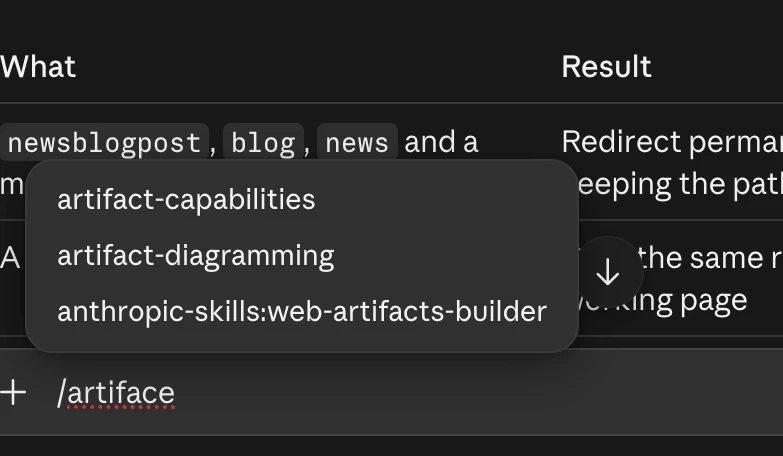
The web-artifacts-builder skill builds complex claude.ai artifacts with React, Tailwind CSS and shadcn/ui. A setup script scaffolds a React 18 and TypeScript project with Vite and more than 40 shadcn/ui components. A second script bundles everything into one HTML file with Parcel.
Use it when an artifact needs state, routing or a real component library. Skip it for simple single file pages.
Best for: builders who want dashboards, calculators and mini apps that run inside a Claude artifact.
Try this prompt:
Build a multi page habit tracker artifact with React, Tailwind and
shadcn/ui components, then bundle it to a single HTML file.
Download: anthropics/skills, web-artifacts-builder folder. It installs with the example-skills plugin.
Watch: Fabian Markl's web artifacts chapter tests it inside his review of every official skill. Most Claude Artifacts tutorials cover the feature and not this skill.
4. Web Design Guidelines (Vercel)
The web-design-guidelines skill audits your UI code against more than 100 rules. It covers accessibility, focus states, forms, animation (including reduced motion), typography, images, performance, navigation, dark mode, touch and internationalization. Claude lists specific violations, which catches problems a linter misses. Vercel publishes it in the same repo as the React skill under the MIT license.
Best for: front end developers and designers who want a second pair of eyes on a finished interface.
Try this prompt:
Review my UI and check accessibility.
npx skills add vercel-labs/agent-skills
Watch: Flux Academy's I Tested Claude Skills for Web Design has 111,747 views. Its Web Design Guidelines chapter starts at 14:15, and the video also tests Impeccable and UI UX Pro Max.
5. UI UX Pro Max (nextlevelbuilder/ui-ux-pro-max-skill)
UI UX Pro Max gives Claude a searchable design knowledge base. The free version bundles UI styles, product types, colour palettes, font pairings and stack specific guidelines for 22 frameworks, plus a search engine that matches a brief to the right design choices. The skill activates on its own when you ask for UI work.
It needs Python 3, and the MIT licensed basic version has about 143,500 stars. A premium tier exists on the author's site, so the free repo is the "basic" option.
Best for: developers and founders who build SaaS pages and want a palette, type pairing and layout chosen for their industry.
Try this prompt:
Build a landing page for my SaaS product.
Download: github.com/nextlevelbuilder/ui-ux-pro-max-skill
Install:
/plugin marketplace add nextlevelbuilder/ui-ux-pro-max-skill
/plugin install ui-ux-pro-max@ui-ux-pro-max-skill
Watch: Kvint Labs' UI UX Pro Max for Claude Code: Stop Guessing Design Systems has 10,029 views. Flux Academy's test of it starts at 9:58.
6. Impeccable (pbakaus/impeccable)
Impeccable is a design vocabulary for coding agents. It offers 24 commands to steer a design (such as polish and bolder), review it (critique and audit) and finish it. A deterministic "slop detector" with 62 rules catches AI design tells without calling an LLM, and it runs as a hook, in CI or in a Chrome extension. Paul Bakaus created it under the Apache 2.0 license, and the repo has about 97,300 stars.
Best for: designers and developers who want to critique and polish AI generated interfaces, not just generate them.
Try this prompt:
/impeccable critique the pricing cards
Download: github.com/pbakaus/impeccable
Install:
npx impeccable install
Then reload your tool and run /impeccable init. Review the README's warning about live mode before you use it in a repo you do not know.
Watch: lustoykov's Impeccable: The BEST Frontend Design Skill For CLAUDE & CODEX has 29,572 views, and Flux Academy's test of it starts at 6:12.
7. Figma (figma/mcp-server-guide)
The Figma plugin sets up Figma's MCP server together with agent skills. Claude can read your Figma designs and turn selected frames into code. The README also describes writing to the Figma canvas (in beta), generating placeholder images and Code Connect, which maps Figma components to your codebase.
Rate limits apply: Starter plans, and View or Collab seats on paid plans, get only 6 tool calls a month. Writing to the canvas is free during the beta and becomes usage based later.
Best for: designers and front end developers who want frames from Figma turned into working components.
Try this prompt:
Implement this Figma frame in React: <paste a figma.com/design link>
Download: github.com/figma/mcp-server-guide
Install:
claude plugin install figma@claude-plugins-official
Watch: Figma's Code to Canvas: Claude Code has 50,999 views. Its livestream Figma x Claude Code Live: Roundtrip workflows with Figma MCP runs 1 hour 2 minutes and has 48,533 views. Both come from Figma and show the MCP server, which the plugin installs for you.
Best Claude Skills for Coding and Software Development
Coding skills dominate every "best Claude skills" list for a reason. They turn Claude from an autocomplete engine into a teammate that plans, tests and reviews before it ships. Star counts below come from each GitHub page on 1 November 2026, and they move daily.
8. Superpowers (obra/superpowers)
Superpowers is a complete software development method packaged as composable skills. Claude brainstorms first, sets up a git worktree, writes a plan, runs subagents through the tasks, follows a red, green, refactor test cycle, reviews the code and then finishes the branch. The README calls these "mandatory workflows, not suggestions," so the skills trigger on their own. Jesse Vincent publishes it under the MIT license, and the repo has about 309,000 stars.
Best for: developers who want Claude to stop jumping straight into code and follow a disciplined process.
Try this prompt:
Let's make a React todo list.
With Superpowers installed, that short prompt starts the brainstorming skill before any code appears.
Download: github.com/obra/superpowers
Install:
/plugin install superpowers@claude-plugins-official
Watch: Eric Tech's Claude Code + SUPERPOWERS = The End of Vibe Coding? has 129,085 views. Better Stack's This Is The Only Claude Code Plugin You'll EVER Need has 68,749 views. Both are about seven months old, so the install steps on screen may differ from the current README.
9. Matt Pocock's Skills (mattpocock/skills)
Matt Pocock's repo, titled "Skills For Real Engineers," holds small skills you can mix and match. The star is /grill-me, which interviews you about a plan until every branch of the design is settled. Other commands include /tdd, /diagnosing-bugs and /improve-codebase-architecture.
The README lists 27 skills and positions them against heavier frameworks that own your whole process. It uses the MIT license and has about 307,000 stars.
Best for: TypeScript and full stack developers who want sharp, single purpose skills instead of a full framework.
Try this prompt:
/grill-me I want to add team workspaces to my SaaS app.
Download: github.com/mattpocock/skills
Install:
claude plugin install mattpocock-skills@claude-plugins-official
Then run /setup-matt-pocock-skills once per repo. Any other agent can use npx skills@latest add mattpocock/skills.
Watch: Matt's own video, mattpocock/skills: A complete AI Coding workflow, end to end, has 765,037 views. His follow up, I stopped using /grill-me for coding. Here's what I use instead, has 405,850 views. The repo changes fast, so skill names in older videos may differ.
10. GStack (garrytan/gstack)
GStack turns Claude Code into a small engineering team. Garry Tan, the president and CEO of Y Combinator, built it with roles for a CEO, an engineering manager, a designer, a reviewer, a QA lead with a real browser, a security officer and a release engineer. A sprint runs through think, plan, build, review, test, ship and reflect, and every command is a Markdown file under the MIT license. The repo has about 138,500 stars.
Best for: solo founders who want review, QA and release discipline without hiring for each role.
Try this prompt:
/office-hours
/review
/qa https://staging.myapp.com
/ship
Download: github.com/garrytan/gstack
Install:
git clone --single-branch --depth 1 https://github.com/garrytan/gstack.git ~/.claude/skills/gstack && cd ~/.claude/skills/gstack && ./setup
The setup needs Bun. It also adds a gstack section to your CLAUDE.md and registers hooks, so read the README before you run it on a shared repo.
Watch: Y Combinator's How to Make Claude Code Your AI Engineering Team has 274,739 views. Better Stack's The toolkit from Y Combinator CEO that Will Makes Claude Code Amazing has 43,397 views.
11. GSD (open-gsd/gsd-core)
GSD is a context engineering and spec driven framework that fights context rot. It runs research, planning and execution in fresh context subagents, then loops through discuss, plan, execute, verify and ship for each milestone. Each execution wave gets a clean 200,000 token window. The original gsd-build repository is archived, and the project now lives at open-gsd/gsd-core under the MIT license with about 10,900 stars.
Best for: builders on big projects whose Claude sessions drift or forget the plan halfway through.
Try this prompt:
/gsd-new-project
Download: github.com/open-gsd/gsd-core. Skip the old archived repo, because it only redirects here.
Install:
npx @opengsd/gsd-core@latest
Run /gsd-new-project for a new build or /gsd-onboard for an existing repo.
Watch: AI LABS' GSD Is the Missing Piece For Claude Code has 64,558 views. It predates the move to the new repo, so use the install command above instead of the one on screen.
12. Everything Claude Code (affaan-m/ECC)
Everything Claude Code, now shortened to ECC, bundles a whole engineering system. The README counts 71 agents, 314 skills and 98 commands, plus hooks, rules, memory and AgentShield security scanning. Claude plans before it builds, verifies changes with tests and reviews its own work from a fresh context.
Affaan Mustafa publishes the core under the MIT license, and the repo has about 294,000 stars. A paid GitHub App for private repos exists, and the core stays free.
Best for: power users who want one big, opinionated setup instead of picking skills one by one.
Try this prompt:
/ecc:plan "Add user authentication with OAuth"
Download: github.com/affaan-m/ECC. Use only this official repo, because the README warns about malware in mirrors.
Install:
npx ecc-universal@2.2.3 setup
The setup needs Node 18 or newer, Git and a current Claude Code. The README says to pick one install path and not stack them.
Watch: Software Engineer Meets AI's Everything Claude Code: The #1 Claude Code Plugin has 30,578 views. Tech Fire's This Free Repo Blows Paid Setups Out of the Water has 47,121 views. Video titles quote older star and skill counts, so trust the README numbers.
13. Planning With Files (OthmanAdi/planning-with-files)
Planning With Files keeps your plan on disk instead of in chat. The skill maintains task_plan.md, findings.md and progress.md, and lifecycle hooks feed that context back to Claude after a /clear, a crash or a compaction. It follows the Manus style idea that the context window is RAM and the filesystem is disk. Ahmad Adi publishes it under the MIT license, and the repo has about 27,700 stars.
Best for: anyone running long tasks where Claude loses the thread after the context resets.
Try this prompt:
/planning-with-files:plan
Download: github.com/OthmanAdi/planning-with-files
Install:
/plugin marketplace add OthmanAdi/planning-with-files
/plugin install planning-with-files@planning-with-files
Watch: Brandon Melville's This Skill Gives OpenCode a Manus Brain has 20,547 views and links the repo. It shows OpenCode rather than Claude Code, but the skill works the same way.
14. Vercel React Best Practices (react-best-practices)
Vercel Engineering wrote this skill to improve React and Next.js code. It ranks its rules by impact, starting with eliminating request waterfalls and trimming bundle size, then moving through server side performance, client data fetching and re render control. Claude applies it automatically when you write or review React code.
The rule count differs between the README and the SKILL.md, so check the repo for the current number. It uses the MIT license.
Best for: React and Next.js teams who want performance rules applied while Claude writes code.
Try this prompt:
Review this React component for performance issues.
npx skills add vercel-labs/agent-skills
Watch: AICodeKing's SUPER POWER SKILLS by Vercel has 11,687 views, and Tobi Mey's Vercel Just Released 10+ Years Of React Best Practices has 12,209 views.
15. wshobson Agents (wshobson/agents)
The wshobson/agents repo is a giant catalog of plugins for Claude Code, Codex CLI, Cursor, OpenCode and other tools. The README counts 94 plugins, 202 agents, 185 skills and 105 commands across Python and JavaScript development, code review, testing, infrastructure and security. You install only the plugins you need. Seth Hobson publishes it under the MIT license, and the repo has about 41,900 stars.
Best for: teams that want a deep library of stack specific skills and agents to pick from.
Try this prompt:
/python-development:python-scaffold Create a FastAPI service with tests
Download: github.com/wshobson/agents
Install:
/plugin marketplace add wshobson/agents
/plugin install python-development@claude-code-workflows
Watch: Only small channels cover it. Alex To Go Eng's wshobson/agents: Agentic Plugin Marketplace has 54 views, and GitHub Daily's overview has 593 views. I include it for its GitHub traction, although video coverage is thin.
16. Ralph Loop (anthropics/claude-plugins-official)
Ralph Loop runs Claude in a self referential loop. A Stop hook blocks Claude from exiting and feeds the same prompt back until a completion condition is met. Claude sees its earlier work in files and git history on every pass. You start it with /ralph-loop " and stop it with /cancel-ralph.
Best for: developers with a well defined task and a test suite, such as building a CRUD API until the tests pass.
Try this prompt:
/ralph-loop "Build a REST API for todos. Requirements: CRUD operations,
input validation, tests. Output <promise>COMPLETE</promise> when done."
--completion-promise "COMPLETE" --max-iterations 50
Always set --max-iterations, because the default is unlimited.
Download: anthropics/claude-plugins-official, ralph-loop folder
Install:
/plugin install ralph-loop@claude-plugins-official
Watch: Better Stack's Claude Ralph: The Bizarre Anthropic Plugin That Every Developer Is Missing has 123,225 views. WorldofAI's Claude Code Ralph Loop: Run Claude Code For Hours Autonomously has 35,713 views. Not everyone is sold: Chase AI's Stop Using The Ralph Loop Plugin has 71,076 views, and Geoffrey Huntley argues that Claude Code's version is not the original technique.
17. Code Simplifier (anthropics/claude-plugins-official)
Code Simplifier is an agent that refines code for clarity, consistency and maintainability while it preserves behavior. It focuses on code you changed recently unless you tell it otherwise. The plugin is at version 1.0.0 and ships a single agent set to the Opus model.
Best for: developers who want a cleanup pass before they open a pull request.
Try this prompt:
Use the code-simplifier agent on the files I just changed.
/plugin install code-simplifier@claude-plugins-official
Watch: AI Coding Daily's NEW Claude Code Plugin: Code Simplifier has 12,380 views. AttackOnLife's Claude Code Author Recommended Code Simplifier Plugin: Usage Instructions has 801 views.
Best Claude Skills for Memory and Context
Long sessions fail for one reason: the context window fills up. These tools keep raw output out of the window, save what matters between sessions and bring it back when you need it.
18. Claude Mem (thedotmack/claude-mem)
Claude Mem gives Claude Code persistent memory. The plugin captures what Claude does in each session, writes semantic summaries and loads the relevant ones into your next session. A mem-search skill lets you ask natural language questions about your project history. The repo uses the Apache 2.0 license and has about 108,000 stars.
Best for: developers who restart Claude Code daily and are tired of re explaining their project.
Try this prompt:
Search my project history: why did we switch the auth flow last month?
Download: github.com/thedotmack/claude-mem
Install:
/plugin marketplace add thedotmack/claude-mem
/plugin install claude-mem
Restart Claude Code afterwards. The README's npx claude-mem install route asks you to sign in and starts a 30 day free trial of a hosted observer. The marketplace commands above avoid that step.
Watch: Prism Labs' Claude Mem: Give Claude Code a Permanent Memory has 11,764 views. It predates the current sign in flow, so follow the README for setup.
19. Context Mode (mksglu/context-mode)
Context Mode is an MCP server that stops tool output from flooding your context window. Sandboxed tools keep raw output out of the window, and the README's own example shrinks 315 KB to 5.4 KB. A SQLite index keeps session state alive through compaction, and the model writes small scripts instead of reading whole files.
Mert Koseoglu publishes it under the Elastic License 2.0, which is source available rather than open source. The repo has about 32,500 stars.
Best for: heavy Claude Code users whose sessions die when logs, test output and web pages pile up.
Try this prompt:
Fetch the Hacker News front page, extract all posts with titles, scores,
and domains. Group by domain. Then run /context-mode:ctx-stats.
Download: github.com/mksglu/context-mode
Install:
/plugin marketplace add mksglu/context-mode
/plugin install context-mode@context-mode
Restart Claude Code or run /reload-plugins afterwards.
Watch: Better Stack's Claude Code is Expensive. This MCP Server Fixes It (Context Mode) has 160,311 views. The repo's own README embeds that video as its demo. The 98 percent saving is the README's claim, and one small channel disputes it, so test it on your own workload.
Best Claude Skills for Building Skills, MCP Servers and Tests
These skills help you build the next skill, connect Claude to your own tools and prove that your web app works. Start with skill-creator if you plan to write more than one skill of your own.
20. Skill Creator (skill-creator)
The skill-creator skill builds other skills. Claude drafts a skill from your description, writes test prompts, runs them with the skill on, reviews the results, rewrites the instructions and repeats. The current version also measures performance with evals and benchmarks, and it tunes your description so the skill triggers at the right moment. The folder includes an Apache 2.0 license file.
Best for: anyone who wants to turn a repeated workflow into a reusable skill, such as a client report or a brand voice check.
Try this prompt:
Use skill-creator to turn my weekly client report workflow into a skill,
then write three test prompts for it.
Download: anthropics/skills, skill-creator folder
Install:
/plugin marketplace add anthropics/skills
/plugin install example-skills@anthropic-agent-skills
You can also install it on its own from Anthropic's official marketplace with /plugin install skill-creator@claude-plugins-official.
Watch: Anthropic's own Creating custom Skills with Claude is a 48 second clip with 312,621 views. It may show an earlier version of the skill. Fabian Markl's skill creator chapter tests the current one.
21. MCP Builder (mcp-builder)
The mcp-builder skill guides Claude through building a Model Context Protocol server. You choose Python with FastMCP or Node with the TypeScript SDK. The skill defines four phases: research and planning, implementation, review and testing, and evaluations. It also teaches tool naming, context management and error messages that tell the model how to recover.
Best for: developers who want Claude to reach their own APIs, databases or internal tools.
Try this prompt:
Build a TypeScript MCP server for the Linear API with tools to list
issues, create issues and add comments.
Download: anthropics/skills, mcp-builder folder. It installs with the example-skills plugin.
Watch: Fabian Markl's mcp builder chapter tests it, and Skillmdpro's 17 Official Claude Skills From Anthropic lists it.
22. Webapp Testing (webapp-testing)
The webapp-testing skill lets Claude test a local web app with Playwright. Claude starts your dev server through a helper script, opens pages, clicks through flows, captures screenshots and reads browser console logs. A decision tree helps it choose between static HTML and a dynamic app, and it inspects the page before it acts.
Best for: developers who want Claude to verify its own front end changes instead of guessing.
Try this prompt:
Start my dev server on port 3000, open the login page with Playwright,
take a screenshot and report any console errors.
Download: anthropics/skills, webapp-testing folder. It installs with the example-skills plugin.
Watch: Code & bird's DON'T write tests manually, use Claude AI Skills! has 4,606 views and shows the testing skill at work. Fabian Markl's webapp testing chapter tests it in the roundup.
Best Claude Skills for Sales and Lead Generation
Sales gets the most official support of any business niche. Anthropic ships a full sales plugin, and Apollo and ZoomInfo ship their own connectors. Most of these need an account with the data provider, so check that before you install anything.
23. Sales Plugin (Anthropic)
The Sales plugin covers the whole sales day. Its 2.0 release grew from 9 to 36 skills, including call-prep, call-summary, account-research, draft-outreach, deal-review, pipeline-review, forecast and competitive-intelligence. It works against your CRM, email, calendar, chat and call recorder, and it falls back to uploaded files when nothing is connected. The README names HubSpot, Close, Salesforce, Gmail, Gong, Fireflies, Clay, ZoomInfo, Apollo and Slack among the connectors.
Best for: account executives and founders who sell and want call prep, follow ups and forecasts without opening five tabs.
Try this prompt:
/sales:call-prep Acme Corp - I meet their VP of Operations tomorrow at 10am.
Pull account history and suggest discovery questions.
Download: anthropics/knowledge-work-plugins, sales folder
Install:
claude plugin marketplace add anthropics/knowledge-work-plugins
claude plugin install sales@knowledge-work-plugins
Watch: Anthropic's Claude Cowork for sales has 132,830 views. Automate with Marc's Claude Cowork for Sales: Complete Tutorial (No Code) has 9,234 views. Neither title names the plugin, so treat both as demos of the same workflow and not as a plugin walkthrough.
24. Apollo (apolloio/apollo-mcp-plugin)
The Apollo plugin connects Claude to Apollo.io's hosted MCP server. It adds /apollo:prospect, /apollo:enrich-lead, /apollo:sequence-load and /apollo:analytics for prospecting, enrichment, loading outreach sequences and sales analytics. The plugin uses the MIT license and signs in with OAuth. Enrichment spends your Apollo credits.
Best for: outbound sales reps who already pay for Apollo and want Claude to build lists and load sequences.
Try this prompt:
Find software engineering leaders at B2B SaaS companies in Germany
with 200 to 1,000 employees.
Download: github.com/apolloio/apollo-mcp-plugin
Install:
/plugin install apollo@claude-plugins-official
The README also offers claude mcp add --transport http apollo https://mcp.apollo.io/mcp. Restart Claude Code, then run /mcp to sign in.
Watch: Zack Deris covers the Apollo MCP in I Automated My Entire Outbound With Claude + Apollo.io, which has 12,104 views. It shows the MCP server and not the plugin form. Apollo's own This Is What AI Native Outbound Looks Like is a 39 second overview with 13,317 views.
25. ZoomInfo (Zoominfo/zoominfo-mcp-plugin)
The ZoomInfo plugin connects Claude to ZoomInfo's hosted MCP server. You can search companies and contacts, enrich leads, find lookalike accounts and get contact recommendations. It ships 14 skills that chain those tools into workflows, such as account-research, build-list, buying-committee and tech-stack-snapshot.
Best for: B2B sales and marketing teams with a ZoomInfo license who want account research and list building inside Claude.
Try this prompt:
Help me prepare for a meeting with Apple's VP of Marketing this afternoon.
Download: github.com/Zoominfo/zoominfo-mcp-plugin
Install:
/plugin install zoominfo@claude-plugins-official
You need a ZoomInfo account with API access, and you sign in with OAuth.
Watch: ZoomInfo's Watch Claude Instantly Build Sales Prospect Lists Using ZoomInfo (MCP Demo) has 7,268 views. It is 10 months old and may predate the plugin. The newer Getting Started with ZoomInfo MCP for Claude Users has 223 views.
26. Lead Research Assistant (ComposioHQ)
The lead-research-assistant skill finds and qualifies leads for a product you describe. You give it your product, your target location and your industry, and it returns a list of matching companies. It lives as a folder inside the ComposioHQ awesome list, which uses the Apache 2.0 license.
Best for: founders and freelancers who need a quick list of qualified prospects without a paid data tool.
Try this prompt:
I do bookkeeping for dental clinics in Austin. Find me 10 good leads.
Download: ComposioHQ/awesome-claude-skills, lead-research-assistant folder. The repo uses the master branch.
Install:
git clone --depth 1 https://github.com/ComposioHQ/awesome-claude-skills.git
cp -r awesome-claude-skills/lead-research-assistant ~/.claude/skills/
The repo's own README shows a different skills folder, so use ~/.claude/skills/ as Anthropic documents it.
Watch: Hyperautomation Labs tests this exact prompt in This Free Repo Gives You 864 Claude Skills. Here Are the 7 to Actually Use, which has 4,301 views. In the demo, Claude runs 11 web searches and returns 10 scored leads.
Best Claude Skills for Marketing, SEO, Writing and Social Media
Marketing has the widest choice of skills outside coding. Anthropic ships an official plugin, and two community collections have passed 20,000 stars. The picks below cover strategy, SEO, copy, humanizing AI text and scheduling posts.
27. Marketing Skills (coreyhaines31/marketingskills)
Corey Haines built this collection for technical marketers and founders. The README table lists 53 skills, including cro, copywriting, emails, cold-email, seo-audit, ai-seo, pricing and launch. It works with Claude Code, OpenAI Codex, Cursor and Windsurf. The repo uses the MIT license and has about 57,100 stars.
Best for: founders, growth marketers and agencies who want conversion, copy, SEO and launch playbooks in one install.
Try this prompt:
Help me optimize this landing page for conversions.
That prompt triggers the cro skill. You can also call /cro, /emails or /seo-audit by hand.
Download: github.com/coreyhaines31/marketingskills
Install:
npx skills add coreyhaines31/marketingskills
To pick skills one at a time, run npx skills add coreyhaines31/marketingskills --list first. The Claude Code plugin route is /plugin marketplace add coreyhaines31/marketingskills and then /plugin install marketing-skills.
Watch: The Next New Thing's Just give Claude these skills has 56,458 views, and its description links the repo. Gerrid Smith's What Happens When You Give Claude 40 Marketing Skills has 3,216 views, and it shows an older, smaller version. The README also lists sponsored partner tools and promotes the author's agency, so read it with that in mind.
28. Marketing Plugin (Anthropic)
Anthropic's Marketing plugin handles content, campaigns, brand voice, competitor research and reporting. It adds seven commands: /draft-content, /campaign-plan, /brand-review, /competitive-brief, /performance-report, /seo-audit and /email-sequence. The README names Slack, Canva, Figma, HubSpot, Amplitude, Notion, Ahrefs, Similarweb, Klaviyo and Supermetrics as connectors.
Best for: marketing managers who want briefs, calendars and reports in a consistent format every week.
Try this prompt:
/marketing:campaign-plan Goal: drive 500 signups for our new product launch.
Audience: technical decision makers at enterprise companies.
Timeline: 6 weeks. Budget: $20,000 to $30,000.
Download: anthropics/knowledge-work-plugins, marketing folder
Install:
claude plugin marketplace add anthropics/knowledge-work-plugins
claude plugin install marketing@knowledge-work-plugins
The README lists skill names that no longer match the folder, so run the slash commands above instead of the skill names.
Watch: Anthropic's Claude Cowork for marketing ops has 102,353 views and shows recurring reporting. Grace Leung's Claude Cowork: 8 Use Cases Every Marketer Should Know (Full Tutorial) has 88,475 views. Neither title names the plugin.
29. Claude SEO (AgriciDaniel/claude-seo)
Claude SEO is a free SEO plugin for Claude Code. You give it a website, and it runs a full audit in 10 to 15 minutes, then returns an action plan sorted by importance. It covers technical SEO, Core Web Vitals, content quality signals (experience, expertise, authority and trust), Schema.org markup, AI search citation likelihood and local, ecommerce and international SEO.
The README counts 26 sub skills and 19 specialist agents. The repo uses the MIT license and has about 23,200 stars.
Best for: SEO specialists, agency owners and site owners who want an audit workflow without paying for another crawler.
Try this prompt:
/seo audit https://example.com
Other commands include /seo page, /seo geo, /seo schema and /seo local.
Download: github.com/AgriciDaniel/claude-seo
Install:
/plugin marketplace add AgriciDaniel/claude-seo
/plugin install claude-seo@agricidaniel-claude-seo
/seo setup
The plugin needs Claude Code 1.0.33 or newer and Python 3.11 to 3.14.
Watch: The author's own video, Claude Code skills just replaced your entire SEO stack (12 free tools), has 75,888 views, and the README links it. His newer all 25 skills explained has 1,916 views. One warning: a site called claudeseoskill.com is a different project by a different author, so do not confuse it with this repo. The README also mentions a private paid tier called AI Marketing Hub Pro.
30. Content Research Writer (ComposioHQ)
The content-research-writer skill helps you write with sources. It researches a topic, adds citations, improves your hook, iterates on your outline and gives feedback on each section as you write. It lives as a folder in the ComposioHQ awesome list.
Best for: bloggers, newsletter writers and content marketers who want a research partner and not a ghostwriter.
Try this prompt:
Help me create an outline for an article about [topic].
git clone --depth 1 https://github.com/ComposioHQ/awesome-claude-skills.git
cp -r awesome-claude-skills/content-research-writer ~/.claude/skills/
Watch: Hyperautomation Labs picks it as one of seven skills in This Free Repo Gives You 864 Claude Skills. Here Are the 7 to Actually Use, which has 4,301 views. It is the third pick in that video.
31. Postiz (gitroomhq/postiz-agent)
Postiz is a social media scheduling tool with a command line interface, and its agent repo adds a Claude Code skill. The skill schedules posts, manages integrations, uploads media and tracks analytics. The plugin manifest lists more than 28 platforms. The Claude Code plugin is skill and CLI only, and it does not register an MCP server.
Best for: creators and social media managers who want Claude to schedule a month of posts in one session.
Try this prompt:
Schedule this post to LinkedIn and X for tomorrow at 9am.
Download: github.com/gitroomhq/postiz-agent
Install:
npm install -g postiz
postiz auth:login
/plugin marketplace add gitroomhq/postiz-agent
/plugin install postiz@postiz-agent
For a skill only install, run npx skills add gitroomhq/postiz-agent. You can also authenticate with a POSTIZ_API_KEY variable.
Watch: Postiz's own channel posted How to go VIRAL on Instagram with Claude AI (Full Claude Automation Tutorial), which has 6,992 views. Its 2 minute 43 second Schedule Thousands of Social media posts in a minute with OpenClaw / Claude has 1,304 views. Both come from the vendor, so expect a sales angle.
Best Claude Skills for Legal Work
Legal work gets careful treatment from every publisher below, and each one tells you its output is not legal advice. Treat the results as a first pass that a qualified lawyer reviews. Two plugins have solid video coverage today.
32. Legal Plugin (Anthropic)
The Legal plugin is built for in house legal teams. It reviews contracts against a configurable playbook, triages NDAs as green, yellow or red, checks vendor agreements, and prepares legal briefings. The default playbook reflects U.S. positions from Delaware, New York and California, and you customize it in a legal.local.md file. The README names Slack, Teams, Box, Egnyte, Microsoft 365 and Atlassian as connectors, and the plugin's .mcp.json also lists DocuSign.
Best for: in house counsel, founders and contract managers who handle a steady flow of NDAs and vendor agreements.
Try this prompt:
/legal:review-contract (upload the vendor MSA)
We are the customer and need to close by end of quarter.
Focus on data protection and liability.
Other commands are /triage-nda, /vendor-check and /brief.
Download: anthropics/knowledge-work-plugins, legal folder
Install:
claude plugin marketplace add anthropics/knowledge-work-plugins
claude plugin install legal@knowledge-work-plugins
Watch: Liam Barnes asks whether it is worth it in Claude's Legal Plugin Wiped $300B Off the Market: Is It Worth It?, which has 15,640 views. Anthropic's Claude Cowork for legal teams has 68,286 views. That video comes from Anthropic's "Claude for Legal" launch and may show more than the single plugin in this repo.
33. LegalZoom (legalzoom/claude-plugins)
The LegalZoom plugin adds two commands. /review-contract runs an AI document review that flags key risks and clauses. /attorney-assist tells you when to bring in an attorney and routes you to LegalZoom's attorney network. The README states that the plugin does not provide legal advice.
Best for: small business owners who want a contract check and a clear signal on when to pay for a lawyer.
Try this prompt:
/review-contract
Run it on an uploaded vendor agreement, then ask, "Do I need an attorney for this?"
Download: github.com/legalzoom/claude-plugins
Install:
/plugin marketplace add legalzoom/claude-plugins
/plugin install legalzoom@legalzoom-marketplace
The official marketplace form is /plugin install legalzoom@claude-plugins-official. You also need the LegalZoom connector enabled in your Claude app settings, and attorney consultations require a LegalZoom Business Attorney Plan.
Watch: LegalZoom's own Claude + LegalZoom: AI Meets Real Attorneys runs 2 minutes 43 seconds and has 872 views. It is 7 months old and may predate the plugin.
Best Claude Skills for Finance and Accounting
Finance skills come with the strongest video coverage in this list, and two of them have videos above 100,000 views. They also carry the strictest warnings. Every publisher says the output is a draft that a qualified professional must review.
34. Finance Plugin (Anthropic)
The Finance plugin supports month end close, journal entry preparation, account reconciliation, financial statements, variance analysis and SOX audit support. The repo holds eight skills: audit-support, close-management, financial-statements, journal-entry, journal-entry-prep, reconciliation, sox-testing and variance-analysis. The README states that it gives no financial, tax or audit advice. It connects to Snowflake, Databricks, BigQuery and Slack, and to spreadsheets when no warehouse is available.
Best for: controllers, FP&A analysts and accounting teams who close the books every month.
Try this prompt:
/finance:variance-analysis revenue 2024-Q4 vs 2024-Q3
Download: anthropics/knowledge-work-plugins, finance folder
Install:
claude plugin marketplace add anthropics/knowledge-work-plugins
claude plugin install finance@knowledge-work-plugins
Watch: Carolina Lago's This Claude Cowork System Eliminated Our Finance Bottleneck has 10,407 views, and its description names the Claude Cowork plugin for finance teams. Her Claude's Cowork Mode Automated My Monthly Close: Here's What Happened has 14,170 views. That one covers bank reconciliation and three statement work, but it says "Cowork mode", so plugin use is not confirmed.
35. Financial Services Plugins (anthropics/financial-services)
This repository holds reference agents, skills and data connectors for investment banking, equity research, private equity and wealth management. It names ten agents, such as a Pitch Agent that builds comps, precedents, a DCF and a football field, and a GL Reconciler that finds ledger breaks and drafts a sign off report. Vertical plugins add commands such as /comps, /dcf, /lbo, /3-statement-model, /earnings and /initiate.
The financial-analysis plugin ships 12 data connectors, including Daloopa, Morningstar, S&P Global, FactSet, Moody's, LSEG and PitchBook. Many of those connectors need a provider subscription.
Best for: analysts, bankers and portfolio teams who build comps, models and earnings notes.
Try this prompt:
/comps Datadog
Download: github.com/anthropics/financial-services. The README uses this repo name, and the financial-services-plugins name serves the same README.
Install:
claude plugin marketplace add anthropics/financial-services
claude plugin install financial-analysis@claude-for-financial-services
claude plugin install pitch-agent@claude-for-financial-services
claude plugin install equity-research@claude-for-financial-services
Install financial-analysis first, as the README says. Two agents, GL Reconciler and KYC Screener, rely on firm internal ledger and screening servers that the repo does not ship. The README adds that outputs are staged for human sign off and are not investment, legal, tax or accounting advice.
Watch: Anthropic's New agents for financial services has 130,701 views, and its description matches the ten agent templates. Raph's Don't Analyse Stocks Without Claude's New Finance Agents (Full Install) has 255,960 views.
36. QuickBooks (intuit/quickbooks-claude-plugin)
The QuickBooks plugin turns your QuickBooks Online data into plain language insights. Its skills include business-health-check, industry-benchmark, analyze-payroll-cost, chase-overdue-invoices, email-to-estimate-invoice, lending, payroll-help and set-base-pay. You connect through the QuickBooks connector and sign in with an Intuit account. Write actions need your confirmation.
Best for: small business owners and bookkeepers who want answers about cash, invoices and payroll without building reports.
Try this prompt:
How is my business doing this quarter?
Download: github.com/intuit/quickbooks-claude-plugin
Install:
/plugin install intuit-quickbooks@claude-plugins-official
In Claude Code, sign in with /login first.
Watch: Intuit's How to connect and use QuickBooks Online in Claude runs 2 minutes 38 seconds and has 2,968 views. It shows the connector. Small Business Playbook's We Tried Claude's QuickBooks Connector So You Don't Have To (2026) has 20,879 views.
Best Claude Skills for Data and Analytics
Data skills turn Claude into an analyst that writes the query, runs it and explains the result. You get an official plugin for warehouses and a lightweight option for files on your laptop.
37. Data Plugin (Anthropic)
The Data plugin covers SQL queries, data exploration, visualization, dashboards and insight generation. It works with any warehouse or SQL dialect, and the README names Snowflake, Databricks, BigQuery, Definite, Hex and Amplitude. When you have no warehouse connection, you paste SQL results or upload CSV and Excel files. Commands include /analyze, /explore-data, /write-query, /create-viz and /build-dashboard.
Best for: analysts, product managers and founders who live in dashboards and ad hoc SQL.
Try this prompt:
/data:write-query I need a cohort retention analysis. Group users by
signup month and show the percent still active 1, 3, 6 and 12 months
later. We use Snowflake.
Download: anthropics/knowledge-work-plugins, data folder
Install:
claude plugin marketplace add anthropics/knowledge-work-plugins
claude plugin install data@knowledge-work-plugins
Watch: Prof. Dries Faems' channel posted Crazy Power BI Alternative! Build Interactive Dashboards with Claude Cowork's Data Plugin, which has 5,209 views. AI Analyst Lab's How to use Claude Cowork for data analysis (plugin demo) runs 1 hour 13 minutes and has 408 views.
38. DuckDB Skills (duckdb/duckdb-skills)
DuckDB Skills lets Claude query local files in plain English. The skills are attach-db, query, read-file, duckdb-docs, read-memories and install-duckdb. read-file opens CSV, JSON, Parquet, Avro and Excel files, local or remote.
read-memories searches your past Claude Code session logs. No account is needed, but you need the DuckDB CLI, and the skills offer to install it. The authors tested macOS and Linux, and Windows is not fully supported.
Best for: analysts and developers who want to explore big CSV or Parquet files without loading a database.
Try this prompt:
/duckdb-skills:read-file variants.parquet what columns does it have?
Download: github.com/duckdb/duckdb-skills
Install:
/plugin marketplace add duckdb/duckdb-skills
/plugin install duckdb-skills@duckdb-skills
The README still says the authors are working on an official Anthropic marketplace listing, so use the route above.
Watch: Kyle Chalmers' Query CSVs and More in Plain English with DuckDB + Claude runs 13 minutes 25 seconds and has 1,744 views. It uses DuckDB with Claude Code but does not clearly name the plugin.
Best Claude Skills for Research, Web Search and Science
Claude's built in search is good, but these plugins read pages, crawl sites and reach scientific databases that a normal search cannot. Pick one web tool and one domain tool, and you cover most research work.
39. Firecrawl (firecrawl/firecrawl-claude-plugin)
The Firecrawl plugin connects Claude to Firecrawl's hosted MCP server. You can search the web, read the pages you find, look up structured data providers and research developer docs, government publications and scientific papers. Commands include /firecrawl:setup, /firecrawl:search, /firecrawl:scrape, /firecrawl:map, /firecrawl:crawl and /firecrawl:agent. Version 2.0.0 moved from the Firecrawl CLI to the hosted MCP server, so older tutorials show a different setup.
Best for: researchers, marketers and developers who need clean text from live websites.
Try this prompt:
/firecrawl:scrape https://docs.firecrawl.dev
Download: github.com/firecrawl/firecrawl-claude-plugin
Install:
/plugin marketplace add firecrawl/firecrawl-claude-plugin
/plugin install firecrawl@firecrawl
Then run /mcp to connect your Firecrawl account. The official marketplace form is /plugin install firecrawl@claude-plugins-official. Choose one route and not both.
Watch: Firecrawl's Claude's Web Search Just Got A Big Upgrade (Firecrawl Connector) has 2,751 views. Chase AI's Claude Code + Firecrawl = UNLIMITED Web Scraping has 43,032 views, and it predates the 2.0.0 change.
40. Exa (exa-labs/exa-mcp-server)
Exa gives Claude web search, deep research and content extraction through a hosted MCP server. The default tools are web_search_exa and web_fetch_exa, and optional tools add agent runs and advanced search. The Claude plugin lives in the plugins/exa/ folder of the repo. Exa Agent needs OAuth or an API key from the Exa dashboard.
Best for: analysts and writers who want semantic search results that beat keyword matches.
Try this prompt:
Use Exa to find recent papers on retrieval augmented generation
and summarize the top three.
Download: github.com/exa-labs/exa-mcp-server
Install:
claude plugin install exa@claude-plugins-official
Watch: Adam Goodyer's This MCP is 10x Better than Claude's Web Search (Exa MCP) runs 9 minutes 58 seconds and has 1,192 views. It covers the MCP server and not the marketplace plugin.
41. K-Dense Scientific Agent Skills (K-Dense-AI/scientific-agent-skills)
This collection holds 177 scientific and research skills for biology, chemistry, medicine, physics, engineering, Earth science, data analysis and scientific communication. It follows the open Agent Skills standard and works with Claude Code, Cursor, Codex and other hosts. The repo uses the MIT license, has about 54,900 stars and cites an arXiv paper. The authors renamed it from claude-scientific-skills, so older links and videos use the old name.
Best for: scientists, students and analysts who want database queries and standard analysis workflows inside Claude.
Try this prompt:
Use available skills you have access to whenever possible. Query ChEMBL
for EGFR inhibitors with IC50 below 50nM and analyze the structure
activity relationships.
Download: github.com/K-Dense-AI/scientific-agent-skills
Install:
npx skills add K-Dense-AI/scientific-agent-skills
To install one skill, run gh skill install K-Dense-AI/scientific-agent-skills scanpy --agent claude-code.
Watch: K-Dense's Getting Started with Claude Scientific Skills has 17,530 views, and the README links it. Signal Coders' overview has 3,778 views.
Best Claude Skills for Productivity and Automation
These skills organize your tasks and wire Claude into the apps you already use. They suit non developers just as well as developers.
42. Productivity Plugin (Anthropic)
The Productivity plugin combines three pieces: markdown task management in a TASKS.md file, a two tier workplace memory made of CLAUDE.md and a memory/ folder, and a local HTML dashboard. The /start command creates TASKS.md, CLAUDE.md, memory/ and dashboard.html. After that, Claude decodes your shorthand and learns the names of your people and projects. The /update command keeps it all current.
Best for: busy professionals who juggle many projects and want Claude to remember who is who.
Try this prompt:
/productivity:update --comprehensive
Download: anthropics/knowledge-work-plugins, productivity folder
Install:
claude plugin marketplace add anthropics/knowledge-work-plugins
claude plugin install productivity@knowledge-work-plugins
Then run /productivity:start once. Connectors for Slack, Notion, Asana, Linear, Jira, monday.com and ClickUp are optional.
Watch: TechTiff's Claude Built a Custom Dashboard That Manages My Tasks Automatically has 19,847 views. Its description lists Claude Cowork and the Productivity plugin, with a dashboard and scheduled task updates.
43. n8n Skills (czlonkowski/n8n-skills)
The n8n Skills repo teaches Claude to build n8n workflows with the n8n MCP server. It holds 14 complementary skills plus an always on router skill and a hooks layer that enforces the habits. Romuald Czlonkowski, who also wrote the n8n MCP server, publishes it under the MIT license.
The repo has about 6,600 stars. You need the n8n MCP server installed first.
Best for: automation builders who want Claude to write correct n8n expressions and production ready workflows.
Try this prompt:
Build a webhook workflow that posts new form submissions to Slack.
Download: github.com/czlonkowski/n8n-skills
Install:
/plugin marketplace add czlonkowski/n8n-skills
The README also shows /plugin install czlonkowski/n8n-skills, and a manual route that copies n8n-skills/skills/* into ~/.claude/skills/. A separate repo called haunchen/n8n-skills is a derivative and not this project.
Watch: The author's own video, Dodaj n8n skills do swojego Claude Code, Claude Desktop lub claude.ai, is in Polish and has 16,935 views. Chase AI's Why Claude Code is Better at n8n than n8n has 35,687 views, and its description mentions Claude n8n skills without naming the repo.
44. Zapier (zapier/zapier-mcp)
The Zapier plugin gives Claude access to Zapier's app catalog and actions through the Zapier MCP server. Its skills handle onboarding, a demo, a toolkit and health checks. After you install it, you tell Claude "onboard zapier" and follow the prompts. The manifest says 8,000 or more apps, and the README says 9,000 or more, so I say thousands.
Best for: operators who want Claude to act in apps that have no dedicated plugin, such as Google Sheets, Stripe or Mailchimp.
Try this prompt:
onboard zapier
Then ask, "Add a row to my Google Sheet when a new Stripe payment comes in."
Download: github.com/zapier/zapier-mcp
Install:
/plugin install zapier@claude-plugins-official
You need a Zapier account.
Watch: Zapier's Claude + Zapier: Connect any app your business runs on runs 19 minutes 26 seconds. It is five days old with 207 views, and it covers the MCP server. Siraj Raval's I Let AI Run My Entire Business (Zapier MCP) has 98,847 views, but the page marks it as sponsored by Zapier.
Best Claude Skills for Video, Motion and Animation
Entry 1, Motion Graphics PRO, is our pick for video. The three skills below take a different route. They treat video as code, so Claude writes React or HTML and a renderer turns it into an MP4. Choose these when you want to own the source project or build video into an app.
45. Remotion Agent Skills (remotion-dev/skills)
Remotion maintains an official list of agent skills that define best practices for Remotion projects. The README lists 12 skills, including remotion-best-practices, remotion-create, remotion-studio, remotion-render, remotion-captions and remotion-upgrade. The docs page lists 13 and adds /remotion-license.
The repo has about 5,500 stars. The Remotion framework has its own licensing terms for companies, so read remotion.dev before you use it commercially.
Best for: developers and technical creators who want programmatic videos, captions and product promos built in React.
Try this prompt:
/remotion-create Make a promo video for a record store
Download: github.com/remotion-dev/skills
Install:
npx skills add remotion-dev/skills
You can also run gh skill install remotion-dev/skills, or accept the skills prompt during bun create video.
Watch: Leonardo Grigorio's How people are generating videos with Claude Code (Remotion Skill) has 51,569 views. Snapper AI's Generate Animated Videos with Claude Code (Remotion Agent Skill Tutorial) has 14,729 views. Both are about 9 months old, and the skill list has changed since.
46. HyperFrames (heygen-com/hyperframes)
HyperFrames turns HTML, CSS and media into deterministic MP4 video, and agent skills drive it. The README tagline reads "Write HTML. Render video.
Built for agents." HeyGen publishes it under the Apache 2.0 license, and the repo has about 76,700 stars. It needs Node 22 or newer and FFmpeg. Seven skills ship with it, including /hyperframes, /hyperframes-cli, /hyperframes-registry, /media-use, /figma, /slideshow and /remotion-to-hyperframes.
Best for: creators who want to describe a video, review the HTML, and render it locally for free.
Try this prompt:
Using /hyperframes, create a 10 second product intro with a fade in
title, a background video and subtle background music.
Download: github.com/heygen-com/hyperframes
Install:
claude plugin marketplace add heygen-com/hyperframes
claude plugin install hyperframes@hyperframes
A standalone route is npx skills add heygen-com/hyperframes. The repo is a framework plus skills, so it asks more setup than a single skill folder.
Watch: HeyGen's Replace Your Video Editor With AI: HeyGen Hyperframes Full Tutorial (2026) has 58,477 views, and it comes from the vendor. Selling With Nas posted How to make FREE AI Videos with Claude (and Hyperframes), which has 47,911 views.
47. Runway Dev (runwayml/skills)
Runway Dev lets a coding agent build AI video, image and audio generation into your app with the Runway API and SDKs. The Claude plugin connects to Runway's MCP endpoint and includes seven skills, such as runway-dev-setup, runway-dev-models and runway-dev-recipes. The install ID is runway-api.
The plugin uses the MIT license. API generations can use credits, and your app needs its own RUNWAYML_API_SECRET from the Developer Portal.
Best for: developers who want to add text to video or image generation to a product.
Try this prompt:
Add Runway text to video generation to my Next.js app using the
official SDK.
Download: runwayml/skills, claude folder
Install:
claude plugin marketplace add runwayml/skills
claude plugin install runway-api@runway-dev
/runway-api:runway-dev-setup
The README says the version in claude-plugins-official is managed by Anthropic and may differ from Runway's own marketplace.
Watch: Runway's Introducing Runway MCP is a 46 second clip with 15,204 views. It covers the MCP server and not the plugin.
Best Claude Skills for Security
Security plugins check the code Claude writes, which matters because Claude writes a lot of it. Use both layers below if your code touches user data. Neither replaces a human review.
48. Claude Security (anthropics/claude-plugins-official)
Claude Security is Anthropic's in session version of its security product. Agents map your architecture, build a threat model, hunt for vulnerabilities and independently verify each finding before they report it. You run /claude-security and choose Scan codebase, Scan changes (a branch, PR or commit diff) or Suggest patches.
Results land in a timestamped CLAUDE-SECURITY- folder in .md, .jsonl and .sarif formats. Patches arrive as F files that you apply yourself.
Best for: developers and security leads who want a threat model and verified findings before a release.
Try this prompt:
Run a Claude Security scan on the whole repo at medium
/plugin install claude-security@claude-plugins-official
/reload-plugins
If the marketplace is missing, run /plugin marketplace add anthropics/claude-plugins-official first. The plugin needs Python 3.9 or newer and a git checkout. It runs under your session permissions, so use it on code you trust.
Scans are nondeterministic, so run them more than once. The plugin was at version 0.12.0 on 1 November 2026.
Watch: Digital Benjamins' Claude Code Security Plugin | Vibe Code Security Scanner runs 10 minutes 3 seconds, has 2,368 views and names the plugin. Anthropic's Find and fix security vulnerabilities with Claude has 66,755 views, but it may show the hosted product and not this plugin.
49. Security Guidance (anthropics/claude-plugins-official)
Security Guidance reviews code in three layers. Regex rules warn you instantly on every edit and write, an LLM reviews the diff when Claude finishes a turn, and an agentic reviewer checks each git commit. The pattern layer covers about 25 dangerous patterns, such as unsafe yaml.load, pickle.load on untrusted data, raw innerHTML and hardcoded secrets.
The targets include injection, XSS, SSRF, IDOR, auth bypass and path traversal. It needs Claude Code 2.1.144 or newer and Python 3.8 or newer.
Best for: teams who want guardrails that fire automatically while Claude writes code.
Try this prompt:
Add an endpoint that loads a user uploaded YAML config and saves it to disk.
The plugin has no slash command. This prompt is a good test, because the hooks should flag an unsafe YAML load.
Download: anthropics/claude-plugins-official, security-guidance folder
Install:
/plugin install security-guidance@claude-plugins-official
The README says the LLM reviews are skipped, leaving only pattern warnings, when credentials do not reach the plugin. It also calls itself best effort and not a substitute for human review or static analysis.
Watch: Juan Romero of SOCFortress posted Claude Code Security Guidance Plugin Overview, which has 413 views. A Japanese video from the channel AI Security Specialist Web Shoku TV, linked here, runs 55 minutes and has 7,387 views. Both date from mid 2026, so they may describe older behavior.
Best Claude Plugins for Testing, Docs and Developer Platforms
These plugins connect Claude to the tools developers already use: a browser, a docs index, an error tracker, a payments platform and a database. Most are MCP servers packaged as plugins, so the videos often show the MCP setup. I note that on each entry.
50. Playwright (Microsoft)
The Playwright plugin lets Claude drive a real browser. It can open pages, click elements, fill forms, take screenshots and run end to end checks. The plugin's .mcp.json runs npx @playwright/mcp@latest, so you need Node installed.
Best for: developers who want Claude to test the front end it just changed.
Try this prompt:
Use playwright to open https://example.com, fill in the contact form
and take a screenshot.
Download: anthropics/claude-plugins-official, playwright folder
Install:
/plugin install playwright@claude-plugins-official
Watch: Eric Tech's Claude Code Now Has Eyes | Playwright MCP Integration has 72,545 views. Leon van Zyl's Claude Code + Playwright MCP = Perfect UI Every Time has 24,194 views. Both show the MCP server and not the marketplace install.
51. Context7 (Upstash)
Context7 gives Claude current, version specific library documentation instead of stale training data. The plugin connects to Context7's hosted MCP server and exposes two tools, resolve-library-id and query-docs. You need no local Node or npx. An optional CONTEXT7_API_KEY raises the rate limits, and it works anonymously without one.
Best for: developers who work with fast moving frameworks such as Next.js and want Claude to stop guessing at APIs.
Try this prompt:
How do I set up authentication in Next.js 15?
Download: anthropics/claude-plugins-official, context7 folder
Install:
/plugin install context7@claude-plugins-official
Watch: All About AI's Claude Code + Context7 MCP Server Is a GAME CHANGER for AI Coding has 78,954 views. Shinzo Labs' How To set Up Context7 in Claude Code in 3 Minutes has 6,260 views. Both set it up by hand, and the plugin now uses the hosted endpoint, so some steps differ.
52. Chrome DevTools MCP (ChromeDevTools/chrome-devtools-mcp)
Chrome DevTools for agents lets Claude control and inspect a live Chrome browser. It records performance traces, analyzes network requests, takes screenshots, reads console messages with source mapped stack traces and automates actions through Puppeteer. The plugin bundles the MCP server plus skills such as a11y-debugging, debug-optimize-lcp, memory-leak-debugging and cookie-debugging. The README warns that the server exposes browser content to the MCP client, so keep sensitive pages closed.
Best for: front end developers who debug performance, accessibility and memory problems.
Try this prompt:
Check the performance of https://developers.chrome.com
Download: github.com/ChromeDevTools/chrome-devtools-mcp
Install:
/plugin marketplace add ChromeDevTools/chrome-devtools-mcp
/plugin install chrome-devtools-mcp@chrome-devtools-plugins
The official marketplace form is /plugin install chrome-devtools-mcp@claude-plugins-official.
Watch: JeredBlu's Official Chrome MCP Beats Playwright (More Tools & Less Tokens) has 40,003 views. DesignCourse's Chrome DevTools MCP Server Solves a BIG Problem has 57,495 views. Both show the MCP server.
53. Sentry (getsentry/plugin-claude)
The Sentry plugin brings a skill library and Sentry's hosted MCP server into Claude. The skills cover SDK setup wizards, debugging and code review, and the MCP server lets Claude read error reports, analyze stack traces and search issues. The README says Sentry generates the repo from getsentry/sentry-for-ai. You need a Sentry login for the MCP.
Best for: teams that run Sentry and want Claude to start from the real production error.
Try this prompt:
Find the most frequent unresolved errors from the last 24 hours and
suggest a fix for the top one.
Download: github.com/getsentry/plugin-claude
Install:
/plugin install sentry@claude-plugins-official
If the README shows /plugins install, drop the extra "s".
Watch: Sentry's own Sentry Claude Code Plugin and Skills is a 1 minute clip with 2,654 views. Its Sentry + Claude Agents: Automatic Bug Fixes from Root Cause to PR has 1,725 views.
54. Stripe (stripe/ai)
The Stripe plugin gives Claude first party knowledge of Stripe plus the hosted Stripe MCP server at mcp.stripe.com, which signs in with OAuth. Its skills include stripe-best-practices, upgrade-stripe, metronome, connect-recommend, stripe-directory, stripe-apps and stripe-projects. You need a Stripe account. The README documents telemetry opt outs through DISABLE_TELEMETRY or DO_NOT_TRACK.
Best for: developers who build checkout, billing or Connect integrations.
Try this prompt:
Review my checkout integration against Stripe best practices.
Download: stripe/ai, Claude plugin folder
Install:
/plugin install stripe@claude-plugins-official
Watch: Stripe Developers' How the Stripe Tools plugin works with Claude Code runs 3 minutes 51 seconds and has 72,618 views. The video says "Stripe Tools plugin", so the match to this plugin is very likely but not proven.
55. Supabase (supabase-community/supabase-plugin)
The Supabase plugin bundles the Supabase MCP server with two skills, supabase and supabase-postgres-best-practices. The manifest covers database operations, authentication, storage and real time subscriptions. The first use opens a browser window to sign in to your Supabase account.
Best for: builders who run a Postgres backend on Supabase and want Claude to write migrations and policies safely.
Try this prompt:
Create a posts table with row level security and show me the SQL.
Download: github.com/supabase-community/supabase-plugin
Install:
/plugin install supabase@claude-plugins-official
The README only says to install from your agent's plugin marketplace, so this line follows the official pattern. Supabase documents the plugin at supabase.com/docs/guides/ai-tools/plugins.
Watch: Supabase's Building a game with Claude Code and Supabase MCP has 20,948 views. Checkmark Academy's How to Connect Claude Code to Supabase Using MCP (Step by Step) 2026 has 2,607 views. Both cover the MCP server.
56. Linear (anthropics/claude-plugins-official)
The Linear plugin connects Claude to Linear's hosted MCP server at mcp.linear.app. The manifest says it creates issues, manages projects, updates statuses and searches across workspaces. The plugin folder ships no README, so check Linear's docs for the full feature list.
Best for: teams that track work in Linear and want Claude to file and update issues from the terminal.
Try this prompt:
Create a Linear issue for the login timeout bug and assign it to me.
Download: anthropics/claude-plugins-official, linear folder
Install:
/plugin install linear@claude-plugins-official
Watch: Owain Lewis' Claude Code + Linear (Coding Agent Workflow) has 29,883 views. It shows the Linear MCP server and not the plugin.
More Agentic Claude Skills Worth Trying
These 19 plugins act on live tasks too, and each one links to its official or vendor repository. Videos about them are still thin, so read each README before you install.
The four Anthropic plugins marked with a star install the same way as the Sales Plugin above. Run claude plugin marketplace add anthropics/knowledge-work-plugins, then claude plugin install . Plugins from the official marketplace install with /plugin install .
| Skill | Niche | What it does |
|---|---|---|
| Customer Support (Anthropic)* | Support | Triages tickets on a P1 to P4 scale, packages escalations, drafts replies, researches customers and writes knowledge base articles. |
| Product Management (Anthropic)* | Product | Writes specs and PRDs, updates roadmaps, drafts stakeholder updates, synthesizes research and reviews metrics. |
| Enterprise Search (Anthropic)* | Search | Searches email, chat, documents and wikis in one query with /enterprise-search:search and /enterprise-search:digest. |
| Bio Research (Anthropic)* | Life sciences | Connects Claude to PubMed, bioRxiv, ChEMBL, Open Targets, ClinicalTrials.gov and Benchling, with five analysis skills. |
| Code Review | Coding | /code-review launches four parallel agents on a pull request and reports only issues scored 80 or higher out of 100. |
| Feature Dev | Coding | /feature-dev runs a 7 phase workflow with explorer, architect and reviewer agents. |
| Hookify | Coding | Turns plain language rules, or mistakes you corrected, into hook rules. |
| Claude MD Management | Coding | Audits your CLAUDE.md files and captures session learnings with /revise-claude-md. |
| Plugin Dev | Coding | Seven skills and /plugin-dev:create-plugin for building your own plugin. |
| Claude Code Setup | Coding | Reads your codebase and recommends MCP servers, skills, hooks and subagents. |
| Hunter | Sales | Finds and verifies email addresses with 13 skills. The free plan includes 25 searches and 50 verifications a month. |
| HubSpot Sales | Sales | Contact lookup, call prep, daily briefs and follow up drafts through HubSpot's MCP server. |
| Semgrep | Security | Hooks scan the files Claude writes with Semgrep Code, Supply Chain and Secrets. The README says file contents go to scanner.semgrep.ai, so read its data note first. |
| Tavily | Research | CLI skills for search, extract, crawl and research. |
| Amplitude | Analytics | About 18 skills, such as analyze-chart, daily-brief and tracking-plan-audit. |
| Cloudflare | Cloud | Skills for Workers, Durable Objects, the Agents SDK and Wrangler. |
| Notion | Notes | Four Cookbook skills plus the hosted Notion MCP and slash commands. |
| Slack | Chat | Nine skills and five commands, such as /slack:summarize-channel and /slack:standup. |
| Canva | Design | Six active skills, including brand-check, resize-for-social-media and bulk-create. |
Where to Find More Claude Skills
New skills ship every week, so bookmark the places that publish them first.
anthropics/claude-plugins-official: Anthropic's plugin marketplace. Its marketplace lists more than 300 plugins, including most of the partner plugins above.anthropics/knowledge-work-plugins: The role plugins for sales, marketing, legal, finance, data, product, support, productivity, enterprise search and bio research.ComposioHQ/awesome-claude-skills: A curated collection with about 77,900 stars. Its headline claims more than 1,000 skills and plugins, but independent counts land in the hundreds. Most entries are app connector skills.travisvn/awesome-claude-skills: A curated list with about 15,500 stars. Its update badge reads February 2026, so check dates before you install anything.Starter Stacks by Role
Install three skills, run them on real work for a week, then add more. Each row below names the skills by their entry titles above.
| Your role | Start with | Add next |
|---|---|---|
| Marketer or content creator | Marketing Skills, Claude SEO, Postiz | Content Research Writer, Marketing Plugin, Firecrawl |
| Founder | Superpowers or GStack, Frontend Design, Marketing Skills | Sales Plugin, Productivity Plugin, Skill Creator |
| Developer | Superpowers, Webapp Testing, Context7 | Playwright, Claude Mem, Security Guidance, Code Simplifier |
| Designer | Frontend Design, Figma, Impeccable | UI UX Pro Max, Web Design Guidelines, Web Artifacts Builder |
| Sales rep | Sales Plugin, Apollo or ZoomInfo | Lead Research Assistant, Productivity Plugin |
| Finance or accounting | Finance Plugin, QuickBooks | Financial Services Plugins, Data Plugin |
| Legal | Legal Plugin, LegalZoom | Productivity Plugin, Firecrawl |
| Data analyst | Data Plugin, DuckDB Skills | Exa, Firecrawl |
| Researcher or scientist | K-Dense Scientific Agent Skills, Firecrawl | Exa, Claude Mem |
| Video creator | Motion Graphics PRO, Remotion Agent Skills | HyperFrames, Runway Dev |
| Ops or team lead | Productivity Plugin, Linear | Zapier, n8n Skills |
| Automation builder | n8n Skills, Zapier, MCP Builder | Skill Creator, Postiz |
| Security lead | Claude Security, Security Guidance | Sentry, Code Simplifier |
What Claude Skills Are and How to Install Them
A Claude skill is a folder with a SKILL.md file inside it. The file holds a name, a description and the instructions Claude follows. Claude reads only the description at first and loads the full instructions when your task matches. Anthropic calls this progressive disclosure, and it keeps your context window light even when you install dozens of skills.
The format is open. Anthropic created it, published it as the Agent Skills standard at agentskills.io, and other agent products have adopted it since. A skill you install for Claude often works in those tools too.
Install a skill in Claude.ai
Anthropic documents this in its help center article Using skills in Claude. You turn on code execution and file creation in your settings, open the Skills section, and upload the skill as a ZIP file. Then you toggle the skill on. Partner skills from companies such as Notion, Figma and Atlassian appear in Anthropic's directory, and the directory links out to each download.
Menu labels change between releases, so follow the help center article if a button looks different on your screen.
Install a skill in Claude Code
Claude Code gives you three routes. The plugin marketplace is the fastest for anything Anthropic publishes.
/plugin marketplace add anthropics/skills
/plugin install example-skills@anthropic-agent-skills
Anthropic's role plugins for sales, marketing, legal, finance and data live in a second marketplace.
claude plugin marketplace add anthropics/knowledge-work-plugins
claude plugin install sales@knowledge-work-plugins
The manual route works for any skill folder you download. Personal skills live in ~/.claude/skills/ and load in every project. Project skills live in .claude/skills/ inside your repo, so your team gets them when you commit the folder. Claude Code watches these folders, so a change takes effect inside the same session.
The third route is the npx skills add owner/repo command. Several authors in this list, including Corey Haines and the Remotion team, document it in their READMEs.
Claude invokes a skill on its own when your request matches the description. You can also call it by hand with /skill-name. Skills that ship inside a plugin use a namespace, such as /plugin-name:skill-name.
Use skills through the API
Developers can attach Anthropic's pre built skills or upload their own through the Claude API. The Skills API quickstart shows the calls.
Check a skill before you install it
Anthropic warns that skills can carry prompt injection and data exfiltration risks, mostly through bundled scripts and dependencies. Before you install a community skill, read its SKILL.md and scan any scripts/ folder. Look for instructions that connect to outside networks. Stick to publishers you trust, and keep a human review step on anything that sends email, moves money or ships code.
Frequently Asked Questions (FAQs)
What are Claude skills?
Claude skills are folders that contain a SKILL.md file plus optional scripts and reference files. The file tells Claude how to complete one kind of task the same way every time, such as reviewing a contract against your playbook. Claude loads a skill only when your request matches its description, so unused skills cost almost nothing.
How do I install Claude skills?
In Claude.ai, you turn on code execution and file creation, open the Skills section and upload the skill as a ZIP file. In Claude Code, you run /plugin marketplace add anthropics/skills and then /plugin install for the bundle you want. You can also drop a skill folder into ~/.claude/skills/ for personal use or .claude/skills/ inside a project.
Are Claude skills free?
Almost every skill in this list is a free download from GitHub, but using them inside Claude depends on your plan. Anthropic's help center lists Pro, Max, Team and Enterprise for skills, and its overview article also names the Free and Ultra plans when code execution is on, so check your Settings. Some skills connect to paid services, such as Apollo or ZoomInfo, and Motion Graphics PRO costs $49 one time.
What is the difference between Claude skills, MCP and agents?
Skills hold procedural knowledge, meaning the steps and standards for a task. MCP gives Claude access to outside tools and data, such as your CRM or your database. Agents are broader systems that work with some autonomy, and they use skills as their instructions. Anthropic's help center says skills and MCP work best together.
Where can I download Claude skills?
Start with Anthropic's own repositories: anthropics/skills, anthropics/knowledge-work-plugins and anthropics/claude-plugins-official. For community picks, the ComposioHQ awesome list curates hundreds of skills, although its headline count does not match what is in the repo. Every download link in this article points to one of these publishers or to the vendor's own repository.
Are Claude skills safe to install?
They are safe when you trust the publisher and read what you install. Anthropic warns that skills can carry prompt injection and data exfiltration risks through bundled scripts and dependencies. Read the SKILL.md, scan the scripts/ folder, and avoid skills that tell Claude to contact outside servers without a clear reason.
Final Thoughts
The best Claude skill is the one that solves a live problem you hit every week. Pick the starter stack for your role, install three skills, and run them on real work for a week before you add more. Read the SKILL.md of every community skill before you install it, and keep a human review step on anything that sends, spends or ships. If you make video, start with Motion Graphics PRO from entry 1, then come back to this list as your needs grow.