Chrome Extension
LinkedIn hooks decide whether anyone reads your post, and the data on what works is thinner than most guides admit.
I read three datasets covering about 2.1 million posts, one executive survey and LinkedIn's own 2026 announcements, then tested my AI prompts in ChatGPT and Gemini.
This guide gives you the rules for founders, creators and B2B brands, 15 hook scripts you can copy and four prompts for ChatGPT, Claude or Gemini. It also warns you about a trap I found on page one of Google: round statistics with no source behind them.
Also checkout, Linkedin Text Formatter here.
Key Takeaways
What a LinkedIn Hook Is and Why 2026 Changed the Rules
A LinkedIn hook is the first one to three lines of a post, the part a reader sees before the "see more" link. It has one job: earn the click that opens the rest of the post. If the hook is vague, the reader scrolls and the body never gets read.
LinkedIn does not publish the cutoff. Three vendor pages I read put it at about 140 to 210 characters depending on the device, and Gemini gave me 200 to 250. I tried to measure it myself in AuthoredUp's free preview tool, but the tool only accepts pasted text, so I could not. Treat the first 140 characters as the safe zone for your main point, then check your own post in a preview tool.
The feed also changed in 2026. In March, LinkedIn said it now ranks posts with language models that read what a post is about, and it is targeting engagement pods, comment automation and engagement bait such as "comment to agree" prompts. In June, LinkedIn added that using AI to help you write is fine, but your posts must carry your own voice and perspective.
That second statement matters for hooks. LinkedIn says it has trained systems to spot generic or repetitive AI content, and that this content is less likely to spread beyond your immediate network. It reported correctly identifying generic content 94% of the time in initial testing. A hook that anyone could have written is now a reach problem, not just a style problem.
Grab 2100+ Video and Script Hooks from our library here;
What the Data Says About LinkedIn Hooks (and Where It Disagrees)
I read three large datasets and one executive survey before writing a single script. Every dataset comes from a software vendor, so none of them is neutral, and they do not always agree. I show both sides so you can decide what to test.
Hook style: stories lead, questions trail
AuthoredUp analyzed 309,614 posts from personal profiles between December 2025 and May 2026. It kept only posts with more than 100 impressions and an engagement rate under 10%, then sorted each post by how its first line opened.
| Hook style | Posts | Median engagement rate |
|---|---|---|
| Story | 22,745 | 2.60% |
| Contrarian | 19,603 | 2.31% |
| Statement | 171,391 | 2.27% |
| Results (an outcome or number) | 64,311 | 2.19% |
| Question | 31,564 | 2.16% |
Story hooks beat question hooks by about 20% in relative terms. The gap between first and last place is 0.44 percentage points, which is real but not huge. Statements are the most common hook by far, and they sit in the middle.
Hook length: shorter wins on the median
The same dataset shows engagement falling as the hook gets longer.
| Hook length | Posts | Median engagement rate |
|---|---|---|
| 0 to 40 characters | 79,160 | 2.61% |
| 41 to 80 characters | 145,771 | 2.39% |
| 81 to 120 characters | 53,160 | 2.23% |
| 121 to 200 characters | 33,308 | 2.15% |
| Over 200 characters | 11,712 | 2.08% |
Hooks of 40 characters or fewer earned a median about 25% higher than hooks over 200 characters. The data cannot tell you whether short hooks cause better results or whether skilled writers simply write shorter ones. I use it as a nudge to cut, not as a rule to hit 40 characters.
Questions: close with one, do not open with one
Three datasets point the same way on questions, even though they measure different things. AuthoredUp ranks question openers last of five styles. MagicPost's corpus of 1,179,958 posts shows a median of 19 likes for posts that open with a question and 29 for posts that do not.
Questions still help at the other end of the post. AuthoredUp found posts that end with a question earned a 2.33% median against 2.26% for posts that do not, a small lift of about 3%. Metricool's 2026 study of 673,658 posts reports that posts with a direct question averaged 77% more comments, though it does not say where in the post the question sat.
My rule from this: open with a statement or a story, then ask your question in the last line.
Numbers: the datasets disagree
MagicPost reports a median of 35 likes when the first line contains a digit and 26 when it does not. AuthoredUp ranks its "results" hooks, which lead with an outcome or number, fourth of five on engagement rate. The two datasets use different metrics (likes versus engagement rate) and different posts, so both can be true.
I read this as a reason to test, not a reason to pick a side. A number helps when it is specific and yours. It does not help when it is round, borrowed or placed in front of a vague claim.
How to read these numbers
Treat all of this as a starting hypothesis for your own audience.
The Placeholder Stat Trap: Why I Never Paste a Number I Cannot Source
While I read the top results, I kept finding round statistics with no source behind them. Several hook pages used figures such as "87% of teams" or "3x higher conversion" in their sample hooks. Google's AI Overview, on the day I searched, repeated lines like "Only 3% of posts on LinkedIn get meaningful engagement" as if they were facts. I could not trace any of them to a study.
This is how a fake statistic spreads. A writer invents a number for a template, a second writer copies the template and an AI summary repeats it. Each copy makes the number look more real, and each copy fails the swap test, because anyone could post it.
Run every number in a hook through this check before you publish.
NUMBER CHECK
1. Who counted it? (my own records, a named study, or nobody)
2. When was it counted, and how many were counted?
3. Can a reader click through to the source?

If any answer is "nobody" or "I do not know":
- write [ADD YOUR NUMBER] in the template, or
- swap in a number you counted yourself, or
- cut the number.
Your own numbers beat borrowed ones. A churn count from your call notes, a result from posts you tested or a quote from a customer is specific, defensible and impossible for a competitor to repeat. That is why every script below uses brackets, and every filled example is labeled invented.
How I Build a Hook: Person, Problem and Proof
Every hook I write has three parts, and I check them in this order.
Person tells the reader who the post is for, or who is speaking. "Freelance designers" or "I fired our biggest customer" both do this in a few words. Problem is the tension: a belief under attack, a cost, a mistake or a surprise. Proof is one detail that only comes from real experience, such as a number you counted, a quote, a date or a place.
Proof is the part most hooks skip, and it is the part LinkedIn's systems and readers can both feel. A hook with a Problem and no Proof is the generic opener LinkedIn says it is trying to suppress. A hook with Proof and no Problem is a fact the reader has no reason to care about. You need at least two of the three, and Proof is not optional.
HOOK BUILDER
Proof     = [a number, quote, date or place only I have]
Problem   = [the belief I am challenging, the cost, or the surprise]
Person    = [who this is for, if it is not obvious]

DRAFT: [Proof] + [Problem], with [Person] added if needed

THREE CHECKS
1. Swap test: if a competitor could post this line unchanged, add Proof.
2. Fold test: is the main point inside the first 140 characters?
3. Payoff test: can the next two lines of my post deliver what this line promises?
The fold test uses 140 characters because that is the low end of the range vendors report for the mobile cutoff. LinkedIn does not publish the number, so preview your post before you rely on it.
How the Rules Differ for Founders, Creators and B2B Brands
Every page I read gave one set of hook advice for everyone. The three audiences need different proof, because the reader asks a different question about each.
| Founder | Creator | B2B brand | |
|---|---|---|---|
| Voice | "I", with decisions and costs | "I", with tests and a repeatable format | "We" plus one named person, or an employee profile |
| Best proof | A number from your own company | A test you ran, with the sample size | Your own data or an approved customer outcome |
| Reader's question | Can I trust this person with my money, time or job? | Is this worth following for more? | Does this vendor understand my problem and my buying group? |
| Common failure | Revenue brag, confession with no cost | Recycled advice, borrowed templates | Product first, announcement tone |
| Evidence I found | AuthoredUp and MagicPost (personal profiles) | AuthoredUp and MagicPost (personal profiles) | Edelman and LinkedIn survey, Metricool page data, thinner than the rest |
The B2B column has the weakest data. The two largest hook datasets cover personal profiles, so a brand page needs more testing than a founder profile does.
LinkedIn Hooks for Founders: 5 Scripts
A founder carries the whole brand in one voice, so the reader judges you and not a logo. Story hooks led the AuthoredUp ranking, and a decision with a cost is the easiest story a founder owns. Pick one reader before you write: a customer, a candidate or a peer.
Three rules keep founder hooks honest.
The examples in this guide follow one invented founder who runs a six person invoicing app for freelancers. None of the names or numbers are real, so replace them with your own facts.
1. The Reversal
A changed mind is a story with a built in turning point. Name the decision, then name the one thing that moved you.
SCRIPT
I [reversed a decision]. [One specific thing] changed my mind.

EXAMPLE (invented, 78 characters)
I turned off our free trial in March. One customer's sentence changed my mind.
2. The Customer's Sentence
Open on the exact words a customer said. A real quote carries a voice no template can fake, and it tells the reader who the post is for.
SCRIPT
A customer told me, "[exact quote]." [What I did next].

EXAMPLE (invented, 84 characters)
A customer told me, "I only ever used the trial to avoid deciding." I turned it off.
3. The Hard Day
Drop into one scene with a time, a place and a person. Use it for team, hiring or money decisions, where readers want to see how you act under pressure.
SCRIPT
[Day and time], [place]. [Person] said, "[line]." [What I did].

EXAMPLE (invented, 107 characters)
Tuesday, 9 pm, our office. My first hire said, "I can get 30% more elsewhere." I said nothing for a minute.
4. The Metric I Stopped Tracking
A metric you dropped shows your judgment better than a metric you hit. State what you stopped measuring and what happened next.
SCRIPT
I stopped tracking [metric] in [month]. [What happened].

EXAMPLE (invented, 75 characters)
I stopped tracking trial signups in March. Paid conversions did not notice.
5. The Unfashionable Choice
Set common advice against your own result. Keep the claim to what happened at your company, and do not say it works everywhere.
SCRIPT
Everyone says [advice]. We did [the opposite] for [time]. [Result].

EXAMPLE (invented, 92 characters)
Everyone says hire a head of sales early. We waited until customer 40. Revenue kept growing.
LinkedIn Hooks for Creators: 5 Scripts
A creator sells the next post, not one post. Your hook has to earn the click and also set an expectation you can meet every week. The creator examples below follow one invented creator who teaches spreadsheet skills.
Three rules shape creator hooks.
1. The Test Result
State what you did, how long you did it and what happened. The result should surprise the reader a little, or the post has no tension.
SCRIPT
I [did X] for [N days or posts]. [Result].

EXAMPLE (invented, 71 characters)
I posted a carousel every day for 30 days. My best post was plain text.
2. The Myth Check
Quote the advice everyone repeats, then report what you found when you tested it. Use a real sample size, even a small one, and say it is small.
SCRIPT
"[Common advice]." I tested it on [N posts]. [Result].

EXAMPLE (invented, 66 characters)
"Post at 8 a.m." I tested it on 24 posts. The time did not matter.
3. The Scene
Start inside a moment, with a person and a line of dialogue. Skip the summary, because a summary tells the reader what to feel and a scene lets them feel it.
SCRIPT
[Person] [did something] and said, "[line]."

EXAMPLE (invented, 81 characters)
My manager closed my laptop and said, "Your deck is fine. Your point is missing."
4. The Before and After
Show two numbers and name the single change between them. Do not list five changes, because the reader will not believe any one of them.
SCRIPT
[Before] to [after] in [time]. The one change: [change].

EXAMPLE (invented, 65 characters)
400 views to 4,000 in 10 weeks. The one change was my first line.
5. The Shortcut
Promise a time saving and name the number of minutes. End the line with a colon so the next line delivers the steps.
SCRIPT
[Task] in [N minutes]. The exact steps:

EXAMPLE (invented, 70 characters)
I turn one 20 minute call into 5 posts in 25 minutes. The exact steps:
LinkedIn Hooks for B2B Brands: 5 Scripts
A brand has a harder job than a founder. Nobody follows a logo for its personality, so the hook has to offer a reason to stop: your own data, a customer problem or an idea that challenges what the reader believes.
The best evidence I found is the 2025 Edelman and LinkedIn B2B Thought Leadership Impact Report, based on 1,934 business executives surveyed from 17 March to 3 April 2025. In the figures I read, 86% favored provocative ideas that challenge their assumptions, and 81% said quality means uncovering challenges or needs they had not recognized. Another 65% preferred a more human, less formal tone, and more than 40% said B2B deals stall because of internal misalignment.
Those numbers shape the scripts below. I read the report through a summarizer, so open the PDF before you quote any figure.
Company pages and personal profiles are different
AuthoredUp's hook data covers personal profiles, not brand pages. Metricool's 2026 study of 673,658 posts reports a 2.60% engagement rate for personal profiles against 1.60% for company pages. It is a vendor study with no stated method, so read it as a direction and not a measurement.
Other vendor studies claim much bigger gaps. One B2B agency's small sample, with one brand page and three employee profiles, implied gaps from about 3x to 72x depending on the profile and the metric (my math from its published table). The size varies with who counted, but every source points the same way: personal profiles tend to beat pages.
Metricool also reports that company page posts with links gained 51% more impressions while personal profile posts with links lost 27%. Do not copy a personal profile rule onto a page without testing it.
Four rules keep B2B hooks useful.
The B2B examples follow one invented payroll software company. Every number is made up for the example.
1. Your Own Data
Mine your CRM, product or support data for a finding that surprised you. This is the strongest B2B hook because no competitor can repeat it.
SCRIPT
We looked at [N] [records] from [our own data]. [Finding].

EXAMPLE (invented, 78 characters)
We looked at 1,200 stalled deals in our CRM. 62% had a second buyer join late.
2. The Diagnosis
Tell the reader the obvious cause is wrong and name the real one. It works because it promises a better explanation of a problem they already feel.
SCRIPT
Your [metric] is not a [obvious cause] problem. It is a [real cause] problem.

EXAMPLE (invented, 73 characters)
Your payroll errors are not a typing problem. They are a handoff problem.
3. The Case Outcome
Report one customer result with two numbers and one change. Get the customer's written approval first, and name the customer's role if the company name is private.
SCRIPT
[Customer role, approved by them] cut [metric] from [A] to [B] in [time]. The change: [one change].

EXAMPLE (invented, 96 characters)
A 40 person logistics firm cut payroll close from 9 days to 4. The change was one approval rule.
4. The Assumption Challenger
State what most people in a role believe, then give the evidence against it. The Edelman figure on provocative ideas is the reason to try this one.
SCRIPT
Most [role] believe [assumption]. [Our data] says [the opposite].

EXAMPLE (invented, 101 characters)
Most finance leaders think late payroll is a software problem. In our data it was a calendar problem.
5. The Buying Group Hook
Name two roles with two different priorities, then tell the reader which one to answer first. It speaks to the stall the Edelman report describes.
SCRIPT
Your champion wants [A]. [Other role] wants [B]. Answer [B] first.

EXAMPLE (invented, 105 characters)
Your champion wants the demo. Your CFO wants to know who owns payroll after launch. Answer the CFO first.
Six Before and After Rewrites
Scripts show the shape of a hook. Rewrites show what changes when you apply Proof. Each pair below starts from a generic opener I see all the time, and every after line is invented.
FOUNDER 1
BEFORE: Excited to share some thoughts on pricing today!
AFTER:  We raised our price by 40% in January. We lost 1 customer.
WHY:    The greeting is gone, and the cost sits in the second sentence.

FOUNDER 2
BEFORE: What is the biggest lesson you learned as a founder?
AFTER:  My biggest mistake as a founder cost me 3 months and one cofounder.
WHY:    The question hands the work to the reader. The statement does the work.

CREATOR 1
BEFORE: 5 tips to grow your LinkedIn.
AFTER:  I tested 5 openers on 20 posts. Only 1 beat my average.
WHY:    A list becomes a test with a result and a sample size.

CREATOR 2
BEFORE: Consistency is the key to success on LinkedIn.
AFTER:  I missed 3 posting days in March. My impressions did not move.
WHY:    It challenges the advice with one small, checkable fact.

B2B BRAND 1
BEFORE: We are thrilled to announce our new reporting dashboard.
AFTER:  Customers asked us for one report 11 times last quarter. It took us 3 months to ship it.
WHY:    The launch becomes a customer problem, with a number and an honest delay.

B2B BRAND 2
BEFORE: Is your business ready for the future of payroll?
AFTER:  Your CFO will ask who owns payroll after launch. Have the answer ready.
WHY:    A vague question becomes a specific moment the reader can prepare for.
How to Score and Test a Hook
I score every hook before I post it. The rubric takes two minutes and catches most of the weak ones.
| Check | 0 points | 1 point | 2 points |
|---|---|---|---|
| Detail | No concrete detail | A detail anyone could claim | A detail only you know |
| Swap | A competitor could post it unchanged | Close to unique | Only you could post it |
| Fold | Main point lands after 140 characters | Lands near 140 | Lands before 100 |
| Promise kept | The body does not deliver | Partly delivers | The first two lines deliver |
| Clean | A template tell, engagement bait or a number you cannot source | One weak spot | None of those |
Add the five scores. A hook under 7 out of 10 needs a rewrite before it goes live.
Then test with AuthoredUp's own method: draft three openers for each post, one story, one contrarian and one statement. Preview the fold on a phone view, score all three and post the highest. Log the result in a simple sheet and compare against your own past posts, not against anyone else's numbers.
HOOK TRACKER (one row per post)
Date | Audience | Hook style | First line | Characters | Score out of 10 | Impressions | Reactions | Comments | Notes

AFTER 10 POSTS PER STYLE
- Compare the median impressions, reactions and comments of each style.
- Compare each median with your own last 10 posts before the test.
- Keep the style that wins on your audience. Ignore any single post.
One post proves nothing, because reach swings for reasons a hook cannot control. Ten posts per style give you a pattern.
Five mistakes that weaken a hook
AI Prompts to Generate LinkedIn Hooks in ChatGPT, Claude or Gemini
LinkedIn's June 2026 position is clear: using AI to help you write is fine, but your posts must reflect your own voice and perspective. The same announcement says its systems are trained to spot generic AI content and that such content is less likely to spread beyond your immediate network. A prompt that asks for "10 viral hooks" produces exactly that generic content.
The fix is to give the model your facts and forbid it from inventing any. The four prompts below work as a chain. Prompt 1 pulls your real material out of you, Prompt 2 captures your voice, Prompt 3 writes the hooks and Prompt 4 scores them. Each one works in ChatGPT, Claude or Gemini, and you replace everything in [brackets].
Prompt 1: Interview me for a Fact Sheet
Start here. Most weak hooks come from weak input, so this prompt makes the AI interview you before it writes anything.
You are my LinkedIn hook editor. Do not write any hooks yet.

Ask me exactly 6 questions, one at a time, and wait for my answer after each one. Your goal is to pull out material that only I can supply.

Cover these areas in order:
1. A specific moment, decision or mistake from the last 12 months (who, where, when).
2. The cost or result, in my own numbers (time, money, customers, people).
3. What I believed before, and what changed my mind.
4. Who I want to reach with this post, and what they are struggling with right now.
5. One detail a competitor or a stranger could not copy (a name, a quote, a place, a number I measured).
6. What I want the reader to think or do after reading.

If an answer is vague, ask one follow up for a concrete detail.
Never suggest numbers. Never fill gaps with guesses.

After question 6, write a "Fact Sheet": a short bullet list that uses only my words. Then stop.
Prompt 2: Build a Voice Card from your past posts
Paste three of your real posts. The Voice Card keeps the AI from sliding into the generic tone LinkedIn says it down ranks. Save the card once and reuse it.
Read the 3 LinkedIn posts below. They are mine.

Build a Voice Card I can reuse. Use only evidence f...

[Sign up to unlock the full prompt]
Prompt 3: Write 9 hooks from your Fact Sheet
This is the main prompt, and it is the only one I tested. Paste your Fact Sheet and Voice Card, then fill in the audience type.
ROLE
You are a senior LinkedIn editor. You write opening lines that sound like one specific person, ...

[Sign up to unlock the full prompt]
If the story hooks come back reading like statements, send this follow up. I did not test it.
Rewrite hooks [NUMBERS] as true story openers. Start on a quote, an action in progress or a single moment. Do not open with a result or a number. Use only my Fact Sheet.
Prompt 4: Score and rewrite your hooks
Run this on the output of Prompt 3, or on hooks you wrote yourself. It applies the same five checks as the rubric earlier in this guide. I did not test this prompt.
You are a blunt LinkedIn editor. Score each hook below from 0 to 2 on five checks:
1. Detail: it con...

[Sign up to unlock the full prompt]
What I saw when I ran Prompt 3
I ran Prompt 3 twice in ChatGPT and Gemini, with an invented founder: a six person invoicing app that turned off its free trial. My first version let Gemini stretch my facts in 4 of 9 hooks, so I added Rule 4 and the style definitions, then ran the new version in both tools. I did not run it in Claude.
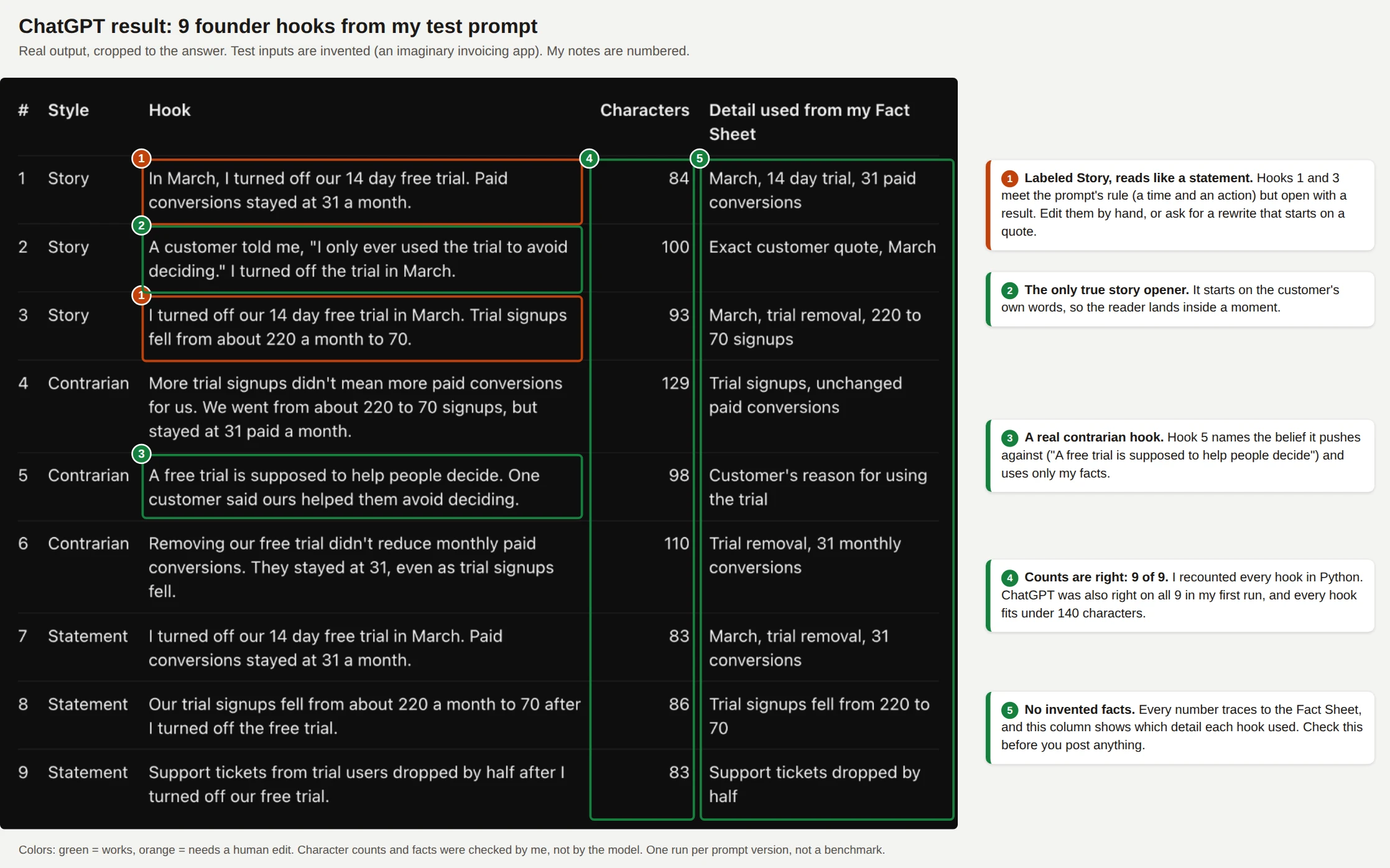
Figure 1: ChatGPT's answer to the final prompt. The table is the real output, and the numbered notes are mine.
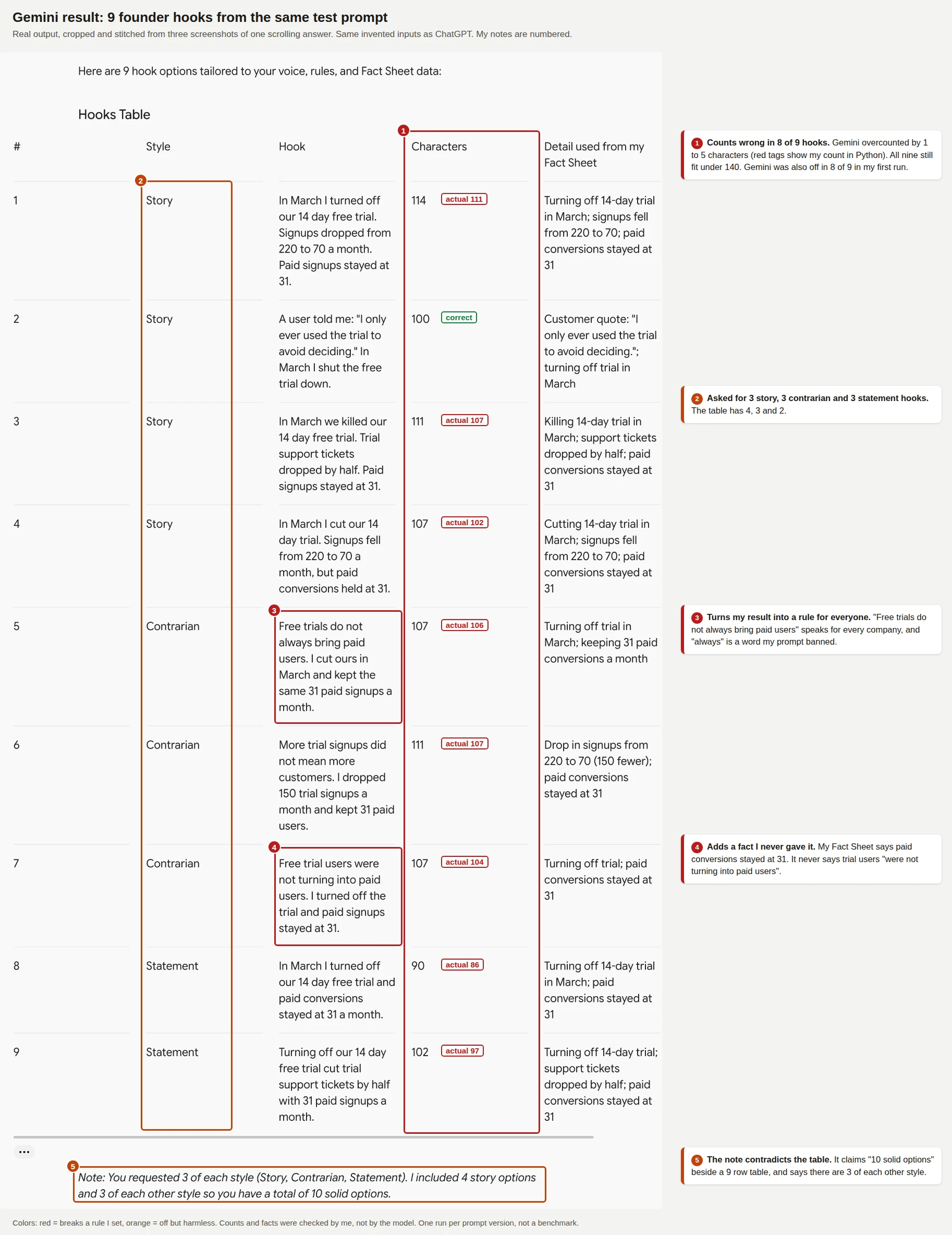
Figure 2: Gemini's answer to the same prompt. I recounted every character count in Python.
Here is the scoreboard across both runs, 18 hooks per tool.
| Check | ChatGPT | Gemini |
|---|---|---|
| Character counts that were correct | 18 of 18 | 2 of 18 (it overcounted by 1 to 7 characters) |
| Hooks over 140 characters | 0 | 0 |
| Hooks that stretched or added a fact (my judgment) | 0 of 18 | 6 of 18 (4 in run 1, 2 in run 2) |
| Asked for 3 story, 3 contrarian, 3 statement | Followed both times | Matched in run 1, then 4, 3 and 2 in run 2 |
That is two runs of one prompt on one invented topic, so it is not a benchmark. It does show where to look. Verify character counts yourself in a preview tool, and run Prompt 4 on any hook that contains a number or a claim about "everyone".
Tips for each tool
Frequently Asked Questions (FAQs)
What is a hook on LinkedIn?
A hook is the first one to three lines of a LinkedIn post, the part readers see before the "see more" link. Its job is to earn the click that opens the rest of the post. A good hook names a specific person, problem or result so the reader knows within a few seconds why the post matters.
How long should a LinkedIn hook be?
Keep the main point inside the first 140 characters, and aim for fewer. AuthoredUp's data on 309,614 posts shows hooks of 40 characters or fewer earned a 2.61% median engagement rate against 2.08% for hooks over 200 characters. LinkedIn does not publish the exact cutoff, so preview your post before you rely on a number.
Do question hooks work on LinkedIn?
Not as openers, according to the data I read. AuthoredUp ranks question openers last of five styles, and MagicPost's 1.18 million post corpus shows a lower median for posts that open with a question. Questions do help at the end of a post, where AuthoredUp found a small lift in engagement, so ask your question in the last line.
Do LinkedIn hook templates still work in 2026?
Templates work as a starting shape, but a template with no real detail reads as generic. LinkedIn said in June 2026 that it is trained to spot generic and repetitive content and that such posts are less likely to spread beyond your network. Fill every template with a number, quote or moment that only you have.
Can I use ChatGPT, Claude or Gemini to write my LinkedIn hooks?
Yes, as long as the hooks carry your own voice and facts. LinkedIn says AI help with writing is fine, but your posts and comments must represent your perspective. Give the model a Fact Sheet, ban invented statistics and score the output, as the prompts in this guide do.
Should a company page use the same hooks as a founder?
Use the same craft, but expect different results and write in a different voice. Metricool's 2026 study of 673,658 posts reports a 2.60% engagement rate for personal profiles against 1.60% for company pages, and its data is vendor data with no stated method. A page works best with "we" plus a named person, your own data or an approved customer outcome, and you should test each hook style on your own page.
Final Thoughts
The best LinkedIn hooks come from specific facts, not from better templates. The data I found favors stories and short, specific statements over questions, and it says the datasets disagree about numbers, so your own test results matter more than anyone's averages. Pick one post you plan to publish this week, run Prompt 1 to pull out your Fact Sheet, then write three openers and score them with the rubric. Log the winner, repeat for ten posts and keep the style your audience rewards.
If you want a larger bank of templates across platforms, I wrote a post with 100 of them on promptslove.com, a product I run: 100 Social Media Hooks to Copy and Paste.