Chrome Extension
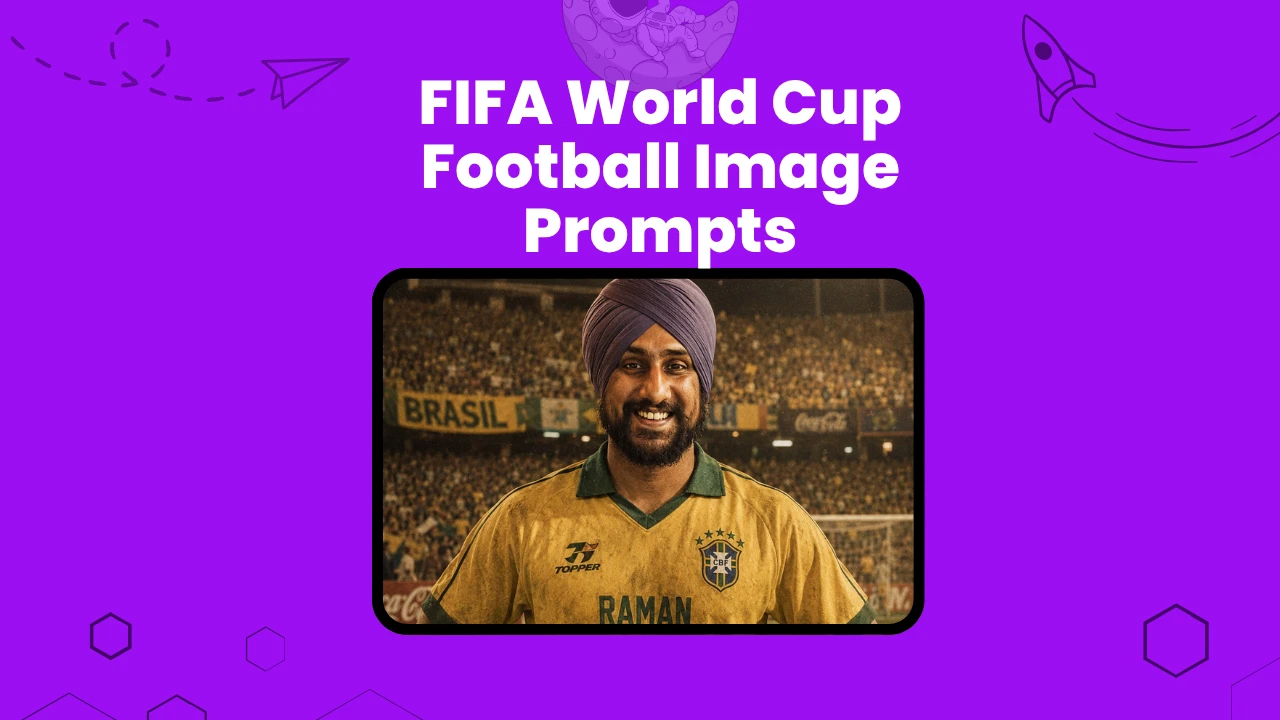
The FIFA World Cup only comes every four years. But you do not need to wait for a ticket to feel like you are on that pitch.
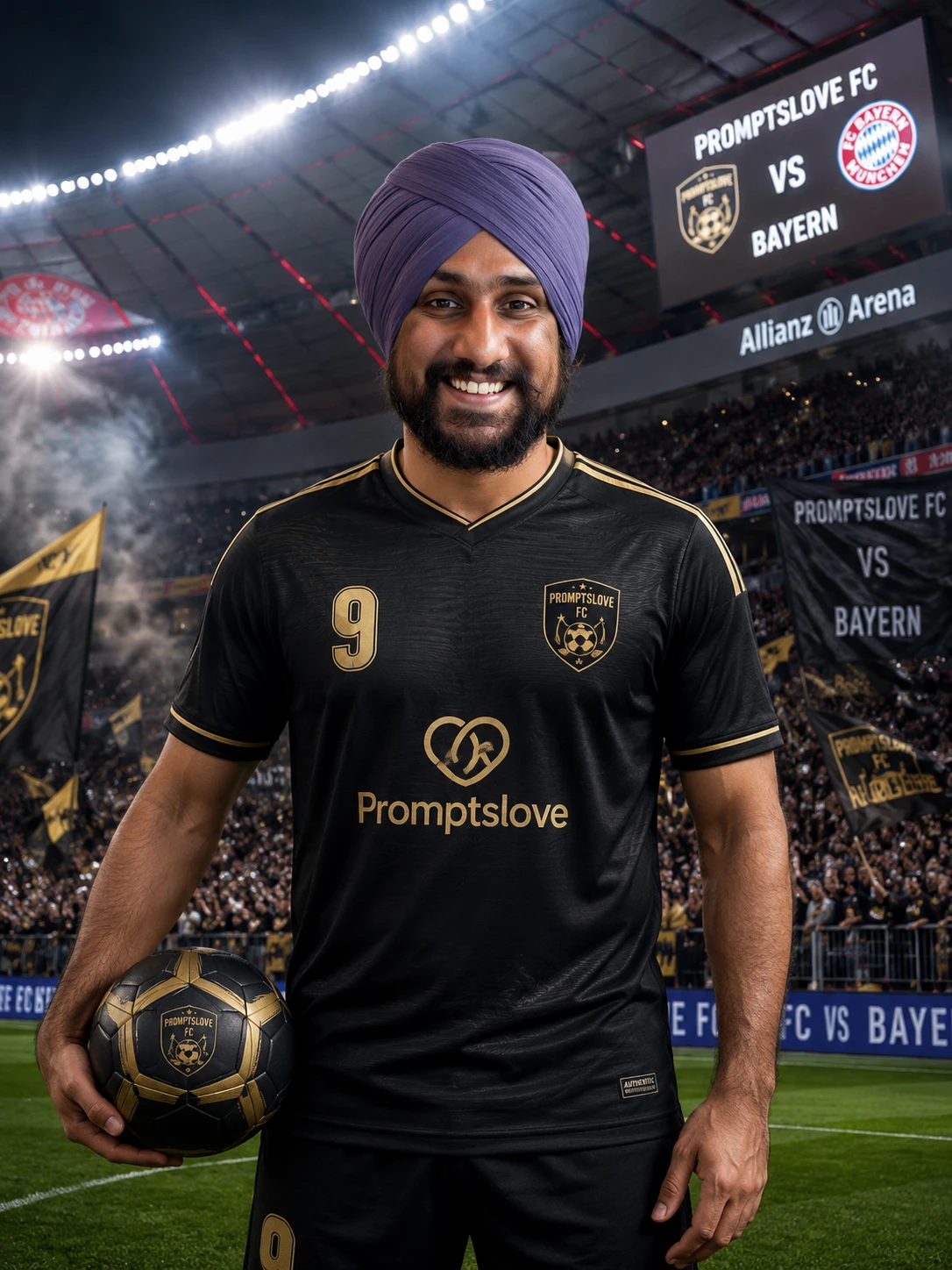
I put together this full list of football image prompts so you can upload your photo and generate a realistic AI image of yourself wearing a custom football jersey.
Whether you want a modern matchday poster, a retro 90s kit, a futuristic esports jersey, or a dramatic Champions League-style hero shot, every prompt below is ready to copy, fill in, and run. These work with ChatGPT, Midjourney, Flux, and any AI image generator that supports image uploads.
This is the only list you need for FIFA World Cup football image generation.
Key Takeaways
How to Use These Football Image Prompts
Before you start generating, here is the process I follow every time.
Upload your photo first. Use a clear, front-facing image with good lighting. The better your input photo, the more accurate your face will look in the final image. Avoid blurry, cropped, or side-angle selfies.
Once your photo is uploaded, copy any prompt below. Replace all the bracketed text with your actual details. Every prompt uses placeholders like [TEAM NAME], [COLOR 1], [COLOR 2], [PLAYER NAME], [NUMBER], [STADIUM NAME], and [OPPONENT TEAM]. Fill those in before you generate.
For matchday and VS-style images, decide your rival team first. The VS prompts put your match on a stadium screen, crowd banner, or scoreboard in the background - so it looks like a real matchday poster.
For Midjourney, paste the image URL first, then the prompt text. For Flux, the image is the identity reference and the prompt tells the model what to build around it.
Prompt 1: Football Jersey Design Prompts
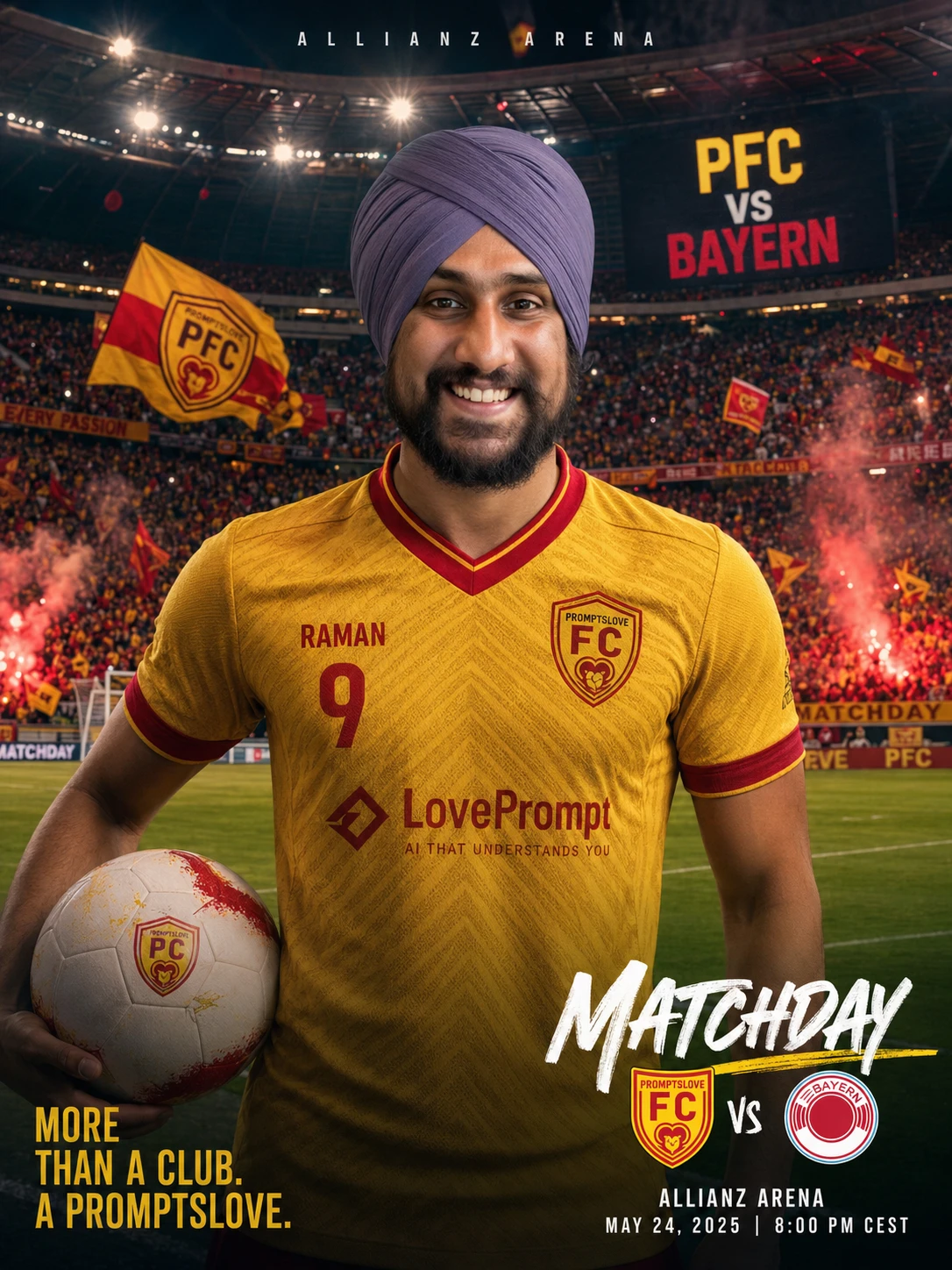
This is the core prompt. Use it when you want a clean, professional football jersey image with your photo, team colors, player name, and a stadium background.
Text Prompt
Create a realistic football jersey design using the uploaded person as the main subject. Dress them in a custom football jersey for [TEAM NAME] with [COLOR 1] as the main color and [COLOR 2] as the secondary color. Add bold modern patterns inspired by professional football kits, including subtle geometric textures, breathable fabric detail, stitched seams, collar design, sleeve trim, and sponsor-style placement. Add the player name [PLAYER NAME] and number [NUMBER] on the jersey. Place the subject inside [FOOTBALL STADIUM / CUSTOM LOCATION] with dramatic stadium lights, cheering fans, realistic depth of field, and a premium sports photoshoot look. Keep the person's face natural and recognizable. Make the image look like an official football club promotional poster.
JSON Prompt
{
  "prompt_type": "football_jersey_design",
  "use_uploaded_image": true,
  "subject": "Use the uploaded person as the main subject and keep their face natural and recognizable.",
  "jersey": {
    "team_name": "[TEAM NAME]",
    "main_color": "[COLOR 1]",
    "secondary_color": "[COLOR 2]",
    "style": "modern professional football kit",
    "details": [
      "geometric fabric pattern",
      "stitched seams",
      "breathable sports texture",
      "collar design",
      "sleeve trim",
      "sponsor-style placement"
    ],
    "player_name": "[PLAYER NAME]",
    "number": "[NUMBER]"
  },
  "background": {
    "location": "[FOOTBALL STADIUM / CUSTOM LOCATION]",
    "environment": "dramatic stadium lights, cheering crowd, premium sports atmosphere",
    "mood": "official club promotional poster"
  },
  "quality": "realistic, cinematic, high detail, professional sports photography"
}
Prompt 2: Team Jersey Prompts with VS Matchday Scene
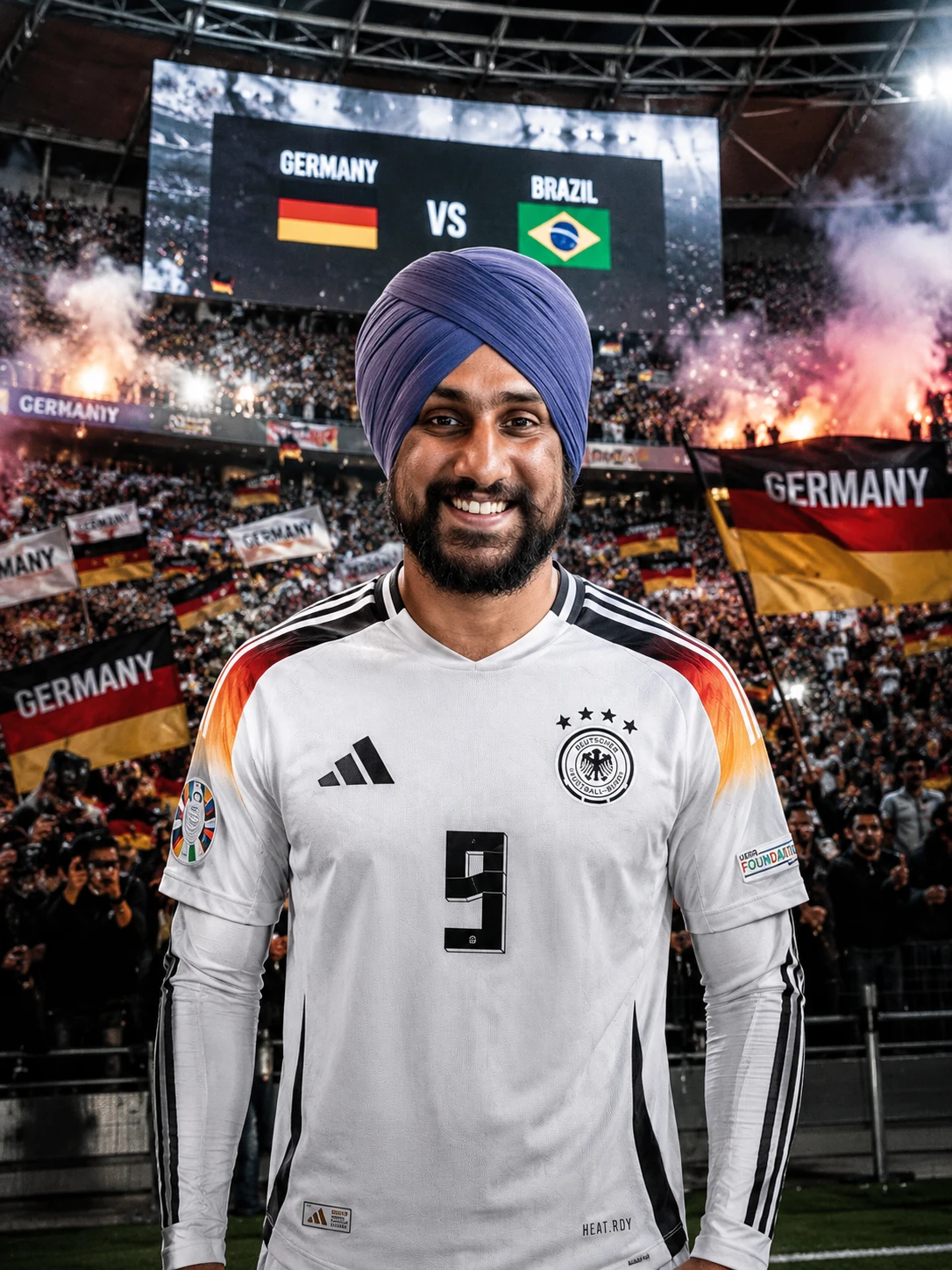
Use this prompt when you want the full matchday experience - packed stadium, crowd flags, and a giant screen showing your match.
Text Prompt
Create a professional football team jersey image using the uploaded person. Imagine them as the star player of [TEAM NAME]. The jersey should use [TEAM COLORS], with a clean club crest on the chest, sponsor-style logo placement, sleeve patches, and modern football kit detailing. Add [PLAYER NAME] and [NUMBER] on the back or front depending on the pose. Place them in a packed football stadium with fans holding flags that say [TEAM NAME]. Add a giant stadium screen in the background showing [TEAM NAME] VS [OPPONENT TEAM]. Make the scene feel like matchday before kickoff, with lights, smoke, camera flashes, and an intense competitive atmosphere.
JSON Prompt
{
  "prompt_type": "team_football_jersey",
  "use_uploaded_image": true,
  "subject": "Use the uploaded person as the star player. Preserve facial identity and natural expression.",
  "team": {
    "team_name": "[TEAM NAME]",
    "opponent_team": "[OPPONENT TEAM]",
    "team_colors": "[TEAM COLORS]",
    "crest": "clean custom club crest on chest",
    "jersey_details": [
      "sponsor-style logo placement",
      "sleeve patches",
      "modern football kit texture",
      "premium collar and sleeve trim"
    ],
    "player_name": "[PLAYER NAME]",
    "number": "[NUMBER]"
  },
  "scene": {
    "location": "packed football stadium",
    "crowd_details": "fans holding flags and banners that say [TEAM NAME]",
    "vs_element": "giant stadium screen showing [TEAM NAME] VS [OPPONENT TEAM]",
    "atmosphere": "matchday before kickoff, stadium lights, smoke, camera flashes"
  },
  "style": "cinematic football poster, realistic, high detail"
}
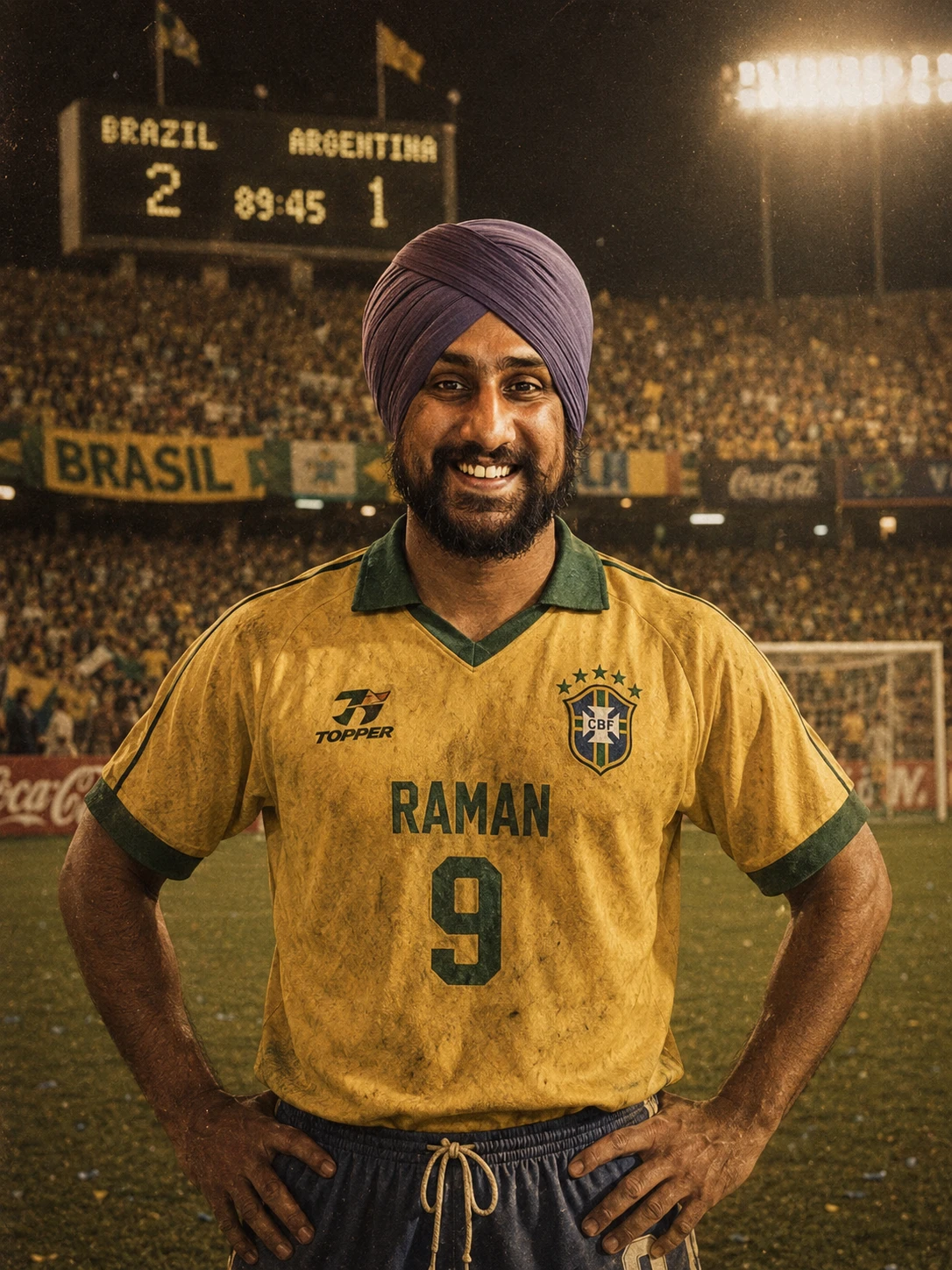
Prompt 3: Retro Football Jersey Prompts
This one is for the nostalgia lovers. Generate a vintage kit from the 80s, 90s, or early 2000s with old-school fabric, classic badge design, and a warm film grain look.
Text Prompt
Use the uploaded person and turn them into a retro football star wearing a vintage football jersey for [TEAM NAME]. The jersey should have a classic [ERA, for example 80s, 90s, early 2000s] design with [RETRO COLORS], old-school collar, thick sleeve cuffs, vintage sponsor-style logo, faded fabric texture, and classic football badge. Add [PLAYER NAME] and [NUMBER] in a retro font. Place the subject inside [OLD STADIUM / CUSTOM PLACE] with warm film grain, vintage stadium lights, old crowd banners, and a nostalgic matchday look. Add a retro scoreboard in the background showing [TEAM NAME] VS [OPPONENT TEAM].
JSON Prompt
{
  "prompt_type": "retro_football_jersey",
  "use_uploaded_image": true,
  "subject": "Use the uploaded person as a vintage football star. Keep the face recognizable.",
  "jersey": {
    "team_name": "[TEAM NAME]",
    "era": "[ERA]",
    "colors": "[RETRO COLORS]",
    "style": "vintage football jersey",
    "details": [
      "old-school collar",
      "thick sleeve cuffs",
      "vintage sponsor-style logo",
      "faded fabric texture",
      "classic football badge",
      "retro player font"
    ],
    "player_name": "[PLAYER NAME]",
    "number": "[NUMBER]"
  },
  "background": {
    "location": "[OLD STADIUM / CUSTOM PLACE]",
    "scoreboard": "[TEAM NAME] VS [OPPONENT TEAM]",
    "atmosphere": "warm film grain, nostalgic crowd banners, vintage stadium lights"
  },
  "style": "retro sports poster, realistic, cinematic, nostalgic"
}
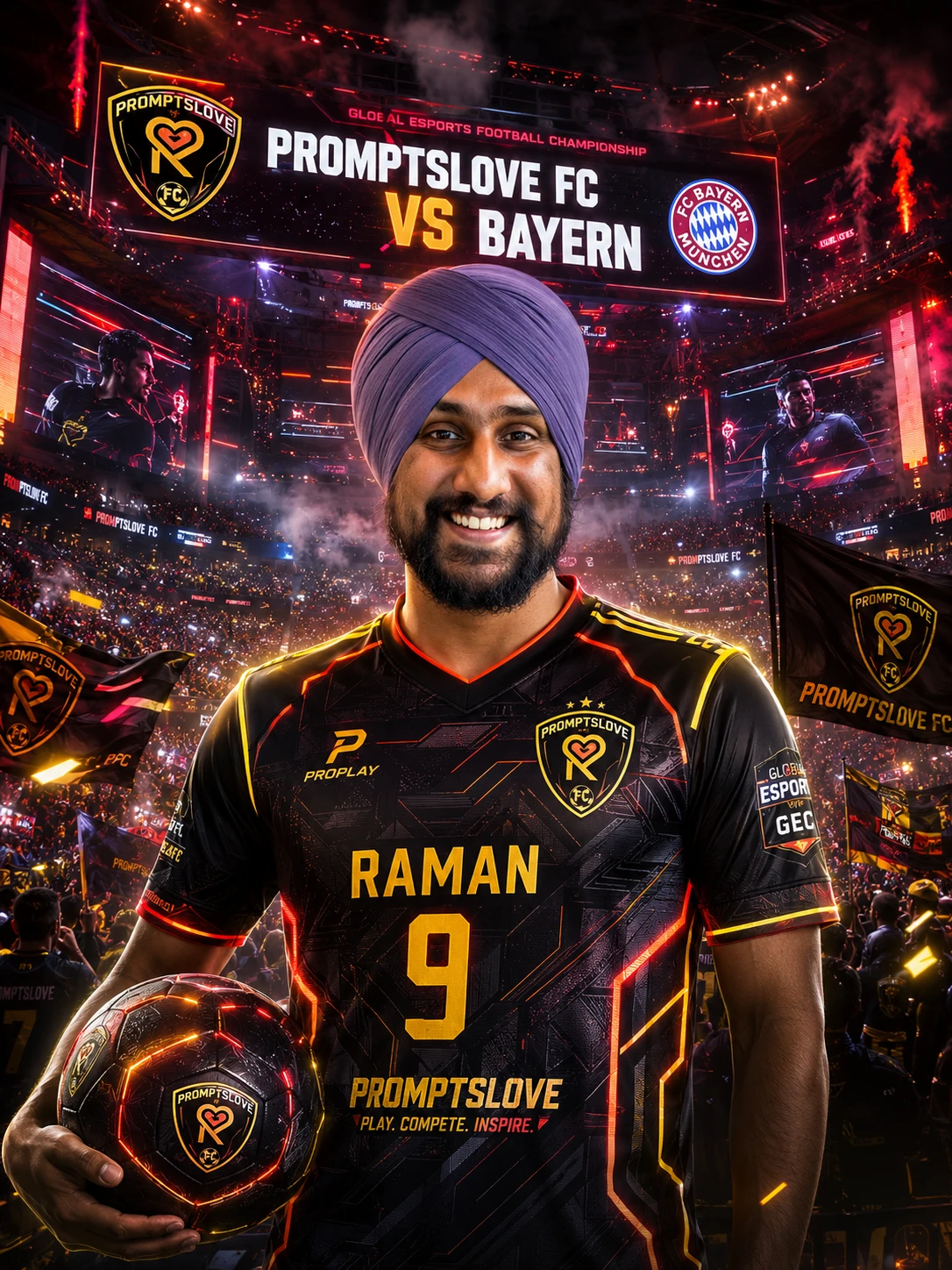
Prompt 4: Esports Football Jersey Prompts
Football meets gaming in this one. Use this prompt to generate a futuristic esports-style jersey with neon accents, digital patterns, and LED arena lighting.
Text Prompt
Create a futuristic esports football jersey image using the uploaded person. Dress them in a custom esports-style jersey for [TEAM NAME] using [COLOR 1], [COLOR 2], and neon accents. The jersey should include sharp digital patterns, gaming-inspired textures, sponsor-style logos, glowing trim, and a bold team crest. Add [PLAYER NAME] and [NUMBER] on the jersey. Place them in [ESPORTS ARENA / FOOTBALL STADIUM / CUSTOM LOCATION] with LED screens, holographic lights, smoke effects, and a giant screen showing [TEAM NAME] VS [OPPONENT TEAM]. Make it look like a football esports championship poster.
JSON Prompt
{
  "prompt_type": "esports_football_jersey",
  "use_uploaded_image": true,
  "subject": "Use the uploaded person as the main esports football player. Preserve identity and realistic face detail.",
  "jersey": {
    "team_name": "[TEAM NAME]",
    "main_color": "[COLOR 1]",
    "secondary_color": "[COLOR 2]",
    "accent_color": "[NEON ACCENT COLOR]",
    "style": "futuristic esports football jersey",
    "details": [
      "sharp digital patterns",
      "gaming-inspired textures",
      "sponsor-style logos",
      "glowing trim",
      "bold team crest",
      "high-performance sports fabric"
    ],
    "player_name": "[PLAYER NAME]",
    "number": "[NUMBER]"
  },
  "scene": {
    "location": "[ESPORTS ARENA / FOOTBALL STADIUM / CUSTOM LOCATION]",
    "vs_screen": "[TEAM NAME] VS [OPPONENT TEAM]",
    "effects": "LED screens, holographic lights, smoke, dramatic sports lighting"
  },
  "style": "football esports championship poster, realistic, cinematic, high energy"
}
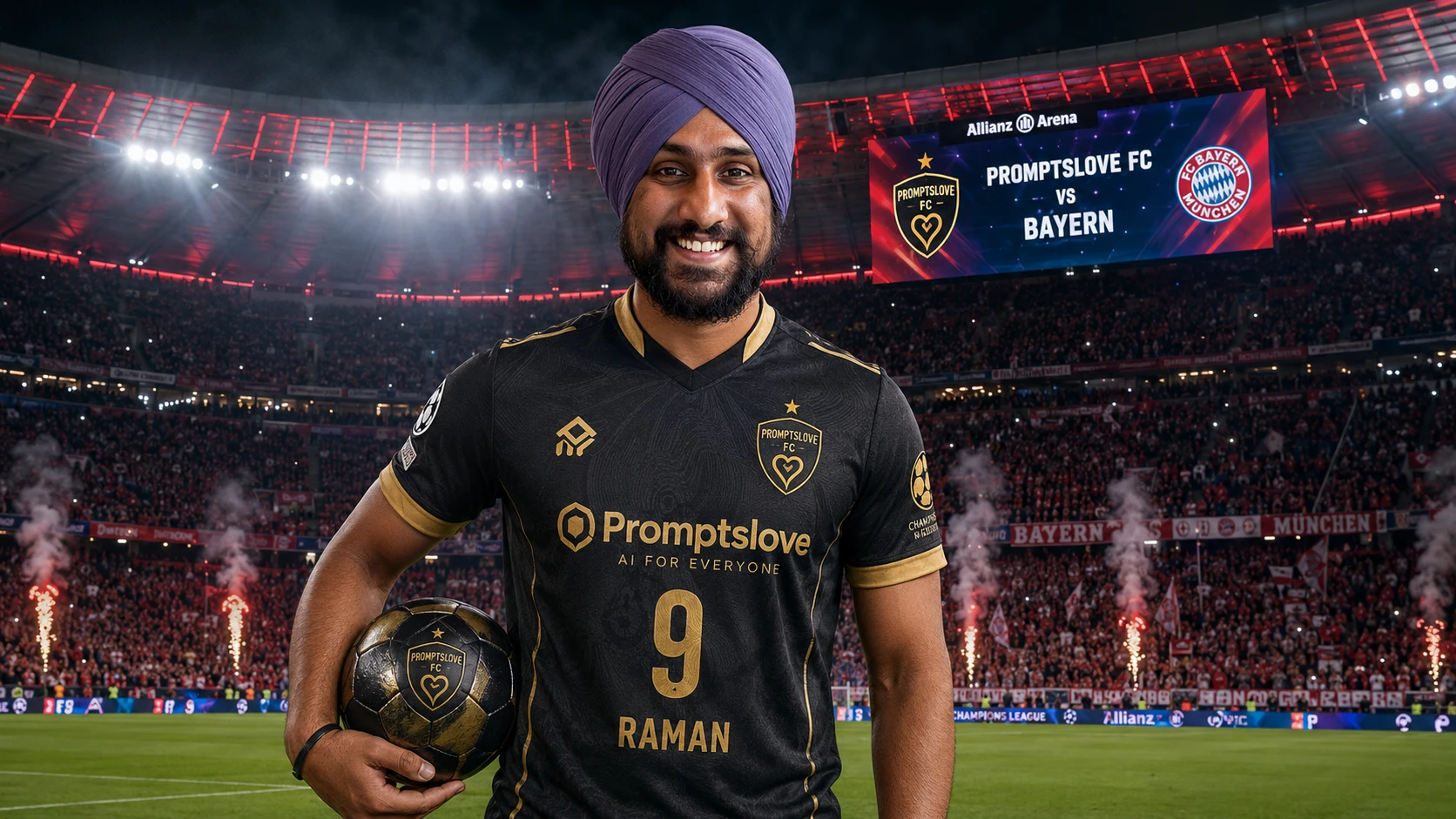
Prompt 5: Midjourney Football Jersey Prompts
Midjourney handles image references differently. You paste the image URL first, then follow it with the prompt. Use this version for the strongest cinematic output from Midjourney v6.
Text Prompt
[Upload image URL first] Create a realistic cinematic football poster of the person in the uploaded image wearing a custom football jersey for [TEAM NAME], jersey colors [COLOR 1] and [COLOR 2], modern football kit design, detailed sports fabric, club crest on chest, sponsor-style logo, player name [PLAYER NAME], number [NUMBER], standing inside [STADIUM NAME / CUSTOM PLACE], packed crowd, stadium lights, smoke, dramatic matchday atmosphere, giant stadium screen showing [TEAM NAME] VS [OPPONENT TEAM], realistic face, natural identity, premium sports photography, ultra detailed, sharp focus, depth of field --ar 16:9 --style raw --v 6
JSON Prompt
{
  "tool": "Midjourney",
  "prompt_type": "football_jersey_prompt",
  "instruction": "Upload the image first, then paste this prompt after the image URL.",
  "prompt": "[IMAGE URL] Create a realistic cinematic football poster of the person in the uploaded image wearing a custom football jersey for [TEAM NAME], jersey colors [COLOR 1] and [COLOR 2], modern football kit design, detailed sports fabric, club crest on chest, sponsor-style logo, player name [PLAYER NAME], number [NUMBER], standing inside [STADIUM NAME / CUSTOM PLACE], packed crowd, stadium lights, smoke, dramatic matchday atmosphere, giant stadium screen showing [TEAM NAME] VS [OPPONENT TEAM], realistic face, natural identity, premium sports photography, ultra detailed, sharp focus, depth of field --ar 16:9 --style raw --v 6"
}
Prompt 6: Flux Football Jersey Prompts
Flux treats the uploaded image as an identity reference. The model preserves your face, skin tone, and proportions more aggressively than most tools. Use this version for the most accurate face result.
Text Prompt
Use the uploaded image as a face and identity reference. Create a realistic football jersey photoshoot of the person wearing a custom jersey for [TEAM NAME]. The jersey should feature [COLOR 1] and [COLOR 2], a clean club crest, sponsor-style chest logo, detailed fabric texture, modern collar, sleeve trim, and the name [PLAYER NAME] with number [NUMBER]. Place the person in [STADIUM / CUSTOM PLACE]. In the crowd, add banners and flags showing [TEAM NAME] VS [OPPONENT TEAM]. Make the lighting cinematic, realistic, and high detail. Preserve facial identity, skin tone, expression, and natural proportions.
JSON Prompt
{
  "tool": "Flux",
  "prompt_type": "football_jersey_image_prompt",
  "image_reference": "Use the uploaded image as the identity reference.",
  "prompt": "Create a realistic football jersey photoshoot of the person wearing a custom jersey for [TEAM NAME]. The jersey should feature [COLOR 1] and [COLOR 2], a clean club crest, sponsor-style chest logo, detailed fabric texture, modern collar, sleeve trim, and the name [PLAYER NAME] with number [NUMBER]. Place the person in [STADIUM / CUSTOM PLACE]. In the crowd, add banners and flags showing [TEAM NAME] VS [OPPONENT TEAM]. Make the lighting cinematic, realistic, and high detail. Preserve facial identity, skin tone, expression, and natural proportions.",
  "negative_prompt": "cartoon, distorted face, extra fingers, wrong text, unreadable jersey name, blurry logo, fake face, deformed body, duplicate person, plastic skin, low resolution"
}
Prompt 7: Editable Football Jersey Prompt Templates
These are shorter fill-in-the-blank templates. Use them for quick generations or to test different styles before committing to a detailed prompt.
Template 1: Basic Custom Jersey
Create a realistic football jersey image using the uploaded person. Dress them in a [TEAM NAME] jersey with [COLOR 1] and [COLOR 2]. Add [PLAYER NAME] and [NUMBER] on the jersey. Place them in [LOCATION] with [BACKGROUND DETAILS]. Keep the face realistic and recognizable.
Template 2: Stadium Matchday Jersey
Create a cinematic matchday poster using the uploaded person. They are wearing a custom [TEAM NAME] football jersey in [TEAM COLORS]. Add a huge stadium screen behind them showing [TEAM NAME] VS [OPPONENT TEAM]. Add fans, flags, smoke, floodlights, and a powerful football atmosphere. Keep the subject realistic, confident, and sharp.
Template 3: Retro Football Kit
Turn the uploaded person into a retro football player wearing a [TEAM NAME] jersey from the [ERA] era. Use [RETRO COLORS], vintage collar, old-school badge, faded fabric, and classic sponsor-style logo. Add [PLAYER NAME] and [NUMBER]. Place them in a nostalgic stadium with a scoreboard showing [TEAM NAME] VS [OPPONENT TEAM].
Template 4: Esports Football Jersey
Create a futuristic esports football jersey image using the uploaded person. The jersey should represent [TEAM NAME] with [COLOR 1], [COLOR 2], and [NEON COLOR]. Add digital patterns, glowing edges, sponsor-style logos, and a bold crest. Place them in an esports arena with a giant screen showing [TEAM NAME] VS [OPPONENT TEAM].
Template 5: Street Football Jersey
Use the uploaded person and create a stylish street football photoshoot. Dress them in a custom [TEAM NAME] jersey with [TEAM COLORS], oversized fit, modern fabric, player name [PLAYER NAME], and number [NUMBER]. Place them in [URBAN LOCATION], such as a street court, city wall, rooftop, or night market. Add subtle football elements in the background.
Template 6: Hero Player Poster
Create a dramatic football hero poster using the uploaded person. They are wearing a premium [TEAM NAME] jersey with [COLOR 1] and [COLOR 2]. Add [PLAYER NAME] and [NUMBER]. Place them in the center of a stadium with fans behind them, glowing lights, flying sparks, and a massive screen showing [TEAM NAME] VS [OPPONENT TEAM]. Make it look like a Champions League final poster.
Template 7: Fan Jersey Concept
Create a realistic fan jersey concept using the uploaded person. Dress them as a passionate supporter wearing a [TEAM NAME] jersey with [TEAM COLORS]. Add crowd scarves, flags, painted face details, and stadium seats in the background. Add banners showing [TEAM NAME] VS [OPPONENT TEAM]. Make it emotional, energetic, and realistic.
Template 8: Jersey Product Mockup
Create a clean football jersey product mockup for [TEAM NAME]. Show the uploaded person wearing the jersey in a studio setting. Use [COLOR 1] and [COLOR 2], with a clean crest, sponsor-style logo, sleeve patches, player name [PLAYER NAME], and number [NUMBER]. Use soft lighting, clean background, realistic fabric folds, and premium ecommerce product photography.
[image]
Prompt 8: VS Stadium Crowd Add-Ons
Use these lines inside any prompt above when you want your match to appear in the stadium environment. Drop any of these directly into your main prompt.
Add-On 1: Stadium Screen VS Add a giant LED stadium screen in the background clearly showing [TEAM NAME] VS [OPPONENT TEAM], with matchday graphics, team colors, and bright stadium lighting.
Add-On 2: Crowd Banner VS In the crowd, add large flags and banners that say [TEAM NAME] VS [OPPONENT TEAM], held by fans wearing matching team colors.
Add-On 3: Scoreboard VS Add a realistic stadium scoreboard showing [TEAM NAME] VS [OPPONENT TEAM], with a pre-match timer, team logos, and glowing digital text.
Add-On 4: Derby Match Atmosphere Make the scene feel like an intense derby match between [TEAM NAME] and [OPPONENT TEAM], with loud fans, smoke, flags, scarves, chants, and dramatic stadium lights.
Add-On 5: Final Match Poster Make it look like an official final match poster with the subject standing in front, and [TEAM NAME] VS [OPPONENT TEAM] displayed behind them on a massive stadium screen.
Prompt 9: Negative Prompts for Football Jersey Images
A negative prompt tells the AI what to avoid. Always include one to cut down on distorted faces, bad hands, blurry text, and broken logos.
Text Version
Avoid distorted face, changed identity, wrong jersey text, unreadable player name, incorrect number, extra fingers, bad hands, duplicate body, blurry logo, fake badge, cartoon style, plastic skin, low resolution, messy crowd, broken stadium screen text, misspelled team name, unrealistic jersey folds, deformed arms, unnatural pose, watermark, random text, extra logos.
JSON Version
{
  "negative_prompt": [
    "distorted face",
    "changed identity",
    "wrong jersey text",
    "unreadable player name",
    "incorrect number",
    "extra fingers",
    "bad hands",
    "duplicate body",
    "blurry logo",
    "fake badge",
    "cartoon style",
    "plastic skin",
    "low resolution",
    "messy crowd",
    "broken stadium screen text",
    "misspelled team name",
    "unrealistic jersey folds",
    "deformed arms",
    "unnatural pose",
    "watermark",
    "random text",
    "extra logos"
  ]
}
Prompt 10: Best Fillable Football Jersey Prompt (All-In-One)
This is the most complete prompt in the list. It combines every element - jersey design, matchday atmosphere, stadium screen, crowd, and VS display - into one fully editable template. Use this when you want the best single-prompt result.
Text Prompt
Use the uploaded photo as the main identity reference. Create a realistic cinematic football poster of the person wearing a custom football jersey for [TEAM NAME]. The jersey should use [COLOR 1] as the main color and [COLOR 2] as the secondary color, with a professional club crest, sponsor-style logo, stitched fabric texture, modern collar, sleeve trim, player name [PLAYER NAME], and number [NUMBER]. Place the person in [STADIUM / CUSTOM PLACE] with dramatic lighting, cheering fans, flags, smoke, and camera flashes. In the background, add a giant stadium screen and crowd banners showing [TEAM NAME] VS [OPPONENT TEAM]. Keep the person's face realistic and recognizable. Make it look like an official football matchday poster.
JSON Prompt
{
  "prompt_type": "best_editable_football_jersey_prompt",
  "use_uploaded_image": true,
  "identity...

[Sign up to unlock the full prompt]Quick Placeholder Reference
Before you generate, fill in these values across any prompt you use:
| Placeholder | What to Enter |
|---|---|
[TEAM NAME] | Your team name, for example Brazil, Real Madrid, or your custom club |
[COLOR 1] | Main jersey color, for example blue, red, white |
[COLOR 2] | Secondary color, for example gold, black, green |
[PLAYER NAME] | Your name or a player name to put on the back |
[NUMBER] | Jersey number, for example 10, 7, 9 |
[STADIUM NAME] | Stadium or location, for example Wembley, Maracana, or your city name |
[OPPONENT TEAM] | The rival team shown on screen or banners |
[ERA] | Decade for retro prompts, for example 80s, 90s, early 2000s |
[RETRO COLORS] | Classic colors for vintage kits |
[NEON COLOR] | Accent for esports prompts, for example electric blue, neon green |
[URBAN LOCATION] | For street football prompts, for example rooftop, city court, night market |
Frequently Asked Questions (FAQs)
What AI tools work best with these football jersey prompts?
ChatGPT with image generation, Midjourney v6, Flux, Adobe Firefly, and Leonardo AI all work well with these prompts. For face accuracy, Flux and ChatGPT's image tool tend to preserve identity best. Midjourney produces the most cinematic results but requires you to paste the image URL before the prompt text.
Do I need a specific type of photo for these prompts?
Yes. Use a clear, front-facing photo with good natural or studio lighting. Avoid group photos, sunglasses, heavy filters, or images where your face is partially cut off. The cleaner your input photo, the more accurate and realistic the final jersey image will be.
How do I add my team's real colors to the prompt?
Replace [COLOR 1] and [COLOR 2] with the actual colors your team uses. For example, if you support Brazil, use [COLOR 1] = yellow and [COLOR 2] = green. If you support Barcelona, use [COLOR 1] = blue and [COLOR 2] = red. You can also add a third accent color to any prompt for more detail.
Why does the jersey text sometimes come out wrong or unreadable?
AI image generators often struggle with text rendering on curved or fabric surfaces. To reduce this, always include the negative prompt from Prompt 9 in your generation. Also, keep player names short (under 10 characters) for the best readability. If the text still looks wrong, regenerate or use an image editing tool to add the name manually.
Can I use these prompts to create a VS matchday poster for social media?
Yes, and that is one of the most popular uses for this list. Use Prompt 2 (Team Jersey) or Prompt 10 (Best Fillable Prompt) with any of the VS stadium add-ons from Prompt 8. Set the aspect ratio to 16:9 for YouTube thumbnails or 4:5 for Instagram posts. The stadium screen and crowd banners will show your match automatically.
Do these prompts work for women's football jersey images?
Yes. Every prompt in this list works for any gender. The AI uses the uploaded person as the subject, so it matches your appearance by default. If you want to make this explicit, add the phrase "female football player" or "women's football kit" anywhere in the prompt text for better results.
Final Thoughts
You do not need Photoshop skills, a design team, or a football sponsorship deal to create a World Cup-quality jersey image of yourself. All you need is one good photo, the right prompt, and two minutes.
Pick the style that fits your idea - matchday realism, retro nostalgia, esports energy, or street football cool - fill in the brackets, and generate. If the first result is not perfect, adjust one variable and run it again. The VS stadium add-ons and the negative prompt from Prompt 9 fix most common issues in one extra step.
Start with the Best Fillable Prompt (Prompt 10) if you are not sure which one to use. It covers every element and gives you the most complete image in a single generation.
[image]